A keyboard and mouse bought separately can leave you with two lighting systems that never match, separate software, and a mouse that feels like an afterthought. A combo solves the matching problem in one box: the keyboard and mouse share a lighting style, one set of cables or one receiver, and a design meant to sit together. The real decision is not whether the set glows, but how it types, how the mouse tracks, and whether the lighting controls are simple enough to use.
This article is for first-time PC builders putting together a desk from scratch, players refreshing a worn-out set, and anyone who wants a coordinated look without buying them one at a time. Every pick below is a single listing that includes both a keyboard and a mouse with RGB lighting, and every specification comes from the product name and details on its Amazon page. Wired and wireless sets are both covered, so you can match the combo to your desk.
Top 3 picks at a glance

Quick Picks
As an Amazon Associate we earn from qualifying purchases
| Product | Best for | Key spec from title |
|---|---|---|
| Redragon S101-3 PRO | First-time builders who want macros and quiet keys | RGB backlit keyboard and mouse, programmable with software |
| Havit Mechanical Combo (HV-KB389L) | Typists who want clicky blue mechanical switches | 104 keys, blue switches, detachable wrist rest |
| MageGee GT838 | Buyers who want a solid-color look and a sturdy board | 104 keys RGB backlit, metal panel, anti-ghosting |
| MageGee V560 Wireless | Clean-desk setups that need no cables | 2.4GHz wireless, rechargeable, RGB backlit |
How to Choose
Membrane or mechanical switches
Most RGB combos use membrane keys, and three of the four picks here do. Membrane keys are quieter, with a soft press and a rubber-dome feel under each keycap, which suits shared rooms, late-night sessions, and players who type as much as they game. Mechanical switches are the exception: the Havit combo in this article uses blue mechanical switches, which click audibly and give a sharp tactile bump with every press. That feedback suits fast typists and players who like to feel each key register, but the sound carries through thin walls and open microphones. If you share a room or record voice chat, membrane is the safer default, and mechanical is a deliberate choice rather than an upgrade.
How the RGB lighting really works
RGB on a combo listing can mean several different things, so check what the lighting actually does before you buy. Some sets cycle through preset modes with function-key shortcuts, while others need downloadable software for full control. The Redragon set lists seven keyboard lighting modes with four brightness levels, and the Havit set lists fourteen keyboard modes plus seven mouse modes. The MageGee GT838 adds a solid-color mode switched with Fn + Home, which matters if you want the lighting to sit still instead of cycling. Also check whether the mouse lighting can be set on its own: a mouse locked to one rainbow cycle will clash with a keyboard set to a single color.
Mouse DPI and buttons
The mouse in a combo is often simpler than a standalone gaming mouse, so the listing details matter. Look for the DPI range and how many steps it has: the Redragon mouse runs from 800 to 3,200 DPI in four steps, while the Havit mouse covers 800 to 4,800 DPI in six steps. More steps give finer control when you switch between desktop work and games. Programmable buttons matter too. The Redragon mouse has six buttons, five of them programmable, and the Havit mouse has programmable buttons set through its software. A dedicated DPI button behind the scroll wheel lets you change sensitivity mid-game without opening any software, which is worth having even if you rarely touch it.
Wired or wireless, and desk space
Three of these combos are wired, which means no charging and no wireless link to manage, but also two USB cables and two occupied ports, one for the keyboard and one for the mouse. The wireless MageGee V560 removes the cables and runs on rechargeable batteries, so check that you are comfortable charging both devices and keeping the USB receiver plugged in. Full-size boards also take real desk space: the Havit keyboard measures 17 inches wide, and a wrist rest adds depth in front of it. Measure your desk before ordering, and leave room on the right for the mouse to move without hitting the keyboard edge.
The 4 Best Options
Redragon S101-3 PRO

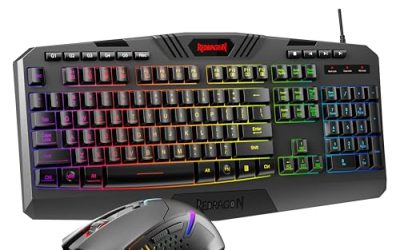
The S101-3 PRO is the most complete starter set in this article. It pairs an RGB backlit keyboard with a matching RGB mouse, adds software for programming keys and lighting, and includes independent macro record keys for players who want one-press shortcuts in games. The keys are quiet membrane keys, so the set works in shared rooms, and the mouse carries its own lighting effects rather than a single fixed glow. The built-in wrist rest and spill-resistant build suit long sessions, and the WIN key can be disabled so a stray press does not drop you out of a game.
Specs
- RGB backlit keyboard and mouse, programmable with software
- Independent macro record keys
- 7 RGB lighting modes, 4 brightness levels, adjustable breathing speed
- Mouse: up to 3,200 DPI (800/1600/2400/3200), 6 buttons, 5 programmable
- 10 dedicated multimedia keys plus 12 FN multimedia keys, full numeric keypad
- built-in wrist rest, spill-resistant build, WIN key can be disabled
Best for: First-time builders who want macros, quiet keys, and a matched set in one box.
Watch out for: The keyboard and mouse each need their own USB port, and full lighting and macro control require the Redragon software.
Havit Mechanical Keyboard and Mouse Combo (HV-KB389L)
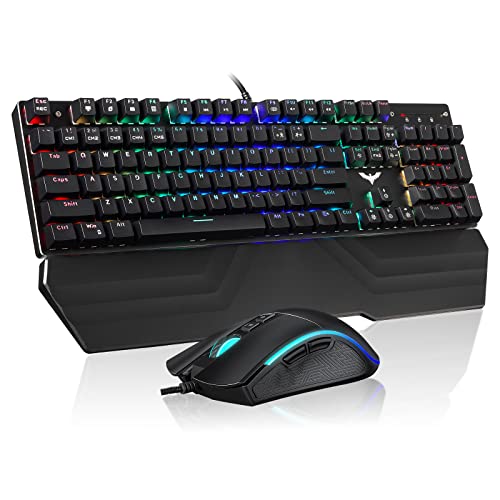
This is the only mechanical set among the four picks, and it is the one to choose if key feel matters more than silence. The blue mechanical switches click with each press and are listed with a 50 million keystroke life in the product manual, while the 104-key layout keeps a full numeric keypad. Lighting is the most flexible here, with fourteen keyboard modes and seven mouse modes, and the mouse covers six DPI steps from 800 to 4,800. The detachable wrist rest clips on for long sessions and comes off when desk space is tight.
Specs
- 104 keys, blue mechanical switches, wired USB
- 14 keyboard RGB lighting modes, 7 mouse RGB modes
- Mouse: 6 DPI settings, 800-4800 DPI, programmable buttons
- Detachable wrist rest, anti-ghosting across 105 keys
- 12 multimedia keys (Fn + F1-F12), WIN key lock
- Keyboard dimensions 17 x 8.1 x 2.1 inches
Best for: Typists and players who want a clicky mechanical feel and the widest lighting choice.
Watch out for: Blue switches are loud, so check noise tolerance in shared spaces before ordering; the set also needs two USB ports.
MageGee GT838
The GT838 suits buyers who want the RGB look without the rainbow cycling. Its keyboard has a metal panel and a number pad, and the listing names anti-ghosting for the full 104-key layout. The useful detail is the solid-color mode: pressing Fn + Home cycles through solid colors, including solid white, and the mouse color can be set to stay on one color as well. That makes the set a good fit for a desk with a fixed color theme. The keys are quiet membrane keys, and the wired connection works with laptop, PC, and Mac according to the listing.
Specs
- 104 keys, RGB backlit, quiet wired keyboard
- Number pad, metal panel, anti-ghosting
- Solid-color mode via Fn + Home, mouse can stay on one color
- For laptop, PC, and Mac
Best for: Buyers who want a fixed solid color across keyboard and mouse, not a cycling rainbow.
Watch out for: The keys are membrane, not mechanical, so the typing feel is soft rather than clicky; the set is wired only.
MageGee V560 Wireless

The V560 is the only wireless combo here, and it exists for desks where cables are the problem. Keyboard and mouse both run over 2.4GHz through a USB receiver, and both are rechargeable, so nothing trails across the desk. The keys are mechanical-feel membrane keys with RGB backlighting, and the listing describes quiet typing, which suits mixed work-and-play desks. The pastel color options, including a blue, white, and purple version, give it a different look from the black sets above, and the compact layout leaves more room for the mouse.
Specs
- Wireless 2.4GHz keyboard and mouse combo, rechargeable
- RGB backlit, mechanical-feel keys, quiet typing
- USB receiver included for the wireless link
- Color options include Blue White Purple
Best for: Clean-desk setups and shared desks where cables get in the way.
Watch out for: Both devices need recharging, so check the listing for charging details; the wireless link needs its receiver plugged into a USB port.
Which One Fits Your Situation
Your first gaming desk, built from one box
Pick the Redragon S101-3 PRO. It covers the basics in a single listing: RGB lighting on both devices, programmable keys and macros through software, quiet membrane keys, and a mouse with adjustable DPI up to 3,200. The built-in wrist rest and spill-resistant build suit a desk that gets daily use, and you will not need to research a separate mouse to match the keyboard.
You type all day and game at night
Pick the Havit mechanical combo. The blue switches give a firm click and a tactile bump that membrane keys cannot match, and the 104-key layout keeps the numeric keypad for daytime work. The fourteen keyboard lighting modes and the detachable wrist rest round out a set built for long hours, as long as the clicking will not disturb anyone nearby.
You want the lighting to sit still, not cycle
Pick the MageGee GT838. Its solid-color mode holds one color across the keyboard, and the mouse can be set to match, so the desk keeps a single theme instead of a shifting rainbow. The metal panel and number pad make it feel solid, and the quiet wired keys suit a desk used for both work and play.
You hate cables
Pick the MageGee V560 Wireless. The 2.4GHz link and rechargeable batteries remove both cables from the desk, and the quiet mechanical-feel keys keep the set usable for work as well as games. It is the only pick here that leaves the desk clear, which matters most on small or shared surfaces.
Common Mistakes
- Assuming every RGB combo lights the keyboard and mouse the same way: some mice have fewer modes or a fixed cycle, so check the listing for each device.
- Buying blue mechanical switches for a shared room without considering the noise; membrane keys are the quieter choice.
- Expecting full lighting control without software: several combos need a download for macros and custom effects, while basic use stays plug and play.
- Forgetting that wired combos need two free USB ports, one for the keyboard and one for the mouse.
- Picking a full-size board for a small desk and leaving no room for the mouse to move.
Frequently Asked Questions
Do these keyboard and mouse combos work with consoles?
Most of these combos are built for Windows PCs, and the Redragon set lists Windows versions with limited Mac keyboard support. The MageGee GT838 names laptop, PC, and Mac in its listing. Console support varies by model and is not promised on every listing, so check the compatibility section of the listing for your console before ordering.
Can I make the keyboard and mouse stay on one color?
It depends on the set. The MageGee GT838 has a solid-color mode switched with Fn + Home, and its mouse can be set to one color as well. The Redragon and Havit sets list multiple lighting modes, including breathing and solid effects, controlled through function keys or software. Check the mode list on the listing if a fixed color is a must.
Do I need to install software to use the lighting?
Basic typing, pointing, and lighting work without software on these sets, and several lighting modes switch with function-key shortcuts. Software adds the deeper controls: the Redragon set uses software for programming keys and macros, and the Havit mouse buttons and lighting effects are set through downloadable software from Havit. If you only want preset modes, you can skip the download.
Is a wireless combo worse for gaming than a wired one?
Not necessarily. The MageGee V560 uses a 2.4GHz wireless link with a USB receiver, which is the standard connection for wireless gaming peripherals, and it keeps the desk free of cables. Wired sets avoid charging and any concern about the wireless link, so they suit players who never want to think about batteries. Choose by desk setup and charging habits rather than by connection type alone.
Related guides
More from Amazon
Programs that pair well with the guide above. Offers and eligibility are set by Amazon and may change.
Free shipping on eligible items, Prime Video and more. Eligible new members can start with a free trial.
Start a Prime free trialAd-free music streaming. Eligible new subscribers can start with a free trial.
Try Music Unlimited freeA Prime membership for ages 18-24 with a trial period. Eligibility is set by Amazon.
See Prime for Young AdultsAudiobooks and podcasts to listen to on the go. Eligible new members can start with a free trial.
Try Audible freeAs an Amazon Associate we earn from qualifying purchases.