Buying a cheap wireless gaming mouse is not really about finding the lowest number on a page. It is about avoiding the three mistakes that make a value purchase feel wasted: a shape that does not fit your hand, a wireless connection that is only meant for office work, and a button layout that does not match your games. Get those three things right and a value-tier mouse can serve a first gaming setup, a school or work laptop bag, or a second desk for years.
This guide approaches value differently from a pure performance roundup. Instead of ranking mice mainly by sensor ceiling, it sorts them by job. One pick is built for travel and small hands. One is a simple, symmetric option for fast-paced shooters and MOBA games. One gives MMO players a full side-button grid without moving into a premium tier. And one offers a wide ergonomic body with macro buttons for players who split their time between games and long desktop sessions. Every model here is a true wireless gaming mouse with a 2.4 GHz receiver connection, with Bluetooth added on some models as a second mode.
As with any value purchase, confirm the exact variant on the live listing before you buy. Several of these product families also include wired versions with similar names, and choosing the wrong variant is the most common buying error in this category. This guide describes specifications and manufacturer positioning only, and it does not state a current selling price for any model.
Disclosure: As an Amazon Associate, we earn from qualifying purchases made through links in this article, at no additional cost to you.
Top 3 picks at a glance
Quick Picks
- Best for travel and small hands: Razer Orochi V2 — a compact shell under 60 grams before its battery is fitted, with HyperSpeed 2.4 GHz and Bluetooth modes and exceptionally long rated battery life.
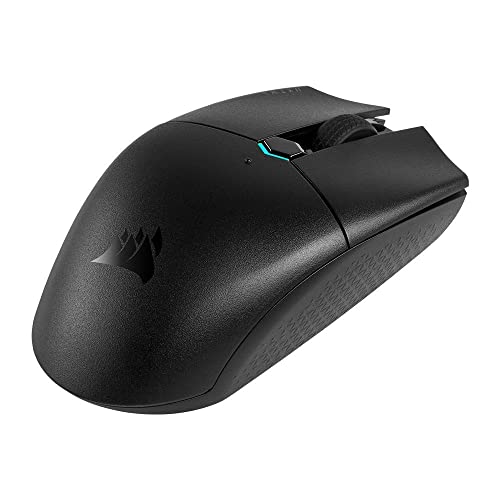
- Best simple pick for shooters and MOBA: Corsair KATAR PRO Wireless — a compact symmetric shape, SLIPSTREAM 2.4 GHz plus Bluetooth, and up to 135 hours from one AA battery.
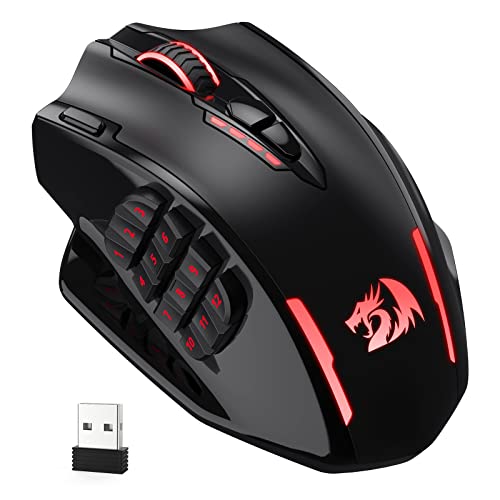
- Best for MMO and MOBA ability bars: Redragon M913 Impact Elite — 12 side buttons within 16 programmable controls, 2.4 GHz wireless plus wired modes, and up to 16,000 DPI.
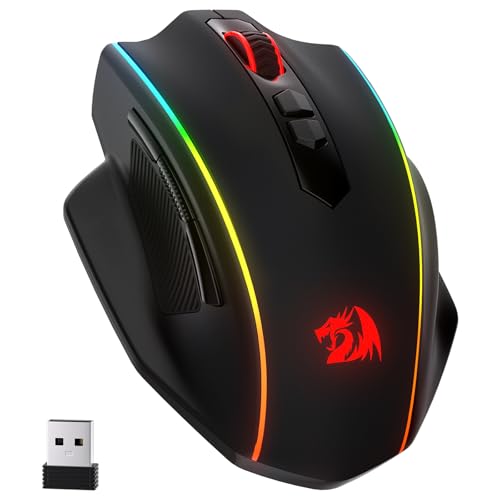
- Best wide ergonomic value pick: Redragon M686 Vampire Elite — a broader right-handed body, 8 macro-capable buttons, 2.4 GHz wireless plus wired modes, and a rechargeable battery rated for up to 45 hours.
Who Each Mouse Is Really For
The Orochi V2 suits players who carry their mouse daily and grip with their fingertips. The KATAR PRO Wireless suits players who want a tidy, no-drama mouse for one gaming PC and occasional Bluetooth use. The M913 Impact Elite suits players whose games live on ability bars and who would rather press a thumb button than reach across a keyboard. The M686 Vampire Elite suits palm-grip players who want a fuller body under their hand and a handful of extra binds, without needing a full MMO grid. Reading the sections below by your game type, rather than by brand, will get you to the right answer faster.
1. Razer Orochi V2

Best for: laptop gamers, travellers, small hands, and fingertip or claw grips where portability matters as much as tracking.
Check the Razer Orochi V2 on Amazon
Specifications
- Connection: dual wireless — Razer HyperSpeed 2.4 GHz via USB receiver, plus Bluetooth
- Sensor: Razer 5G Advanced optical sensor, up to 18,000 DPI
- Buttons: 6 programmable buttons, with Razer Mechanical Mouse Switches rated for 60 million clicks
- Battery: 1 AA or 1 AAA battery, rated by Razer for up to 425 hours on HyperSpeed wireless and up to 950 hours on Bluetooth
- Weight: under 60 grams excluding the battery, with the final weight depending on whether an AA or AAA cell is fitted
- Software: Razer Synapse for DPI stages, button assignments, and power settings
Why it earns a value place
The Orochi V2 is the rare value mouse that does not feel like a smaller version of something else. It was designed from the start as a mobile gaming mouse, and that shows in the battery flexibility: fit an AA cell for maximum runtime, or an AAA cell when you want the lightest possible setup for a trip. Few mice at any level offer that choice, and for a mouse that lives in a laptop bag it is a genuinely practical feature.
Its rated battery figures are the strongest argument for students and shared-desk players. Long Bluetooth endurance covers lectures, library work, and office days, while the HyperSpeed receiver covers gaming at home. The compact shell will not suit a relaxed palm grip on a large hand, but for fingertip control it is quick to position and easy to lift, which many aim-focused players prefer.
Pros
- Exceptionally portable, with a shell under 60 grams before the battery
- Choice of AA or AAA power changes both weight and runtime
- Very long rated battery life in both wireless modes
- HyperSpeed connection is suitable for fast-paced gaming
Cons
- Compact size is a poor fit for large hands and full palm grips
- No wired fallback, so a flat battery means swapping the cell
- Only two side buttons for players who rely on mouse macros
- Receiver storage and setup should be checked on the live listing for the exact colour variant
2. Corsair KATAR PRO Wireless
Best for: a first wireless gaming setup, symmetric-shape fans, and players who want one AA battery and very little setup.
Check the Corsair KATAR PRO Wireless on Amazon
Specifications
- Connection: dual wireless — Corsair SLIPSTREAM 2.4 GHz via USB receiver, described by Corsair as sub-1 ms, plus low-latency Bluetooth
- Sensor: PixArt optical sensor, up to 10,000 DPI
- Buttons: 6 programmable buttons
- Battery: 1 AA battery, rated by Corsair for up to 135 hours of use
- Weight: 96 grams
- Shape and software: compact symmetric shell for claw and fingertip grips, with Corsair iCUE for DPI, button, and lighting settings
Why it earns a value place
The KATAR PRO Wireless is the straightforward recommendation for someone replacing a basic office mouse or a worn wired model. Its shape makes no strong demands: the symmetric body, moderate size, and familiar button layout let a new player focus on sensitivity settings and game practice instead of adapting to an unusual shell. That neutrality is a value feature in itself, because a mouse you do not have to think about is a mouse you will keep.
Corsair also keeps the power story simple. One AA battery, a clear runtime rating, and no charging cable to manage. The 10,000 DPI ceiling is lower than the headline figures elsewhere in this guide, but in real play that ceiling is far above the settings most people use, so it is not a practical limitation for shooters, MOBA titles, or everyday games. Buyers should take care to select the wireless model, because Corsair also sells wired KATAR variants under similar names.
Pros
- Simple symmetric shape suits claw and fingertip grips
- Both SLIPSTREAM 2.4 GHz and Bluetooth connections
- Single AA battery keeps running costs and setup simple
- Trusted brand software through Corsair iCUE
Cons
- Lower maximum DPI figure than rivals, even though it rarely matters in play
- No rechargeable option for players who dislike disposable batteries
- Six buttons are enough for shooters but limited for heavy macro use
- Similar wired model names make variant checking essential
3. Redragon M913 Impact Elite
Best for: MMO, MOBA, and RPG players who want a full thumb grid for abilities, items, and push-to-talk without a premium-tier purchase.
Check the Redragon M913 Impact Elite on Amazon
Specifications
- Connection: dual mode — 2.4 GHz wireless via USB receiver, plus wired USB connection
- Sensor: optical gaming sensor rated up to 16,000 DPI, as listed by Redragon
- Buttons: 16 programmable buttons in total, including 12 side buttons arranged for MMO play
- Battery: built-in rechargeable battery, rated by Redragon for up to 45 hours of use, with longer runtime possible in its eco mode as described on the listing
- Lighting and software: RGB lighting with Redragon software support for remapping, macros, DPI, and effects
- Shape: right-handed ergonomic body designed around the side-button grid
Why it earns a value place
Button count is where value MMO mice separate themselves, and the M913 Impact Elite is built entirely around that idea. Twelve numbered side buttons put a full ability row under your thumb, which can transform rotations in MMOs and item use in MOBA and RPG titles. Players coming from a standard five-button mouse often find that moving two or three key abilities to the thumb is enough to make combat feel calmer and more consistent.
The wired mode matters more here than it might seem. A rechargeable MMO mouse that cannot be used while charging would be a liability during long sessions; the M913 can be plugged in and kept in play. Expect a learning period, though. A thumb grid takes practice, accidental presses are normal in the first week, and most players end up binding only part of the grid. That is fine — the value is in having the important binds close, not in filling every slot.
Pros
- Twelve side buttons for abilities, items, and communication binds
- Wireless freedom with a wired mode for charging during play
- Rechargeable battery removes ongoing battery purchases
- Macro and remapping support through Redragon software
Cons
- Side grid has a real learning curve and can cause early mis-presses
- Larger, busier body is not aimed at fingertip-grip shooter players
- Battery runtime is modest beside AA-powered models
- Right-handed ergonomic shape excludes left-handed players
4. Redragon M686 Vampire Elite
Best for: palm-grip players who want a wide, supportive body, a moderate set of macro buttons, and rechargeable power for mixed gaming and desktop use.
Check the Redragon M686 Vampire Elite on Amazon
Specifications
- Connection: dual mode — 2.4 GHz wireless via USB nano receiver, plus wired USB connection
- Sensor: optical gaming sensor rated up to 16,000 DPI, as listed by Redragon, with a 1,000 Hz polling rate described for the model
- Buttons: 8 buttons with macro and remapping support
- Battery: built-in rechargeable battery, rated by Redragon for up to 45 hours of use
- Lighting and software: RGB backlighting with Redragon software support for DPI, macros, and effects
- Shape: wide right-handed ergonomic body with support for a fuller palm grip
Why it earns a value place
Not every value buyer wants a small esports shape. The M686 Vampire Elite serves the opposite preference: a broad body that fills the palm, with enough width that your hand can relax instead of pinching a narrow shell. For players who split evenings between games, browsing, and creative or office work, that support can matter more than shaving off weight.
Its button set sits in a sensible middle ground. Eight buttons allow a few game abilities, a DPI shift, and everyday forward and back navigation, without the commitment of a twelve-button MMO grid. Combined with rechargeable power and a wired fallback, it makes a practical shared family or second-desk mouse: anyone can pick it up, the shape is forgiving, and a low battery never forces a stop. As with the M913, verify on the live listing that the variant selected is the wireless M686, since Redragon uses close naming across its range.
Pros
- Wide ergonomic body suits relaxed palm grips and longer desktop sessions
- Eight buttons cover game binds and everyday navigation well
- Rechargeable battery with wired play while charging
- 2.4 GHz wireless connection for low-latency gaming
Cons
- Fuller body and weight will feel slow to players used to compact mice
- Battery runtime requires a regular charging habit
- Software is functional rather than polished compared with larger brands
- Not suitable for left-handed players or strict fingertip grips
How to Choose a Cheap Wireless Gaming Mouse Without Regretting It
Buy the connection first. A gaming mouse should offer a 2.4 GHz receiver mode. Bluetooth is a useful bonus for laptops and battery saving, and two picks here include it, but a Bluetooth-only office mouse is a different product category and will not feel the same in fast games. All four mice in this guide include 2.4 GHz.
Let your main game choose the buttons. Shooter and MOBA players are well served by six buttons and a shape they can move quickly. MMO players should start with the M913 and its thumb grid. Players in between, who want a few extra binds and a supportive body, are the natural audience for the M686.
Think about where the mouse will live. A bag mouse needs to be small, light, and forgiving about batteries, which points to the Orochi V2. A single-desk mouse can be larger and rechargeable. A shared mouse should have a neutral shape and simple power, which is where the KATAR PRO Wireless makes sense.
Plan the battery habit honestly. Replaceable batteries suit people who want instant swaps and very long runtimes. Rechargeable mice suit people who already charge a headset or controller at their desk. A good routine you keep beats a specification you admire once.
Check the variant, every time. Wireless and wired versions often share a product family name, photos, and even packaging style. Before ordering, confirm the listing title says wireless, the connection section lists a receiver or Bluetooth, and the model number matches the version described in this guide.
Frequently Asked Questions
Are cheap wireless gaming mice reliable enough for daily play?
Models from established gaming lines are built for daily use, with gaming sensors, rated switch lifespans, and low-latency receiver connections. Reliability in this tier is less about headline sensitivity and more about choosing the correct variant, keeping the receiver close to the mouse, and following a battery routine that suits the model.
Is Bluetooth good enough for gaming on these mice?
Bluetooth is fine for turn-based games, strategy titles, casual play, and all everyday work, and it usually delivers the longest battery life. For shooters and other fast games, switch to the 2.4 GHz receiver mode on models that offer both, because that connection is designed for lower latency.
How long does it take to learn an MMO mouse with twelve side buttons?
Most players need several sessions to stop pressing the wrong buttons, and about one to two weeks of regular play for the main binds to feel automatic. Start by binding only three or four abilities, add more gradually, and keep critical actions such as interrupts on keys you already trust until the grid feels natural.
Should a first gaming mouse be rechargeable or battery powered?
Either works. Battery-powered models such as the Orochi V2 and KATAR PRO Wireless offer long runtimes and instant swaps, which suits a first setup with minimal desk cables. Rechargeable models such as the two Redragon picks suit a tidy desk where a charging cable already lives. Choose the system that matches habits you already have.
Can these mice be used for work as well as gaming?
Yes. Their sensors, button layouts, and wireless connections handle office and school work comfortably, and the Bluetooth models can pair with a work laptop while the receiver stays in a gaming PC. Ergonomic picks such as the M686 are especially comfortable for long mixed-use days.
Conclusion
The best cheap wireless gaming mouse is the one matched to your job, not the one with the largest specification on its box. Pick the Razer Orochi V2 for travel, small hands, and outstanding battery flexibility. Pick the Corsair KATAR PRO Wireless for a simple first setup that handles shooters and everyday play without fuss. Pick the Redragon M913 Impact Elite when your games are built around ability bars and thumb binds, and the Redragon M686 Vampire Elite when you want a wide, supportive body with rechargeable power. Check the wireless variant carefully on the listing, set a sensitivity you can practise with consistently, and a value-tier mouse will stop feeling like a compromise very quickly.
Related guides
More from Amazon
Programs that pair well with the guide above. Offers and eligibility are set by Amazon and may change.
Free shipping on eligible items, Prime Video and more. Eligible new members can start with a free trial.
Start a Prime free trialAd-free music streaming. Eligible new subscribers can start with a free trial.
Try Music Unlimited freeA Prime membership for ages 18-24 with a trial period. Eligibility is set by Amazon.
See Prime for Young AdultsAudiobooks and podcasts to listen to on the go. Eligible new members can start with a free trial.
Try Audible freeAs an Amazon Associate we earn from qualifying purchases.