The best gaming monitor stand for most desks is a gas-spring monitor arm rated above your screen’s weight, with the Ergotron LX as the long-standing premium pick and the HUANUO single gas-spring arm as the value pick. If your monitor is a heavy 34-inch-plus ultrawide, step up to a heavy-duty arm such as the Ergotron HX; if you only need height, a simple riser stand is enough. The deciding numbers are your monitor’s weight, its VESA pattern and your desk thickness.
As an Amazon Associate we earn from qualifying purchases at no extra cost to you.


Our Top Picks
 Petify Computer Monitor Stand Riser with Storage Drawer20.5 x 7.9 x 3.4 inches2.2 poundsCheck on Amazon


Top 3 picks at a glance
Quick comparison of the picks
| Pick | Best for | Key specs (per maker listings) | Price range |
|---|---|---|---|
| Ergotron LX Desk Mount Monitor Arm | Best overall | Single arm, about 7-25 lb, screens up to roughly 34 in, long warranty | Upper-mid |
| Ergotron HX Desk Monitor Arm | Heavy ultrawides | Higher weight rating, built for ultrawides up to around 49 in | Premium |
| HUANUO single gas-spring arm | Best budget | 13-32 in screens, up to about 19.8 lb, VESA 75×75 / 100×100 | Budget |
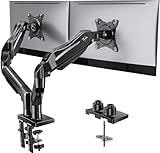
| HUANUO dual gas-spring arm | Best dual setup on a budget | Two arms on one pole, similar per-screen limits | Budget to mid |
| VIVO dual monitor mount | Simple two-screen desk | Dual arms, VESA 75×75 / 100×100, clamp or grommet | Budget |
| ASUS ROG Ergo Monitor Arm | Gaming-themed desks | Gas-spring arm with ROG styling and cable management | Mid to upper-mid |
| Basic riser stand (spec class) | Height only, no clamping | Fixed height, often with storage underneath | Budget |
Specs above reflect the manufacturers’ published listings and may differ by variant, so confirm the weight range on the exact model you buy.
Best overall: Ergotron LX
The LX is the arm most roundups default to. It supports screens up to about 34 inches and roughly 7-25 lb, moves smoothly with one hand, and carries a long manufacturer warranty. It suits a single 27-inch or 32-inch gaming monitor that you tilt, pull closer for competitive play, or push back when you stream. The trade-off is price and appearance: it is a plain, business-style arm without RGB, and it costs several times more than a budget gas-spring arm.
Best for heavy ultrawides: Ergotron HX
If you own a 34-inch curved or a 49-inch super-ultrawide, the weight is the real problem, not the size. The HX is Ergotron’s heavier-duty design for exactly these screens and is commonly recommended for ultrawides up to about 49 inches. Check the maker’s weight range against your monitor’s spec sheet before ordering. The downside is cost and a wider arm sweep that needs more desk depth than a basic arm.
Best budget: HUANUO single gas-spring arm
HUANUO arms are a frequent value recommendation. The single-arm version fits 13-32 inch monitors up to about 19.8 lb, uses the common 75×75 and 100×100 VESA patterns and includes basic cable routing. It covers most 24-inch to 27-inch gaming panels and many 32-inch ones. The trade-off is finish and long-term smoothness: gas springs can need re-tensioning, and the clamp is less refined than the Ergotron’s.
Best for two screens: HUANUO dual or VIVO dual
A dual arm frees the desk space two feet would occupy. HUANUO’s dual gas-spring design gives independent height adjustment per screen, while the VIVO dual mount is a simpler, cheaper option that suits two same-size monitors at a fixed distance. Gas-spring dual arms are better when your two monitors differ in weight; basic fixed-tension arms are fine for matched pairs.
Best for gaming desks with style: ASUS ROG Ergo Monitor Arm
The ROG Ergo arm targets gaming setups, with a black finish and integrated cable management that matches ROG peripherals. It is a good fit if your desk already follows that look. As with any branded arm, compare its listed weight range with an Ergotron or HUANUO before assuming it handles a large panel.
Best when you only need height: a riser stand
A riser lifts the screen about 3-6 inches and often adds a shelf for a keyboard or audio interface. It needs no clamp, so it suits rented desks or glass tops. It cannot swing, rotate or free desk space, and its height cannot be tuned finely, so it is a compromise rather than a true monitor arm.
How to choose: worked weight and VESA check
Run three checks before buying:
- Weight margin. Take the monitor’s weight without its stand (listed on the spec sheet) and keep it inside the arm’s range. Example: a 27-inch monitor weighing 11 lb without its base fits the HUANUO’s 19.8 lb limit with a margin of 8.8 lb, while a 34-inch ultrawide at 18 lb sits near the limit and is better on an Ergotron LX (up to 25 lb).
- VESA pattern. Most monitors use 75×75 mm or 100×100 mm mounting holes. Some curved or very thin gaming panels have no VESA holes, and a few have recessed ones that need an adapter or extension kit.
- Desk fit. Clamp arms usually need a desk edge about 10-100 mm thick, with a back lip free of obstructions. Glass or hollow desks may need a grommet mount or a reinforcement plate.
| Your monitor | Typical weight without stand | Suggested arm class |
|---|---|---|
| 24-27 in flat, 1080p-1440p | About 6-12 lb | Budget gas-spring or riser |
| 32 in flat or curved | About 12-20 lb | HUANUO or Ergotron LX |
| 34 in ultrawide | About 14-22 lb | Ergotron LX or HX |
| 49 in super-ultrawide | About 25 lb or more | Heavy-duty arm such as HX, wall-grade mounts |
The weights above are typical ranges across brands, not specific models, so always read your own monitor’s spec sheet.
Arm versus stand: what changes in play
A gas-spring arm lets you move the screen farther back for casual play or closer for shooters, and it clears the desk surface for mouse sweeps. The cost is that a loose clamp or a weak desk edge can transmit shake. Tighten the clamp, add the desk reinforcement plate if supplied, and set the tension so the screen stays put when released. Cable management channels on the arm keep cords from tugging the panel.
Frequently Asked Questions
Do I need a monitor arm for a gaming monitor?
No, but it helps. An arm puts the top of the screen at eye level, saves desk space and lets you reposition the display for different games. If your included stand already reaches the right height, you can skip it.
How do I know my monitor is VESA compatible?
Look for four screw holes on the back, usually 75×75 or 100×100 mm, and check the spec sheet for a VESA line. If the panel is recessed or has no holes, you need an adapter bracket sold for that model.
Are gas-spring arms better than fixed-tension ones?
Gas springs let you adjust height by hand without tools and cope with a wider weight range. Fixed-tension arms are cheaper but suit only the weight they were set for.
Can I mount a 34-inch ultrawide on any arm?
Not any arm. Many 34-inch ultrawides weigh in the high-teens of pounds, which exceeds some budget limits. Choose an arm whose maximum rating sits comfortably above your monitor’s weight without the base.
Will an arm fit a glass or thin desk?
Often yes with a grommet mount or a steel reinforcement plate, but clamping directly to thin glass is risky. Check the arm’s desk-thickness range and the desk maker’s guidance.
Related guides
More from Amazon
Programs that pair well with the guide above. Offers and eligibility are set by Amazon and may change.
Free shipping on eligible items, Prime Video and more. Eligible new members can start with a free trial.
Start a Prime free trialAd-free music streaming. Eligible new subscribers can start with a free trial.
Try Music Unlimited freeA Prime membership for ages 18-24 with a trial period. Eligibility is set by Amazon.
See Prime for Young AdultsAudiobooks and podcasts to listen to on the go. Eligible new members can start with a free trial.
Try Audible freeAs an Amazon Associate we earn from qualifying purchases.