A mouse for coding spends far more time in an editor than in a game, so the priorities shift from raw speed to comfort, quiet clicks and useful buttons. You scroll through long files, jump between windows, copy and paste all day, and a mouse with a fast scroll wheel and a few well-placed side buttons saves a surprising amount of effort. The sensor still matters for precise text selection, but a comfortable shape you can hold for eight hours matters more than the highest DPI number on the box.


This guide is for programmers who code all day, for developers who switch between a laptop and a desktop, and for anyone who wants a quiet mouse for shared rooms that can still handle an evening game. Every mouse below was picked from the name and specifications shown on its Amazon product page, so you can check the listed buttons and sensor before you buy.
Top 3 picks at a glance

Quick Picks
As an Amazon Associate we earn from qualifying purchases
| Product | Best for | Key spec from title |
|---|---|---|
| Logitech MX Master 3S | All-day comfort and quiet clicks | 8,000 DPI, MagSpeed scroll wheel |
| Razer Basilisk V3 | Extra buttons for shortcuts and macros | Focus+ 26K sensor, 11 buttons |
| Logitech MX Anywhere 3S | A compact mouse for laptop and travel | 8,000 DPI, up to 70 days battery |
| Logitech Lift | A vertical shape that eases the wrist | 57-degree angle, 4,000 DPI |
How to Choose
Put comfort first, because the hours add up
A coding mouse is in your hand for most of the working day, so a shape that fits your palm matters more than any sensor number. Ergonomic mice support the hand and keep the wrist straight, while a vertical shape tilts the hand into a handshake position that some people find easier over long stretches. Try to match the size to your hand as well: a mouse that is too small forces a tight claw grip, and one that is too large stretches the fingers. Comfort is the feature you feel on day one and still feel on day one hundred.
Look for buttons you will actually map
Extra buttons help only when they sit where your thumb can reach them without shifting your grip. Two side buttons cover forward and back in a browser or editor, while a few more can hold copy, paste, build or window-switch shortcuts. Mice with on-board memory keep those mappings when you move between computers, which matters if you code on a laptop and a desktop. Count the buttons you would really use each day, then ignore the rest, since a row of buttons you never touch adds weight and confusion.
Check the scroll wheel for long files
Programmers scroll more than almost anyone, so the wheel deserves as much attention as the sensor. A free-spinning wheel flies through a thousand lines of code in one flick, while a notched wheel gives precise control for reading line by line. Some mice switch between the two modes with a button or a smart wheel that changes on its own. A second horizontal wheel helps with wide files and timelines, though it is a bonus rather than a must. Test the wheel feel in your mind as you read, because a stiff or noisy wheel annoys you every single day.
Think about noise, battery and switching devices
Quiet clicks matter in shared rooms, libraries and late-night sessions, and several mice in this guide cut the click sound sharply without losing the feel. Battery life matters too: a mouse that runs for weeks or months on a charge is one less thing to manage, while a wired mouse never needs charging at all. If you code on two or three machines, look for a mouse that pairs with several devices and switches between them with a button. That single switch saves you from carrying a second mouse or re-pairing every morning.
The 4 Best Options
Logitech MX Master 3S
The MX Master 3S is the standard pick for long coding days, with an ergonomic shape that supports the palm, quiet clicks that suit shared rooms, and a MagSpeed wheel that flies through long files. Its Darkfield sensor tracks up to 8,000 DPI and works on glass, so it keeps up on almost any desk surface. A second thumb wheel scrolls sideways through wide files, and the mouse pairs with up to three devices over Bluetooth or the Logi Bolt receiver. One charge lasts up to 70 days, which means the cable mostly stays in the drawer.
Specs
- 8,000 DPI Darkfield sensor, tracks on glass
- MagSpeed electromagnetic scroll wheel
- Quiet Clicks
- Second thumb wheel for horizontal scrolling
- Connects to up to 3 devices
- Up to 70 days of battery life
- USB-C charging
- Bluetooth and Logi Bolt USB receiver
Best for: Programmers who code all day and want quiet clicks and fast scrolling.
Watch out for: At 141 g it is heavier than gaming mice, so fast flicks feel slower.
Razer Basilisk V3
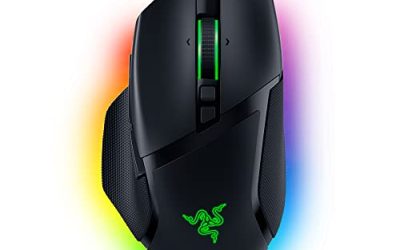
The Basilisk V3 brings a gaming mouse into the coding setup, with 11 programmable buttons that hold editor shortcuts, macros and window controls. Its Focus+ sensor reaches 26,000 DPI, and the HyperScroll tilt wheel spins freely through long files or clicks in notches for careful reading. Chroma RGB lighting runs from its default pattern, and the ergonomic shape with a thumb rest suits long sessions. It is wired, so there is no battery to manage, though the cable stays on the desk and the clicks are louder than the quiet mice here.
Specs
- Focus+ 26K optical sensor, up to 26,000 DPI
- 11 programmable buttons
- HyperScroll tilt wheel
- Chroma RGB lighting
- Gen-2 optical switches
- Ergonomic shape with thumb rest
- Wired USB connection
Best for: Coders who want many programmable buttons for shortcuts and macros.
Watch out for: The clicks are louder than quiet office mice, and it needs a cable.
Logitech MX Anywhere 3S
The MX Anywhere 3S is the compact pick for coders who work from a laptop, a cafe table or a shared desk, with the same 8,000 DPI any-surface sensor and MagSpeed wheel as its larger sibling in a much smaller body. It tracks on glass, clicks quietly, and runs up to 70 days on a charge, with USB-C quick charging for a fast top-up. The mouse pairs with up to three devices and switches between them with a button, so it follows you from laptop to desktop. Its small size suits travel, though large hands may find it cramped for a full day.
Specs
- 8,000 DPI any-surface tracking, works on glass
- MagSpeed scroll wheel
- Quiet Clicks
- Connects to up to 3 devices
- Up to 70 days of battery life
- USB-C quick charging
- Compact size
- Bluetooth and Logi Bolt USB receiver
Best for: Laptop coders who want a small mouse for travel and shared desks.
Watch out for: The compact shape can feel cramped for large hands over a full day.
Logitech Lift

The Lift is the vertical pick for coders whose wrist aches after long days, with a 57-degree angle that holds the hand in a natural handshake position. It weighs 125 grams, tracks up to 4,000 DPI, and runs up to 24 months on a single AA battery, so it asks almost nothing of you once it is set up. Quiet clicks and a Smartwheel that shifts between smooth and notched scrolling suit shared rooms, and it pairs with up to three devices. The right-handed shape fits medium and large hands, while left-handed coders need a different model.
Specs
- 57-degree vertical angle
- 125 g
- 4,000 DPI tracking
- Up to 24 months of battery life on one AA battery
- Quiet Clicks
- Smartwheel with speed and precision modes
- Connects to up to 3 devices
- Bluetooth and Logi Bolt USB receiver
Best for: Coders with wrist strain who want a vertical mouse for long days.
Watch out for: Right-handed only, and the vertical shape takes a few days to learn.
Which One Fits Your Situation
You code eight hours a day at one desk
Comfort and quiet clicks lead here, so the MX Master 3S is the natural pick, with its palm support, silent buttons and fast wheel for long files. The Lift is the alternative when your wrist aches, since its vertical angle changes the load on your arm. Keep the mouse you pick on the desk and let the shape do the work.
You work from a laptop in different places
A compact mouse with long battery life and multi-device pairing fits this routine best. The MX Anywhere 3S slips into a laptop bag, tracks on glass cafe tables, and switches between laptop and desktop with one button. Charge it over USB-C and it runs for weeks without a second thought.
You want shortcuts and macros under your thumb
The Basilisk V3 is the pick when your editor shortcuts matter as much as the sensor, with 11 buttons to map and a tilt wheel for scrolling. Its wired connection means no battery to watch, and on-board memory is not needed if you code on one machine. Map the buttons you use daily and leave the rest alone.
Your wrist hurts by the end of the day
A vertical mouse changes the angle of your hand and takes pressure off the wrist, which is why the Lift exists. Give it a few days, since the handshake grip feels strange at first and the buttons sit in new places. If the ache stays after a week of use, the shape may not be the cause, and a rest or a different setup is worth trying.
Common Mistakes
- Buying a gaming mouse for its sensor and ignoring the shape you hold all day.
- Mapping buttons you never use, then forgetting which one does what.
- Picking a loud clicky mouse for a shared room or a library.
- Forgetting multi-device pairing when you code on two or three machines.
- Choosing a tiny travel mouse for a full day at a fixed desk.
Frequently Asked Questions
Is a gaming mouse good for coding?
Yes. A gaming mouse gives you a precise sensor, extra buttons for shortcuts and a fast scroll wheel, all of which help in an editor. The main thing to check is comfort, since you hold it far longer than in a game. Pick an ergonomic shape with quiet clicks and buttons you will map, and the gaming label matters less.
How many buttons do I need for coding?
Two side buttons cover the basics, like forward and back, while four to six extra buttons hold copy, paste, build and window shortcuts. More than that helps only if you map them and remember them, since unused buttons add weight and confusion. Start with the shortcuts you use every day, map those first, and add more only when a need appears.
Does a vertical mouse help with wrist pain?
A vertical mouse can help, because it holds the hand in a handshake position that reduces twisting in the wrist. The shape takes a few days to learn, and the buttons sit in new places. It is not a cure: if pain stays or gets worse, rest the wrist and speak to a clinician rather than buying another mouse.
Should I use wireless or wired for coding?
Wireless keeps the desk tidy and suits laptop work, especially with a mouse that runs for weeks on a charge. Wired never needs charging and costs less attention, though the cable stays on the desk. For coding, the link type matters less than comfort and buttons, so pick the connection that fits your desk and your habits.
Related guides
More from Amazon
Programs that pair well with the guide above. Offers and eligibility are set by Amazon and may change.
Free shipping on eligible items, Prime Video and more. Eligible new members can start with a free trial.
Start a Prime free trialAd-free music streaming. Eligible new subscribers can start with a free trial.
Try Music Unlimited freeA Prime membership for ages 18-24 with a trial period. Eligibility is set by Amazon.
See Prime for Young AdultsAudiobooks and podcasts to listen to on the go. Eligible new members can start with a free trial.
Try Audible freeAs an Amazon Associate we earn from qualifying purchases.