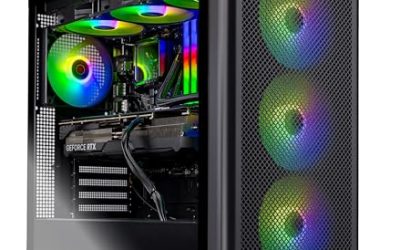
The best GPU for Into the Breach is the cheapest current card that suits your monitor, because the game’s published minimum is just integrated graphics with OpenGL 2.1 support (Intel HD 3000 or better) and 1 GB of RAM. Pick a budget model like the GeForce RTX 5060 if you also play other 1080p and 1440p games, step up to a 16 GB card such as the RTX 5060 Ti or Radeon RX 9060 XT for 4K and longer-term headroom, and keep your current hardware if it is anything from the past decade.
What Into the Breach asks of a graphics card
Subset Games’ turn-based tactics title, released in 2018, lists a single tier of requirements on Steam. For Windows that means Vista through 10, a 1.7 GHz or better processor, 1 GB of memory, OpenGL 2.1 support with an Intel HD 3000 as the named floor, and 400 MB of storage. There is no recommended tier, no VRAM figure, no mention of ray tracing, and no DLSS or FSR support on the store page. No frame rate targets are published, so none are quoted here.
That has a practical consequence for a buyer: this game cannot justify a GPU purchase. The card you pick will be driven by your monitor and by your heaviest games. The guide below therefore explains how to choose a card for the screen you own, with Into the Breach as an easy passenger.
At a glance
| Option | Best for | Key stated specs | Trade-off |
|---|---|---|---|
| Integrated graphics (recent Ryzen or Intel Core Ultra) | Only playing light games like this one | Shares system memory; no extra power connector | Not suited to demanding games |
| GeForce RTX 5060 | 1080p and 1440p on a budget | 8 GB GDDR7, 128-bit, 3,840 CUDA cores, 145 W, 550 W PSU suggested, one 8-pin connector | 8 GB can limit some newer titles |
| GeForce RTX 5060 Ti | 1440p, mild 4K, longer life | 8 GB or 16 GB GDDR7, 4,608 CUDA cores, 180 W, 600 W PSU suggested | The 8 GB variant lacks the main advantage |
| Radeon RX 9060 XT | Mid-range with large memory | 8 GB or 16 GB GDDR6, 32 compute units on the 16 GB version, around 160 W typical board power, 450 W minimum PSU listed | Different upscaling and driver ecosystem |
These figures are the makers’ own, as listed on NVIDIA’s RTX 5060 family page and AMD’s Radeon RX 9060 XT page. Pricing is intentionally left out; think in terms of budget, mid-range and premium tiers.
1080p picks
At 1080p the game is trivial for any modern card. If your goal is a compact, quiet and efficient PC, a budget card is enough. The RTX 5060’s 145 W figure and single 8-pin connector, as stated by NVIDIA, make it easy to fit into smaller cases and to pair with a modest power supply. If you already own an older card, such as a GeForce GTX 10-series or a Radeon RX 500-series part, the game’s requirements are well within its reach, so leave it alone until a newer game forces the issue.
1440p picks
A 1440p display uses about 78 percent more pixels than 1080p. For a 2D tactics game that is still a light load. Here the argument for a mid-range card is about the rest of your library. The 16 GB versions of the RTX 5060 Ti and Radeon RX 9060 XT are the sort of cards that keep up with newer releases that fill 8 GB of memory quickly. Reviewers such as Club386 have published direct comparisons of those two 16 GB cards, and both are commonly discussed as the mid-range options of this generation.
4K picks
For a 4K monitor, the pixel count is four times that of 1080p. Into the Breach is a 2D game, and nothing on the store page suggests it is demanding at that resolution, but the publisher does not state any 4K target. If you also play modern 3D games at 4K, a premium-tier card from NVIDIA or AMD is the logical path. If this game and similar titles are all you play, one of the 16 GB mid-range cards is more than enough hardware.
VRAM and upscaling
The developer lists no VRAM requirement. Treat VRAM as a question about your other games. In broad terms:
- 8 GB suits 1080p and older or lighter titles.
- 16 GB is the safer choice for 1440p and 4K in new releases.
- Check which variant you are buying; both NVIDIA and AMD sell 8 GB and 16 GB versions of their 60-class Ti and XT parts.
On upscaling, DLSS 4 is supported on the RTX 50 series according to NVIDIA, and AMD’s Radeon RX 9000 line supports its own FSR generation. Neither matters for this game, which does not advertise either. If you want to use them elsewhere, check each game’s settings menu.
Decision table: pick X if…
| Pick | If you… |
|---|---|
| Keep your current card | already have any discrete card from the past decade and play mainly lighter games |
| Integrated graphics | use a recent Ryzen or Core Ultra chip and play this and similar titles |
| RTX 5060 | want a low-power budget card for 1080p or light 1440p |
| RTX 5060 Ti 16 GB | want broad 1440p capability and NVIDIA features |
| Radeon RX 9060 XT 16 GB | want generous memory at a mid-range tier and prefer AMD |
| Premium-tier card | play demanding games at 4K and high refresh rates |
Alternatives and what to skip
Alternatives
- Intel Arc B-series: Intel’s current discrete cards are positioned at the budget tier. Read the maker’s page for model details and driver guidance before buying.
- Previous-generation NVIDIA or AMD cards: a GeForce RTX 40-series or Radeon RX 7000 card already in your PC far exceeds anything this game wants.
- A better monitor or an SSD: if the PC already runs this game well, these upgrades often change daily use more than a new GPU.
What to skip
- A premium card bought only for this game.
- An 8 GB card for a 4K monitor if you play new 3D releases.
- Unsourced FPS charts. The developer publishes none.
- Any card whose power connector or length does not fit your case and supply.
Fit and compatibility notes
| Check | Why it matters |
|---|---|
| Card length and thickness | Compact cases may not take longer or triple-slot designs |
| Power connector | The RTX 5060 family lists one 8-pin connector or an adapter option |
| PSU wattage | Follow the maker: 550 W for RTX 5060, 600 W for RTX 5060 Ti, 450 W minimum for the 16 GB RX 9060 XT |
| PCIe slot | Current cards use a PCIe 5.0 interface but work in older slots |
| Monitor inputs | Make sure your display has the ports the card outputs |
| Operating system | The game lists Windows Vista to 10; Mac and Linux are listed separately |
For anything involving wiring or opening a power supply, follow the card and PSU makers’ manuals, and ask a technician if you are unsure.
Frequently Asked Questions
What graphics card does Into the Breach need?
The Steam page names Intel HD 3000 graphics or better, with OpenGL 2.1 support, as the minimum. No recommended card is published.
Is 8 GB of VRAM enough?
For this game, yes, because the developer states no VRAM requirement and the minimum is integrated graphics. For newer 3D games at 1440p or 4K, 16 GB offers more margin.
Should I buy NVIDIA or AMD?
Either works for this game. Base the choice on your budget, your other games and whether you prefer DLSS or FSR in those titles.
Do I need to upgrade my PSU?
Only if you are fitting a new card whose maker suggests a higher wattage than your current supply. The game itself places no demands.
Can I play on integrated graphics?
Yes. The published floor is an Intel HD 3000, and current integrated graphics exceed it in most cases.
Does the game support DLSS or FSR?
The store page does not mention either. The game is light enough that upscaling is not a concern.
Related guides
More from Amazon
Programs that pair well with the guide above. Offers and eligibility are set by Amazon and may change.
Free shipping on eligible items, Prime Video and more. Eligible new members can start with a free trial.
Start a Prime free trialAd-free music streaming. Eligible new subscribers can start with a free trial.
Try Music Unlimited freeA Prime membership for ages 18-24 with a trial period. Eligibility is set by Amazon.
See Prime for Young AdultsAudiobooks and podcasts to listen to on the go. Eligible new members can start with a free trial.
Try Audible freeAs an Amazon Associate we earn from qualifying purchases.