For most people who want a vertical mouse for gaming and long desk sessions, the Logitech MX Vertical suits larger hands and the Logitech Lift suits small to medium hands, while players who need very fast flick aiming in competitive shooters will usually be better served by a conventional lightweight gaming mouse and a separate vertical mouse for work. Vertical mice are built around comfort rather than esports speed, and that shapes which ones make sense for gaming. This guide compares the main options, explains fit and trade-offs, and gives a decision table, without quoting prices.
As an Amazon Associate we earn from qualifying purchases at no extra cost to you.


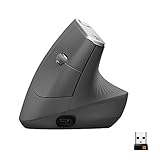

Our Top Picks
Top 3 picks at a glance
What a Vertical Mouse Does
A vertical mouse tilts your hand into a handshake position instead of resting it palm-down. Logitech describes both the MX Vertical and the Lift as having a 57-degree angle, which the company says supports a more natural wrist posture. Some people with wrist or forearm discomfort find the posture more comfortable, but this is not a medical treatment. If you have persistent pain, numbness or tingling, talk to a doctor or physical therapist rather than relying on a mouse change.
Why Gaming Use Is Limited
Vertical mice move the whole hand differently from a standard mouse, and many players report that precise flick shots and quick direction changes feel less natural. The shape also limits the button layouts that makers can use. That is why true vertical mice built specifically for esports are rare. Many of the popular vertical models are workplace or ergonomic products that happen to work for casual and slower-paced games such as strategy, MMOs, city builders and adventure titles. For shooters that rely on speed, the usual approach is a standard lightweight gaming mouse for play and a vertical mouse for work.
Options at a Glance
| Model | Best for | Maker-stated details | Limits |
|---|---|---|---|
| Logitech MX Vertical | Medium to large hands, long work and casual gaming sessions | Logitech lists a 57-degree angle, wireless connection, rechargeable battery with quick charge, multi-device pairing and a dedicated cursor speed switch | Sized for medium to large hands; heavier than light gaming mice |
| Logitech Lift | Small to medium hands, quieter office use and casual gaming | Logitech lists a 57-degree angle, quiet clicks, multi-device connection, and both right-handed and left-handed versions | Not built for competitive shooter speed; smaller size may not suit large hands |
| Anker wireless vertical mouse | Buyers seeking a lower-tier vertical mouse | Anker markets wireless vertical mice with adjustable sensitivity steps; check the model listing for details | Simpler sensor and build than premium models |
| Evoluent VerticalMouse | Buyers who want a long-running ergonomic design with several size and handedness options | Evoluent sells wired and wireless versions and left-hand models, according to the maker | Designed for ergonomics rather than gaming performance |
| Standard lightweight gaming mouse plus a vertical mouse | Competitive players who also need a comfortable desk mouse | Two-device setup | Two products to buy and manage |
Logitech’s DPI figures for these models are listed in its FAQs rather than on the visible product page, so check the maker’s specification sheet if sensitivity range matters to you.
Fit and Hand Size
Hand size is the main fit factor. Logitech states that the MX Vertical suits medium to large hands, while the Lift is for small to medium hands. Measure your hand from the wrist crease to the tip of the middle finger and compare to the maker’s size guidance. If the mouse is too small, your fingers may curl or drag; if too large, your thumb may stretch. The Lift also comes in a left-handed version per Logitech, which is a real advantage because many vertical mice are right-hand only.
Features That Matter for Gaming
Sensor and sensitivity range
Look for a stated DPI range and an adjustable setting. Some vertical models offer limited steps, which can be less flexible than gaming mice with software tuning.
Weight
Vertical mice are often heavier than competitive gaming mice. Weight affects fatigue and speed of movement, so check the maker’s stated weight.
Buttons
Thumb buttons are useful for MMOs and strategy games. Check whether the buttons are programmable in the maker’s software.
Wireless, battery and latency
Many vertical mice are wireless. Logitech lists rechargeable battery and quick charging on the MX Vertical. If you play competitive games, a wired connection or a dedicated receiver may give the lowest latency; check the maker’s stated connection type.
Noise
The Lift is listed with quiet clicks, which helps in shared spaces. Quiet switches may feel different from the crisp click of a gaming mouse.
Budget Tiers
| Tier | What to expect | Good fit |
|---|---|---|
| Budget | Simple wireless vertical mice with basic sensors and a few DPI steps | Trying the vertical shape before investing more |
| Mid-range | Logitech Lift and similar ergonomic models with quiet clicks and multi-device pairing | Daily office use plus casual gaming |
| Premium | Logitech MX Vertical and other larger ergonomic mice with rechargeable batteries and software support | Larger hands and long sessions |
Pick X If You Want Y
| Pick this | If you want | Trade-off |
|---|---|---|
| Logitech MX Vertical | A full-size vertical mouse for medium to large hands | Heavier feel, not tuned for esports |
| Logitech Lift | A smaller shape, quiet clicks and a left-handed option | May feel small for large hands |
| Anker wireless vertical | A simple vertical mouse at a lower tier | Fewer features and a simpler sensor |
| Evoluent VerticalMouse | Ergonomic focus with handedness and size choices | Not a gaming-first design |
| Standard gaming mouse for play, vertical for work | Competitive performance and desk comfort | Two devices to switch between |
Getting Used to a Vertical Mouse
- Expect an adjustment period; many users report that it takes several days to feel natural.
- Start by using it for office tasks before using it in fast games.
- Raise or lower the desk or chair so your forearm is level and your shoulder is relaxed.
- Take breaks and stretch regularly, whatever mouse you use.
- Lower sensitivity at first, since the new hand position changes how movements feel.
Alternatives
Ergonomic standard-shape gaming mice
Some gaming mice use sculpted right-hand shapes that support the palm, offering comfort without the full vertical tilt. These are often lighter and use higher-end sensors.
Trackball mice
Trackballs keep the hand still and move the cursor with the thumb or fingers. They are useful for limited desk space but are a different skill for gaming.
Wrist rests and desk setup changes
Adjusting chair height, desk height and mouse position can improve comfort with any mouse. A doctor or physical therapist can advise if you have ongoing symptoms.
Setting Up Your Desk for a Vertical Mouse
The mouse is only part of the comfort picture. Because a vertical mouse rotates the hand, the position of the keyboard and desk surface matters more than usual. Keep the keyboard close so you do not reach across to the mouse, and consider a compact keyboard without a number pad to free up space on the right. Make sure the mouse surface is smooth and uniform, since the larger body of a vertical mouse can catch on uneven pads or desk edges. Let your forearm rest naturally rather than propping it on a hard edge.
For gaming, check the polling and sensitivity settings in the maker’s software if it offers any, and adjust in-game sensitivity to match. Remember that this category is chosen mostly for comfort. If you notice that your aim suffers in fast games, use the vertical mouse for work, strategy and slower titles, and keep a standard mouse for fast shooters. Many buyers find that a two-mouse arrangement gives the best of both approaches.
Frequently Asked Questions
Are vertical mice good for gaming?
They work for casual and slower-paced games and for long sessions where comfort matters. For fast competitive shooters, many players prefer a conventional lightweight gaming mouse because aiming feels more natural with a flat hand position.
What angle do Logitech’s vertical mice use?
Logitech lists a 57-degree vertical angle for both the MX Vertical and the Lift. The company says this supports a more natural handshake posture.
Is there a left-handed vertical mouse?
Yes. Logitech sells a left-handed version of the Lift, and Evoluent offers left-hand models, according to the makers. Many other vertical mice are right-hand only, so check the listing.
Will a vertical mouse cure wrist pain?
No. A vertical mouse changes hand position, and some people find it more comfortable, but it is not a treatment. If you have persistent pain, numbness or tingling, see a doctor or physical therapist.
How long does it take to get used to one?
Users commonly report a few days to a couple of weeks. Start with everyday tasks and lower sensitivity until the movement feels natural.
Which is better for large hands, the MX Vertical or the Lift?
Logitech lists the MX Vertical for medium to large hands and the Lift for small to medium hands, so the MX Vertical is the better fit for larger hands.
Related guides
More from Amazon
Programs that pair well with the guide above. Offers and eligibility are set by Amazon and may change.
Free shipping on eligible items, Prime Video and more. Eligible new members can start with a free trial.
Start a Prime free trialAd-free music streaming. Eligible new subscribers can start with a free trial.
Try Music Unlimited freeA Prime membership for ages 18-24 with a trial period. Eligibility is set by Amazon.
See Prime for Young AdultsAudiobooks and podcasts to listen to on the go. Eligible new members can start with a free trial.
Try Audible freeAs an Amazon Associate we earn from qualifying purchases.


