If you want a vertical GPU display with the least extra shopping, the HYTE Y70 is the most commonly named case because it ships with a PCIe 4.0 x16 riser; the HAVN HS 420 VGPU suits buyers who want a PCIe 5.0 riser and a dedicated vertical bay, and the Cooler Master NR200P MAX V2 suits small-form-factor builders. Buyers who already own a case can add a kit instead. This guide explains how vertical mounting works, which cases include the riser and what to check before ordering.
As an Amazon Associate we earn from qualifying purchases at no extra cost to you.


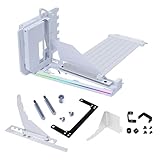
Top 3 picks at a glance
Vertical GPU Cases at a Glance
| Case | Best for | Stated traits | Limits |
|---|---|---|---|
| HYTE Y70 | Showcase ATX builds | The maker lists a PCIe 4.0 x16 riser included, 422 mm max GPU length, 105 mm GPU thickness, 180 mm CPU cooler height, 235 mm PSU length | Large footprint; Touch Infinite variant lists a shorter 390 mm GPU limit |
| HAVN HS 420 VGPU | Premium vertical display | Roundups list a dedicated vertical bay, PCIe 5.0 riser, vertical bracket, anti-vibration pads and a magnetic airflow divider | Premium tier |
| ARCTIC Xtender VG | Full tower with radiator room | Roundups list a vertical GPU mount and PCIe Gen 4 riser included | Big case |
| MSI MPG Gungnir 110R | ATX at a lower tier | Roundups list a bracket and PCIe 4.0 riser included | Fewer premium touches |
| Cooler Master NR200P MAX V2 | Mini-ITX | Roundups list riser and holder included in a small case | Small-form-factor build constraints |
| SSUPD Xhuttle | Compact vertical airflow design | Roundups list three ARGB fans and an RGB strip | Check GPU length in the maker spec |
| darkFlash DY470 | Value full tower | Named a value vertical GPU full tower in roundups | Confirm included parts |
| Corsair 9000D | Giant builds | Built-in vertical bracket, riser sold separately per roundups | Riser not included |
| Lian Li O11 series with VG4 kit | Existing O11 owners | The VG4 kit includes a riser; the case ships with an anti-sag bracket | Extra purchase |
How Vertical GPU Mounting Works
A vertical mount turns the graphics card so its fans face the glass panel instead of the case floor. The card connects to the motherboard through a flexible PCIe riser cable. That shows off the card but changes the airflow around it, because the card sits close to the glass.
Riser generation
The riser should match the PCIe generation of your board and GPU. HYTE’s Y70 lists PCIe 4.0 x16, the Cooler Master Gen5 kit includes a PCIe 5.0 riser and the HAVN HS 420 VGPU is listed with PCIe 5.0. A riser below your hardware’s generation will limit link speed or force the slot to a lower setting, so match or exceed it.
Clearance to the glass
Cards need room between the fans and the glass. GamersNexus notes 90 mm is optimal on the Y70, and HYTE lists 105 mm as the maximum thickness. Four-slot cards are supported on the Y70 per the search results. Check the card’s listed thickness against the case’s limit, not only the length.
Case airflow
Dual-chamber designs such as the Y70 keep the PSU and drives separate, and the HAVN includes an airflow divider. Without intake fans angled toward the GPU, temperatures can rise because the card breathes from a narrow gap.
Buying Considerations
Included riser or add-on kit
Cases with a riser included simplify the purchase. Roundups report that buying a bracket and riser separately adds cost, and add-on kits exist from Cooler Master (V3 kit with a 165mm PCIe 4.0 riser; Gen5 kit with a 165mm PCIe 5.0 riser), NZXT (a bracket with a 175mm PCIe 4.0 riser) and Lian Li (VG4v4 for four-slot cards). Confirm your case model is listed as compatible.
Size and motherboard support
Mini-ITX buyers should look at the NR200P MAX V2 or SSUPD Xhuttle; ATX buyers have most options. CPU cooler height and PSU length limits apply, as the Y70’s 180 mm and 235 mm limits show.
Cooling space
Full towers like the ARCTIC Xtender VG list plenty of radiator room, which helps liquid-cooled builds.
Cable length and routing
The riser cable and GPU power cables must reach their connectors. Power cables for GPUs with 12-volt high-power connectors should be routed without sharp bends, as the manufacturer’s manual instructs.
Compatibility Notes
- Check maximum GPU length and thickness against the card’s exact dimensions.
- Check riser generation against your motherboard and GPU.
- Check that your motherboard form factor is supported in the vertical configuration.
- Look for half-height card clearance behind the vertical card if you use sound or capture cards.
- Be careful with heavy cards; use the supplied bracket to reduce stress on the riser slot.
Pick X If You…
| If you… | Pick |
|---|---|
| Want the simplest showcase build with riser included | HYTE Y70 |
| Want a premium dedicated bay and PCIe 5.0 riser | HAVN HS 420 VGPU |
| Want a full tower with radiator room | ARCTIC Xtender VG |
| Want an ATX case at a lower tier | MSI MPG Gungnir 110R |
| Build in mini-ITX | Cooler Master NR200P MAX V2 or SSUPD Xhuttle |
| Already own an O11 or ATX case | Lian Li VG4 or Cooler Master V3 kit |
Budget Tiers
At the lower tier, the MSI MPG Gungnir 110R and darkFlash DY470 are described as value options. Mid-range buyers look at the HYTE Y70 and ARCTIC Xtender VG. Premium builders choose the HAVN HS 420 VGPU. Note that several roundups used here are affiliate-style lists, so read the maker pages for exact dimensions.
Alternatives
- Horizontal mounting: The standard slot gives the shortest signal path and simpler cooling.
- Anti-sag brackets: If your goal is only to support a heavy card, a bracket does that without a riser.
- Previous-generation cases: Older models may need separate risers; confirm.
Planning a Vertical Build Step by Step
1. Measure the graphics card
Write down the card’s length, thickness in millimeters and power connector position from the maker’s specification page. Vertical cases limit thickness as well as length, and the Y70 figures of 422 mm and 105 mm show why both numbers matter. Cards with a bulky cooler can use most of the available gap to the glass.
2. Match the riser to the platform
Choose a riser that equals or exceeds your motherboard and card generation. Cases that ship with a riser remove this step, but you should still read the listed generation. An unshielded or very long riser can cause link errors, so shorter, well-shielded cables are generally preferred by reviewers.
3. Plan the airflow
Because the card faces the glass, the fans draw air from a narrow gap. Look for cases with a ventilated side or bottom intake and fans angled toward the card. Reviewers point to the HAVN’s airflow divider and the Y70’s dual-chamber layout as examples of designs that address this.
4. Check the cables and the CPU cooler
Ensure the CPU cooler height, power supply length and cable routing fit. The Y70 lists 180 mm for coolers and 235 mm for power supplies, so a long power supply or tall air cooler may not fit.
5. Support the weight
Use the supplied bracket or anti-vibration pads. The HAVN HS 420 VGPU is listed with a bracket and adjustable pads, and a bracket is the simplest way to keep weight off the riser connector.
Who Should Skip Vertical Mounting
If you prefer the lowest temperatures and the easiest upgrades, a standard horizontal layout is simpler. Vertical mounting is mainly a display choice, and some cards run warmer when pressed close to a panel. It also limits access to other expansion slots in many designs.
Frequently Asked Questions
Does vertical mounting reduce performance?
A quality riser matching your PCIe generation should keep performance close to normal, and one roundup cites a roughly 0.2 percent frame rate loss. Poor risers or mismatched generations can cause instability.
Will my GPU overheat vertically?
It can if the glass sits too close to the fans. Choose a case with enough clearance and intake airflow.
Do I need a separate riser?
Not with cases that include one, such as the HYTE Y70. Some cases, like the Corsair 9000D, need one purchased separately.
Can I use a PCIe 5.0 card with a PCIe 4.0 riser?
It will typically run at the lower speed. If you want the full link speed, choose a PCIe 5.0 riser.
Does the Y70 support large GPUs?
The maker lists a 422 mm maximum length and 105 mm thickness on the standard model. The Touch Infinite lists 390 mm.
Is vertical mounting safe for heavy cards?
Use the case’s bracket or support, and follow the manual. Do not leave the weight on the riser slot alone.
Related guides
More from Amazon
Programs that pair well with the guide above. Offers and eligibility are set by Amazon and may change.
Free shipping on eligible items, Prime Video and more. Eligible new members can start with a free trial.
Start a Prime free trialAd-free music streaming. Eligible new subscribers can start with a free trial.
Try Music Unlimited freeA Prime membership for ages 18-24 with a trial period. Eligibility is set by Amazon.
See Prime for Young AdultsAudiobooks and podcasts to listen to on the go. Eligible new members can start with a free trial.
Try Audible freeAs an Amazon Associate we earn from qualifying purchases.


