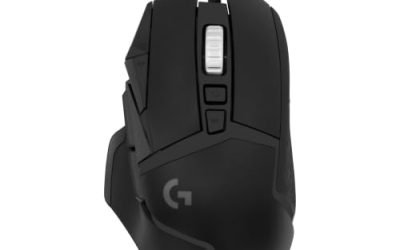
The wired budget tier is where gaming mice get honest. With no battery or radio to pay for, the money goes into the sensor, switches and shell, and a cable removes charging from your life entirely. The decision is which feature set matters at this tier: optical switches, extra buttons, adjustable weight, or the lightest shell.
This guide compares five wired mice sold in that budget tier, framed by the features their Amazon listings state rather than by any price figure. It suits first-time buyers, students building a first setup, and experienced players who want a dependable wired spare that still carries modern switches and sensors. Where a listing leaves a field unstated, the article says so plainly instead of borrowing the figure from another source.
Top 3 picks at a glance


Quick Picks
As an Amazon Associate we earn from qualifying purchases.
| Product | Best for | Key spec from title |
|---|---|---|
| Razer Cobra | Lightest shell with optical switches | 58 g, 8,500 DPI optical sensor |
| MSI Clutch GM08 | Adjustable weight system | 4,200 DPI, 3 adjustable weights |
| Redragon M711 COBRA | Seven programmable buttons | 10,000 DPI, RGB backlit |
| Razer Basilisk V3 | Ergonomic controls and tilt wheel | 26K DPI sensor, 11 programmable buttons |
| Logitech G502 X | Most controls in the tier | HERO 25K sensor, LIGHTFORCE switches |
How to Choose
Decide Which Feature Tier You Need
Budget wired mice split into clear tiers by their listings. The simplest models, like the MSI Clutch GM08 at 4,200 DPI, cover everyday play with a symmetrical shell and basic buttons. Mid-tier listings add optical switches, higher sensor ceilings and programmable buttons, as the Cobra and M711 show. The top of this tier, represented by the Basilisk V3 and G502 X, adds ergonomic shaping and many controls. Buy the tier that matches your games instead of paying for buttons you will never bind.
Switch Type Outlasts Sensor Numbers
At this level, switches decide how long the mouse feels new. Optical switches, listed on both Razer models here, register clicks with light and avoid the contact wear behind double-click faults. The G502 X uses LIGHTFORCE hybrid optical-mechanical switches, which keep a mechanical feel with optical actuation. Mechanical-only listings can still serve well, but where a listing names its switch and rating, such as the Basilisk V3 at 70 million clicks, treat that as the durability evidence to compare.
Shape, Weight and Adjustability
Weights here range from the Cobra’s listed 58 g to the Basilisk V3’s 101 g, with very different shapes behind those numbers. Symmetrical shells suit fingertip and claw grips across both hands, while the Basilisk’s right-handed ergonomic shape supports a palm. The GM08 takes a third route with three adjustable weights, letting you tune balance after purchase. Because this tier rarely allows returns after heavy use, matching the shape description to your grip is the most important step in the whole purchase.
Buttons and Software for Your Games
Button counts in these listings run from six to thirteen controls. Shooter players need few, while MMO and MOBA players use every side button they can get. The M711 lists seven programmable buttons, the Basilisk V3 lists eleven, and the G502 X lists thirteen programmable controls. More buttons also mean more software setup time, so count the binds your main games actually use. A mouse with two well-placed side buttons beats a crowded grid your thumb cannot navigate blind.
The 5 Best Options
Razer Cobra

The Cobra leads the tier on modern essentials: a 58 g wired shell, an 8,500 DPI optical sensor and Gen-3 optical switches rated to 90 million clicks. Six programmable buttons cover standard shooter and MOBA binds, and full PTFE feet keep glide consistent on cloth pads. At 4.71 inches long it stays compact enough for claw and fingertip grips while suiting smaller desks. The Speedflex cable adds little drag, so the wired connection rarely makes itself felt during fast, wide mouse movements.
Specs
- Sensor: 8,500 DPI optical, 300 IPS, as listed
- Weight: 58 g
- Switches: Optical Gen-3, 90M clicks
- Connection: Wired Speedflex cable
- Buttons: 6 programmable
- Dimensions: 4.71 x 2.46 x 1.5 in
Best for: Players wanting the lightest, most modern wired mouse in this tier.
Watch out for: Polling rate was not stated in the captured listing details, so verify it on the live page if that specification matters to you.
ASIN: B0C51J2ZXN
MSI Clutch GM08
MSI’s Clutch GM08 is the straightforward symmetrical option, with an optical sensor up to 4,200 DPI and six buttons under red LED lighting. Its distinguishing feature is the adjustable weight system with three weights, rare in this tier, letting you add heft if the shell feels too light for controlled aim. The listing does not state a base gram weight, switch type or polling rate, so judge it on its shape and adjustability rather than a deep specification sheet. It suits players who want simplicity plus one meaningful tuning option.
Specs
- Sensor: Optical, up to 4,200 DPI, as listed
- Connection: USB wired
- Buttons: 6
- Weights: Adjustable weight system with 3 weights, as listed
- Lighting: Red LED, as listed
Best for: Players wanting a symmetrical wired mouse with tunable weight.
Watch out for: Base weight, switch type and polling were not in the captured listing block, so check the live page before relying on those details.
ASIN: B08DDLMGCY
Redragon M711 COBRA
The Redragon M711 COBRA aims at button value, listing seven programmable buttons and an optical sensor adjustable up to 10,000 DPI in its title. Chroma RGB backlighting with 16.8 million colours gives it the full gaming look that plainer tier-mates skip. The wired USB connection keeps it simple for a first setup or a spare that lives in a drawer until needed. Use the listing’s own figures, seven buttons and 10,000 DPI, rather than the higher counts some non-Amazon sources claim for this model.
Specs
- Sensor: Optical, adjustable up to 10,000 DPI, as listed in the title
- Connection: Wired USB
- Buttons: 7 programmable, as listed in the title
- Lighting: 16.8 million colour Chroma RGB backlit, as listed
Best for: First setups wanting programmable buttons and RGB on a wired mouse.
Watch out for: Weight, switch and polling details were not captured from the listing, so confirm them on the live page if they affect your choice.
ASIN: B0751D11BL
Razer Basilisk V3

The Basilisk V3 brings a full ergonomic feature set into this wired tier: a Focus+ 26K optical sensor, eleven programmable buttons and a HyperScroll tilt wheel inside a 101 g right-handed shell. Its Gen-2 optical switches are rated up to 70 million clicks, and Chroma RGB lighting runs through the design. At 5.12 inches long it supports palm grips that the smaller mice here cannot. Polling was not stated in the captured listing block, so this pick is about shape, wheel and controls rather than a polling claim.
Specs
- Sensor: Focus+ 26K optical, 26,000 DPI
- Switches: Optical Gen-2, up to 70M clicks
- Buttons: 11 programmable
- Weight: 101 g
- Dimensions: 5.12 x 2.96 in, as listed
- Connection: USB wired
Best for: Palm grippers wanting a tilt wheel and many controls, wired.
Watch out for: Do not assume a high polling figure; the captured listing block does not state one, so check the live page if it matters.
ASIN: B09C13PZX7
Logitech G502 X

The G502 X tops this tier on controls and switches, pairing the HERO 25K sensor with LIGHTFORCE hybrid optical-mechanical primary switches. Its listing describes up to 25,600 DPI, and a captured page summary credits it with thirteen programmable controls. The wired connection keeps it in this budget frame while the G502 shape serves palm and claw players who like a substantial mouse. Weight, polling and dimensions were not captured from a reproduced listing block for this ASIN, so confirm those on the live page before ordering.
Specs
- Sensor: HERO 25K, up to 25,600 DPI, as listed
- Switches: LIGHTFORCE hybrid optical-mechanical
- Connection: Wired
- Buttons: 13 programmable controls, per a captured listing summary
Best for: Players wanting the most controls and hybrid switches in this tier.
Watch out for: The button count comes from a captured page summary and other fields were not reproduced, so verify the full specification on the live listing.
ASIN: B0943HXDVM
Which One Fits Your Situation
You Play Fast-Paced Shooters
Take the Razer Cobra. At 58 g with optical switches and PTFE feet, it is built for quick lifts and clean clicks, and its compact shell suits the claw and fingertip grips shooters favour. The wired connection removes battery anxiety during long sessions. Players wanting a larger palm shape should step up to the Basilisk V3 instead of forcing this smaller shell to fit.
You Are Building a First Gaming Setup
The Redragon M711 COBRA or MSI Clutch GM08 covers the basics with colour and adjustability respectively. The M711 adds programmable buttons and full RGB for the complete gaming-desk look, while the GM08’s three tuning weights let you experiment with balance as your aim style develops. Both keep the setup simple: one USB cable, no charging, no receiver to lose between desks.
You Play MMOs or MOBAs With Many Binds
Choose by button count. The G502 X lists thirteen programmable controls and the Basilisk V3 lists eleven, both far beyond the six-button mice here. The Logitech suits players who also value hybrid switch feel, while the Razer’s tilt wheel and ergonomic shell favour long palm-grip sessions. Map your rotations to the side buttons before deciding which layout your thumb will learn faster.
You Want a Spare That Still Feels Premium
The Basilisk V3 is the spare that does not feel like a compromise: optical switches, a 26K sensor and a proper ergonomic shell in a wired package. It can cover a main mouse’s repair window without changing your grip or sensitivity. The G502 X is the alternative if your main setup already revolves around Logitech software and control layouts you know.
Common Mistakes
- Comparing this tier by maximum DPI, when switch type and shape differ far more in daily use.
- Assuming every listing states polling, when several here do not; check the live page instead of guessing.
- Quoting third-party button counts for the Redragon M711 instead of the seven its own listing title states.
- Buying an ergonomic right-handed shell like the Basilisk V3 for a left-handed player.
- Ignoring cable drag entirely, rather than routing the cable or using a bungee for fast games.
Frequently Asked Questions
Are wired mice still worth it in this tier?
Yes. A cable removes batteries, charging and wireless interference from the equation, and at this tier it lets the specification focus on sensor and switches. Modern flexible cables like the Cobra’s Speedflex add little drag. If your desk is fixed and you play long sessions, wired remains the simplest reliable choice for the money-conscious feature set described here.
Which specification matters most at this level?
Switch type and shape, in that order after fit. Optical and hybrid switches resist the double-click wear that ends many budget mice early, and a shell matching your grip prevents fatigue. Sensor ceilings from 4,200 to 25,600 DPI in these listings all track well at normal sensitivities, so they should rank below comfort and durability in your decision.
How many buttons do I actually need?
Most shooter and action players use two side buttons plus the wheel click. MMO and MOBA players can fill eleven or more, which is where the Basilisk V3 and G502 X earn their place. Count the binds in your main game before choosing; unused buttons add weight, cost and accidental presses during tense moments in matches.
Can I use these mice for work as well as gaming?
Absolutely. The Basilisk V3’s tilt wheel helps spreadsheets, the G502 X’s controls suit shortcuts, and the simpler mice handle office tasks without fuss. Gaming sensors track fine on office surfaces with a pad, and programmable buttons can carry copy, paste or mute. Only the loudest RGB settings might need toning down for a shared workspace or video calls.
Related guides
More from Amazon
Programs that pair well with the guide above. Offers and eligibility are set by Amazon and may change.
Free shipping on eligible items, Prime Video and more. Eligible new members can start with a free trial.
Start a Prime free trialAd-free music streaming. Eligible new subscribers can start with a free trial.
Try Music Unlimited freeA Prime membership for ages 18-24 with a trial period. Eligibility is set by Amazon.
See Prime for Young AdultsAudiobooks and podcasts to listen to on the go. Eligible new members can start with a free trial.
Try Audible freeAs an Amazon Associate we earn from qualifying purchases.