The best gaming laptop for Escape from Tarkov in 2026 is a model with a fast modern CPU, 32GB of RAM, an RTX 4060 or better, and a 1TB SSD—not necessarily the laptop with the highest advertised GPU tier.
Tarkov is unusually demanding on the processor and memory, especially on Streets of Tarkov, while laptops must also manage heat and power limits inside a smaller chassis. The right choice therefore depends on whether you want a budget 1080p system, a balanced 1440p laptop, or a high-end machine for high settings and other demanding games.
As an Amazon Associate we earn from qualifying purchases at no extra cost to you.
![TOP CUSTOMS Escape from Tarkov - Tagilla Figurine Replica [Updated Packaging]- Collectible Figurine Statue- FactoryBoss - Gift Idea - Gamers](https://m.media-amazon.com/images/I/41EZSWsEqsL._SL160_.jpg)



Our Top Picks


Top 3 picks at a glance
Quick picks by budget
| Use case | Recommended specification | Suitable laptops | Typical market range |
|---|---|---|---|
| Budget Tarkov | Core i5-13420H, Ryzen 7 7735HS or similar; RTX 4050; 16GB minimum, preferably 32GB; 1TB SSD | Lenovo LOQ 15, Acer Nitro V 15 | Usually $700–$950 |
| Best overall | Core i7-14650HX, Ryzen 7 8845HS or similar; RTX 4060; 32GB; 1TB SSD | Lenovo Legion Pro 5 16, ASUS ROG Strix G16 | Usually $1,100–$1,600 |
| High-refresh 1440p | Core i9 or Ryzen 9 class CPU; RTX 4070; 32GB; 1TB or 2TB SSD | Lenovo Legion Pro 5 16, ASUS ROG Strix G16 | Usually $1,500–$2,100 |
| Maximum headroom | Core i9 HX or Ryzen 9 HX; RTX 4080 or RTX 4090; 32–64GB; 2TB SSD | Razer Blade 16, MSI Raider 18 | Usually $2,500–$4,000+ |
Exact components differ by regional configuration, so check the individual SKU before buying. A laptop sold under the same family name may have different memory, screen, GPU wattage, or storage.
Best overall: Lenovo Legion Pro 5 16
The Lenovo Legion Pro 5 16 is the strongest all-round recommendation for Tarkov when configured with a Ryzen 7 or Core i7-class processor, an RTX 4060 or RTX 4070, 32GB of RAM, and a 1TB SSD. Its larger chassis gives the CPU and GPU more cooling capacity than most thin gaming laptops, which matters during long raids.
Choose an RTX 4060 configuration for 1080p or 1600p gaming at sensible settings. Move to the RTX 4070 if you want more graphics headroom, a higher-refresh display, or to play other games with ray tracing. The 16-inch 16:10 display provides more vertical space for menus and inventory than a conventional 16:9 panel.
- CPU: Prioritize a Core i7 HX or Ryzen 7/9 HS-class configuration.
- GPU: RTX 4060 is the value sweet spot; RTX 4070 is better for 1600p.
- Memory: Buy 32GB or plan an upgrade immediately.
- Thermals: The thicker chassis is preferable to an ultra-thin design for sustained performance.
- Trade-off: It is heavier and less portable than thin premium laptops.
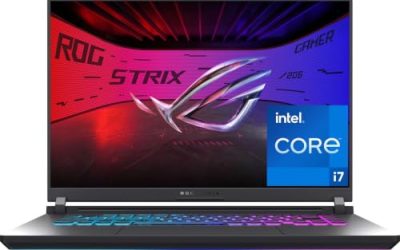
Best alternative: ASUS ROG Strix G16
The ASUS ROG Strix G16 is a good choice when you want strong sustained performance and a high-refresh display. Configurations with Intel HX processors and RTX 4060 or RTX 4070 graphics are particularly suitable for Tarkov, provided the system has 32GB of memory.
Its main advantage is performance-oriented cooling and a display often aimed at fast gaming. Its disadvantages are similar to the Legion: substantial weight, fan noise under load, and battery life that is secondary to plugged-in performance. For Tarkov, those are reasonable compromises because the game is best played while connected to the charger.
Choose the Strix G16 over a thinner laptop if you regularly play long sessions, stream, record gameplay, or run Discord, a browser, and mapping tools at the same time.
Best budget option: Lenovo LOQ 15
The Lenovo LOQ 15 is one of the more sensible lower-cost choices for Escape from Tarkov. Look for an RTX 4050 or RTX 4060 version with a Core i5/i7 H-series or Ryzen 7 processor. A 16GB model can run the game, but a 32GB configuration is much more comfortable on demanding maps.
The RTX 4050 has enough performance for 1080p, but its 6GB of VRAM leaves less room for high texture settings and future games. If the price gap between RTX 4050 and RTX 4060 versions is reasonable, choose the RTX 4060: it generally provides 8GB of VRAM and more graphics headroom.
The LOQ’s drawbacks are its heavier body, ordinary speakers, and display quality that varies by configuration. Avoid a low-color-coverage panel if you also edit photos or video; for Tarkov alone, refresh rate and response time matter more than professional color accuracy.
Best cheaper alternative: Acer Nitro V 15
The Acer Nitro V 15 can make sense when it is substantially cheaper than a comparable LOQ. Select a configuration with an RTX 4050, a modern Core i5 or Ryzen 7 processor, and upgradeable memory. It is a 1080p-focused machine rather than a premium long-term platform.
For Tarkov, the important limitation is not simply the RTX 4050. Some budget Nitro configurations include only 16GB of RAM or a smaller SSD, and those compromises can cause stutter when the game, Windows, a browser, and voice chat compete for resources. Treat 32GB and a 1TB SSD as part of the purchase cost.
Premium picks: Razer Blade 16 and MSI Raider 18
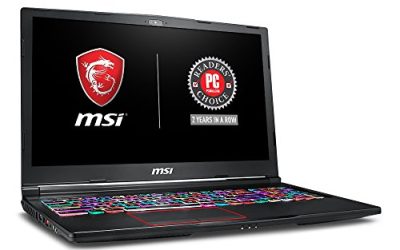
The Razer Blade 16 is appropriate if you want a premium chassis, a high-end display, and the option of RTX 4080 or RTX 4090 graphics. The MSI Raider 18 offers a larger desktop-replacement design with powerful CPU and GPU configurations and more room for cooling and storage.
These laptops are excellent for demanding games at 1600p or higher, but they are not efficient Tarkov purchases for everyone. Tarkov often becomes CPU- or game-engine-limited before a top-tier mobile GPU is fully useful, particularly at 1080p. Spend this money only if you also play GPU-heavy games, use a high-resolution external monitor, or want maximum upgrade life.
What Tarkov needs from each component
CPU: prioritize responsiveness over branding
Tarkov benefits from strong single-thread performance, modern cache design, and enough cores for background tasks. A recent Core i5 H-series or Ryzen 7 HS-series chip can work, but Core i7 HX and Ryzen 7/9 configurations provide more margin on Streets and during online firefights.
Do not compare processors by core count alone. A newer eight-core chip can outperform an older sixteen-core part in a game that depends heavily on per-core speed and memory latency. Avoid low-power U-series processors unless portability is more important than consistent frame pacing.
GPU and VRAM: RTX 4060 is the practical target
An RTX 4050 is adequate for 1080p, while an RTX 4060 is the better long-term minimum for a dedicated Tarkov laptop. The RTX 4070 is useful for 1600p screens and other demanding games. RTX 4080 and RTX 4090 laptops are luxury choices rather than requirements.
VRAM matters when using high textures, supersampling, high-resolution displays, or multiple monitors. As a simple planning guide, 6GB is workable for 1080p, 8GB is more comfortable for 1080p and 1600p, and 12GB or more is preferable for high-resolution gaming. This is not a guaranteed frame-rate formula because Tarkov performance also depends on CPU load and patches.
RAM: 32GB is the sensible target
Buy 32GB whenever possible. Tarkov can consume substantial memory, and 16GB leaves little space for a browser, Discord, recording software, or a map tool. A two-stick setup is also important because dual-channel memory improves bandwidth and frame-time consistency.
A useful bandwidth calculation explains why this matters: DDR5-5600 transfers 5,600 million transfers per second. With a 64-bit channel, one stick provides roughly 44.8GB/s of theoretical bandwidth; two matched channels provide about 89.6GB/s. Real results are lower, but dual-channel memory roughly doubles the available channel bandwidth.
Storage: choose 1TB, preferably with a second slot
Tarkov itself is not the only storage concern. Windows updates, shader caches, recordings, and other games quickly consume a 512GB drive. A 1TB NVMe SSD is the practical minimum, while a second M.2 slot makes future expansion cheaper than replacing the original drive.
Display and thermal decisions
A 1080p 144Hz or 165Hz panel is sensible for RTX 4050 laptops. A 1600p or 1440p 165Hz panel pairs well with an RTX 4060 or RTX 4070, although you may need to lower settings on the most demanding maps. A 240Hz screen is not automatically better: Tarkov may not sustain 240 frames per second, and image quality or CPU performance may be more valuable.
Check the laptop’s GPU wattage and cooling design, not just the GPU name. A high-wattage RTX 4060 in a thick chassis can be a better Tarkov purchase than a restricted RTX 4070 in a thin chassis. Expect fan noise during play, and use the laptop on a hard surface with the rear slightly elevated. Cleaning vents and replacing thermal paste after extended use can help, but do not block the intake.
Recommended Tarkov settings for a new laptop
- Start at the panel’s native resolution, then reduce resolution only if GPU usage is consistently near full load.
- Use medium textures with an RTX 4050, and high textures with an RTX 4060 or better if VRAM usage remains stable.
- Keep shadows around medium; higher shadows often cost performance without a proportional visibility benefit.
- Disable unnecessary post-processing effects and test HBAO or SSR rather than assuming every setting improves visibility.
- Use DLSS Quality at 1440p/1600p if GPU-limited. At 1080p, upscaling can look softer and may not solve a CPU bottleneck.
- Cap frame rate slightly below the display refresh rate if frame pacing is uneven, and leave headroom for demanding areas.
Which laptop should you buy?
| Your situation | Best direction | Why |
|---|---|---|
| You want the lowest reasonable cost | LOQ 15 or Nitro V 15 with RTX 4050 and upgradeable RAM | Good 1080p value, but budget for a 32GB upgrade |
| You mainly play Tarkov and want value | Legion Pro 5 16 or Strix G16 with RTX 4060 and 32GB | Strong CPU, cooling, and enough GPU headroom |
| You use a 1600p monitor or play many new games | RTX 4070 configuration | More graphics capacity without the price of flagship models |
| You need portability | A thinner RTX 4060 laptop with 32GB | Accept shorter sustained performance and more fan noise |
| You want a desktop replacement | Blade 16 or Raider 18 with RTX 4080-class graphics | Maximum GPU power, screen quality, and upgrade headroom |
For most buyers, the final recommendation is a 16-inch Legion Pro 5 or ROG Strix G16 with a fast Core i7/Ryzen 7-class CPU, RTX 4060 graphics, 32GB of dual-channel RAM, and a 1TB NVMe SSD. That combination puts money into the parts Tarkov actually stresses while avoiding the diminishing returns of an oversized flagship GPU.
Frequently asked questions
Can Escape from Tarkov run well on a laptop with 16GB of RAM?
Yes, 16GB can run Tarkov, but 32GB is more comfortable. The game can consume substantial memory, leaving less space for Windows, a browser, Discord, recording software, or a map tool. If you buy a 16GB laptop, choose one with upgradeable memory and consider treating a memory upgrade as part of the purchase cost.
Should I choose an RTX 4050 or RTX 4060 laptop for Tarkov?
Choose the RTX 4060 if the price gap is reasonable. The RTX 4050 is adequate for 1080p, but its 6GB of VRAM leaves less room for high texture settings and future games. An RTX 4060 generally provides 8GB of VRAM and more graphics headroom, making it the better long-term minimum for a dedicated Tarkov laptop.
Is a 240Hz display worth choosing for Escape from Tarkov?
Not automatically. Tarkov may not sustain 240 frames per second, so image quality or CPU performance may be more valuable. A 1080p 144Hz or 165Hz panel suits RTX 4050 laptops, while a 1600p or 1440p 165Hz panel pairs well with an RTX 4060 or RTX 4070, although demanding maps may require lower settings.
Can I play Tarkov comfortably while running Discord, a browser, and mapping tools?
Yes, but 32GB of memory is the sensible target for that setup. Tarkov, Windows, a browser, Discord, and a map tool can compete for resources, and 16GB leaves little space for them. A recent Core i7 HX or Ryzen 7/9 configuration also provides more margin for background tasks and demanding maps.
What should I check besides the laptop’s advertised GPU model?
Check the individual SKU for memory, display, GPU wattage, storage, and cooling design. Laptops in the same family can differ in these areas. A high-wattage RTX 4060 in a thicker chassis may be a better Tarkov purchase than a restricted RTX 4070 in a thin chassis, while a second M.2 slot simplifies future storage expansion.
Related guides
- MSI Titan 18 HX AI Review: Listings Compared, Specs Checked, Cases Sorted
- MSI Cyborg 17 Review: A 17-Inch RTX 5060 Laptop, and the Storage Detail to Check First
- ASUS ROG Strix SCAR 18 Review: RTX 5090 vs RTX 5080 Listings and Four Alternatives
- Alienware 16 Area-51 Review: Configurations, Rivals and Gaps