Choosing between a gaming laptop PCIe Gen 4 vs Gen 5 SSD comes down to compatibility, workload, cooling, and cost—not just advertised read speeds. PCIe Gen 5 offers greater theoretical bandwidth, but Gen 4 remains a practical choice for most gaming laptops. This comparison explains the real differences and when upgrading makes sense.
PCIe Gen 4 vs Gen 5 SSD: What Actually Changes?
PCIe Gen 4 and Gen 5 describe different generations of the interface connecting an NVMe SSD to a computer. Gen 5 doubles the theoretical transfer rate per lane compared with Gen 4, but that does not mean games load twice as fast. Your laptop’s storage controller, SSD design, cooling, and workload all influence real-world results.
1. Sequential Read and Write Speeds
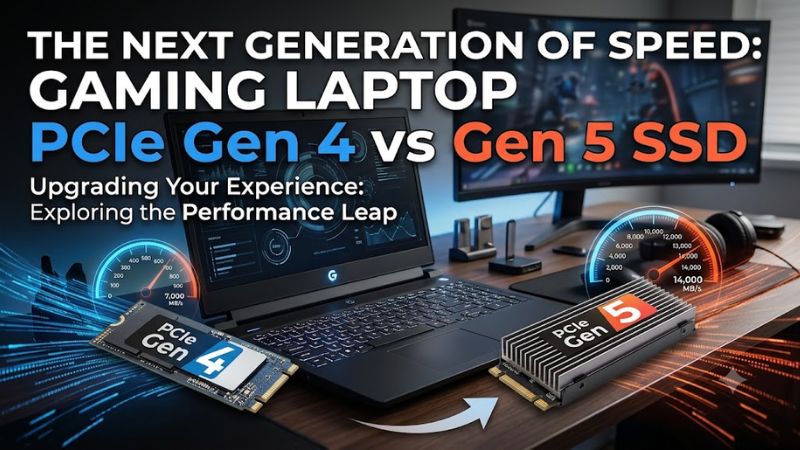
PCIe Gen 4 provides approximately 7.9 GB/s of theoretical bandwidth per direction for an x4 link, while PCIe Gen 5 provides approximately 15.8 GB/s. These figures describe interface bandwidth, not guaranteed file-transfer speeds. Actual performance depends on the SSD controller, NAND flash, firmware, and workload.
Advertised sequential speeds also describe large, relatively continuous transfers rather than every storage task. Copying a large video file may benefit more from a fast Gen 5 drive than launching a game that reads smaller groups of files. Drive capacity, cache behavior, and sustained write performance can further change the outcome.
2. Gaming Load Times and Frame Rates
For most games, moving from a capable Gen 4 SSD to a Gen 5 SSD will not produce a proportional improvement in loading times. Games depend on more than raw storage bandwidth, including CPU processing, decompression, memory availability, and how their engines request assets.
Independent comparisons of gaming storage have generally found smaller differences between PCIe SSD generations than their headline bandwidth figures suggest. Some workloads benefit from faster storage, especially when transferring substantial amounts of data, but ordinary gameplay FPS is usually determined more by the CPU and GPU than by SSD generation.
3. Heat, Power Consumption, and Cooling
PCIe Gen 5 SSDs can consume more power and generate more heat under demanding workloads, although the exact difference depends on the individual drive. A laptop has less room for airflow and heat dissipation than a desktop tower, making the SSD’s thermal design particularly important.
When a drive reaches its thermal limit, it may reduce performance to control temperature. A Gen 4 SSD with adequate cooling can therefore sustain its workload better than a poorly cooled Gen 5 model in some circumstances. Check whether your laptop provides a compatible thermal pad, shield, or other cooling provision before choosing a high-performance drive.
4. Compatibility With Your Laptop
An M.2 slot does not automatically support every SSD generation. You must verify the laptop’s supported PCIe generation, physical drive size, interface, and installation requirements. Many NVMe drives use the M.2 2280 format, but some gaming laptops require shorter drives or have different restrictions.
A Gen 5 SSD may operate at Gen 4 speeds when installed in a compatible Gen 4 slot, provided the device supports that arrangement. Conversely, a Gen 4 drive generally negotiates a lower generation on a compatible Gen 5 interface. Neither situation makes an unsupported laptop slot compatible, so consult the exact model’s maintenance manual and storage specifications before purchasing.
Gaming Laptop PCIe Gen 4 vs Gen 5 SSD: Comparison Table
The practical difference is that Gen 5 provides more interface bandwidth, while Gen 4 often offers sufficient performance for gaming at a lower overall cost. The table below compares the two generations by their typical strengths and limitations. Individual SSDs can differ substantially, so generation alone should not determine your purchase.
| Category | PCIe Gen 4 SSD | PCIe Gen 5 SSD |
| Theoretical x4 bandwidth per direction | About 7.9 GB/s | About 15.8 GB/s |
| Sequential transfer potential | High | Higher |
| Typical gaming benefit | Strong for most games | Often modest over a good Gen 4 drive |
| Large file transfers | Fast with a capable drive | Potentially faster |
| Heat and power | Varies by model; often easier to accommodate | Some models require more thermal attention |
| Laptop compatibility | Requires a suitable M.2 NVMe slot | Requires Gen 5 support for full speed |
| Value for gaming | Usually attractive | Depends on price and workload |
| Best use case | Gaming, everyday use, general productivity | Heavy data transfers and demanding storage workloads |
1. When Gen 4 Is the Better Gaming Upgrade
Gen 4 is a sensible choice when your existing laptop already supports PCIe Gen 4 and you need additional storage or want to replace a slow or nearly full drive. A quality Gen 4 SSD can provide fast game installations, responsive application launches, and practical loading performance without requiring the highest-bandwidth hardware.
Capacity can matter more to your experience than interface generation. If a 1 TB drive is almost full, a compatible 2 TB Gen 4 SSD may offer more immediate value by giving you room for additional games and updates. Compare sustained performance, endurance ratings, warranty terms, and price per terabyte instead of relying on peak read speeds alone.
2. When Gen 5 Is Worth Considering
Gen 5 makes more sense when your laptop explicitly supports it and your work involves frequent large-file transfers, demanding content creation, or other storage-heavy tasks. Moving large datasets or media files can expose bandwidth differences more clearly than ordinary gaming, provided the source drive and the rest of the system are fast enough to take advantage of the additional throughput.
However, Gen 5 is not automatically a better purchase just because a laptop supports it. A high-end drive can cost more, generate additional heat, or provide little practical benefit for a gaming-focused workload. Compare the actual model’s sustained performance and thermal behavior, and consider whether the price difference would be better spent on additional storage capacity.
3. How to Choose the Right SSD for Your Budget
When comparing the cost of Gen 4 and Gen 5 drives, use current prices for the same capacity and similar product quality. A premium Gen 4 SSD may outperform an entry-level Gen 5 model in some workloads because controller design, flash type, cache, and firmware matter alongside interface bandwidth.
For a gaming laptop, prioritize the following factors:
- Capacity: Choose enough space for your installed games, applications, and future updates.
- Sustained performance: Look beyond the maximum sequential read figure, particularly if you regularly write large files.
- Thermal behavior: Check whether the SSD is suitable for a compact laptop environment.
- Warranty and endurance: Compare the manufacturer’s warranty and rated total bytes written (TBW), where published.
- Compatibility: Confirm the exact slot specification, supported form factor, and any drive-size or capacity restrictions.
A well-matched Gen 4 drive can be a better overall purchase than a more expensive Gen 5 SSD. Conversely, a Gen 5 model can justify its cost when the laptop supports its full capabilities and the user’s workload regularly benefits from faster transfers.
4. Upgrade Requirements and Common Mistakes
Before installing an SSD, check the laptop manufacturer’s service documentation. Confirm the supported M.2 length, PCIe/NVMe interface, available slot, capacity limits if specified, and whether the drive requires a particular thermal pad or shield. Do not assume that a laptop with a Gen 5-compatible CPU also provides a Gen 5 storage connection.
If you are replacing the system drive, back up important files and prepare a recovery method before making hardware changes. A new SSD may require Windows installation or drive cloning, and some laptops use internal screws or covers that can be damaged by improper handling. Follow the manufacturer’s shutdown and battery-disconnection instructions, and avoid forcing the connector or heatsink into place.
FAQ: Gaming Laptop PCIe Gen 4 vs Gen 5 SSD
Is a PCIe Gen 5 SSD faster for gaming than Gen 4?
A PCIe Gen 5 SSD has greater theoretical bandwidth, but it does not necessarily load games much faster than a good Gen 4 SSD. The difference depends on the game, storage workload, and the rest of the laptop.
For typical gaming, both generations can provide responsive loading and smooth gameplay when the SSD meets the game’s storage requirements. If your goal is higher FPS, prioritize GPU and CPU performance before paying extra for Gen 5 storage.
Can I install a Gen 5 SSD in a Gen 4 gaming laptop?
You can use a Gen 5 SSD in a Gen 4 laptop only if the specific laptop and drive support compatible operation. In that situation, the drive normally operates at the lower supported PCIe generation rather than Gen 5 speeds.
Check the manufacturer’s storage specifications before buying. Also verify the M.2 form factor, keying, available slot, and any capacity or cooling restrictions; the connector’s physical fit alone does not establish full compatibility.
Does a Gen 5 SSD increase FPS in games?
A Gen 5 SSD usually does not deliver a meaningful increase in average FPS compared with a capable Gen 4 SSD. Frame rates generally depend more on the GPU, CPU, memory, graphics settings, and game engine.
Storage can influence loading and asset streaming in certain games, particularly when storage throughput is a limiting factor. However, buying a faster SSD should not be treated as a general FPS upgrade, and the results depend on the particular game and system.
Should I upgrade from Gen 4 to Gen 5 now?
Upgrade to Gen 5 when your laptop supports it and your workload can benefit enough to justify the cost. If you primarily play games, a larger or better-priced Gen 4 SSD is often the more practical option.
Before spending money, check your existing drive’s capacity, free space, performance, and condition. If the current SSD already meets your needs, keeping it and saving the upgrade budget may be the better decision.
Final Thoughts
The gaming laptop PCIe Gen 4 vs Gen 5 SSD decision is primarily about workload, compatibility, and value. Gen 5 offers more bandwidth, but Gen 4 remains a strong choice for most gaming setups. Before upgrading, verify your laptop’s storage specifications, compare same-capacity drives, and prioritize the improvement you will actually notice.