Finding the best coding laptops under budget comes down to four specs: 16 GB of RAM, an SSD, a modern 6- or 8-core processor and a screen you can read for hours. You do not need a gaming GPU to write code. This guide covers laptops for programming and working from home, rupee-style budget searches, and low-budget 17-inch screens.
Our Top Picks
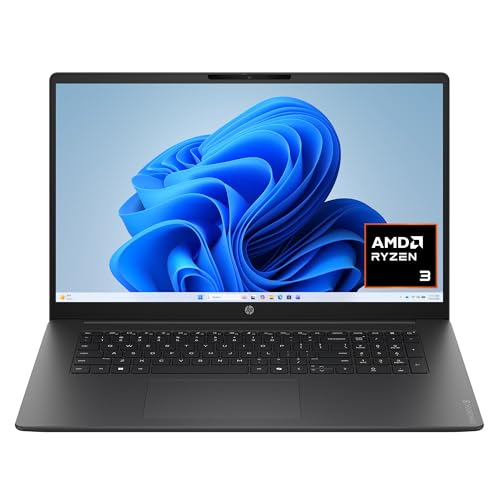 HP OmniBook 3 17.3 inch Laptop PCRyzen3|8GB|256GB|Touch15.65 x 10.09 x 0.65 inches4.43 poundsCheck on Amazon
 NIMO 15.6" Light-Gaming-Laptop16GB RAM | 256GB SSD14.07 x 8.98 x 0.76 inches3.75 poundsCheck on Amazon
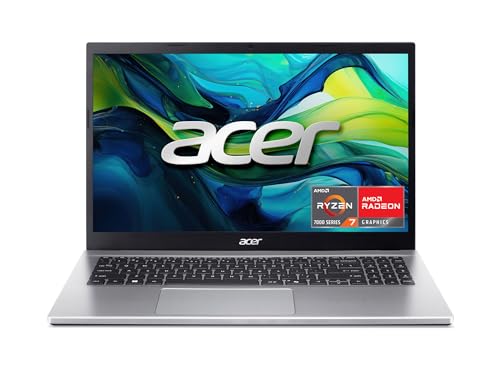
Top 3 picks at a glance
Picks at a Glance
We did not use these laptops. The picks come from real store listings, and the specs quoted are the ones listed. Where a listing is silent, we say “not listed”. A coding laptop is judged by memory, storage, processor and keyboard, so the table focuses on those.
| Laptop | Processor (listed) | RAM / storage | Screen | Best for |
|---|---|---|---|---|
| Lenovo V15 Business | AMD Ryzen 7 | 16 GB / 512 GB | 15.6-inch FHD | Best all-round coding value |
| Lenovo IdeaPad Slim 3 | Ryzen 7 5825U | 16 GB / 512 GB | 15.6-inch FHD touch | Reliable everyday developer laptop |
| Acer Aspire Go 15 | Ryzen 7 7730U | 16 GB / 512 GB | 15.6-inch FHD IPS | Newer chip at a low cost tier |
| ASUS Vivobook 15 | Ryzen 7 170 | 16 GB / 1 TB | 15.6-inch | Roomiest storage |
| HP 17.3-inch Laptop | Ryzen 5 7430U | 16 GB / 1 TB | 17.3-inch FHD IPS | Best large-screen pick |
| HP OmniBook 3 17.3 | Ryzen 3 30 | 8 GB / 512 GB | 17.3-inch FHD | Lowest-cost 17-inch, with limits |
| NIMO 15.6-inch | Ryzen 7 (8-core) | 16 GB DDR5 / 256 GB | 15.6-inch FHD | Fast chip, small drive |
What Coding Actually Needs From a Laptop
Code editors are light, but the tools around them are not. A modern workflow may include a browser with many tabs, a local server, a container runtime, an emulator or a Windows Subsystem for Linux session. Those are what consume memory and processor time, not the text editor.
RAM: 16 GB is the working floor
8 GB works for learning HTML, Python basics or small scripts. Once you run Docker, an Android emulator or several browser tabs next to an IDE, 8 GB runs out. Choose 16 GB, and check whether the RAM is upgradeable, since some budget laptops solder it.
Processor: more cores beat higher clocks
Compiling and running tests use multiple cores. A 6- or 8-core Ryzen 5 or Ryzen 7 is a safer buy than a 2-core or 4-core chip. Avoid listings with very old chips such as Core m3 or Celeron if you plan to compile code.
Storage: SSD with room to spare
A 512 GB SSD is comfortable for most developers. Docker images, node_modules and virtual machines fill drives faster than you expect, so 1 TB is worth a small step up if the cost tier allows.
Display and keyboard
You read text for many hours, so a 1080p IPS panel is the minimum, with a matte finish if possible. A numeric keypad is nice for data work but makes the keyboard layout wider. Keyboard feel is personal and rarely listed, so read owner reviews on the maker’s site and in stores.
Operating system: Windows, Linux or macOS
Most laptops in this price range run Windows 11. Windows runs Linux tools through WSL, and most of these laptops can also run a Linux distribution. If your job needs macOS-only tools, such as iOS development, you need an Apple laptop, which is outside this guide’s budget range.
Best Coding Laptops Under Budget: The 7 Picks
1. Best All-Round Value
Lenovo V-Series V15 (Ryzen 7, 16 GB)
As an Amazon Associate we earn from qualifying purchases at no extra cost to you.

- CPU: AMD Ryzen 7
- Memory and storage: 16 GB, 512 GB SSD
- Display: 15.6-inch FHD
The Lenovo V15 listing shows a 15.6-inch FHD display, an AMD Ryzen 7 processor (the exact model is not listed), 16 GB of RAM and a 512 GB SSD, with a numeric keypad, HDMI, RJ45 Ethernet, a webcam and Windows 11 Pro. The Ethernet port and Pro licence suit a work-from-home setup. It is a business-style laptop that prioritises function over looks.
Best for: developers and remote workers who want ports, Ethernet and a Pro licence. Skip if: you want a premium aluminium body or a high-resolution screen.
Pros
- 16 GB RAM and a 512 GB SSD
- Ethernet and HDMI ports
- Windows 11 Pro
- Numeric keypad
Cons
- Exact Ryzen 7 model not listed
- Plain plastic design
2. Best Everyday Developer Laptop
Lenovo IdeaPad Slim 3 (Ryzen 7 5825U)

- CPU: Ryzen 7 5825U, 8-core
- Memory and storage: 16 GB, 512 GB SSD
- Display: 15.6-inch FHD touch
The IdeaPad Slim 3 listing shows a 15.6-inch Full HD touchscreen, a Ryzen 7 5825U with 8 cores, 16 GB of memory and a 512 GB SSD in Arctic Grey. The 5825U is an older generation but still has the core count for compiling, local servers and virtual machines. It is a solid mid-tier choice that most developers will find comfortable.
Best for: a mainstream coding laptop with 8 cores and 16 GB. Skip if: you want the newest processor generation.
Pros
- 8-core Ryzen 7 5825U
- 16 GB RAM
- Touchscreen
Cons
- Older processor generation
- Battery life not listed
3. Best Newer Chip at a Low Cost Tier
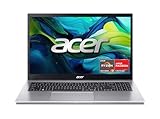
Acer Aspire Go 15 (Ryzen 7 7730U)
- CPU: Ryzen 7 7730U
- Memory and storage: 16 GB DDR4, 512 GB SSD
- Display: 15.6-inch FHD IPS
The Acer Aspire Go 15 AG15-42P lists a 15.6-inch FHD IPS display, an AMD Ryzen 7 7730U, AMD Radeon Graphics, 16 GB of DDR4 and a 512 GB PCIe Gen4 SSD, with Wi-Fi 6 and Windows 11 Home. It gives you a newer 8-core chip at a lower cost tier than many rivals. The graphics are integrated, which is fine for coding.
Best for: budget developers who want a newer Ryzen 7 and a fast SSD. Skip if: you need a discrete GPU or a premium chassis.
Pros
- Ryzen 7 7730U
- 16 GB RAM
- PCIe Gen4 SSD
- Wi-Fi 6
Cons
- Integrated graphics only
- Basic build
4. Best for Storage
ASUS Vivobook 15 (Ryzen 7 170, 1 TB)

- CPU: Ryzen 7 170
- Memory and storage: 16 GB, 1 TB SSD
- Display: 15.6-inch
The ASUS Vivobook 15 M1502NAQGS76 listing shows a 15.6-inch screen, an AMD Ryzen 7 170, 16 GB of RAM, a 1 TB SSD and Windows 11 Home. The 1 TB drive gives space for Docker images and several project folders. The listing does not state the panel type, so check the maker for brightness and finish.
Best for: developers who keep many projects and container images locally. Skip if: you care about panel details; they are not listed.
Pros
- 1 TB SSD
- 16 GB RAM
- Ryzen 7 170 processor
Cons
- Panel details not listed
- Basic design
Best 17 Inch Laptops Under 500 Dollars: What Is Realistic
If you want the best 17 inch laptop under 500 dollars for coding, accept some compromise. Big screens in this tier usually come with 8 GB of RAM or an entry-level processor. A 17-inch screen is excellent for side-by-side code and documentation, but the cheapest models rarely pair it with 16 GB. The two listings below show the usual trade-offs.
5. Best Large-Screen Pick
HP 17.3-inch Laptop (Ryzen 5 7430U)

- CPU: Ryzen 5 7430U, 6-core
- Memory and storage: 16 GB, 1 TB
- Display: 17.3-inch FHD IPS, 300 nits
The HP 17-cp3000 listing shows a 17.3-inch FHD IPS anti-glare display at 300 nits, an AMD Ryzen 5 7430U with 6 cores, 16 GB of RAM and 1 TB of storage, a webcam with shutter, Wi-Fi 6 and Windows 11 Home. A big matte screen, 16 GB of RAM and 1 TB of storage is a strong combination for programming on a budget.
Best for: developers who want a large screen for split windows and long sessions. Skip if: you need a light laptop for commuting; 17-inch laptops are heavier.
Pros
- 17.3-inch anti-glare IPS screen
- 16 GB RAM
- 1 TB storage
- Webcam shutter
Cons
- Larger and heavier
- Ryzen 5 rather than Ryzen 7
6. Lowest-Cost 17-Inch, With Limits
HP OmniBook 3 17.3 (Ryzen 3, 8 GB)

- CPU: Ryzen 3 30
- Memory and storage: 8 GB, 512 GB SSD
- Graphics: Radeon 610M (integrated)
The HP OmniBook 3 17-dp0199nr listing shows a 17.3-inch FHD display, an AMD Ryzen 3 30, 8 GB of RAM, a 512 GB SSD and Radeon 610M integrated graphics. It is the entry-level large-screen option. It works for web development, scripting and learning to code, but heavy tools such as Docker or emulators will push the 8 GB limit.
Best for: students and beginners who want a big screen at the lowest cost tier. Skip if: you plan to run containers, emulators or virtual machines.
Pros
- 17.3-inch screen
- 512 GB SSD
- Low cost tier
Cons
- Only 8 GB RAM
- Entry-level Ryzen 3 processor
Best Laptop for Working From Home Under 500 Dollars
The best laptop for working from home under 500 dollars is not always a coding machine. Remote work needs a good webcam, a quiet keyboard, reliable Wi-Fi and enough memory for video calls plus a browser. Under that budget, you may have to choose between RAM and processor. Prioritise 16 GB of RAM and an SSD over a high-resolution screen. The Aspire Go 15 and OmniBook 3 listings sit closest to this tier among our picks, but check the maker’s current listing since tiers shift.
7. Best Fast Chip With a Small Drive
NIMO 15.6-inch Light Gaming Laptop (Ryzen 7)

- CPU: Ryzen 7 (8-core)
- Memory and storage: 16 GB DDR5, 256 GB SSD
- Graphics: Radeon 680M (integrated)
The NIMO 15.6-inch listing shows an 8-core AMD Ryzen 7, 16 GB of DDR5, a 256 GB SSD, Radeon 680M graphics, a backlit keyboard, 100W fast PD charging and a two-year warranty. It has a fast processor and quick memory, but only 256 GB of storage. The listing compares the chip to an Intel i7 in marketing language, which is not a measurement.
Best for: developers who prefer fast memory and plan to add storage. Skip if: you want a well-known brand or large built-in storage.
Pros
- 8-core Ryzen 7
- 16 GB DDR5
- 100W fast charging
- Two-year warranty listed
Cons
- 256 GB SSD fills quickly
- Lesser-known brand
Also Consider
- HP 15.6-inch touchscreen with Ryzen 7 7730U: several HP listings carry a Ryzen 7 7730U with 16 GB of RAM and 512 GB storage, a close match to the Aspire Go 15.
- Lenovo ThinkPad E16 Gen 3: a 16-inch business laptop with a Ryzen 7 250 and 16 GB in the listing, at a higher cost tier, known for its keyboard class.
- Used or refurbished business laptops: older ThinkPads and Latitudes can offer more build quality per dollar, but battery wear and warranty vary. Check the seller’s terms.
Coding Laptop Under 30k, 40k and 50k
Searches such as coding laptop under 30k, coding laptop under 40k and coding laptop under 50k come from rupee budgets, and many shoppers in India use them. We do not convert prices, since exchange rates and local models change often. Instead, use the same spec thresholds at each rung and see how far each budget gets you.
| Budget rung | What to aim for | What to compromise |
|---|---|---|
| Lowest (under 30k range) | Ryzen 3 or Core i3, 8 GB RAM, 256 GB SSD | Plan to add RAM; expect basic web development and scripting |
| Middle (under 40k range) | Ryzen 5 or Core i5, 8 to 16 GB RAM, 512 GB SSD | Screen quality and build |
| Upper (under 50k range) | Ryzen 5 or 7, 16 GB RAM, 512 GB SSD | GPU and premium design |
The ranges above are a framework, not a price list. If the 40k best laptop in your local store offers 16 GB and an SSD, it can match most of this list; if it offers a hard drive and 4 GB, skip it. Local retailers list model numbers that may differ from the US models here, so check the processor name and RAM, not the marketing title.
Best Laptops Under 700 Dollars: A Note on Consumer Reports
People often search best laptops under 700 dollars Consumer Reports. We do not reproduce that magazine’s ratings, and we did not use any of these laptops. If you want a third-party score, visit the publisher’s site. Use it with this guide: their ranking of everyday performance, battery life and ergonomics is useful, while this guide focuses on specs that matter for code. At this budget you can usually find a Ryzen 7 with 16 GB of RAM and 512 GB or 1 TB of storage, which already matches or beats several picks above.
What Different Kinds of Coding Need
| Kind of work | RAM | CPU | Other notes |
|---|---|---|---|
| Learning HTML, CSS, Python basics | 8 GB | 4 cores is fine | Any SSD laptop works |
| Web development with Node and a browser | 16 GB | 6 cores | Many tabs and a dev server |
| Backend with Docker | 16 GB or more | 6 to 8 cores | Plenty of storage for images |
| Android development | 16 GB | 8 cores | Emulator is heavy; use a real phone if possible |
| Data science and notebooks | 16 GB | 8 cores | Cloud notebooks reduce local needs |
| Machine learning with GPU | 16 GB or more | 6 to 8 cores | NVIDIA GPU needed; above this budget class |
Setting Up a Budget Laptop for Development
A budget laptop performs better when you set it up with care. These steps cost nothing and make a visible difference on 8 to 16 GB machines.
- Remove preinstalled trial software. Many budget laptops ship with extra apps that start with Windows and use memory.
- Turn on WSL 2 if you need Linux tools. It runs Linux command-line tools without a full virtual machine. Cap its memory in the configuration file so it does not take half your RAM.
- Use a lightweight editor first. A code editor with a few extensions uses far less memory than a full IDE. Switch to the heavier IDE only for projects that need it.
- Keep the SSD below about 80 percent full. Free space helps performance and leaves room for updates.
- Use cloud tools for heavy jobs. Remote development environments and cloud notebooks move the heavy work off the laptop.
- Set a sensible power plan. Balanced mode saves battery for writing code; use performance mode only for builds.
Screens, Keyboards and Eye Comfort
Coding means long reading sessions, so comfort matters more than a high refresh rate. A matte, anti-glare screen reduces reflections near a window. The HP 17.3-inch listing mentions an anti-glare display at 300 nits, which is a useful detail. Where listings do not mention brightness or finish, visit the maker’s page.
For the keyboard, look for a full-size layout with a decent key travel. Business-oriented models like the Lenovo V15 tend to have simple keyboards without flashy extras. If you type all day, an external keyboard and mouse can improve comfort for little cost, and a laptop stand lifts the screen to eye level.
How We Chose
This is a research-based guide. We did not use the products. We searched store listings for laptops with 16 GB of RAM or a clear upgrade path, a 6- or 8-core processor, an SSD and a 15- or 17-inch screen. Then we ranked by RAM, core count, storage and screen, capped two models per brand and skipped Renewed or unavailable listings. Anything a listing does not say is marked “not listed”.
Buying Guide: How to Choose Under a Budget
Thresholds worth holding to
- RAM: 16 GB, or 8 GB only if it is upgradeable and you accept lighter work.
- CPU: 6 cores or more, Ryzen 5 or 7, Core i5 or i7 of a recent generation.
- Storage: SSD, 512 GB preferred.
- Screen: 1080p IPS, matte if available.
Skip these specs
- Discrete graphics, unless you also do machine learning or game development.
- 4K screens, which drain battery and cost more.
- Listings with eMMC storage or old processors such as Core m3 and Celeron.
When a discrete GPU helps
Machine learning with GPU acceleration, game development and 3D work benefit from a dedicated NVIDIA card. For web, mobile and backend development, integrated graphics are enough. Do not pay for an RTX card to run a code editor.
Weight, ports and battery
Developers often use external monitors and USB devices. Look for HDMI, at least two USB-A or USB-C ports and Wi-Fi 6. Battery life figures are often marketing claims, so rely on owner reviews and assume less than the box says.
Linux friendliness
Many developers install Linux on a budget laptop. Ryzen laptops generally run Linux well, but Wi-Fi chips and fingerprint readers can be problematic on some models. Look up the exact model with your preferred distribution before you buy.
Finally, think about how long the laptop must last. A student starting a computer science course will use the same machine for three or four years, and software gets heavier each year. If the cost tier allows, spend the extra on 16 GB of RAM and a 512 GB SSD rather than a fancier screen or a thinner body. Memory and storage are the two specs that make a budget laptop feel slow when they are too small, and they are the hardest to fix later on laptops with soldered parts. Check the maker’s page for whether the RAM and the SSD can be replaced.
Which One Should You Buy?
- Best overall value: Lenovo V15 or Lenovo IdeaPad Slim 3.
- Newest chip on a budget: Acer Aspire Go 15.
- Most storage: ASUS Vivobook 15 or HP 17.3-inch.
- Biggest screen: HP 17.3-inch Laptop with Ryzen 5 and 16 GB.
- Tightest budget: HP OmniBook 3 17.3, with the RAM caveat.
FAQ
What are the best coding laptops under budget?
Look for 16 GB of RAM, a 6- or 8-core Ryzen or Core processor and an SSD. The Lenovo V15, IdeaPad Slim 3 and Acer Aspire Go 15 listings all meet that standard.
How much RAM do I need to code?
16 GB is the comfortable level. 8 GB works for learning and light web work but struggles with containers, emulators and many browser tabs.
Do I need a graphics card for programming?
No, not for web, backend or mobile development. A dedicated GPU matters for machine learning with GPU acceleration, game development and 3D work.
What is the best 17 inch laptop under 500 dollars for coding?
Entry-level 17-inch laptops usually have 8 GB of RAM. The HP OmniBook 3 17.3 fits the budget tier, and the HP 17.3-inch with 16 GB is a stronger choice if the cost tier allows.
What is the best laptop for working from home under 500 dollars?
Prioritise 16 GB of RAM, an SSD and a decent webcam. Budget Ryzen 3 or Ryzen 5 laptops cover video calls and browsing, but check the maker’s listing for the current tier.
Is a coding laptop under 40k enough for programming?
It can be, if it has an SSD and at least 8 GB of RAM, preferably 16 GB. Check the processor name and RAM in the listing rather than the marketing title.
Should I buy a refurbished laptop for coding?
It can offer more build quality per dollar, but battery wear and warranty vary. Check the seller’s terms and the battery health before you commit.
Sources
AMD Ryzen mobile processor pages; Lenovo, Acer, ASUS and HP manufacturer listings; Docker Desktop system requirements; Microsoft WSL documentation.
Last updated: November 2026
Related guides
More from Amazon
Programs that pair well with the guide above. Offers and eligibility are set by Amazon and may change.
Free shipping on eligible items, Prime Video and more. Eligible new members can start with a free trial.
Start a Prime free trialAd-free music streaming. Eligible new subscribers can start with a free trial.
Try Music Unlimited freeA Prime membership for ages 18-24 with a trial period. Eligibility is set by Amazon.
See Prime for Young AdultsAudiobooks and podcasts to listen to on the go. Eligible new members can start with a free trial.
Try Audible freeAs an Amazon Associate we earn from qualifying purchases.