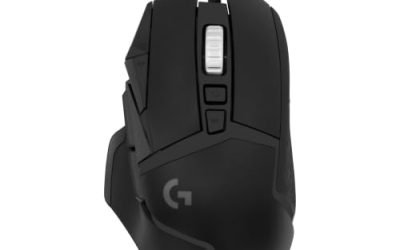
A macro turns a sequence you repeat a hundred times into a single thumb press. In an MMO that sequence might be a full ability rotation, in a MOBA it might be a combo that has to land in the right order,. The mouse that runs those sequences well is not the one with the highest sensor number on the box; it is the one with enough buttons in the right places, software that records sequences reliably, and memory that keeps them when the mouse moves to another computer.
This roundup is for players who want their most-used commands on the mouse itself. Every pick below is a gaming mouse sold on Amazon, and every button count in this article comes from the number stated on its product page. The five that follow range from an 11-button all-rounder to a 20-button MMO grid, so the choice comes down to how many sequences you run and how much thumb real estate you are willing to learn.
Our Top Picks


Top 3 picks at a glance


Quick Picks
As an Amazon Associate we earn from qualifying purchases.
| Product | Best for | Key spec from title |
|---|---|---|
| Razer Naga V2 Pro Wireless MMO Gaming Mouse | A full rotation on swappable thumb plates | 19+1 programmable buttons, Focus Pro 30K sensor |
| Logitech G600 MMO Gaming Mouse | The most buttons for the least learning curve | 20 programmable buttons, 12-button thumb panel |
| Corsair Scimitar RGB Elite | A sliding thumb grid that fits your hand | 17 programmable buttons, 18,000 DPI sensor |
| Logitech G502 HERO High Performance Wired Gaming Mouse | Macros on a familiar all-round shape | 11 programmable buttons, HERO 25K sensor |
| Redragon M908 Impact RGB LED MMO Gaming Mouse | A first macro mouse with a 12-button side panel | 18 programmable macro shortcuts, 12,400 DPI |
How to Choose
Count Macro Buttons, Not Just Buttons
The number that matters for a macro mouse is how many buttons can hold a recorded sequence, and that figure is not always the same as the total button count on the box. A 12-button thumb grid plus a shift-style modifier can hold twice as many commands as the grid alone, because the modifier gives every button a second function. Start by listing the sequences you actually run: a full MMO rotation, a MOBA combo, a set of editing shortcuts, or a handful of chat commands.
Learn How Macros Get Recorded
Macro software decides whether a sequence feels dependable or flaky, so look closely at what the maker’s app can record before you buy. The useful features are recording key presses with their timing, adding delays between steps, and assigning the finished sequence to a specific button or a specific game profile. Some mice store those sequences in onboard memory, which means the macros travel with the mouse to another computer, while others need the software running in the background to work. If you play on more than one machine, onboard storage is worth prioritising over a slightly higher button count.
Match the Thumb Grid to Your Hand
A thumb grid only pays off if your thumb can find the right button without looking, and that depends on hand size, button spacing, and how the panel is shaped. Twelve-button grids work best for medium and large hands with a palm or relaxed claw grip. Smaller hands often do better with a six-button plate, a sliding panel that moves the grid into reach, or a conventional layout with fewer side buttons. Try to picture your thumb at rest on the panel: if the far row feels like a stretch, it will stay a stretch in the middle of a fight.
Weigh the Cost of Carrying So Many Buttons
Macro mice carry a trade-off that shows up the moment you pick one up: more buttons usually mean more weight and a wider body. The heaviest picks here sit around 133 to 134 grams, which feels steady during slow, deliberate play but asks more of the wrist in fast shooters. A lighter macro mouse gives up some buttons in exchange for speed, and that exchange suits players who split time between ability-heavy games and fast aiming. Sensor ceilings matter less than the button layout for this category, since most macro work happens at modest sensitivities, so treat weight and shape as the deciding factors once the button count is settled.
The 5 Best Options
Razer Naga V2 Pro Wireless MMO Gaming Mouse
The Naga V2 Pro is the most adaptable macro mouse in this roundup, because its three magnetic side plates carry 2, 6, or 12 thumb buttons and swap in seconds. Fit the 12-button plate for a full MMO rotation, the 6-button plate for a MOBA combo, or the 2-button plate for shooters, and the total reaches 19 plus 1 programmable buttons across the device. The Focus Pro 30K optical sensor tracks up to 30,000 DPI, Gen-3 optical switches fire with no debounce delay. Battery life runs up to 150 hours over HyperSpeed Wireless and up to 300 hours over Bluetooth, so the mouse keeps working through long sessions either way.
Specs
- 19 plus 1 programmable buttons with three swappable side plates
- Side plates: 12, 6, and 2 thumb buttons
- Focus Pro 30K optical sensor, up to 30,000 DPI
- Optical Switches Gen-3
- HyperScroll Pro wheel with tactile and free-spin modes
- Weight: 134 grams
- Battery: Up to 150 hours over HyperSpeed Wireless, up to 300 hours over Bluetooth
- Connection: HyperSpeed Wireless, Bluetooth, and wired USB-C
Best for: Players who want one mouse to cover MMO rotations, MOBA combos, and shooters by swapping plates.
Watch out for: At 134 grams it is the heaviest mouse here, and the wide body suits medium and large hands better than small ones.
ASIN: B0BGJTLFN5
Logitech G600 MMO Gaming Mouse
The G600 is the classic macro mouse, and it remains the simplest way to put a full action bar under your thumb. Twenty programmable buttons include a 12-button thumb panel arranged in two rows of six, with each key slightly dished so you can tell them apart without looking down. The G-Shift button under the ring finger doubles the actions available on every other button, so a single panel can hold two full sets of commands. The sensor reaches up to 8,200 DPI, which is more than enough for the ability-heavy games this mouse is built for, and the wired connection means no battery to manage mid-session.
Specs
- 20 programmable buttons, including a 12-button thumb panel
- G-Shift button doubles the actions on every other button
- Sensor: Up to 8,200 DPI
- Weight: 133 grams
- RGB backlit thumb panel and logo
- Connection: Wired USB
- Onboard memory: 1 profile
Best for: MMO players who want the maximum number of macro buttons on a single fixed layout.
Watch out for: An older design at 133 grams with a right-handed shape only, and the thumb panel takes days of practice to learn by touch.
ASIN: B0086UK7IQ
Corsair Scimitar RGB Elite
The Scimitar RGB Elite suits players who like the thumb-grid idea but find fixed panels sit in the wrong place. Its patented Key Slider system moves the 12-button side panel forwards or backwards, so the grid can be positioned where your thumb naturally rests, and the 17 programmable buttons in total cover a full rotation with room for extras. The custom PixArt optical sensor reaches 18,000 DPI with 1 DPI adjustment steps. The mouse connects by a braided cable, works with the iCUE software for recording macros and lighting, and its sculpted shape includes a finger rest on the right side for longer sessions.
Specs
- 17 programmable buttons, including 12 side buttons
- Patented Key Slider system repositions the side panel
- Custom PixArt optical sensor, up to 18,000 DPI
- Omron switches rated for 50 million clicks
- Connection: Wired USB with braided cable
- Software: iCUE compatible
Best for: Players whose thumb does not sit comfortably on a fixed 12-button grid.
Watch out for: The wired-only design and the wide body suit a fixed desk better than a travel bag.
ASIN: B082LRMY53
Logitech G502 HERO High Performance Wired Gaming Mouse

The G502 HERO is the macro mouse for players who do not want a thumb grid at all. Its 11 programmable buttons are spread across a familiar ergonomic shape, so the thumb buttons, the DPI-shift button, and the scroll-wheel inputs are all easy to reach without relearning your grip. The HERO 25K sensor tracks from 100 to 25,600 DPI with no smoothing, filtering, or acceleration, and the dual-mode hyper-fast scroll wheel switches between a notched step and a free spin for fast scrolling. Five 3.6-gram tuning weights let you adjust the balance of the mouse. It is the pick for macros that number in the handfuls rather than the dozens.
Specs
- 11 programmable buttons
- HERO 25K sensor, 100–25,600 DPI
- Dual-mode hyper-fast scroll wheel
- Adjustable weight system with five 3.6-gram weights
- Onboard memory
- Connection: Wired USB
- Customisable RGB lighting
Best for: Players who want a few well-placed macro buttons on a shape they already know.
Watch out for: Eleven buttons cannot hold a full MMO rotation, so heavy macro users will outgrow it.
ASIN: B07GBZ4Q68
Redragon M908 Impact RGB LED MMO Gaming Mouse

The M908 is the entry point into macro mice, offering a 12-button side panel and a straightforward setup for players trying a thumb grid for the first time. Its listing states 18 programmable macro shortcuts, with the 12 side buttons holding the bulk of the commands and the remaining controls covering the usual clicks and DPI switching. The optical sensor reaches up to 12,400 DPI across five adjustable levels, and five memory profiles each carry a dedicated light colour, so you can tell at a glance which set of macros is active. The ergonomic wired design suits right-handed players.
Specs
- 18 programmable macro shortcuts
- 12 side buttons
- Optical sensor, up to 12,400 DPI
- 5 adjustable DPI levels: 500, 1000, 2000, 3000, 6200 DPI
- 5 memory profiles, each with a dedicated light colour
- Polling rate: 1000 Hz
- Connection: Wired USB
Best for: A first macro mouse, or a second mouse dedicated to one ability-heavy game.
Watch out for: Some mirrors of this listing state 20 programmable buttons, so confirm the 18-button count on the listing you buy from.
ASIN: B07HC4NBQ8
Which One Fits Your Situation
You Raid in MMOs and Run a Full Rotation
Choose the Razer Naga V2 Pro if your rotation fills an action bar. The 12-button plate holds the whole rotation under your thumb, the swappable plates let you drop to six or two buttons for other games, and the 150-hour HyperSpeed battery means the mouse is ready for long raid nights. It is the most flexible pick here, provided your hand is large enough for the wide body.
You Want Maximum Buttons on One Fixed Layout
Choose the Logitech G600 if you want to learn one layout and never change it. Twenty programmable buttons plus G-Shift give you two full sets of commands, and the dished thumb keys help you find each button without looking. It is heavier and older than the Naga, but nothing else here puts this many macros on a single unchanging panel.
Your Thumb Misses Buttons on a Fixed Grid
Choose the Corsair Scimitar RGB Elite if fixed thumb grids never quite fit your hand. The Key Slider moves the 12-button panel into the position your thumb naturally rests, and 17 programmable buttons still cover a full rotation. The 18,000 DPI sensor and the durable Omron switches handle the repeated pressing that macro play demands.
You Only Need a Few Macros on a Familiar Shape
Choose the Logitech G502 HERO if your macro list is short and you dislike thumb grids. Eleven programmable buttons on a proven ergonomic shape cover a handful of sequences, a push-to-talk key, and a few work shortcuts, while the HERO 25K sensor and the adjustable weights keep aiming precise. Add the Redragon M908 instead if you want to try a 12-button panel without committing to a premium model.
Common Mistakes
- Counting total buttons instead of programmable macro buttons, then finding half the inputs cannot hold a recorded sequence.
- Buying a 12-button grid for small hands, where the far row stays out of reach and gets mispressed at the worst moments.
- Recording macros with fixed delays that break when a game lags, instead of testing each sequence in real play first.
- Forgetting that some mice need their software running for macros to work, then losing every sequence on a computer without that app installed.
- Using multi-action automation in a game whose rules restrict it, instead of checking that game’s rules before binding a long sequence to one press.
Frequently Asked Questions
What is a macro on a gaming mouse?
A macro is a recorded sequence of key presses, clicks, or delays assigned to a single mouse button, so one press runs the whole chain. Players use macros for ability rotations, combos, and repeated shortcuts, while the mice in this roundup store those sequences through their software and, in most cases, in onboard memory on the mouse itself.
How many macro buttons do I need?
A handful of sequences fits on nine to eleven programmable buttons, which suits MOBA combos and a few work shortcuts. A full MMO rotation usually needs a 12-button thumb grid, giving 17 to 20 programmable buttons in total, while a modifier key such as G-Shift can double whatever count you start with.
Can macros get me banned from a game?
Some games restrict automation that plays the game for you, so a long multi-action sequence can break the rules even when the mouse itself supports it. Check the rules of each game before binding a sequence, keep macros to commands you could press by hand, and avoid anything that repeats on its own without your input.
Do macros work without the maker’s software running?
It depends on the mouse. Models with onboard memory store macros on the mouse, so the sequences work on any computer once configured. Others need the maker’s software running in the background, so confirm how your pick stores macros before you rely on them on a second machine.
Related guides
More from Amazon
Programs that pair well with the guide above. Offers and eligibility are set by Amazon and may change.
Free shipping on eligible items, Prime Video and more. Eligible new members can start with a free trial.
Start a Prime free trialAd-free music streaming. Eligible new subscribers can start with a free trial.
Try Music Unlimited freeA Prime membership for ages 18-24 with a trial period. Eligibility is set by Amazon.
See Prime for Young AdultsAudiobooks and podcasts to listen to on the go. Eligible new members can start with a free trial.
Try Audible freeAs an Amazon Associate we earn from qualifying purchases.