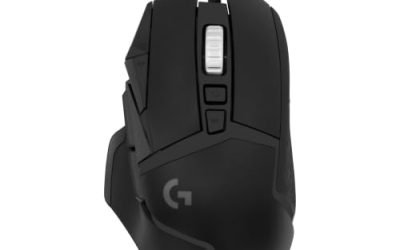
A gaming mouse decides how precisely your hand turns into movement on screen, and the wrong one shows up fast: a shell that cramps your palm after an hour, a sensor that stutters on quick flicks, or a cable that drags every time you reset your aim. The choice is not about chasing the biggest DPI number on the box. It is about matching shape, weight, sensor and buttons to the games you actually play and the grip you actually use.
This guide compares five mice for different players, from competitive shooter fans who want the lightest possible shell to MMO players who need a row of thumb buttons within reach. Every specification below comes from the product name or the specification table on its Amazon listing, so you can check each claim against the same source before you buy.
Our Top Picks


Top 3 picks at a glance

Quick Picks
As an Amazon Associate we earn from qualifying purchases.
| Product | Best for | Key spec from title |
|---|---|---|
| Logitech G502 HERO | Players who want many buttons and a tunable weight | HERO 25K sensor, 25,600 DPI, 11 programmable buttons |
| Razer DeathAdder V2 | Palm-grip players who want a proven ergonomic shape | Focus+ 20K DPI optical sensor, 8 programmable buttons |
| Logitech G PRO X Superlight | Competitive FPS players who want a very light wireless mouse | HERO 25K sensor, 25,600 DPI, under 63 g |
| Razer Basilisk V3 | Players who want a scroll wheel with two modes and many binds | Focus+ 26K DPI optical sensor, 11 programmable buttons |
| Logitech G305 LIGHTSPEED | Players who want wireless freedom on a single AA battery | HERO 12K sensor, 12,000 DPI, 6 programmable buttons |
How to Choose
Match the shape to your grip first
Grip decides comfort more than any sensor number. Palm-grip players rest the whole hand on the shell and need a taller, longer body with a thumb rest, while claw-grip players arch their fingers and want a shorter shell with a defined hump. Fingertip players barely touch the mouse at all and need a light, low shell they can lift and reposition freely. Measure your hand from wrist to middle fingertip and compare it with the dimensions on the listing, then think about how you hold a mouse during a long match rather than how it looks in a photo. A shape that fights your grip will tire your hand long before the sensor becomes the limiting factor.
Read the sensor range, not just the headline DPI
Most modern gaming sensors track cleanly across the DPI range players actually use, so the headline number matters less than the range and the consistency behind it. A sensor rated from 100 to 25,600 DPI gives you room to run a low sensitivity for precise aiming and a high sensitivity for desktop work without changing hardware. Look for a listing that states zero smoothing, filtering or acceleration across the range, because those three behaviours are what make a cursor feel unpredictable. Set your in-game sensitivity first, then pick a DPI step that keeps your hand moving the distance you expect.
Decide how much weight you want to move
Weight changes how a mouse feels during flicks, tracking and long sessions. Light mice under 70 grams suit fast flick aiming and players who lift the mouse often, since less mass means less effort on every reposition. Heavier mice around 100 grams or more can feel steadier for slow, deliberate tracking, and some models add tunable weights so you can shift the balance toward the palm or the fingers. Check whether the listed weight includes the cable and battery, because a wireless mouse with a battery inside weighs more than the shell alone suggests. If you play for hours at a time, a lighter mouse usually leaves your wrist fresher at the end of the session.
Count the buttons you will actually press
Extra buttons only help if they sit where your thumb can reach them without shifting your grip. Two side buttons cover push-to-talk and a melee attack for most shooter players, while MMO and MOBA players benefit from a full thumb grid they can bind to abilities, items and pings. A dedicated DPI button lets you drop sensitivity for a scoped shot and return to normal speed in one press, and a dual-mode scroll wheel switches between notched steps for weapon swaps and free spinning for long documents. Before you buy, map your most-used commands in your head and check that each one has a button you can hit blind.
The 5 Best Options
Logitech G502 HERO

The G502 HERO suits players who want one mouse to cover shooters, strategy games and desktop work without giving up control. Eleven programmable buttons spread across the shell put weapon swaps, abilities and push-to-talk under your thumb and index finger, while the dual-mode scroll wheel flips between notched steps and free spinning. Five small weights slot into the base so you can tune the balance toward the front or the rear until the mouse sits the way your hand expects. Onboard memory stores your profiles on the mouse itself, which keeps your bindings intact when you move between machines.
Specs
- Sensor: HERO 25K optical sensor, up to 25,600 DPI
- Buttons: 11 programmable buttons
- Weight system: five 3.6 g tunable weights
- Scroll wheel: dual-mode hyper-fast scroll wheel
- Lighting: customizable RGB lighting
- Memory: onboard memory for profiles
- Connection: wired, compatible with PC and Mac
Best for: Players who want many programmable buttons and a weight they can tune to their hand.
Watch out for: The shell is broad and fairly heavy before you remove weights, so small hands may find it bulky during long sessions.
Razer DeathAdder V2
The DeathAdder V2 fits palm-grip players who want a familiar, sculpted shape that disappears under the hand. Its right-handed ergonomic shell has a long body and rubberized side grips that keep your thumb planted during fast turns, and the Focus+ optical sensor tracks up to 20,000 DPI with the consistency competitive play demands. Eight programmable buttons cover the essentials without crowding the shell, and Chroma RGB lighting lets the mouse match the rest of your setup. Optical switches sit under the main clicks, which removes the mechanical contact that wears out on older designs.
Specs
- Sensor: Focus+ 20K DPI optical sensor
- Buttons: 8 programmable buttons
- Switches: Razer Optical Switches rated for 70 million clicks
- Lighting: Chroma RGB lighting
- Grips: rubberized side grips
- Connection: wired
Best for: Palm-grip players who want a comfortable ergonomic shape for shooters and everyday play.
Watch out for: The right-handed shape does not suit left-handed players, and the wired cable needs a clean desk route to avoid drag.
Logitech G PRO X Superlight
The PRO X Superlight exists for players who treat every gram as a decision. Weighing under 63 grams, it moves with very little effort on flicks and stays comfortable through long competitive sessions, while the HERO 25K sensor tracks up to 25,600 DPI with no smoothing, filtering or acceleration. LIGHTSPEED wireless keeps the connection free of cable drag, and zero-additive PTFE feet help the shell glide across a pad with minimal resistance. Five programmable buttons keep the layout simple, which is exactly what most competitive shooter players ask for.
Specs
- Sensor: HERO 25K optical sensor, up to 25,600 DPI
- Weight: under 63 g
- Buttons: 5 programmable buttons
- Connection: LIGHTSPEED wireless
- Feet: zero-additive PTFE feet
- Battery: long battery life
- Compatibility: compatible with PC and Mac
Best for: Competitive FPS players who want the lightest wireless mouse they can get.
Watch out for: The minimal layout has no extra side buttons beyond the standard pair, so MMO players who need many binds should look elsewhere.
Razer Basilisk V3

The Basilisk V3 suits players who want a feature-packed wired mouse with a scroll wheel that does real work. Its HyperScroll tilt wheel switches between a notched mode for precise weapon selection and a free-spin mode for scrolling through long pages, and it tilts sideways for extra bindings. Eleven programmable buttons give MOBA and MMO players room for abilities, items and communication, while the Focus+ sensor reaches 26,000 DPI for players who run high sensitivity. Eleven Chroma RGB zones light the shell from underneath, and the thumb rest supports the hand during long sessions.
Specs
- Sensor: Focus+ 26K DPI optical sensor
- Buttons: 11 programmable buttons
- Scroll wheel: HyperScroll tilt wheel with free-spin and notched modes
- Lighting: 11 Chroma RGB zones
- Switches: Gen-2 Razer Optical Switches
- Connection: wired USB
Best for: Players who want many buttons and a versatile scroll wheel in a comfortable wired mouse.
Watch out for: The free-spin wheel takes a few days to get used to, and the right-handed shape with a thumb rest does not suit left-handed players.
Logitech G305 LIGHTSPEED
The G305 LIGHTSPEED suits players who want wireless freedom without the habit of charging a mouse every week. A single AA battery powers it for up to 250 hours, and the LIGHTSPEED receiver reports movement with a 1 ms report rate, so the wireless link feels as responsive as a cable. The HERO sensor tracks up to 12,000 DPI, which covers the sensitivity range most players actually use, and six programmable buttons handle the usual shooter and desktop commands. At 99 grams including the battery, it sits in a middle ground that works for both flick aiming and steady tracking.
Specs
- Sensor: HERO optical sensor, up to 12,000 DPI
- Buttons: 6 programmable buttons
- Weight: 99 g
- Battery: up to 250 hours on one AA battery
- Connection: LIGHTSPEED wireless with a 1 ms report rate
- Memory: onboard memory for profiles
- Compatibility: compatible with PC and Mac
Best for: Players who want a reliable wireless mouse with very long battery life.
Watch out for: It connects only through its USB receiver, with no Bluetooth option, so keep the receiver in a safe place when you travel.
Which One Fits Your Situation
You play competitive shooters and flick a lot
Pick the Logitech G PRO X Superlight. Its sub-63-gram shell and LIGHTSPEED wireless connection remove the two things that slow flicks down most: mass and cable drag. The HERO 25K sensor tracks cleanly at high sensitivity, and the five-button layout keeps your grip consistent shot after shot. If your budget stretches less far, the G305 LIGHTSPEED gives you a similar wireless feel with a little more weight and a much longer battery life.
You play MOBA or MMO games with many abilities
Pick the Razer Basilisk V3. Eleven programmable buttons and a tilting HyperScroll wheel give you room to bind abilities, items, pings and push-to-talk without moving your hand off the mouse. The Focus+ sensor handles fast camera movement across the map, and the thumb rest keeps your hand supported through long matches. The G502 HERO is the alternative here if you also want tunable weights and onboard profile storage.
You want one mouse for long work days and evening games
Pick the Razer DeathAdder V2. Its ergonomic shell and rubberized grips stay comfortable across hours of mixed use, and eight programmable buttons cover work shortcuts as well as game commands. The wired connection means you never think about battery, and the Focus+ sensor is accurate enough for both precise design work and fast shooters. Palm-grip players with larger hands will feel at home with this shape right away.
You want wireless without thinking about charging
Pick the Logitech G305 LIGHTSPEED. A single AA battery lasts up to 250 hours, so charging becomes a rare event rather than a weekly chore, and the LIGHTSPEED receiver keeps the connection responsive. Six programmable buttons and onboard memory cover everyday gaming, and the 99-gram weight suits players who switch between fast flicks and steady tracking. Keep a spare AA battery in your desk drawer and the mouse stays ready.
Common Mistakes
- Buying the highest DPI number available instead of a sensor that tracks consistently at the sensitivity you actually use.
- Choosing a shape that looks good in photos without checking whether it fits your grip style and hand size.
- Ignoring weight, then finding your wrist tired after an hour of flick aiming with a heavy shell.
- Binding commands to side buttons your thumb cannot reach without shifting your grip mid-fight.
- Forgetting to check the connection type, and ending up with a wireless mouse that has no Bluetooth or a wired mouse with a cable that drags across your pad.
Frequently Asked Questions
How much DPI do I actually need for gaming?
Most players use between 400 and 3,200 DPI, and every mouse in this guide tracks well inside that range. A higher maximum DPI gives you flexibility for very high sensitivity setups, but it does not make your aim better on its own. Pick a DPI step that lets your hand move a comfortable distance for a full turn in your game, then adjust in-game sensitivity to fine-tune the feel.
Is a wireless gaming mouse as responsive as a wired one?
Modern wireless mice with a dedicated 2.4 GHz receiver report movement with a 1 ms report rate, which matches wired mice for practical purposes. The difference players notice comes from cable drag on wired mice and from battery weight on wireless ones, not from the wireless link itself. Keep the receiver close to the mouse and the connection stays consistent.
Do I need a mouse with many programmable buttons?
It depends on your games. Shooter players usually need only two side buttons for melee and push-to-talk, while MOBA and MMO players benefit from a full set of thumb buttons for abilities and items. Extra buttons only help when they sit within easy thumb reach, so count the ones you can press without shifting your grip before you decide.
How do I know if a gaming mouse fits my hand?
Check your grip style first, then compare your hand length with the dimensions on the listing. Palm-grip players need a longer, taller shell, claw players want a shorter shell with a clear hump, and fingertip players need a light, low body. If your fingers overhang the front or your thumb cannot reach the side buttons, the shape is wrong for you.
Related guides
More from Amazon
Programs that pair well with the guide above. Offers and eligibility are set by Amazon and may change.
Free shipping on eligible items, Prime Video and more. Eligible new members can start with a free trial.
Start a Prime free trialAd-free music streaming. Eligible new subscribers can start with a free trial.
Try Music Unlimited freeA Prime membership for ages 18-24 with a trial period. Eligibility is set by Amazon.
See Prime for Young AdultsAudiobooks and podcasts to listen to on the go. Eligible new members can start with a free trial.
Try Audible freeAs an Amazon Associate we earn from qualifying purchases.