Left-handed players face a narrow market. Most gaming mice are shaped for the right hand, with thumb buttons on the left side and a palm rest that curves the wrong way when the mouse moves to the left hand. True left-handed gaming shells are rare, and wireless versions are rarer still, so many left-handed players end up using ambidextrous mice instead. Those symmetrical models work well when the side buttons can move, switch off, or be remapped for the left thumb.
This guide is for left-handed PC players who want wireless freedom without fighting their mouse. Competitive shooter players, MMO players, casual gamers, and people who share a desk with right-handed family members will each find a relevant option. Every pick below comes from the name and specifications shown on its Amazon product page, and each one is either a true left-handed shell or an ambidextrous design with side buttons that can be arranged for left-hand use.
Our Top Picks

Top 3 picks at a glance
Quick Picks
As an Amazon Associate we earn from qualifying purchases
| Product | Best for | Key spec from title |
|---|---|---|
| Logitech G903 Lightspeed | Left-hand play with configurable side buttons | HERO 25K sensor, 25,600 DPI, ambidextrous, 140+ hour battery |
| Logitech G PRO 2 Lightspeed | Competitive play with magnetic side buttons for either hand | 44K DPI sensor, up to 4 switchable magnetic side buttons |
| Razer Viper Ultimate | Lightweight ambidextrous play with buttons on both sides | 20K DPI optical sensor, 74g, 8 programmable buttons |
| Logitech G Pro Wireless | Esports play with removable side buttons | HERO 25K sensor, ambidextrous, 4-8 programmable buttons |
| Logitech Lift Left | True left-handed comfort for casual games and work | Left-handed vertical ergonomic mouse, wireless, quiet clicks |
How to Choose
True left-handed shell versus ambidextrous shape
A true left-handed shell mirrors a right-handed ergonomic mouse, with the thumb rest and side buttons on the right side of the body. That shape feels natural immediately, but the choice is small and the sensors are often tuned for office work rather than competitive play. An ambidextrous shell is symmetrical, so it fits either hand, yet the side buttons may sit on both sides or only on the left. Check whether the buttons are removable, switchable, or programmable, because a button that cannot move will sit under the wrong fingers for a left-handed player.
Side-button placement for the left thumb
Side buttons matter most when the left thumb can reach them without stretching. On an ambidextrous mouse, the right-side buttons become the left-thumb buttons when the mouse moves to the left hand, so look for buttons on both sides of the shell. Removable buttons help, because the unused side can be covered with a blank plate to stop accidental presses. Programmable buttons matter too, since the left thumb may want different actions from the right thumb. Confirm the button layout in the listing photos before buying, not just in the headline.
Sensor, polling, and wireless connection
A gaming sensor tracks fast flicks and slow adjustments without skipping, so check the sensor name and maximum DPI on the listing. Wireless mice with a dedicated 2.4 GHz receiver respond faster than Bluetooth, which suits competitive games, while Bluetooth suits casual play and laptops. Polling rate also matters, because a higher rate sends position updates more often, though it can shorten battery life. Look for a receiver that can sit close to the mouse, and check whether the mouse can also run wired while charging, which helps during long sessions.
Weight, grip, and hand size
Left-handed players use the same grips as everyone else, so palm, claw, and fingertip styles all need different shells. Palm players want a taller body that fills the hand, claw players want a shorter shell with a defined hump, and fingertip players want a compact body they can steer with fingers alone. Weight changes how quickly the mouse starts and stops, with lighter mice suiting fast flicks and heavier mice feeling steadier for tracking. Compare the listed weight and dimensions with hand length, and remember that a symmetrical shell can feel different in the left hand than in the right, even when the shape looks identical.
The 5 Best Options
Logitech G903 Lightspeed

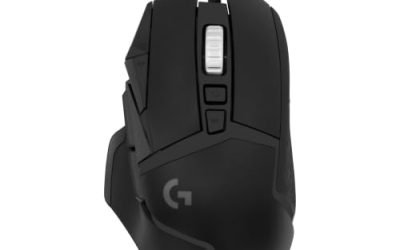
The G903 Lightspeed is one of the most left-hand friendly gaming mice available, because its ambidextrous design was built around configurable buttons from the start. Side buttons can be fitted on either side or covered with blank plates, so the left thumb gets real controls instead of a smooth shell. Eleven programmable buttons cover shooters, MMOs, and shortcuts, while the HERO 25K sensor keeps tracking steady. A battery that lasts well over a hundred hours means charging rarely interrupts play, and PowerPlay support adds wireless charging for players with a compatible mat.
Specs
- HERO 25K sensor with up to 25,600 DPI
- Ambidextrous design with configurable side buttons
- Up to 11 programmable buttons
- 140+ hours of battery life
- LIGHTSPEED wireless connection
- PowerPlay compatible
- LIGHTSYNC RGB lighting
- 107 grams plus 10-gram optional weight
Best for: Left-handed players who want a full gaming mouse with side buttons that can be arranged for the left thumb.
Watch out for: The shell is symmetrical rather than a true left-handed ergonomic shape, so check the grip and button arrangement in the listing photos before ordering.
Logitech G PRO 2 Lightspeed
The G PRO 2 Lightspeed takes the ambidextrous idea further with magnetic side buttons that switch between sides in seconds. Up to four buttons can be fitted for left-hand or right-hand use, with blank covers for the unused side, so the mouse adapts to the player rather than forcing a compromise. A HERO 2 sensor with a 44,000 DPI ceiling handles fast competitive play, while LIGHTFORCE hybrid switches give a crisp click feel. Battery life stretches across many long sessions, and USB-C charging keeps the setup simple when a top-up is finally needed.
Specs
- HERO 2 sensor with up to 44,000 DPI
- Ambidextrous design with switchable magnetic side buttons
- Up to 4 customizable side buttons
- LIGHTSPEED wireless connection
- LIGHTFORCE hybrid switches
- Up to 95 hours of battery life
- USB-C charging
- For PC and Mac
Best for: Competitive left-handed players who want magnetic side buttons that move to the left side.
Watch out for: The magnetic buttons and covers are small parts, so keep the spares in the box and confirm the button layout after fitting them.
Razer Viper Ultimate
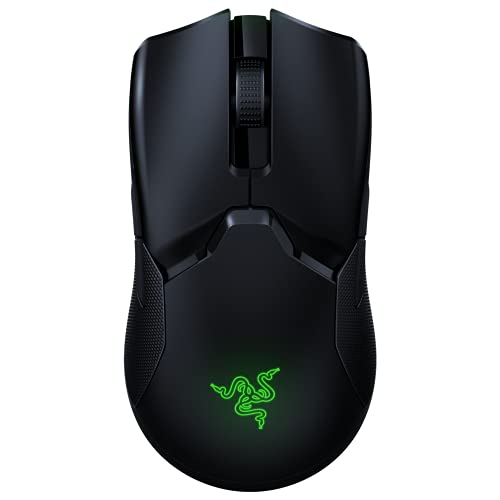
The Viper Ultimate suits left-handed players who want a light, symmetrical mouse with buttons on both sides already fitted. Eight programmable buttons sit within reach of either thumb, so the left thumb gets real controls without any parts to swap. At 74 grams it moves with very little effort, which helps fast flick aiming in shooters, and the 20,000 DPI optical sensor tracks cleanly during quick direction changes. HyperSpeed wireless keeps the connection responsive, and the included RGB charging dock gives the mouse a home between sessions while keeping the battery topped up.
Specs
- Focus+ 20K DPI optical sensor
- 74-gram lightweight ambidextrous design
- 8 programmable buttons on both sides
- HyperSpeed wireless connection
- RGB charging dock included
- Up to 70 hours of battery life
- Chroma RGB lighting
Best for: Left-handed shooter players who want a light ambidextrous mouse with thumb buttons on both sides.
Watch out for: The symmetrical shape has no thumb rest, so palm-grip players should compare the dimensions with their hand before buying.
Logitech G Pro Wireless

The G Pro Wireless is a proven esports mouse with an ambidextrous shell and removable side buttons that suit left-handed play. Buttons can be fitted on the left side, the right side, or both, so the left thumb gets controls while the unused side stays clean. The HERO 25K sensor tracks precisely at high sensitivity, and LIGHTSPEED wireless gives a fast, stable connection for competitive games. At 80 grams the mouse feels light without feeling hollow, and the simple layout keeps accidental presses rare during tense moments.
Specs
- HERO 25K sensor with up to 25,600 DPI
- Ambidextrous ergonomic design
- 4-8 programmable buttons with removable side buttons
- LIGHTSPEED wireless connection
- 80-gram lightweight design
- 50-million-click durability
- For PC and Mac
Best for: Left-handed esports players who want a light, simple wireless mouse with removable side buttons.
Watch out for: The button count is modest, so MMO players who need many thumb buttons should consider a model with a larger side panel.
Logitech Lift Left
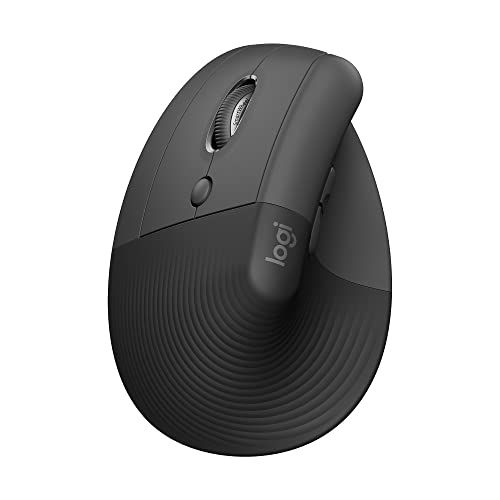
The Lift Left is the only true left-handed shell in this guide, built as a vertical ergonomic mouse for the left hand rather than a mirrored gaming shell. Its 57-degree angle holds the hand in a handshake position, which reduces wrist twist during long desk sessions, and quiet clicks keep shared rooms calm. Wireless connection runs through Bluetooth or the included Logi Bolt USB receiver, and the mouse pairs with up to three devices. This is the pick for left-handed players who value comfort and casual gaming over competitive sensor figures, and for anyone whose wrist complains after long days at the desk.
Specs
- Left-handed vertical ergonomic design
- 57-degree vertical angle
- Wireless connection via Bluetooth or Logi Bolt USB receiver
- Quiet clicks
- Connects to up to 3 devices
- For small to medium hands
- Graphite finish
Best for: Left-handed players who want a true left-handed vertical shell for comfortable casual gaming and work.
Watch out for: This is an ergonomic office mouse rather than a competitive gaming mouse, so confirm the sensor and button layout suit the games played, and check that the listing says Left before ordering.
Which One Fits Your Situation
Competitive FPS with the left hand
Pick the Logitech G PRO 2 Lightspeed when fast competitive play matters most. Its magnetic side buttons move to the left side, the HERO 2 sensor handles high sensitivity cleanly, and the light ambidextrous shell suits claw and fingertip grips during quick matches. Battery life stretches across many long sessions, and USB-C charging keeps the setup simple when a top-up is finally needed.
Button-rich gaming with configurable controls
Pick the Logitech G903 Lightspeed when many buttons need to sit under the left thumb. Eleven programmable buttons cover abilities and shortcuts, the configurable layout adapts to either hand, and the very long battery life keeps the mouse running through long sessions. The HERO 25K sensor and PowerPlay support also make it a strong choice for players who want wireless freedom without giving up a full gaming layout.
Lightweight ambidextrous play with no setup
Pick the Razer Viper Ultimate when the mouse should work for the left hand straight out of the box. Buttons on both sides need no swapping, the 74-gram body suits fast flicks, and the charging dock keeps the battery ready between sessions. Its 20,000 DPI sensor and HyperSpeed wireless connection also keep tracking responsive during quick shooter matches.
True left-handed comfort for casual play
Pick the Logitech Lift Left when comfort matters more than competitive figures. Its true left-handed vertical shell supports the wrist during long days, quiet clicks suit shared spaces, and multi-device pairing covers a PC, a laptop, and a tablet. The 57-degree handshake angle reduces forearm twist, making it a sensible choice for casual games and everyday work alike.
Common Mistakes
- Buying a right-handed ergonomic mouse and hoping the shape will feel fine in the left hand, when the thumb rest and buttons sit on the wrong side.
- Assuming every ambidextrous mouse suits left-handed play, when some models put side buttons only on the left side of the shell.
- Forgetting to fit or remap the side buttons after switching hands, leaving the left thumb with no controls at all.
- Choosing Bluetooth for competitive games when a dedicated 2.4 GHz receiver would respond faster.
- Picking a true left-handed ergonomic mouse for competitive shooters without checking whether its sensor and polling suit fast play.
Frequently Asked Questions
Are there many true left-handed wireless gaming mice?
Very few, because most gaming mice are right-handed or ambidextrous, and true left-handed shells are a small market. Most left-handed players use ambidextrous mice with switchable or removable side buttons, which work well when the buttons move to the left side. A true left-handed shell exists mainly in ergonomic office mice, which suit casual games better than competitive ones.
How do I set up an ambidextrous mouse for left-hand use?
Fit the side buttons on the right side of the shell, since that side sits under the left thumb, and cover the unused side with blank plates if they are included. Swap the primary and secondary click buttons in the operating system or mouse software, then remap the thumb buttons to the actions used most. Play a few casual matches before changing anything else.
Can left-handed players use a right-handed mouse?
Some left-handed players do, usually by using the mouse with the right hand or by adapting to a symmetrical shell. A right-handed ergonomic mouse feels awkward in the left hand, though, because the thumb rest curves the wrong way and the side buttons sit under the wrong fingers. An ambidextrous or true left-handed model is a better starting point.
Does an ambidextrous mouse feel the same in both hands?
The shell feels the same, but the button layout does not, because side buttons sit on both sides or only on one side. A mouse with buttons on both sides feels balanced, while a mouse with buttons on one side needs those buttons moved or remapped. Grip comfort can also differ, since the palm and fingers rest on the shell from opposite angles.
Related guides
More from Amazon
Programs that pair well with the guide above. Offers and eligibility are set by Amazon and may change.
Free shipping on eligible items, Prime Video and more. Eligible new members can start with a free trial.
Start a Prime free trialAd-free music streaming. Eligible new subscribers can start with a free trial.
Try Music Unlimited freeA Prime membership for ages 18-24 with a trial period. Eligibility is set by Amazon.
See Prime for Young AdultsAudiobooks and podcasts to listen to on the go. Eligible new members can start with a free trial.
Try Audible freeAs an Amazon Associate we earn from qualifying purchases.