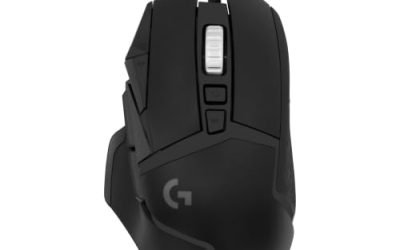
Side buttons decide whether a wireless mouse feels like a simple pointer or a full control panel. Two thumb buttons cover reloads and melee attacks, while six or twelve thumb buttons can hold an entire ability bar, a set of macros, or a row of inventory shortcuts. Wireless freedom adds another layer to the decision, because a mouse that drops its connection or runs flat mid-match wastes every button it carries. Battery life, receiver placement, and software all shape the result as much as the button count itself.
This guide is for players who want wireless play without giving up thumb controls. MMO and MOBA players who map abilities to the mouse, shooter players who want push-to-talk and weapon swaps close at hand, and people who use the same mouse for games and office work will each find a relevant pick. Every product below comes from the name and specifications shown on its Amazon product page, so button counts, sensor figures, and battery claims reflect what the listing itself states.
Our Top Picks
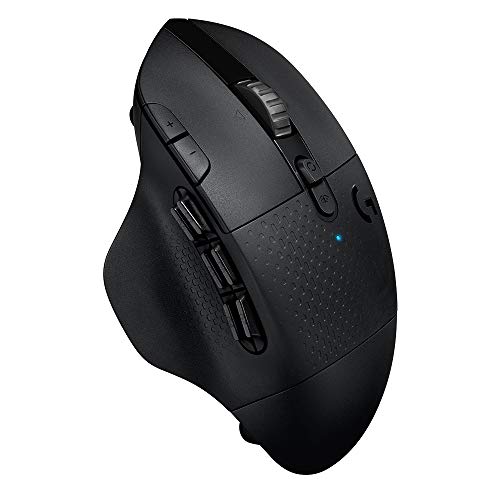 Logitech G604 Lightspeed Wireless Gaming Mouse with 155.1" x 3.1" x 1.8"1.77 x 3.14 x 5.11 inchesCheck on Amazon

Top 3 picks at a glance

Quick Picks
As an Amazon Associate we earn from qualifying purchases
| Product | Best for | Key spec from title |
|---|---|---|
| Razer Naga V2 Pro | MMO players who want a full ability grid | 19+1 programmable buttons, swappable 2, 6, and 12-button side plates |
| Logitech G502 Lightspeed | Button-rich play with a familiar palm shape | HERO 25K sensor, PowerPlay compatible, tunable weights |
| Razer Basilisk V3 Pro | Ergonomic comfort with a flexible thumb layout | Focus Pro 30K sensor, 13 programmable controls |
| Logitech G604 Lightspeed | Long sessions with many controls and long battery life | 15 programmable controls, up to 240-hour battery life |
| Corsair Scimitar Elite RGB Wireless | MMO players who want a sliding 12-button panel | 26,000 DPI, 16 programmable buttons, up to 150-hour battery |
How to Choose
Side-button layout and spacing
Side buttons only help when the thumb can find them without looking, so layout matters more than the raw count. A grid of twelve buttons suits MMO players who memorise positions by row, while two or three larger buttons suit shooter players who need one reliable press under pressure. Check whether the buttons are flat, raised, or separated by gaps, because closely packed buttons invite mis-presses during fast play. Some mice let the whole side panel slide forward or back, which helps players with shorter or longer thumbs reach the back row comfortably. Try to picture the thumb resting on the panel rather than hovering over it.
Wireless connection and latency
Wireless mice connect through a dedicated 2.4 GHz receiver, Bluetooth, or both, and the choice changes responsiveness. A dedicated receiver gives the lowest latency and suits competitive games, while Bluetooth suits laptops and casual play but can feel slower in fast shooters. Dual-mode mice let the same device switch between a gaming PC and a laptop without re-pairing, which helps players who move between machines. Keep the receiver close to the mouse, avoid placing it behind a metal case, and confirm on the listing whether a receiver is included in the box.
Battery life and charging
Battery life decides how often the mouse needs attention, and the figures on listings vary widely because they depend on lighting and polling settings. A mouse that lasts hundreds of hours on a single charge suits players who hate cables, while a mouse with a shorter battery needs a convenient charging cable or dock. Rechargeable models use USB-C or a charging dock, while other models run on replaceable batteries and can be revived instantly with a fresh cell. Check whether the listing states battery life with lighting on or off, and keep a charging cable within reach for long sessions.
Shape, weight, and grip
A button-heavy mouse is usually larger and heavier than a minimal shooter mouse, because the side panel and extra switches take space. Palm-grip players often welcome that size, since the shell fills the hand and the thumb rests naturally on the buttons. Claw-grip players may prefer a shorter shell with a defined hump, even if it means fewer buttons. Weight affects how quickly the mouse starts and stops, and a heavy mouse can tire the wrist during long MMO raids. Compare the listed weight and dimensions with hand size, and remember that a comfortable shell matters more than squeezing in two extra buttons.
The 5 Best Options
Razer Naga V2 Pro

The Naga V2 Pro is the most flexible side-button mouse in this guide, because three magnetic side plates swap between two, six, and twelve-button layouts. MMO players can load the twelve-button plate with a full ability bar, while shooter players can fit the two-button plate and keep the thumb area simple. Nineteen programmable buttons plus the scroll wheel give enormous room for macros, and HyperScroll Pro adds a free-spinning wheel mode for long inventories. HyperSpeed wireless keeps the connection responsive, and the battery lasts for very long stretches between charges.
Specs
- 19+1 programmable buttons
- Swappable side plates with 2, 6, and 12-button layouts
- Focus Pro 30K optical sensor
- HyperScroll Pro wheel
- HyperSpeed wireless connection
- Up to 300 hours of battery life
- Optical Mouse Switches Gen-3
Best for: MMO players who want a full twelve-button thumb grid that can swap down to a simpler layout for other games.
Watch out for: The mouse is large and right-handed, so check hand size first, and confirm which side plate is fitted before the first session.
Logitech G502 Lightspeed
The G502 Lightspeed brings the familiar G502 button layout to wireless play, with eleven programmable buttons arranged around a large palm-grip shell. Six thumb buttons sit within easy reach, and the dual-mode scroll wheel switches between stepped and free-spinning modes for inventories and documents. Tunable weights let the balance shift toward the front or the palm, while the HERO 25K sensor keeps tracking steady across sensitivity settings. PowerPlay support means the mouse can charge wirelessly on a compatible mat, which suits players who never want to plug in a cable.
Specs
- HERO 25K sensor
- 11 programmable buttons
- LIGHTSPEED wireless connection
- PowerPlay compatible
- Tunable weights
- Lightsync RGB lighting
- Dual-mode hyper-fast scroll wheel
Best for: Players who want a proven button-rich palm-grip mouse with wireless freedom and adjustable weight.
Watch out for: The shell is large and right-handed, so smaller hands should compare dimensions carefully, and PowerPlay charging needs a separate compatible mat.
Razer Basilisk V3 Pro
The Basilisk V3 Pro suits players who want side buttons without a full MMO grid. Thirteen programmable controls include thumb buttons, a tilt wheel, and extra buttons near the wheel, giving room for abilities and shortcuts while keeping the layout easy to learn. A Focus Pro 30K sensor handles fast aiming, and the HyperScroll tilt wheel moves sideways as well as up and down, which helps with weapon selection and horizontal scrolling. Three connection modes cover HyperSpeed wireless, Bluetooth, and wired play, so the same mouse works across a gaming PC, a laptop, and a work desk.
Specs
- Focus Pro 30K optical sensor
- 13 programmable controls
- HyperScroll tilt wheel
- Gen-3 optical switches
- 13-zone Chroma RGB lighting
- 3 connection modes
- HyperSpeed wireless and Bluetooth
Best for: Players who want a comfortable ergonomic mouse with a useful set of side buttons and three connection options.
Watch out for: The thumb buttons sit close together, so check the layout against thumb length, and confirm the battery mode that matches the stated battery life.
Logitech G604 Lightspeed
The G604 Lightspeed is built for players who want many controls and very long battery life in one wireless mouse. Fifteen programmable controls include six thumb buttons arranged in two rows, which suits MMO, MOBA, and battle royale games where abilities and items need quick access. Dual wireless modes switch between LIGHTSPEED for gaming and Bluetooth for a laptop or tablet, and the hyper-fast scroll wheel handles long lists with a flick. A single AA battery powers the mouse for months of typical use, so charging cables rarely enter the picture.
Specs
- 15 programmable controls, including 6 thumb buttons
- HERO 25K sensor
- Up to 240 hours of battery life
- Dual wireless connectivity modes
- Hyper-fast scroll wheel
- LIGHTSPEED wireless and Bluetooth
- G HUB software support
Best for: MMO and MOBA players who want six thumb buttons, dual wireless modes, and very long battery life.
Watch out for: The mouse runs on a single AA battery rather than a rechargeable cell, so keep a spare battery nearby for long sessions.
Corsair Scimitar Elite RGB Wireless

The Scimitar Elite RGB Wireless is made for MMO players who want a twelve-button side panel that actually fits their thumb. A patented Key Slider panel moves the whole twelve-button grid forward or back, so the back row stays reachable without stretching. Sixteen programmable buttons cover abilities, macros, and shortcuts, while a 26,000 DPI sensor keeps tracking precise. Battery life stretches across many long sessions, and iCUE software handles button mapping, lighting, and profiles. This is the pick for players who found fixed twelve-button grids awkward and want the panel to move to them.
Specs
- 26,000 DPI optical sensor
- 16 programmable buttons
- 12-button Key Slider side panel
- Up to 150 hours of battery life
- iCUE software compatible
- Wireless connection with receiver
- RGB lighting
Best for: MMO players who want a sliding twelve-button side panel that adjusts to thumb reach.
Watch out for: The mouse is large and right-handed, so confirm hand size and grip style, and check that the side panel position is set before mapping buttons.
Which One Fits Your Situation
Full MMO ability bar on the thumb
Pick the Razer Naga V2 Pro when every ability needs a mouse button. Its twelve-button plate holds a complete rotation, the swappable plates let the same mouse simplify for shooters, and the long battery life keeps raids running without a charging break. The HyperScroll Pro wheel also helps with long inventories, while the Focus Pro 30K sensor keeps aiming steady when a fight suddenly turns fast.
Button-rich play with a familiar shape
Pick the Logitech G502 Lightspeed when a proven palm-grip layout matters more than a twelve-button grid. Eleven programmable buttons cover most games, tunable weights adjust the balance, and PowerPlay support removes charging from the routine for players with a compatible mat. The HERO 25K sensor and dual-mode scroll wheel also make it a strong choice for mixed gaming and everyday computer work.
Ergonomic comfort with flexible controls
Pick the Razer Basilisk V3 Pro when the hand needs a thumb rest and the games mix shooters, action, and work. Thirteen programmable controls give room for shortcuts, the tilt wheel adds sideways scrolling, and three connection modes cover a gaming PC and a laptop alike. Its ergonomic shape stays comfortable through long days, while the Focus Pro 30K sensor keeps tracking precise in faster games.
Long sessions and many controls without charging
Pick the Logitech G604 Lightspeed when battery life and button count matter together. Fifteen programmable controls include six thumb buttons, dual wireless modes switch between machines, and a single AA battery lasts for months of typical use. The hyper-fast scroll wheel also handles long inventories with a flick, making this a practical pick for MMO and MOBA players who dislike charging cables.
Common Mistakes
- Choosing twelve side buttons for a shooter, then mis-pressing abilities during fast fights that need only two reliable thumb buttons.
- Ignoring thumb length and panel position, so the back row of a side grid stays out of reach.
- Using Bluetooth for competitive games when a dedicated 2.4 GHz receiver would respond faster.
- Forgetting to check battery life conditions, such as lighting and polling settings, before trusting a headline figure.
- Mapping every button on day one instead of learning a few core bindings first and adding more as muscle memory builds.
Frequently Asked Questions
How many side buttons should a wireless gaming mouse have?
Two side buttons suit shooters, six suit action and MOBA games, and twelve suit MMO players who want a full ability bar under the thumb. More buttons help only when the thumb can reach them reliably, so layout and spacing matter as much as count. Start with the games played most and choose the smallest layout that covers them.
Does a 12-button side panel work for small hands?
A fixed twelve-button grid can be hard for small hands, because the back row sits far from the thumb rest. Sliding panels help, since the whole grid moves closer, and swappable plates let the mouse drop to six or two buttons. Check the shell length and the panel position before buying, and prefer a layout that keeps every button within a short thumb movement.
Can I use a wireless gaming mouse with side buttons for work?
Yes, and many players do exactly that, because side buttons map well to copy, paste, forward, back, and application shortcuts. Dual-mode wireless helps here, since the mouse can switch between a gaming PC and a laptop. Keep gaming macros on one profile and work shortcuts on another so the two uses stay separate.
Why does my wireless mouse feel slow in games?
Bluetooth adds latency compared with a dedicated 2.4 GHz receiver, so switch to the receiver for competitive games. A low battery, a receiver hidden behind a metal case, and wireless interference from nearby devices can also slow the response. Move the receiver closer, charge the mouse, and check the polling setting in the mouse software.
Related guides
More from Amazon
Programs that pair well with the guide above. Offers and eligibility are set by Amazon and may change.
Free shipping on eligible items, Prime Video and more. Eligible new members can start with a free trial.
Start a Prime free trialAd-free music streaming. Eligible new subscribers can start with a free trial.
Try Music Unlimited freeA Prime membership for ages 18-24 with a trial period. Eligibility is set by Amazon.
See Prime for Young AdultsAudiobooks and podcasts to listen to on the go. Eligible new members can start with a free trial.
Try Audible freeAs an Amazon Associate we earn from qualifying purchases.