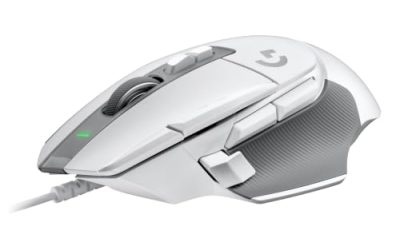
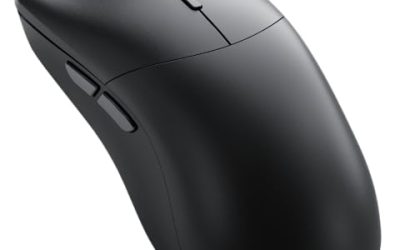
Shopping for a Logitech gaming mouse in the entry-level range is less about finding one perfect model and more about choosing which trade-off you can live with. Every mouse in this guide carries a Logitech HERO sensor, yet the four differ sharply in shape, button count, weight, and whether a cable ties them to the desk. Picking the wrong shape will annoy you every session, while picking a lower sensor ceiling rarely matters at all.
This guide is for first-time buyers, laptop gamers, shooter players, and anyone replacing a worn office mouse with something built for games. Each pick below comes from the mainstream Logitech lineup, and every specification comes from the name and technical details on its Amazon listing. Read the shape and connection notes first, then match the mouse to the games you actually play.
Our Top Picks


Top 3 picks at a glance

Quick Picks
As an Amazon Associate we earn from qualifying purchases.
| Product | Best for | Key spec from title |
|---|---|---|
| Logitech G203 LIGHTSYNC | A first gaming mouse for everyday play | 8,000 DPI, 6 programmable buttons |
| Logitech G305 LIGHTSPEED | Wireless play without a cable on the desk | HERO 12K sensor, 12,000 DPI, 250-hour battery |
| Logitech G502 HERO | Button-heavy games and a full palm grip | HERO 25K sensor, 25,600 DPI, 11 programmable buttons |
| Logitech G403 HERO 25K | An ergonomic palm shape with a top sensor | HERO 25K sensor, 25,600 DPI, 87 g shell |
How to Choose
Start With the Sensor, Not the DPI Number Alone
All four mice in this guide use a Logitech HERO optical sensor, which is the part that tracks movement without acceleration or smoothing. The G203 tops out at 8,000 DPI, the G305 reaches 12,000 DPI, and the G502 HERO and G403 HERO 25K reach 25,600 DPI. Those ceilings look dramatic on a listing, yet most players settle in the low to middle part of the range and change sensitivity with the on-the-fly DPI button. What matters more is consistent tracking at the sensitivity you use daily, plus a sensor that holds its line during fast flicks. Treat the headline number as headroom, and judge the mouse by how steady it feels at your own setting.
Wired or Wireless, and What the Battery Asks of You
Three picks in this guide are wired, and only the G305 cuts the cord, so the choice shapes your whole desk setup. A wired mouse never needs charging and never runs flat mid-match, though its cable can drag across the desk unless you route it with room to move. The G305 runs on a single AA battery for up to 250 hours according to its listing, and it stores its tiny wireless receiver inside the body for travel. That freedom comes with a small routine: keep a spare AA battery nearby. If you hate thinking about power at all, a wired model removes the question entirely.
Shape, Size, and Grip Before Buttons
Sensor numbers fade into the background after a week, but shape never does, so measure your grip before anything else. The G203 and G305 share a compact, symmetrical body that suits claw and fingertip grips and smaller hands, while the G502 HERO and G403 HERO 25K are larger, right-handed ergonomic shapes built for a full palm grip. A mouse that is too long forces your fingers to stretch for the side buttons, and one that is too narrow leaves your palm unsupported during long sessions. Check the listed dimensions against a mouse you already own, and remember that rubber side grips help only when they sit where your thumb actually lands.
Extra Buttons and G HUB Setup
Button count decides how much you can do without touching the keyboard, and the gap here is wide. The G203, G305, and G403 each offer six programmable buttons, which covers DPI switching, push-to-talk, and a couple of game commands. The G502 HERO jumps to eleven programmable buttons plus a dual-mode scroll wheel, which suits MMO abilities, strategy commands, and productivity shortcuts. Every mouse here works with Logitech G HUB software for remapping buttons, adjusting sensitivity steps, and saving profiles to on-board memory. Set your profiles once, store them on the mouse, and your bindings travel with the hardware to another computer.
The 4 Best Options
Logitech G203 LIGHTSYNC

The G203 LIGHTSYNC is the simplest starting point in this guide, and that is exactly why it leads the list. Its compact symmetrical body fits claw and fingertip grips, its HERO sensor tracks cleanly up to 8,000 DPI, and its six programmable buttons cover the commands most new players actually use. LIGHTSYNC RGB lighting runs through G HUB, on-board memory keeps your settings on the mouse, and the wired connection means there is no battery to watch. It is the pick for a first gaming mouse, a second mouse for a laptop bag, or a straightforward replacement for an ageing office mouse.
Specs
- HERO sensor with up to 8,000 DPI
- 6 programmable buttons
- LIGHTSYNC RGB lighting
- On-board memory
- Wired USB connection
- PC and Mac compatible
- Dimensions: 1.5 x 2.45 x 4.59 inches
Best for: A first gaming mouse for everyday play and a compact grip.
Watch out for: The compact symmetrical shape can feel small for a large palm grip, and the wired design means the cable needs routing room on the desk.
Logitech G305 LIGHTSPEED
The G305 LIGHTSPEED is the only wireless mouse in this guide, and it earns its place by removing the cable without removing the performance. Its HERO 12K sensor reaches 12,000 DPI, LIGHTSPEED wireless is listed with 1 millisecond response, and a single AA battery powers up to 250 hours of play. The body weighs only 99 grams including the battery, the receiver stores inside the mouse for travel, and six programmable buttons handle DPI switching and voice chat. It suits laptop gamers, tidy desks, and anyone who keeps catching a cable on the desk edge.
Specs
- HERO 12K sensor, 200 to 12,000 DPI
- LIGHTSPEED wireless with 1 millisecond response
- 6 programmable buttons
- Up to 250 hours on one AA battery
- Weight: 99 grams
- Built-in storage for the USB wireless receiver
- On-board memory
Best for: Wireless play on a laptop or a tidy desk, especially for shooter games.
Watch out for: It runs on a replaceable AA battery rather than a rechargeable cell, so keep a spare nearby, and it has no RGB lighting to match a lit setup.
Logitech G502 HERO
The G502 HERO is the heavyweight of this group in every sense, and it is the right call when buttons matter more than a light shell. Its HERO 25K sensor reaches 25,600 DPI, eleven programmable buttons cover MMO rotations and strategy commands, and a dual-mode hyper-fast scroll wheel switches between stepped and free-spin scrolling. Five 3.6 gram weights tune the balance, LIGHTSYNC RGB ties the look to other Logitech gear, and on-board memory carries your profiles between computers. The large right-handed ergonomic body fills a palm grip and keeps the thumb buttons within easy reach.
Specs
- HERO 25K sensor with up to 25,600 DPI
- 11 programmable buttons
- Dual-mode hyper-fast scroll wheel
- Five 3.6 g adjustable weights
- LIGHTSYNC RGB lighting
- On-board memory
- Wired USB connection
- Dimensions: 1.57 x 2.95 x 5.2 inches
Best for: Button-heavy games and players who want a large, full palm grip.
Watch out for: It is the largest and heaviest mouse in this guide, so small hands and fingertip grips should check the dimensions first, and the extra buttons take time to memorise.
Logitech G403 HERO 25K

The G403 HERO 25K pairs the top sensor in this guide with a cleaner, more classic ergonomic shape than the G502 HERO. Its HERO 25K sensor reaches 25,600 DPI with 1:1 tracking, the 87 gram shell carries a removable 10 gram weight for tuning the feel, and rubber side grips keep the thumb planted during fast swipes. LIGHTSYNC RGB lighting is customisable through G HUB, the braided cable resists tangling better than a plain rubber cord, and on-the-fly DPI shifting switches between five sensitivity settings from the mouse itself. It is a strong fit for palm-grip shooter players who want flagship tracking without eleven buttons.
Specs
- HERO 25K sensor, 100 to 25,600 DPI
- LIGHTSYNC RGB lighting
- 87 g shell with a removable 10 g weight
- Braided cable
- Rubber side grips
- Wired USB connection
- On-the-fly DPI shifting between five sensitivity settings
Best for: Palm-grip shooter players who want a top sensor in a classic ergonomic shape.
Watch out for: The right-handed ergonomic shape does not suit left-handed players, and the top sensor ceiling arrives through a G HUB software update, so install G HUB and confirm the update before judging the DPI range.
Which One Fits Your Situation
You Play Fast Shooters and Want Wireless Freedom
Choose the Logitech G305 LIGHTSPEED when the cable is the thing that bothers you most. Its light 99 gram body moves quickly across the pad, the HERO 12K sensor covers the sensitivity range most shooter players use, and the 250-hour AA battery lasts through many sessions before it needs attention. Keep the receiver stored inside the mouse when you travel, and keep a spare AA battery in the bag.
You Play MMO or Strategy Games With Many Commands
Choose the Logitech G502 HERO when your game needs more buttons than a standard six-button mouse offers. Eleven programmable buttons plus the dual-mode scroll wheel hold abilities, macros, and shortcuts within thumb reach, and the adjustable weights let you tune the balance to your hand. Its large ergonomic body suits long sessions, though small hands should check the dimensions first.
You Want a Simple First Gaming Mouse
Choose the Logitech G203 LIGHTSYNC when you want a straightforward first mouse without a learning curve. Its compact shape, six buttons, and 8,000 DPI sensor cover everyday play, LIGHTSYNC lighting adds colour without extra software fuss, and the wired connection means there is nothing to charge. It is also the easiest pick to hand to a younger player or a second setup.
You Have Larger Hands and Want an Ergonomic Palm Shape
Choose the Logitech G403 HERO 25K when a palm grip is your priority and you still want the strongest sensor here. Its contoured right-handed body and rubber side grips support the whole hand, the 87 gram shell plus the removable 10 gram weight tune the feel, and the HERO 25K sensor reaches 25,600 DPI. It gives up the G502 HERO button count, but it feels calmer in the hand.
Safety Notes
Wireless mice run on batteries, so treat the battery with basic care. Use only the battery type the listing states, in this guide a single AA cell for the G305, and remove the battery if the mouse will sit unused for a long stretch. Keep batteries away from heat and moisture, and never try to open a battery cell. For wired models, keep the cable clear of chair wheels and desk edges, and pull the plug rather than the cable when you unplug the mouse.
Common Mistakes
- Choosing by the highest DPI number instead of by shape, grip, and button count.
- Buying a large ergonomic mouse for a small hand, or a compact mouse for a full palm grip.
- Picking a wireless mouse and then forgetting to keep a spare battery nearby.
- Leaving the side buttons unmapped, then wondering why the extra buttons feel useless.
- Skipping G HUB setup, so the DPI steps and saved profiles never match how you play.
Frequently Asked Questions
Is a higher DPI always better for gaming?
No. A higher DPI ceiling gives you more headroom, but most players settle at a middle sensitivity, and accuracy comes from a setting you can control. The G203 at 8,000 DPI already covers common sensitivities, while the 25,600 DPI ceiling on the G502 HERO and G403 HERO 25K matters mainly at very high sensitivity. Choose the shape first, then check that the sensor covers your setting.
Should I pick a wired or a wireless Logitech mouse?
Pick wired if you never want to think about power, since three mice in this guide run from the cable alone. Pick the G305 LIGHTSPEED if a cable drags on your desk or you move between a laptop and a desktop often. Its listing states up to 250 hours from one AA battery, so keep a spare nearby and let your desk decide.
Do all four mice work with Logitech G HUB?
Yes. Each mouse in this guide is supported by Logitech G HUB software, which handles button remapping, sensitivity steps, lighting, and profile saving. The G502 HERO and G403 HERO 25K reach their 25,600 DPI ceiling through the software update path described on their listings, so install G HUB and confirm the update. Store your profiles in the on-board memory, and your settings travel with the mouse to another computer.
Can I use these mice on a laptop?
Yes. The G203, G305, and G502 HERO listings state PC and Mac compatibility, and the G403 HERO 25K listing states the same broad system support. The G305 is the easiest travel companion because its receiver stores inside the body and its 99 gram weight adds little to a bag. Check that your laptop has a free USB port for the wired models or the receiver.
Related guides
More from Amazon
Programs that pair well with the guide above. Offers and eligibility are set by Amazon and may change.
Free shipping on eligible items, Prime Video and more. Eligible new members can start with a free trial.
Start a Prime free trialAd-free music streaming. Eligible new subscribers can start with a free trial.
Try Music Unlimited freeA Prime membership for ages 18-24 with a trial period. Eligibility is set by Amazon.
See Prime for Young AdultsAudiobooks and podcasts to listen to on the go. Eligible new members can start with a free trial.
Try Audible freeAs an Amazon Associate we earn from qualifying purchases.