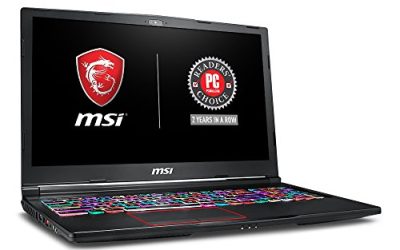
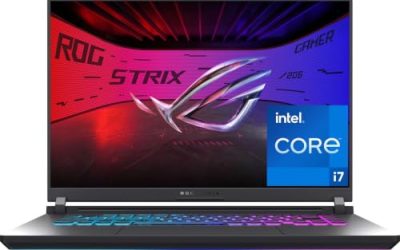
The best 18-inch gaming laptop for most players is the MSI Crosshair 18 HX AI with an Intel Core Ultra 9 275HX processor and an RTX 5070 graphics chip, because it pairs a 24-core CPU with a sharp 2560×1600, 240 Hz display and the roomy cooling that an 18-inch chassis allows. It gives you a sensible balance of speed, screen quality and size for a desk-based gaming setup. If you want to spend less on the graphics side, the ASUS TUF A18 with an RTX 5060 is the value pick, and if you want the fastest card in the list, the ASUS ROG Strix SCAR 18 with an RTX 5090 is the flagship. This guide compares eight listings, explains how an 18-inch panel changes your game settings, and shows how to check the exact configuration before you buy, since sellers often offer the same model with different memory and storage.
Our Top Picks
Pros & cons
- 2TB NVMe storage holds a large game and media library
- 240Hz QHD+ IPS display suits fast gaming and editing work
- Comes bundled with an HDMI cable for extra display hookup
- Listed weight runs over 13 pounds for this configuration
- No optical drive limits use of physical installation media
 ASUS 2025 TUF Gaming A18 18” WUXGA 144Hz16GB | 1TB SSD15.71 x 11.14 x 1.05 inches2.6 KilogramsCheck on Amazon


Top 3 picks at a glance
Top 3 Picks
Best Overall: MSI Crosshair 18 HX AI (Core Ultra 9 275HX, RTX 5070)
MSI’s Crosshair 18 HX AI combines a 24-core processor, an RTX 5070 with 8 GB of GDDR7 memory and an 18-inch 2560×1600 panel at 240 Hz. That screen is a significant step up from 1080p-class panels in this size, and the hardware is strong enough to drive it with DLSS. It is the best overall because it balances all the parts that matter in a big gaming laptop.
Best Value: ASUS TUF A18 (Ryzen 7 260, RTX 5060)
The TUF A18 pairs an 8-core AMD processor with an RTX 5060 and a 144 Hz 18-inch panel. It is the least expensive way into an 18-inch chassis in this list and still handles current games at 1080p-class settings comfortably.
Best Premium Pick: ASUS ROG Strix SCAR 18 (RTX 5090)
For players who want no compromises, the SCAR 18 listing combines a Core Ultra 9 275HX with a GeForce RTX 5090 and a 2.5K, 240 Hz ROG Nebula HDR panel. It is the performance and display leader of the group.
Quick Comparison
| Product | Best for | Key specs |
|---|---|---|
| MSI Crosshair 18 HX AI (32 GB, 2 TB listing) | Ready-to-play high-memory build | Core Ultra 9 275HX, RTX 5070 8 GB GDDR7, 18-inch 2560×1600 240 Hz, 32 GB RAM, 2 TB NVMe |
| MSI Crosshair 18 HX AI (24-core, 2.1-5.4 GHz listing) | CPU-heavy games and content work | Core Ultra 9 275HX with 24 cores, RTX 5070, 18-inch 2560×1600 240 Hz |
| ASUS TUF A18 (RTX 5060, FHD+ 144 Hz) | Value 18-inch gaming | Ryzen 7 260, RTX 5060, 16 GB DDR5, 1 TB SSD, 18-inch FHD+ 144 Hz |
| ASUS TUF Gaming A18 (WUXGA 144 Hz) | Wired networking and durable build | 8-core Ryzen 7 260, RTX 5060, 16 GB DDR5, 1 TB NVMe, WUXGA IPS, RJ-45 |
| ASUS ROG Strix G18 (2025) | Mainstream ROG with Core i9 | Core i9-14900HX, RTX 5070, 18-inch FHD+ 16:10 144 Hz |
| MSI Crosshair 18 HX AI (RTX 5070 listing) | Standard MSI configuration | 24-core Core Ultra 9 275HX, RTX 5070, 18-inch class display |
| ASUS ROG Strix SCAR 18 (2025) | Maximum performance | Core Ultra 9 275HX, RTX 5090, 18-inch 2.5K 240 Hz Nebula HDR |
| GIGABYTE Gaming A18 | RTX 5070 with an AMD CPU | Ryzen 7 260, RTX 5070, 18-inch display |
How We Chose
This ranking is based on research into manufacturer specifications, the wording of each product listing and well-established facts about laptop hardware. We compared the processor and graphics chip named in each listing, the display resolution and refresh rate, memory and storage, port selection, and the cooling and build class implied by the product line. We gave weight to display quality and graphics memory because they decide how well an 18-inch laptop uses its screen. We do not quote frame rates or invent performance numbers. Because sellers often offer different memory and storage in the same model, we recommend checking the exact configuration on the product page. Where a listing is vague about a detail, we describe the specification class and tell you to confirm it before you buy.
1. MSI Crosshair 18 HX AI (32 GB RAM, 2 TB SSD) – Best for a Ready-to-Play High-Memory Build
As an Amazon Associate we earn from qualifying purchases at no extra cost to you.

This listing is the Crosshair 18 HX AI configured with 32 GB of memory and a 2 TB NVMe drive, which is the kind of setup many players eventually upgrade to. It uses an Intel Core Ultra 9 275HX processor and an NVIDIA RTX 5070 laptop GPU with 8 GB of GDDR7 memory, driving an 18-inch 2560×1600 panel at 240 Hz. The 275HX has 24 cores, made up of 8 performance cores and 16 efficiency cores, and boosts up to 5.4 GHz according to MSI. Retail coverage lists a 90 Wh battery, an RGB keyboard, HDMI 2.1, Ethernet, a Thunderbolt port and USB-A ports, though exact port details can vary by listing.
Who it suits: players who want a large, bright screen and strong all-around performance without opening the chassis to upgrade memory or storage. The 2 TB drive holds a large game library, and 32 GB of RAM leaves room for a browser, a streaming app and Discord alongside a game. It is a desk-first laptop, so expect a heavy machine, around 3.1 kilograms according to retail coverage.
Key specs
- CPU: Intel Core Ultra 9 275HX, 24 cores, up to 5.4 GHz
- GPU: NVIDIA GeForce RTX 5070 laptop GPU, 8 GB GDDR7
- Display: 18-inch 2560×1600, 240 Hz
- Memory and storage: 32 GB RAM and 2 TB NVMe SSD as listed
- Battery and weight: about 90 Wh and roughly 3.1 kg per retail coverage
Pros
- High-resolution 240 Hz panel suits both single-player and fast games
- Large memory and storage out of the box
- Powerful 24-core processor handles streaming and creative tasks
- Modern ports, including Ethernet and HDMI 2.1
Cons
- Heavy and bulky for travel
- 8 GB of graphics memory can be tight at 1600p with ray tracing and high textures
- Battery life is short under gaming loads
- Seller configurations vary, so verify the RAM and SSD on the page
Compared with the other two Crosshair listings, this one is easiest to recommend because it names the memory and storage clearly. Compared with the ASUS TUF A18, it costs more but offers a sharper screen and a stronger GPU. Compared with the GIGABYTE A18, it trades an AMD processor for Intel’s 24-core chip and a higher-resolution panel. If you want one all-round 18-inch laptop and your budget allows it, start here.
A practical tip: before the first long session, update the BIOS, the GPU driver and the MSI Center software, then set the fan profile to a balanced mode. That keeps noise reasonable while still giving the GPU room to boost.
Because the 18-inch body is large, keep it on a hard, flat surface so the intake vents under the chassis stay clear. A cooling pad is optional, but a stable desk and a clean vent path matter more than any accessory.
2. MSI Crosshair 18 HX AI (24-Core, 2.1-5.4 GHz) – Best for CPU-Heavy Games and Content Work
The second Crosshair listing highlights the processor in its title: a Core Ultra 9 275HX with 24 cores, a 2.1 GHz base clock and boost up to 5.4 GHz, paired with an NVIDIA RTX 5070 with 8 GB GDDR7 and the same 18-inch 2560×1600, 240 Hz screen. The listing does not state memory or storage in the visible title, so treat the configuration as something to confirm on the product page. The Core Ultra 9 275HX is a high-end laptop processor, and the extra cores benefit games that use many threads, as well as video encoding, 3D modeling and compiling code.
Who it suits: players who also create. A streamer who plays a game while encoding video, a student who runs engineering software, or a modder who compiles builds will notice the value of 24 cores. The GPU remains the same RTX 5070, so pure gaming performance matches the other Crosshair listings.
Key specs
- CPU: Core Ultra 9 275HX, 24 cores, 2.1 GHz base, up to 5.4 GHz boost
- GPU: RTX 5070 laptop GPU, 8 GB GDDR7
- Display: 18-inch 2560×1600, 240 Hz
- Memory and storage: not clear from the listing title; confirm on the page
Pros
- High core count for multitasking and creative work
- Large, fast, sharp display
- Strong cooling potential in an 18-inch body
- Same GPU class as the other Crosshair listings
Cons
- Configuration details are not spelled out in the title
- Graphics memory remains at 8 GB
- Heavy, power-hungry laptop that needs a wall outlet for full performance
- CPU gains do not raise frame rates in games limited by the GPU
The comparison with the first Crosshair listing is mostly about what you get in the box. If you know you want 32 GB and 2 TB right away, choose the first listing. If you are comfortable adding your own storage and memory, this one may offer a more flexible starting point. Against the ROG Strix G18, which uses an older Core i9-14900HX, the Core Ultra 9 275HX is a newer platform with a better efficiency story.
Check that you are comfortable with the weight, too. An 18-inch machine of this class is closer to a portable desktop than to an ultrabook, so plan on a sturdy backpack or a rolling case if you move it often.
Power matters on this class of laptop. Use the charger supplied with it, because a gaming laptop pulls far more power than a typical USB-C charger can deliver. Unplug the laptop and let it cool before packing it in a bag, and never run it under a blanket or on a bed, where the vents can be blocked and heat can build up.
3. ASUS TUF A18 (Ryzen 7 260, RTX 5060, FHD+ 144 Hz) – Best for Value 18-Inch Gaming

The TUF A18 is the entry point to an 18-inch gaming laptop in this list. The listing names an AMD Ryzen 7 260, an NVIDIA GeForce RTX 5060, 16 GB of DDR5 memory, a 1 TB SSD and an 18-inch FHD+ display at 144 Hz with a backlit keyboard. The Ryzen 7 260 is an 8-core, 16-thread processor, and the RTX 5060 laptop GPU carries 8 GB of GDDR7 memory. The FHD+ resolution refers to a 16:10 panel at 1920×1200, which has more vertical space than a standard 1080p screen and is easier for the RTX 5060 to drive.
Who it suits: players who want a big screen and a solid frame rate without paying for top-end hardware. It is a smart pick for anyone who plays esports titles, online shooters and mainstream games at 1080p-class settings, or who uses a laptop as a desktop replacement and plugs in an external monitor when needed. The TUF line is positioned as durable, and ASUS describes the TUF line as built to MIL-STD-810H durability standards, so confirm the exact claim on the product page.
Key specs
- CPU: AMD Ryzen 7 260, 8 cores
- GPU: NVIDIA GeForce RTX 5060 laptop GPU, 8 GB GDDR7
- Display: 18-inch FHD+ (1920×1200), 144 Hz
- Memory and storage: 16 GB DDR5 and 1 TB SSD as listed
Pros
- Lowest entry point for an 18-inch gaming chassis in this list
- Resolution matches the GPU, so frame rates stay high
- Durable build quality and a full keyboard
- Enough RAM and storage to start gaming immediately
Cons
- RTX 5060 is a step below the RTX 5070 listings
- 144 Hz panel is slower than 240 Hz screens
- 16 GB of memory may feel tight with many background apps
- Big and heavy for the performance on offer
Compared with the second TUF listing, this one is described as FHD+ while the other says WUXGA, which are effectively the same 1920×1200 class. Compared with the GIGABYTE A18, which has an RTX 5070 and a similar Ryzen 7 260, the TUF costs less but gives up GPU power. Compared with the Crosshair, it gives up resolution, refresh rate and CPU cores. If you play at 1080p-class settings, it is a very sensible choice.
Plan to add a second SSD later if you want more room. Many gaming laptops of this type have a spare M.2 slot, but confirm that on ASUS’s specification page for your exact configuration.
For a little extra context on the display, 16:10 panels show more of a web page, a document or a game map than 16:9 panels of the same width. If you also use the laptop for school or office work, that extra height is a quiet benefit that you notice every day.
4. ASUS TUF Gaming A18 (WUXGA 144 Hz, Wi-Fi AX and RJ-45) – Best for Wired Networking and a Durable Build

This second TUF A18 listing describes the 2025 TUF Gaming A18 with an 18-inch WUXGA, 144 Hz IPS display, an 8-core AMD Ryzen 7 260, an NVIDIA GeForce RTX 5060, 16 GB of DDR5 memory and a 1 TB NVMe SSD. The title also calls out Wi-Fi AX (Wi-Fi 6), an RJ-45 Ethernet port and Bluetooth. WUXGA is a 16:10 resolution of 1920×1200, so this is the same panel class as the other TUF listing. The hardware, in other words, is nearly identical, and the real choice is between two sellers or two packages.
Who it suits: players who connect to a router by cable, which is the best way to keep latency low in online games, and who want a rugged laptop that can survive a backpack. The built-in Ethernet port is listed in the title, and a Wi-Fi 6 radio provides a solid fallback. With a Ryzen 7 260, you get eight cores for gaming and general computing, though it is not the strongest choice for heavy video editing.
Key specs
- CPU: AMD Ryzen 7 260, 8-core
- GPU: NVIDIA GeForce RTX 5060 laptop GPU
- Display: 18-inch WUXGA (1920×1200), 144 Hz IPS
- Memory and storage: 16 GB DDR5 and 1 TB NVMe SSD
- Connectivity: Wi-Fi 6, Bluetooth and RJ-45 Ethernet as named in the title
Pros
- Ethernet port for stable online play
- Durable TUF build with a comfortable keyboard
- Large, easy-to-read screen with extra vertical space
- Enough memory and storage for most players
Cons
- RTX 5060 limits settings at higher resolutions
- 144 Hz refresh rate is lower than the 240 Hz options
- Wi-Fi 6 rather than Wi-Fi 7 in the listing
- Heavy and large for a mid-range machine
Compared with the first TUF listing, the specifications are almost the same, so choose the listing with the clearer configuration and the better return terms. Compared with the GIGABYTE A18, it gives up graphics power but keeps the same Ryzen 7 260 processor, which means the CPU side is equal. Compared with the Crosshair listings, you trade a higher-resolution screen, a faster processor and a stronger GPU for a lower entry cost.
If you game at a desk, a gaming laptop plugged into Ethernet and a monitor can deliver a desktop-like experience. Use the laptop’s HDMI or USB-C video output to attach an external monitor, then close the lid if you want it to act as a compact tower.
On the practical side, a wired connection also frees the Wi-Fi radio for other uses, such as a phone hotspot fallback or a second network. If your router is far from your desk, a powerline or MoCA adapter, or a long flat Ethernet cable run along a baseboard, can bring wired reliability to a room that was only served by Wi-Fi.
5. ASUS ROG Strix G18 (2025) – Best for Core i9 Power at 144 Hz

The ROG Strix G18 listing describes an 18-inch FHD+ 16:10 display at 144 Hz with a 3 ms response time, an NVIDIA GeForce RTX 5070 and an Intel Core i9-14900HX processor. The title is cut off before the memory and storage details, so confirm those on the product page. The Core i9-14900HX has 24 cores (8 performance and 16 efficiency) and boosts up to roughly 5.8 GHz, according to Intel. It is a previous-generation chip compared with the Core Ultra 9 275HX, but it remains a very fast processor for games, and many titles do not use all the cores anyway.
Who it suits: players who want a Republic of Gamers machine with a strong processor and an RTX 5070 and who do not need a high-resolution screen. At FHD+ (1920×1200), the RTX 5070 has plenty of headroom, which means you can run high settings, turn on DLSS or leave it off, and use the 144 Hz panel at higher frame rates.
Key specs
- CPU: Intel Core i9-14900HX, 24 cores
- GPU: NVIDIA GeForce RTX 5070 laptop GPU
- Display: 18-inch FHD+ 16:10, 144 Hz, 3 ms response
- Memory and storage: not fully visible in the title; confirm on the page
Pros
- Strong processor and RTX 5070 pairing
- Lower resolution means high frame rates at high settings
- ROG design with a roomy chassis for cooling
- Fast response time suited to shooters
Cons
- Only 144 Hz and FHD+, so it does not make full use of the GPU
- Core i9-14900HX runs hot and draws a lot of power
- Older processor generation than the Core Ultra 275HX models
- Specifications in the title are incomplete
Compared with the Crosshair listings, the Strix G18 offers a lower-resolution, lower-refresh-rate screen but a brand with a distinct design language. Compared with the SCAR 18, it uses the same family look at a lower tier. If your goal is to keep frame rates high at 1200p, this laptop is a good match. If you want a sharper panel, the MSI models are better. Against the TUF A18, you gain a stronger GPU and a stronger CPU, at the cost of a higher entry point.
Because a Core i9-HX chip can draw a lot of power, expect fan noise at full load. Use the manufacturer’s performance modes to find a balance, and consider headphones for long competitive sessions.
A word on thermals. The i9-HX series is designed for large chassis, and the fans in an 18-inch ROG model are big enough to move plenty of air, but they can become audible in the highest performance mode. A quieter balanced profile usually costs only a small amount of frame rate in games that are limited by the GPU, and it keeps the keyboard deck more comfortable.
6. MSI Crosshair 18 HX AI (RTX 5070, 24-Core Ultra 9 275HX) – Best for Buyers Who Want to Verify the Configuration First

The third Crosshair listing is short. It names the MSI Crosshair 18 HX AI gaming laptop, an RTX 5070 and an Intel 24-core Ultra 9 275HX processor, and nothing else. The display, memory and storage are left for the product page. This is the same platform as the first two listings, so the core strengths are the same: 24 cores, 8 GB of GDDR7 graphics memory, an 18-inch 2560×1600 240 Hz panel in the standard model and a roomy chassis that helps with cooling.
Who it suits: shoppers who compare several sellers and want to confirm exactly what they get. Because listings of the same laptop can differ in memory (16, 32 or 64 GB), storage (1 to 4 TB) and Windows edition, this is where a checklist helps. Read the page for the display resolution, the RAM amount and whether it is upgradeable, the SSD size, the Windows edition, and the return terms.
Key specs
- CPU: Intel Core Ultra 9 275HX, 24 cores
- GPU: NVIDIA GeForce RTX 5070 laptop GPU
- Platform: MSI Crosshair 18 HX AI, 18-inch class
- Memory, storage and display: confirm on the product page
Pros
- Same high-end platform as the other two MSI listings
- Large chassis and strong cooling potential
- Good balance of CPU and GPU power
- Likely suited to both gaming and creative work
Cons
- Listing offers little detail about display, memory and storage
- Seller configurations differ, so mistakes are easy
- Heavy chassis, short battery life when gaming
- 8 GB of GPU memory is a limit for the highest texture settings
The best way to choose among the three MSI listings is to compare configurations. If memory and storage are the same, pick the one with the clearest description and return policy. If the descriptions differ, prefer the version with 32 GB of RAM and at least 1 TB of storage. Compared with the ASUS and GIGABYTE listings, MSI’s platform offers more cores and a higher-resolution screen at the top of the range.
Make a note of the Windows edition. Windows 11 Home is fine for gaming, while Windows 11 Pro adds business features that most players do not need. A few sellers add accessories, but the laptop itself is what you are paying for.
Finally, keep your driver and BIOS updates current. Newer BIOS versions often refine fan curves and power limits, and a clean driver install can solve many odd display or sleep issues on a new gaming laptop. Keep a record of the original configuration, too, so you can compare it with what arrives and report any mismatch quickly.
7. ASUS ROG Strix SCAR 18 (2025) – Best for Maximum Performance

The SCAR 18 is the flagship of this list. The listing describes an 18-inch ROG Nebula HDR display in 16:10 with 2.5K resolution and a 240 Hz, 3 ms panel, paired with an NVIDIA GeForce RTX 5090 and an Intel Core Ultra 9 275HX processor with 32 GB of memory (the title is cut off, so confirm storage). The RTX 5090 laptop GPU carries 24 GB of GDDR7 memory, which is three times the graphics memory of the RTX 5070 and RTX 5060 models in this list. NVIDIA allows a wide power range for this chip, so the final tuning depends on ASUS’s design, which is why the cooling system of a large SCAR chassis is part of the product.
Who it suits: enthusiasts who want the fastest laptop graphics available, 2.5K gaming at high frame rates with ray tracing, and the ability to run large AI or creative workloads on a laptop. The 24 GB of video memory also helps with 3D rendering, video editing and local AI models. It is a desktop replacement more than a portable laptop.
Key specs
- CPU: Intel Core Ultra 9 275HX, 24 cores
- GPU: NVIDIA GeForce RTX 5090 laptop GPU, 24 GB GDDR7
- Display: 18-inch ROG Nebula HDR, 16:10, 2.5K, 240 Hz, 3 ms
- Memory: 32 GB as stated in the title; confirm storage on the page
Pros
- Fastest graphics chip in the list, with 24 GB of video memory
- High-resolution HDR display with a 240 Hz refresh rate
- Strong cooling design in the SCAR chassis
- Useful for creative and AI work as well as gaming
Cons
- Highest cost in the group by a wide margin
- Large, heavy and loud under load
- Needs a large power adapter and a sturdy bag
- Many games cannot take full advantage of the GPU on a 2.5K panel
Compared with the Crosshair 18 HX AI, the SCAR offers a much stronger GPU and more video memory with the same CPU family. Compared with the Strix G18, it offers a better panel and a processor from a newer generation. Compared with the TUF A18, it is in a different class entirely. If you want the best and are willing to pay for it, the SCAR 18 is the one to buy, but make sure your space and your power supply can handle it.
Because the power draw is high, always use the supplied charger and a wall outlet. Do not use a laptop of this class on a bed or sofa. Avoid carrying it with the lid closed when it is hot, and let it cool before packing it.
One more thing to consider is the dock. A laptop of this class is easy to turn into a desktop with a single Thunderbolt or USB-C dock plus a monitor, a keyboard and a mouse. If you plan to keep the SCAR plugged in most of the time, think about where the power brick will sit and how the cables will route, because the charger is large and the connectors are thick.
8. GIGABYTE Gaming A18 (Ryzen 7 260, RTX 5070) – Best for an RTX 5070 With an AMD Processor

The GIGABYTE Gaming A18 listing is brief: an AMD Ryzen 7 260 processor, a GeForce RTX 5070 and an 18-inch display. It is the only listing in this group that pairs the 8-core Ryzen 7 260 with the RTX 5070, which makes it a middle path between the TUF A18 (same CPU, weaker GPU) and the Crosshair (stronger CPU, same GPU). Because the title omits the display resolution, memory and storage, confirm those on the product page before you buy.
Who it suits: players who care most about the graphics chip and who do not need a 24-core processor. An 8-core Ryzen is plenty for most games, and the RTX 5070 provides the graphics power to handle high settings at 1080p and 1200p, and reasonable settings at higher resolutions with DLSS. It may also suit people who prefer AMD processors for their efficiency.
Key specs
- CPU: AMD Ryzen 7 260, 8-core
- GPU: NVIDIA GeForce RTX 5070 laptop GPU
- Display: 18-inch; resolution and refresh rate to be confirmed
- Memory and storage: confirm on the product page
Pros
- RTX 5070 graphics at a lower processor tier
- Large 18-inch screen for immersive play
- Efficient AMD processor
- Likely a good balance for gaming-first buyers
Cons
- Listing is vague about key specifications
- Fewer cores than the Core Ultra 9 models
- Brand has a smaller presence in the gaming laptop market than ASUS or MSI
- Heavy and large like all 18-inch laptops
Compared with the TUF A18, the GIGABYTE adds a stronger GPU, which matters most in demanding games. Compared with the MSI Crosshair, it has a weaker processor and, depending on the configuration, may have a lower-resolution screen. If your priority is the GPU and your budget is limited, this is a reasonable option. If you plan to stream or edit, the 24-core MSI models are a better fit.
Be careful with the details. Check for the exact RAM, storage, display and warranty terms, and compare them with the other listings before you decide. A short listing is not a problem if the product page is complete, but it is a reason to read more carefully.
As with every big gaming laptop, ask about the warranty, the service process and the return window. A longer coverage period and an easy path for repairs are worth more than a small saving, because a laptop of this size is difficult to ship back and forth.
If you are choosing between this laptop and the ASUS TUF A18 with the same processor, the question is simple: is the move from an RTX 5060 to an RTX 5070 worth the extra spending for the games you play? For modern, graphics-heavy titles at 1200p or above, the answer is usually yes.
How to Choose an 18-Inch Gaming Laptop
Start with the screen you want to look at
Resolution and refresh rate decide how hard the graphics chip must work, so choose them before anything else. The listings here fall into two groups. The first group uses 1920×1200 (called FHD+ or WUXGA) at 144 Hz, which suits the RTX 5060 and still leaves headroom for an RTX 5070. The second group uses 2560×1600 (QHD+ or 2.5K) at 240 Hz, which is sharper and smoother but needs a stronger GPU. If you play esports titles and care most about frame rate, 1200p at 144 Hz is plenty. If you want detail in single-player games and also use the laptop for creative work, the 1600p panel is the better match.
Worked example: what 1600p costs the GPU
A 1920×1200 panel has 2,304,000 pixels. A 2560×1600 panel has 4,096,000 pixels, which is about 1.78 times as many. In a game that is limited by the graphics chip, frame rate falls roughly in proportion to the number of pixels, so a game running at 100 frames per second at 1200p would run at about 56 frames per second at 1600p with the same settings. DLSS upscaling, which renders at a lower internal resolution and scales up, recovers much of that loss, which is why an RTX 5070 can handle a 1600p screen well in many games. This also explains why the RTX 5060 is a better match for the 1200p panels in the TUF and ROG listings, and why the RTX 5090 is paired with a 2.5K panel in the SCAR 18. These figures are simple scaling estimates, not measured results, and games differ.
Understand the graphics chips
The RTX 5060 and RTX 5070 laptop chips both carry 8 GB of GDDR7 memory, while the RTX 5090 carries 24 GB. Graphics memory is the first thing to fill up when you raise texture quality or turn on ray tracing at a higher resolution. At 1200p, 8 GB is enough for most current games. At 1600p, some new games with high texture packs can reach the limit, and you may need to lower texture quality. The RTX 50 series supports DLSS 4 with multi-frame generation, which can raise frame rates in supported games, but the feature depends on game support and adds some latency, so competitive players often leave it off.
Choose the processor for how you play
For games alone, an 8-core Ryzen 7 260 is enough, and the graphics chip matters more. A 24-core Intel chip such as the Core Ultra 9 275HX or the Core i9-14900HX adds value for streaming, video editing, 3D work and running many apps. Higher-core processors also draw more power and create more heat, so they depend on the cooling of the chassis. In an 18-inch laptop, that cooling is generous, which is one reason to buy the larger size.
Memory and storage
16 GB of RAM is the minimum for a modern gaming laptop, and 32 GB gives breathing room for streaming, browsers and mod tools. For storage, 1 TB fills quickly because many modern games take more than 100 GB each, so 2 TB is a comfortable choice. Check whether the laptop has a spare M.2 slot and accessible memory slots, because adding your own parts is usually cheaper than buying a larger factory configuration.
Decision matrix
| Your situation | Pick | Why |
|---|---|---|
| Best all-round 18-inch gaming laptop | MSI Crosshair 18 HX AI (32 GB, 2 TB listing) | Sharp 240 Hz panel, 24 cores, RTX 5070, ready to play |
| Streaming or video editing alongside gaming | MSI Crosshair 18 HX AI (24-core listing) | 24 cores and a strong GPU |
| Tightest budget for an 18-inch screen | ASUS TUF A18 (either listing) | RTX 5060 and 144 Hz at the entry point |
| Online games over Ethernet | ASUS TUF Gaming A18 (WUXGA, RJ-45) | Wired port named in the title |
| High frame rates at 1200p with a Core i9 | ASUS ROG Strix G18 | RTX 5070 with fast CPU and low-latency panel |
| Best graphics performance available | ASUS ROG Strix SCAR 18 | RTX 5090 with 24 GB and 2.5K 240 Hz panel |
| RTX 5070 without a 24-core CPU | GIGABYTE Gaming A18 | Ryzen 7 260 with RTX 5070 |
Check ports and networking
Look for HDMI or DisplayPort output for an external monitor, a USB-C or Thunderbolt port for docks and fast storage, an Ethernet port for stable online play, and enough USB-A ports for a mouse, headset and storage. Wi-Fi 6E or Wi-Fi 7 is a bonus, but a wired connection is better for competitive games.
Verify the exact configuration
The same laptop name can appear with different memory, storage and Windows editions. Before you buy, confirm the CPU, GPU, RAM, SSD, display resolution and refresh rate, and look for a clear warranty and return policy. If something is not listed, assume it is not included.
18-Inch vs 16-Inch: What You Gain and What You Give Up
An 18-inch laptop has a bigger screen, which suits long sessions, strategy games, creative work and anyone who uses the laptop as a desktop replacement. The larger body also allows bigger fans and heat pipes, which can sustain high power for longer than a thin 16-inch model. The costs are weight, size and battery life. Machines in this class often weigh about 3 kilograms and need a large bag, plus a separate power adapter. A 16-inch laptop is easier to carry and often costs less, so if you move often, consider that size instead. If your laptop stays on a desk and you want a big display, 18 inches is a strong choice.
Power, Heat and Safety Tips
Gaming laptops use a lot of power and produce a lot of heat. Always use the charger that came with the laptop or an identical replacement from the maker, and do not use a low-power USB-C charger for gaming. Keep the vents clear, use the laptop on a hard, flat surface, and clean dust from the fans every few months with compressed air while the laptop is off and unplugged. Do not leave a hot laptop in a closed bag, and do not run it under a blanket. Lithium batteries should be stored at a moderate charge, and a battery that swells or overheats should be taken to the maker for service. For travel, the lithium battery in a laptop of this class is usually listed as 90 Wh, and airlines generally allow batteries up to 100 Wh in carry-on bags, but check your airline’s current rule.
Display Basics for Big Gaming Screens
Three display terms appear in nearly every gaming laptop listing. Refresh rate is how many times per second the panel updates, such as 144 or 240. Response time, shown as 3 ms on the ROG listings, is how quickly a pixel can change color, and lower numbers mean less blur in fast motion. Panel type, such as IPS, affects color and viewing angles. A 16:10 shape, used by many of the models here, adds vertical room compared with 16:9. The ROG Nebula HDR panel in the SCAR 18 listing adds HDR support, which can raise contrast in supported games and videos, but HDR looks best when the content and the Windows HDR settings are set up correctly. For competitive play, a high refresh rate and a low response time matter most. For single-player games and creative work, resolution and color quality matter more.
Cooling and Performance Modes
Every gaming laptop in this list has a performance mode setting in its control software, such as MSI Center, ASUS Armoury Crate or GIGABYTE Control Center. A quiet or balanced mode limits fan speed and power, which keeps noise and temperatures lower. A performance or turbo mode raises the power limits and fan speeds, which can increase frame rates in demanding games but also raises noise. A good approach is to start with the balanced mode, check whether the game runs well, and only move to a louder mode if you need it. Clean the vents regularly, keep the laptop raised slightly for airflow, and avoid placing it on soft surfaces. If the laptop gets very hot or the fans never calm down, update the BIOS and drivers, and contact the maker if the problem continues.
Setting Up a New Gaming Laptop
When the laptop arrives, check the box for the charger, the laptop itself and any extras listed. Charge the battery and run Windows Update before installing games. Install the latest NVIDIA driver from the maker, then open the control software to set a performance mode. In the Windows settings, set the display to its native resolution and highest refresh rate, and make sure the games use the NVIDIA GPU rather than the integrated graphics. Move your game library to the largest drive, turn on the maker’s recommended game mode and check that the laptop recognizes all the memory you ordered. Finally, record the serial number and keep the receipt in case you need warranty service. A few minutes of setup avoids hours of troubleshooting later.
Common Mistakes When Buying a Big Gaming Laptop
The most common mistake is buying on the graphics chip name alone. Two laptops with the same RTX 5070 can perform differently because the chip’s power limit is set by the maker, and a chassis with better cooling can sustain more of it. The second mistake is ignoring the screen, because an excellent GPU behind a dim or slow panel is a poor experience. The third is forgetting storage, since a 1 TB drive fills quickly with large modern games. The fourth is overlooking weight and the charger, which can add another kilogram to your bag. The fifth is skipping the configuration check, because identical names often hide different RAM and SSD sizes. Finally, many buyers assume more cores always mean higher frame rates, but in most games the graphics chip is the limit, and a balanced pairing gives better value than a top CPU with an entry-level GPU. Take a few minutes to compare the real specifications and you will avoid most regrets.
Frequently Asked Questions
Is an 18-inch gaming laptop too big to carry?
It is large and heavy, around 3 kilograms plus a big charger, so it works best as a desk laptop that you occasionally move. If you travel weekly, a 16-inch model is easier to live with. Many owners pair an 18-inch laptop with a backpack designed for large machines.
Is the RTX 5060 enough for an 18-inch laptop?
For 1200p gaming, it can be a good match, especially with DLSS in supported games. It has 8 GB of graphics memory, so you may need to lower textures in the newest titles. If you want a high-resolution screen, an RTX 5070 or better is a safer choice.
Do I need an RTX 5090?
Only if you want the fastest graphics, a 2.5K or higher screen and work such as 3D rendering or local AI. For most players, an RTX 5070 offers a better balance. The RTX 5090 also brings the highest cost, weight and noise.
Which is better, a 24-core Intel chip or an 8-core Ryzen?
For gaming alone, the graphics chip matters more, and an 8-core Ryzen 7 260 is capable. A 24-core Intel chip is better for streaming, editing and heavy multitasking. Choose based on whether you do more than game.
Can I upgrade the RAM and storage later?
Many gaming laptops have accessible memory and M.2 slots, but it depends on the model. Check the manufacturer’s specification page for your exact configuration. Upgrading yourself can be cheaper than buying a higher factory option, but follow the warranty rules.
How long does the battery last when gaming?
Not long. A gaming laptop under load usually runs for well under two hours on battery, and performance is reduced when unplugged. Plan to play while plugged in, and use the battery for light tasks only. If you need longer unplugged time, lower the screen brightness, cap the frame rate and switch the GPU mode to hybrid in the maker software.
Does a higher refresh rate matter if my frame rate is lower?
A 240 Hz panel is smoother when your game reaches high frame rates, but it still works fine at lower rates. Adaptive sync features, when available, help the screen match the frame rate. For many players, a sharp 1600p panel at 240 Hz is a better trade than a 1200p panel at 144 Hz.
Our Recommendation by Situation
If you want one dependable choice, buy the MSI Crosshair 18 HX AI with 32 GB of RAM and 2 TB of storage. If you do a lot of streaming or editing, pick the 24-core MSI listing. On a tighter budget, the ASUS TUF A18 gives you an 18-inch screen and an RTX 5060, and the WUXGA listing adds a named Ethernet port. The ROG Strix G18 suits those who want a Core i9 and a ROG chassis at 1200p, the GIGABYTE A18 suits those who want an RTX 5070 with an AMD processor, and the ROG Strix SCAR 18 is the pick for maximum performance. Whichever you choose, verify the exact configuration on the product page first.
Related guides
- MSI Titan 18 HX AI Review: Listings Compared, Specs Checked, Cases Sorted
- MSI Cyborg 17 Review: A 17-Inch RTX 5060 Laptop, and the Storage Detail to Check First
- ASUS ROG Strix SCAR 18 Review: RTX 5090 vs RTX 5080 Listings and Four Alternatives
- Alienware 16 Area-51 Review: Configurations, Rivals and Gaps