Starting a YouTube channel raises an awkward question long before the first upload: what do you film with? A phone is the obvious answer, yet many new creators want a dedicated camera that frees up the phone, offers a flip-around screen for self-framing, and records for longer without overheating or filling a gallery. The category that answers that need most cheaply is the compact camcorder or vlogging camera, and the listings in it carry some of the boldest numbers in consumer electronics: 8K, 88 megapixels, 18x zoom. Sorting what is useful from what is just a headline is the real job of this guide.
It is written for first-time creators, hobbyists who film tutorials or gaming-desk reviews, and families who want a simple device for travel clips, not for working crews with cinema budgets. Seven cameras from the results are covered, from 1080p entry units to models that advertise 4K and 8K. A listed kit of phone accessories also appeared in the results; it is not a camera, so it is excluded. Everything is judged from the spec lines in each title, and since 2026 listings lean heavily on resolution claims, the advice below focuses on what a viewer will actually see and hear.
Our Top Picks
Top 3 picks at a glance
Quick Picks
As an Amazon Associate we earn from qualifying purchases at no extra cost to you.





| Product | Best for | Key spec from the title |
|---|---|---|
| 5K 64MP Vlogging Camcorder | Higher-resolution talking-head videos | 5K, 64MP, 3-inch 270-degree touch screen, WiFi |
| Xoieod 1080P Camcorder | Budget starter channel | Full HD 1080P, stereo microphone, dual battery |
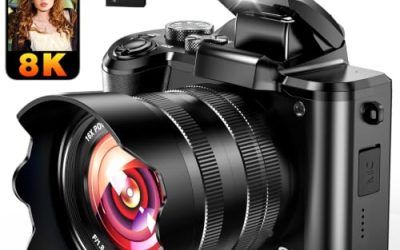
| FlyFrost 8K Camcorder | Feature-heavy spec seekers | 8K, 88MP, WiFi, 18X zoom, microphone |
| CGXUED Mini Camcorder | Pocketable, quick shooting | 180-degree rotating lens, 7-hour battery, 32GB card |
| ZYDIIE 4K Camcorder | Middle ground resolution | 4K, 64MP, 18x zoom, 3-inch IPS touch screen |
| 8K 88MP Camcorder with Remote | Hands-free and webcam use | 8K, WiFi, webcam mode, remote |
| kimire 1080P Camcorder | Lowest-cost basic recording | 1080P, 24MP, 3.0-inch 270-degree LCD |
How to Choose
Treat resolution claims with caution
Platforms play back at 1080p or 4K, so a clear 1080p or 4K recording is perfectly adequate for most channels. Large figures such as 64MP or 88MP in a compact camcorder title usually describe still-photo output that may be produced by software scaling rather than a large sensor. Look for the frame rate attached to each resolution: a “1080P 15FPS” figure, as in one listing here, points to choppy motion, while 30 frames per second is the usual baseline for talking-head and tutorial videos. Before buying, look for a spec line that ties the top resolution to a specific frame rate, because a camera can advertise 4K or 8K only at a slow rate or only for stills. When the title is silent on this point, the practical assumption is that the highest number is a ceiling, not the setting you will use daily.
Audio matters more than extra pixels
Viewers forgive a soft image faster than muffled or hissy sound. A built-in stereo microphone, as one title lists, is a start, and a listing that mentions a bundled microphone is better still. Check whether the camera has a microphone input if you plan to add a lavalier later; without it, you will be limited to the onboard capsule, which picks up room echo and handling noise. A simple fix for any of these cameras is to record in a small furnished room, keep the subject within an arm’s length of the lens, and avoid hard-walled spaces like bathrooms or empty garages where echo builds up. Better source audio often lifts a channel more than an upgrade in resolution would.
Screen, lens, and battery for solo shooting
Self-framing requires a screen that rotates to face you. The 270-degree 3-inch touch screens listed here do that, and a 180-degree rotating lens on the mini model solves the same problem differently. For battery, a roughly 7-hour figure like the one on the mini camcorder, or a dual-battery package, means fewer interruptions during long sessions. Digital zoom at 16x or 18x only crops the image, so keep expectations modest and move closer to the subject when possible.
Where budget models cut corners
Low-cost camcorders typically skimp on sensor size, low-light behavior, and autofocus speed. IR night vision, which several titles advertise, produces a monochrome image and is a novelty rather than a creative tool. WiFi and remote controls are handy for transferring clips and starting a shot from a distance, but they do not improve picture quality. Spend your attention on stable frame rate, sound, and a flip screen, and treat the rest as extras. Storage is a quiet cost too: higher resolutions create larger files, so budget for memory cards that are fast and roomy enough, and plan how you will back up footage. Finally, think about where the camera will live. A model that fits in a jacket pocket gets used more often than a bulkier one that stays on a shelf.
The 7 Best Options
5K 64MP Vlogging Camcorder
This unbranded camera lists 5K video, 64MP stills, a 3-inch 270-degree rotatable touch screen, IR night vision, 16X zoom, and WiFi. It is for creators who want to record at a higher stated resolution with a flip screen for self-framing, such as a desk-based tutorial channel where the camera sits on a small tripod and the creator watches the screen while talking.
- Strength: the rotating touch screen makes it easy to frame yourself at a desk.
- Strength: WiFi allows clips to move to a phone for editing.
- Trade-off: the 5K and 64MP numbers are headline figures, so verify real frame rates in the manual.
Skip it if you want a trusted brand or professional-grade audio features.
Xoieod 1080P Camcorder
The Xoieod lists Full HD 1080P, 36MP stills, 16x zoom, a 270-degree rotatable screen, a stereo microphone, and a dual-battery kit. It is for beginners who prefer a modest resolution done sensibly, with longer shooting time, for example a weekly cooking or hobby channel where each session runs long and swapping batteries beats stopping to recharge.
- Strength: dual batteries support longer sessions without recharging.
- Strength: a stereo microphone is listed, which matters for voice-driven videos.
- Trade-off: 1080P is the ceiling, with no 4K option for future-proofing.
Skip it if you want to crop in during editing or publish in 4K.
FlyFrost 8K Camcorder
The FlyFrost lists 8K, 88MP, WiFi, 18X digital zoom, IR night vision, a 3.0-inch touch screen, and a microphone. It targets spec-driven shoppers who want the most features in one body and are comfortable verifying the real output settings in the menu after it arrives.
- Strength: it bundles a touch screen, WiFi, and a microphone in one package.
- Strength: an 18X zoom range gives flexible framing for distant subjects.
- Trade-off: 8K from a camera in this class is a claim worth treating skeptically, and files will be large.
Skip it if you have limited storage or a computer that struggles with high-resolution editing.
CGXUED Mini Camcorder
The CGXUED is a small handheld camcorder with a 180-degree rotating lens, a 7-hour battery figure, a 32GB card, and one-button recording. It suits creators who want a grab-and-go camera for casual vlogs, day trips, and quick behind-the-scenes clips where setting up a full rig would be a barrier to filming at all.
- Strength: the included 32GB card and 7-hour battery mean it is ready to record out of the box.
- Strength: its small body is easy to carry and use one-handed.
- Trade-off: a compact body usually means a smaller screen and fewer controls.
Skip it if you want a large touch screen or advanced settings.
ZYDIIE 4K Camcorder
The ZYDIIE lists 4K video, 64MP stills, 18x digital zoom, a 3-inch 270-degree IPS touch screen, and night vision. It is a middle path for creators who want 4K without the 8K hype, with files that are easier to store, edit, and upload on an ordinary home computer.
- Strength: 4K is a practical resolution for modern uploads.
- Strength: an IPS touch screen offers better viewing angles than basic panels.
- Trade-off: the 64MP figure is a still-photo claim and does not add video quality.
Skip it if low-light footage is your main use case.
8K 88MP Camcorder with Remote
This unbranded model lists 8K, 88MP, WiFi, IR night vision, 18X digital zoom, a 270-degree 3.0-inch touch screen, webcam mode, and a remote. It is for creators who also want a webcam for streams and calls, so a single device can serve a weekday meeting and a weekend upload.
- Strength: webcam mode adds a second use for live streaming or meetings.
- Strength: the remote lets you start recording from a distance.
- Trade-off: like other 8K-labeled units here, the headline resolution deserves verification.
Skip it if you want a known brand with firm support.
kimire 1080P Camcorder
The kimire lists Full HD 1080P at 15FPS, 24MP, a 3.0-inch 270-degree LCD, and 16X digital zoom. It is for the very tightest budget tier, where the goal is simply to get a first few videos recorded and learn what features matter before spending more.
- Strength: a rotating LCD allows self-framing.
- Strength: it is the simplest option for basic recording.
- Trade-off: 15FPS is a low frame rate that makes motion look choppy.
Skip it if you film anything with movement, such as walking vlogs.
Which One Fits Your Situation
You are starting a channel on a tight budget
The Xoieod 1080P is the more sensible pick because it lists a stereo microphone and dual batteries. The kimire is cheaper in concept but its 15FPS rating limits it. Spend the saved effort on a simple lighting setup, since a window or a desk lamp behind the camera improves every model on this list.
You film talking-head videos at a desk
The ZYDIIE 4K or the 5K camcorder suits this best. Both have a flip-around touch screen, so you can check framing, and 4K or higher gives room to crop in editing.
You vlog on the move
The CGXUED mini camcorder is easiest to carry and lists the 7-hour battery and included card, which keeps the setup simple on trips.
You also want a webcam for streaming
The 8K camcorder with remote and webcam mode covers both roles. Remember to check how it connects to your computer before relying on it for live work.
Common Mistakes
- Choosing on megapixels, which describe stills, not video quality or sound.
- Ignoring frame rate, so footage ends up choppy at 15 frames per second.
- Skipping audio, then discovering that built-in microphones pick up echo and wind.
- Buying an 8K model without enough storage or an editing computer that can handle the files.
- Relying on digital zoom, which crops the picture and softens detail.
Related guides
- Gaming Laptop Battery Draining While Plugged In Fix
- Graphics Cards For Low Wattage Power Supplies
- How To Stop Laptop Thermal Throttling In Software
Frequently Asked Questions
Do I need 4K for YouTube?
No. A clean 1080p recording at a steady frame rate is enough for most channels. 4K adds editing flexibility, such as cropping or reframing in post.
Is a camcorder better than a phone for YouTube?
A phone often has better image processing, while a camcorder offers a flip screen, longer battery, and frees your phone. The right choice depends on how you shoot.
What does digital zoom mean?
It enlarges and crops the existing image rather than using optical lens movement. Quality drops as the zoom increases, so avoid pushing it far.
Is night vision useful for videos?
It records a monochrome infrared image, which is fine for novelty or dark rooms but not for polished content. Good lighting matters more for most YouTube formats.