As an Amazon Associate we earn from qualifying purchases.
Long sessions punish a bad mouse shape before they punish a slow sensor. A wireless ergonomic gaming mouse solves the first problem without giving up the second: a contoured right-hand shell that fills the palm, a thumb rest that keeps the thumb off the pad, and a wireless link fast enough that the cable never enters the conversation. This guide rounds up five wireless ergonomic gaming mice still sold on Amazon US, and explains how each one fits a different hand and a different style of play.
One distinction matters before the picks. Vertical mice tilt the hand into a handshake position and belong to their own category; this guide covers standard-shape ergonomic mice, the familiar palm-down layout with a sculpted right-hand curve. If you want a gaming mouse that feels natural in a palm or claw grip and still aims fast, the five picks below are the place to start.
Top 3 picks at a glance


What Ergonomic Means in a Gaming Mouse
Ergonomic, in this guide, means a shape built around the hand rather than a shape built around symmetry. Every pick here is a right-handed mouse with a raised palm hump, a flared thumb area, and side buttons placed where the thumb rests naturally. None of them is ambidextrous, and that is the point: a shape that commits to one hand can support that hand properly, while a symmetrical shell has to compromise for both.
The palm hump matters most. A higher hump fills the palm and lets the hand rest; a lower, flatter hump suits a claw grip, where the palm stays arched and the fingertips do the work. The picks range from the tall Basilisk shape to the flatter DeathAdder shape. Weight cuts both ways: the lightest pick is 63 grams and the heaviest is 142 grams, the light one built for speed and the heavy one for stability. Buttons are the third factor: the picks carry five to thirteen programmable buttons, and the right count depends on what you play.
How to Choose a Wireless Ergonomic Gaming Mouse
Start with your grip. Palm grip players should look for a tall hump and a long shell, because the whole hand rests on the mouse. Claw grip players should look for a shorter shell with a lower hump, because the palm stays arched and the fingers curl down to the buttons. Fingertip players will usually be happier with a smaller, lighter mouse than the ones in this guide.
Then check hand size against the shell. A mouse that is too small forces the fingers to curl too far and the palm to drag on the pad; a mouse that is too large forces the thumb to stretch for the side buttons. The Basilisk and the G502 X Plus suit medium to large hands, the DeathAdder suits medium hands that want a light shell, the G703 suits medium to large hands that want a simple layout, and the Dark Core suits large hands that want a wide, palm-filling body.
Battery life decides how often the mouse interrupts you. The longest-lived pick here runs up to 130 hours on a charge, the shortest up to 60 hours, and three of the picks support wireless charging through a compatible charging pad, which removes the cable from the desk entirely.
Connection type is the last check. All five picks use a 2.4 GHz wireless receiver with a 1 ms report rate, and most also offer Bluetooth as a second wireless mode for travel or for a second machine. Bluetooth adds convenience but also adds latency, so competitive play should stay on the 2.4 GHz receiver. Every pick here can run wired while it charges, so a dead battery never ends a session.
The 5 Picks at a Glance
- Razer Basilisk V3 Pro — the button-heavy pick, for players who want the most controls under the thumb.
- Razer DeathAdder V3 Pro — the lightest pick, for fast aiming with an ergonomic shape.
- Logitech G502 X Plus — the feature-packed pick, with the most buttons and the longest battery life here.
- Corsair Dark Core RGB Pro SE — the wide, palm-filling pick, with wireless charging built in.
- Logitech G703 LIGHTSPEED — the simple, comfortable pick, with a clean layout and a modest weight.
1. Razer Basilisk V3 Pro

The Basilisk V3 Pro is the most capable thumb-button mouse in this guide. Its right-hand shell is tall and full, with a textured thumb rest and side buttons that fall under the thumb without any grip shift. The scroll wheel tilts left and right as well as scrolling, giving extra inputs for weapon cycling or ability slots, and it switches between a notched feel and a free spin.
The sensor is the Focus Pro 30K optical sensor, which tracks up to 30,000 DPI. The switches are Gen-3 optical switches, which actuate with light instead of a metal contact, so the click stays consistent over long use. Eleven buttons are programmable through the maker’s software, and the mouse connects through HyperSpeed wireless, Bluetooth, or a wired connection.
This is the pick for ability-heavy games and for medium to large hands that like a tall palm hump and a real thumb rest. The trade-off is size: small hands will find the side buttons a stretch. Battery life and weight are not published in the listing text read, so confirm both on the listing.
Specs
- Brand: Razer
- ASIN: B0B6Y3XYFG
- Product: Razer Basilisk V3 Pro Wireless Gaming Mouse, Black
- Sensor: Focus Pro 30K optical, up to 30,000 DPI
- Switches: Gen-3 optical switches
- Buttons: 11 programmable
- Scroll wheel: HyperScroll Tilt Wheel, tilt left and right
- Lighting: 13-zone Chroma RGB
- Connection: HyperSpeed wireless, Bluetooth, wired
- Model number: RZ01-04620100-R3U1
- Battery life: not published in the listing text read — confirm on the listing
- Weight: not published in the listing text read — confirm on the listing
Watch out for: Razer also sells a newer 35K version of this mouse with a different sensor and different battery figures. The pick in this guide is the 30K version, model RZ01-04620100-R3U1, so confirm the model number and the 30K sensor on the listing before ordering.
2. Razer DeathAdder V3 Pro
The DeathAdder V3 Pro is the lightest ergonomic mouse in this guide at 63 grams, and the pick for players who want an ergonomic shape without the weight that usually comes with it. The shell is a classic right-handed ergonomic curve with a gentle palm hump, suiting a palm grip on medium hands and a claw grip on larger hands. The thumb rests naturally on the two side buttons, and the ring and pinky fingers sit in a shallow groove on the right side instead of dragging on the pad.
The sensor is the same Focus Pro 30K optical sensor as the Basilisk, tracking up to 30,000 DPI, and the switches are the same Gen-3 optical switches. Five buttons are programmable, which is fewer than the Basilisk but enough for a shooter or a game where the keyboard carries most of the commands. The battery runs up to 90 hours on a charge, and the standard model polls at 1,000 Hz over the HyperSpeed wireless link.
This is the pick for fast aiming. The light weight means less effort on every flick, and the ergonomic shape keeps the hand relaxed while the wrist works. The trade-off is the button count: players who want many abilities on the mouse should look at the Basilisk or the G502 X Plus instead. The shell is also long and low, so very small hands may find it a stretch, and very large hands may want the wider Dark Core instead.
Specs
- Brand: Razer
- ASIN: B0B6XZLNHQ
- Product: Razer DeathAdder V3 Pro Wireless Gaming Mouse, Black
- Sensor: Focus Pro 30K optical, up to 30,000 DPI
- Switches: Gen-3 optical switches
- Buttons: 5 programmable
- Weight: 63 g
- Battery life: up to 90 hours
- Polling rate: 1,000 Hz (standard model)
- Connection: HyperSpeed wireless
- Model number: RZ01-04630100-R3G1
Watch out for: Razer also sells this mouse bundled with a HyperPolling wireless dongle under a different listing, and in special editions with different model numbers. The pick in this guide is the standard black model, RZ01-04630100-R3G1, with no dongle bundle, so confirm the model number on the listing before ordering.
3. Logitech G502 X Plus
The G502 X Plus is the most feature-packed mouse in this guide, and the successor to one of the most popular gaming mouse shapes ever made. The shell keeps the iconic G502 outline: a tall palm hump, a wide thumb rest, a sniper button under the thumb, and a dual-mode scroll wheel that toggles between a notched feel and a free spin. Thirteen buttons are programmable, the most in this guide.
The sensor is the HERO 25K optical sensor, tracking up to 25,600 DPI, and the switches are LIGHTFORCE hybrid optical-mechanical switches. The battery runs up to 130 hours on a charge, the longest figure in this guide, and the mouse supports PowerPlay wireless charging on a compatible pad. The connection is LIGHTSPEED wireless with a 1 ms report rate, and the mouse charges over USB-C.
This is the pick for players who want everything: the most buttons, the longest battery life, a scroll wheel with two modes, and a shape refined for years. It suits medium to large hands, and players who use the mouse for work as well as play, because the extra buttons map well to shortcuts. The trade-off is that the shape is large and busy, so players who want a clean, simple mouse should look at the G703 instead. Weight is not published in the listing text read, so confirm it on the listing.
Specs
- Brand: Logitech G
- ASIN: B092CB69Q4
- Product: Logitech G502 X Plus Wireless Gaming Mouse, Black
- Sensor: HERO 25K optical, up to 25,600 DPI
- Switches: LIGHTFORCE hybrid optical-mechanical
- Buttons: 13 programmable
- Scroll wheel: dual-mode, infinite scroll toggle
- Lighting: LIGHTSYNC RGB
- Battery life: up to 130 hours
- Connection: LIGHTSPEED wireless, USB-C charging
- Charging: PowerPlay wireless charging capable
- Model number: 910-006160
- Weight: not published in the listing text read — confirm on the listing
Watch out for: Logitech sells the G502 X in several versions, including a non-Plus model without RGB and a wired model. The pick in this guide is the wireless Plus model with RGB, model 910-006160, so confirm the model number and the wireless Plus name on the listing before ordering.
4. Corsair Dark Core RGB Pro SE
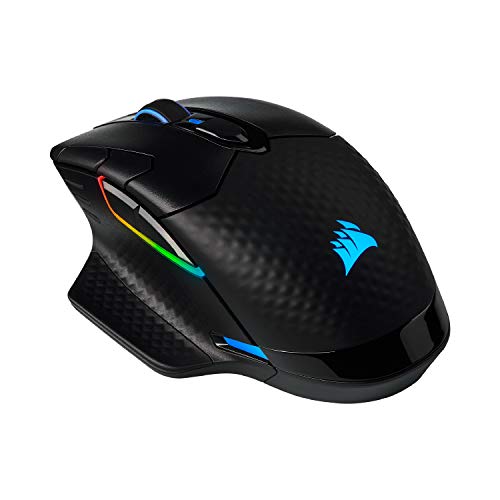
The Dark Core RGB Pro SE is the widest, most palm-filling mouse in this guide, and the pick for large hands that find other gaming mice too narrow. The shell is broad with a high palm hump, and it ships with two interchangeable side grips, so the thumb area can be set up smooth or textured. Eight buttons are programmable, and the sensor is a native 18,000 DPI optical sensor, the lowest top figure here but far above what most players use.
The standout feature is wireless charging. The SE model charges over Qi, so it can sit on a compatible charging pad and top up between sessions without a cable. The wireless link is SLIPSTREAM, which the maker lists as a sub-1 ms connection, and the mouse also runs wired over USB-C while it charges. At 142 grams it is the heaviest pick here, and that weight is part of the design: the broad shell is built for stability rather than speed.
This is the pick for players with large hands who want a mouse that fills the palm completely, and for players who want wireless charging without buying a separate charging system. The trade-off is the weight: at 142 grams it is more than twice the weight of the DeathAdder, so fast flick aiming takes more effort. Battery life is not published in the listing text read, so confirm it on the listing.
Specs
- Brand: Corsair
- ASIN: B082LVNJ4W
- Product: Corsair Dark Core RGB Pro SE Wireless Gaming Mouse, Black
- Sensor: 18,000 DPI optical
- Buttons: 8 programmable
- Connection: SLIPSTREAM wireless, sub-1 ms; wired over USB-C
- Charging: Qi wireless charging
- Side grips: 2 interchangeable included
- Weight: 142 g
- Model number: CH-9315511-NA
- Warranty: 2 years
- Battery life: not published in the listing text read — confirm on the listing
Watch out for: Corsair sells a non-SE version of this mouse without Qi charging under a different listing. The pick in this guide is the SE model with Qi charging, model CH-9315511-NA, so confirm the SE name and the model number on the listing before ordering.
5. Logitech G703 LIGHTSPEED
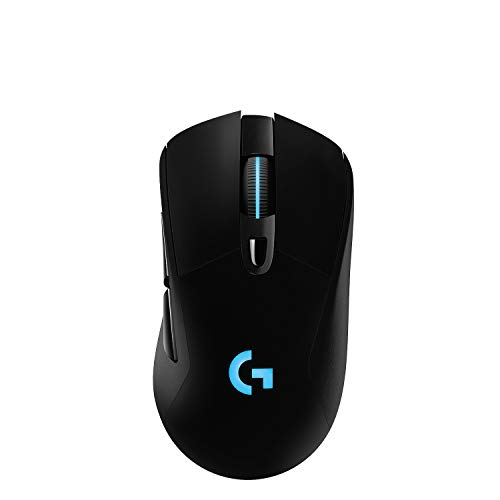
The G703 LIGHTSPEED is the simplest mouse in this guide, and that simplicity is its strength. The shell is a clean right-handed ergonomic curve with a gentle palm hump, rubber side grips, and six programmable buttons: two main clicks, two side buttons, a DPI button, and a clickable scroll wheel. The shape suits medium to large hands in a palm grip and larger hands in a claw grip.
The sensor is the HERO 25K optical sensor, tracking from 100 to 25,600 DPI, and the wireless link is LIGHTSPEED with a 1 ms report rate. The battery runs up to 60 hours on a charge, and the mouse supports PowerPlay wireless charging on a compatible pad. The weight is 95 grams with a removable 10 gram weight in the box. The mouse charges over USB, and it can run wired while it charges.
This is the pick for players who want a comfortable wireless ergonomic mouse without a crowded button layout, and for players who use the mouse for work during the day and play at night. The trade-off is the button count: six buttons cover a shooter and everyday use, but players who want many abilities on the mouse should look at the Basilisk or the G502 X Plus. The battery is also the shortest figure in this guide at 60 hours, so heavy daily players will charge it more often than the G502 X Plus.
Specs
- Brand: Logitech G
- ASIN: B07NSSPV9S
- Product: Logitech G703 LIGHTSPEED Wireless Gaming Mouse, Black
- Sensor: HERO 25K optical, 100–25,600 DPI
- Buttons: 6 programmable
- Weight: 95 g, plus removable 10 g weight
- Battery life: up to 60 hours
- Grip: rubber side grips
- Lighting: LIGHTSYNC RGB
- Charging: PowerPlay wireless charging compatible
- Connection: LIGHTSPEED wireless
- Model number: 910-005638 (HERO 25K version)
Watch out for: Logitech also sells an older G703 with the HERO 16K sensor under a different listing. The pick in this guide is the HERO 25K version, model 910-005638, so confirm the HERO 25K sensor and the model number on the listing before ordering.
How the Five Picks Compare
The Basilisk V3 Pro and the G502 X Plus are the button-heavy group: eleven and thirteen programmable buttons and tall palm humps built for games with many commands. The DeathAdder V3 Pro and the G703 LIGHTSPEED are the clean group: five and six buttons, lighter shells, and simpler layouts. The Dark Core RGB Pro SE stands alone as the wide-body pick, with interchangeable side grips and Qi wireless charging.
Hand size decides more than any other factor. Small to medium hands should start with the DeathAdder. Medium hands should try the G703 or the Basilisk. Medium to large hands should try the G502 X Plus. Large hands should try the Dark Core. If two picks both fit, choose on buttons next: more buttons for ability-heavy games, fewer buttons for shooters and for everyday use.## Frequently Asked Questions
Is a wireless ergonomic gaming mouse fast enough for competitive play?
Yes. Every pick here uses a 2.4 GHz wireless receiver with a 1 ms report rate, which matches a wired connection in practice. Use the 2.4 GHz receiver rather than Bluetooth for competitive play, because Bluetooth adds latency.
What grip style suits an ergonomic gaming mouse?
Palm grip suits these mice best, because the tall hump and the thumb rest are built for a hand that rests on the shell. Claw grip also works well on the DeathAdder and the G703, where the hump is lower. Fingertip grip players usually prefer a smaller and lighter mouse than the ones in this guide.
Does a heavier ergonomic mouse aim worse than a light one?
Not necessarily. A heavier mouse takes more effort to move quickly, which can slow fast flicks, but the same weight can steady the hand during tracking and long aiming holds. The lightest pick here is 63 grams and the heaviest is 142 grams, and both are valid choices: the light one for speed, the heavy one for stability.
How do I keep a wireless ergonomic mouse charged?
Charge it over USB when the battery warning appears, or use a compatible wireless charging pad if the mouse supports it. The G502 X Plus, the Dark Core RGB Pro SE, and the G703 LIGHTSPEED all support wireless charging on a compatible pad. The Basilisk V3 Pro and the DeathAdder V3 Pro charge over a cable.
Related guides
More from Amazon
Programs that pair well with the guide above. Offers and eligibility are set by Amazon and may change.
Free shipping on eligible items, Prime Video and more. Eligible new members can start with a free trial.
Start a Prime free trialAd-free music streaming. Eligible new subscribers can start with a free trial.
Try Music Unlimited freeA Prime membership for ages 18-24 with a trial period. Eligibility is set by Amazon.
See Prime for Young AdultsAudiobooks and podcasts to listen to on the go. Eligible new members can start with a free trial.
Try Audible freeAs an Amazon Associate we earn from qualifying purchases.