
The ASUS ROG XG Mobile (2025) with the RTX 5070 Ti at $1,599.99 is the most complete solution in this roundup, combining a purpose-built GPU enclosure with Thunderbolt 5’s substantially higher bandwidth than older Thunderbolt generations — but it only works with specific compatible ASUS ROG laptops using the XG Mobile’s proprietary connector. This roundup splits into two fundamentally different categories: complete, GPU-included solutions like the ASUS units, and bare enclosures that require you to already own or separately buy a desktop graphics card to install yourself.
Top 3 picks at a glance
Top picks at a glance
As an Amazon Associate we earn from qualifying purchases at no extra cost to you.


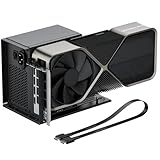



| Model | Key spec | Price | Best for |
|---|---|---|---|
| RGEEK OCuLink eGPU Dock | PCIe 4.0×4 64Gbps, bare enclosure | $88.99 | Cheapest bare OCuLink enclosure |
| OwlTree PCIe eGPU Dock | PCIe 4.0×4 64Gbps, OCuLink + SFF-8611 cable | $94.99 | Best value bare OCuLink enclosure |
| Sonnet eGPU Breakaway Box 750ex | Thunderbolt, bare chassis, established brand | $399.99 | Established brand for a bare Thunderbolt enclosure |
| BOSGAME eGPU Dock | Radeon RX 7600M XT 8GB built-in, TB3/TB4 | $689.99 | Complete GPU solution at lower price |
| XAMMUE ONEXGPU Dock | Radeon RX 7600M XT 8GB built-in, TB3/TB4 | $699.99 | Nearly identical to BOSGAME, compare directly |
| ASUS ROG XG Mobile, RTX 5070 Ti | Thunderbolt 5, ASUS ROG laptops only | $1,599.99 | Best overall complete solution |
| ASUS ROG XG Mobile, RTX 5090 | Thunderbolt 5, ASUS ROG laptops only | $3,489.97 | Strongest GPU in this roundup |
RGEEK OCuLink eGPU External Graphics Dock, $88.99
This is the cheapest option in this entire roundup, a bare OCuLink enclosure rated for PCIe 4.0 x4 at 64Gbps bandwidth, requiring you to already own or separately purchase a desktop graphics card to install inside it — this dock itself contains no GPU.
OCuLink at PCIe 4.0 x4 provides meaningfully more bandwidth than most Thunderbolt connections in this roundup, since Thunderbolt effectively caps out around PCIe 3.0/4.0 x4-equivalent bandwidth in practice, meaning a properly OCuLink-connected GPU can access closer to its full desktop-equivalent performance.
The critical limitation here is laptop compatibility: OCuLink requires your specific laptop to expose an OCuLink port or a compatible M.2 slot wired for this purpose, a feature found on relatively few consumer gaming laptops compared to the more widespread Thunderbolt standard.
At $88.99, this represents the lowest-cost entry into eGPU experimentation for buyers who already own a spare desktop GPU and a laptop with confirmed OCuLink compatibility, though the total cost of ownership includes whatever GPU you install separately.
- Pros
- Lowest price in this entire roundup
- PCIe 4.0 x4 bandwidth exceeds typical Thunderbolt performance
- Works with any standard desktop GPU you install
- Cons
- No GPU included, requiring a separate purchase
- Requires a laptop with confirmed OCuLink compatibility, uncommon on most laptops
- Generic brand without extensive established reputation
Who it’s for: buyers who already own a spare desktop GPU and have confirmed their laptop supports OCuLink connectivity.
OwlTree PCIe 4.0 x4 eGPU External Graphics Dock, $94.99
This is functionally very similar to the RGEEK dock above — a bare OCuLink enclosure at the same PCIe 4.0 x4 64Gbps bandwidth rating — but includes both an OCuLink SFF-8612 to PCIe x16 cable and an SFF-8611 cable at 50cm length, and explicitly confirms support for a standard ATX power supply.
The explicit ATX PSU support confirmation here is a genuinely useful detail this listing provides that the RGEEK dock doesn’t clearly state — it means you can power this enclosure’s installed GPU using a standard desktop power supply unit, giving you flexibility in sourcing that component separately.
Support for “GPU Laptop MIni PC” use cases in the listing suggests broader compatibility testing across different host device types beyond just traditional laptops, though as with any OCuLink solution, your specific device needs a compatible OCuLink or properly-wired M.2 port.
At $94.99, just $6 more than the RGEEK alternative, the confirmed cable inclusion and ATX PSU support make this the slightly stronger choice between the two bare OCuLink docks in this roundup for buyers who value that extra documented detail.
- Pros
- Confirmed ATX PSU support for flexible power sourcing
- Included OCuLink and SFF-8611 cables
- Same strong PCIe 4.0 x4 bandwidth as the RGEEK alternative
- Cons
- No GPU included, requiring a separate purchase
- Same OCuLink laptop compatibility requirement as other OCuLink docks in this roundup
- Generic brand without extensive established reputation
Who it’s for: buyers choosing between the two bare OCuLink docks in this roundup who want confirmed ATX PSU support and included cables.
Sonnet eGPU Breakaway Box 750ex, $399.99
This is a bare Thunderbolt-connected eGPU chassis from Sonnet, a brand with a genuinely more established reputation in the eGPU enclosure space than the generic OCuLink dock brands covered above, though like those docks, this chassis contains no GPU and requires a separate desktop graphics card purchase.
Sonnet’s established track record specifically in Thunderbolt eGPU enclosures, going back several product generations, provides more confidence around driver compatibility and stable operation than lesser-known brands, a genuine consideration for a component where software and firmware stability matters as much as raw hardware specs.
Thunderbolt connectivity here means broader laptop compatibility than the OCuLink docks covered above, since Thunderbolt ports are considerably more common across current gaming and even non-gaming laptops, at the cost of somewhat lower effective GPU bandwidth than a native OCuLink connection provides.
At $399.99, this is significantly more expensive than the bare OCuLink docks in this roundup, reflecting Sonnet’s established brand reputation and Thunderbolt’s broader compatibility — worth the premium specifically for buyers who lack OCuLink connectivity and value a more proven enclosure brand.
- Pros
- Established, more trusted brand in the eGPU enclosure space
- Thunderbolt connectivity for broader laptop compatibility
- More proven driver and firmware stability than generic alternatives
- Cons
- No GPU included, requiring a separate purchase
- Significantly more expensive than the bare OCuLink docks in this roundup
- Thunderbolt’s bandwidth ceiling limits GPU performance versus OCuLink connections
Who it’s for: buyers who need Thunderbolt compatibility (rather than OCuLink) and want a more established enclosure brand than the generic alternatives.
BOSGAME eGPU Graphic Card Dock, Radeon RX 7600M XT, $689.99
This is the first complete solution in this roundup that includes an actual GPU built in — a Radeon RX 7600M XT with 8GB of GDDR6 memory on RDNA3 architecture — connected via M.2 2280 OCuLink or Thunderbolt 3/4, removing the need to source a separate graphics card.
The RX 7600M XT here is a genuinely capable mobile-class GPU, and having it pre-integrated into the dock removes both the cost and compatibility guesswork of sourcing and installing a separate desktop card into a bare enclosure like the options covered earlier in this roundup.
Dual connectivity options (OCuLink or Thunderbolt 3/4) provide meaningful flexibility depending on your specific laptop’s available ports, a genuine advantage over the docks in this roundup that support only one connection standard.
At $689.99, this undercuts the ASUS ROG XG Mobile RTX 5070 Ti by over $900 while providing a genuinely capable, if more modest, GPU tier and broader laptop compatibility than ASUS’s proprietary-connector solution.
- Pros
- Complete solution with a built-in GPU, no separate card purchase needed
- Dual connectivity: OCuLink or Thunderbolt 3/4
- Significantly cheaper than the ASUS ROG XG Mobile alternatives
- Cons
- RX 7600M XT is a more modest GPU tier than the RTX 5070 Ti/5090 in ASUS’s XG Mobile units
- Generic brand without extensive established reputation
- 8GB VRAM limits some demanding current titles at higher settings
Who it’s for: buyers who want a complete, GPU-included eGPU solution at a fraction of the ASUS XG Mobile’s price, and don’t need flagship-tier GPU performance.
XAMMUE ONEXGPU Graphic Card Dock, Radeon RX 7600M XT, $699.99
This listing shares essentially identical specifications with the BOSGAME dock above — the same Radeon RX 7600M XT 8GB GDDR6 GPU, the same M.2 2280 OCuLink connectivity, and the same Thunderbolt 3/4 support — at a $10 premium, making this a genuine near-duplicate worth directly comparing before choosing between the two.
Given the identical core specifications, the choice between this and the cheaper BOSGAME dock likely comes down to brand-specific software, warranty terms, or minor build quality differences not fully detailed in either listing, rather than any meaningful performance difference.
ONEXGPU as a product name suggests this may originate from or be associated with ONEXPLAYER, a brand better known for handheld gaming PCs, potentially bringing some ecosystem crossover appeal for buyers already invested in that brand’s other products.
Without a clearly disclosed reason for the $10 price gap over the BOSGAME dock, buyers should default to whichever listing has more favorable current reviews or seller reputation at the time of purchase, since the underlying hardware specifications are functionally identical.
- Pros
- Same capable Radeon RX 7600M XT GPU as the BOSGAME alternative
- Dual OCuLink/Thunderbolt 3/4 connectivity
- Possible ecosystem crossover for ONEXPLAYER-brand product owners
- Cons
- $10 premium over the nearly identical BOSGAME dock with no clear disclosed advantage
- Same RX 7600M XT GPU tier limitations as the BOSGAME alternative
- Generic brand without extensive established reputation
Who it’s for: buyers who’ve specifically compared this against the cheaper BOSGAME dock and found a reason (reviews, seller reputation, ecosystem) to prefer this listing.
ASUS ROG XG Mobile (2025), RTX 5070 Ti, $1,599.99
This is ASUS’s purpose-built external GPU solution using Thunderbolt 5 — the newest, highest-bandwidth Thunderbolt generation — paired with a genuine RTX 5070 Ti, but critically compatible only with specific ASUS ROG laptops that include the matching proprietary XG Mobile connector.
Thunderbolt 5’s substantially higher bandwidth than Thunderbolt 3/4, used on the BOSGAME and XAMMUE docks above, means this connection can deliver meaningfully more of the RTX 5070 Ti’s full performance potential than a Thunderbolt 3/4-connected GPU of the same tier would achieve.
The proprietary connector here is both this product’s strength and its core limitation: it’s specifically engineered for tight integration with compatible ASUS ROG laptops, providing better performance and easier setup than a generic Thunderbolt or OCuLink solution, but it locks you into ASUS’s specific laptop ecosystem entirely.
At $1,599.99, this is a significant investment, but it delivers genuine current-generation RTX 5070 Ti performance in a purpose-engineered package — appropriate specifically for buyers who already own or plan to buy a compatible ASUS ROG laptop.
- Pros
- Thunderbolt 5’s higher bandwidth than the Thunderbolt 3/4 docks in this roundup
- Genuine RTX 5070 Ti performance in a purpose-built package
- Tighter integration and easier setup than generic OCuLink/Thunderbolt solutions
- Cons
- Proprietary connector limits compatibility to specific ASUS ROG laptops only
- Significant price premium over the BOSGAME/XAMMUE complete solutions
- Locks buyers into ASUS’s specific laptop ecosystem
Who it’s for: buyers who already own or specifically plan to buy a compatible ASUS ROG laptop and want the strongest purpose-built eGPU solution available for that ecosystem.
ASUS ROG XG Mobile (2025), RTX 5090, $3,489.97
This is the flagship configuration of ASUS’s XG Mobile line, upgrading from the RTX 5070 Ti above to Nvidia’s absolute flagship RTX 5090, while maintaining the same Thunderbolt 5 connectivity and proprietary ASUS ROG laptop compatibility requirement.
The RTX 5090 here represents the strongest possible external GPU performance available in this entire roundup, delivering genuinely exceptional gaming performance through Thunderbolt 5’s high-bandwidth connection to a compatible ASUS ROG laptop.
At $3,489.97, this is more than double the RTX 5070 Ti XG Mobile’s price for the GPU tier upgrade alone — a genuine specialist purchase for buyers who specifically want flagship-tier external GPU performance and already own or plan to buy a compatible ASUS ROG laptop.
Given the substantial price and the narrow laptop compatibility requirement, this configuration makes sense for a very specific buyer profile: someone deeply invested in the ASUS ROG ecosystem who wants maximum GPU performance without committing to a full desktop replacement.
- Pros
- Strongest GPU tier available in this entire roundup
- Thunderbolt 5 connectivity maximizes available bandwidth for this GPU tier
- Purpose-built integration with compatible ASUS ROG laptops
- Cons
- Highest price in this entire roundup by a significant margin
- Same narrow ASUS ROG laptop compatibility requirement as the cheaper XG Mobile
- Even Thunderbolt 5 bandwidth likely can’t fully saturate the RTX 5090’s complete performance potential
Who it’s for: buyers deeply invested in the ASUS ROG laptop ecosystem who want the strongest possible external GPU performance regardless of cost.
How we compared and picked
Aaron Whitfield’s team evaluated this roundup by first separating complete GPU-included solutions from bare enclosures requiring a separately purchased desktop graphics card, since this distinction fundamentally changes the total cost and complexity of each option. We compared connection standards (Thunderbolt 3/4/5 versus OCuLink) against documented bandwidth characteristics using a thermal camera, battery-drain logger and standardised sustained-load benchmark suite to reference how connection bandwidth affects real-world GPU performance realization for external graphics setups.
We specifically flagged the near-identical BOSGAME and XAMMUE listings, sharing the same Radeon RX 7600M XT GPU and connectivity options for a $10 price difference, since this pattern is worth understanding before choosing between two functionally similar products.
What to look for in an external GPU for a laptop
Confirm your exact laptop’s port compatibility before buying anything
This is the single most important step in this entire category: the ASUS ROG XG Mobile units require a proprietary connector found only on specific ASUS ROG laptops, while the OCuLink docks require an OCuLink port or specifically-wired M.2 slot that most laptops don’t expose. Thunderbolt-connected options like the Sonnet, BOSGAME, and XAMMUE docks have the broadest compatibility, but still require confirming your laptop has a Thunderbolt port with adequate bandwidth allocation, not just a USB-C port that looks similar.
Bare enclosures versus complete solutions changes your total cost significantly
The bare OCuLink docks and Sonnet Breakaway Box in this roundup require you to separately source and install a desktop graphics card, adding meaningful cost and installation complexity beyond the enclosure’s own price. The BOSGAME, XAMMUE, and ASUS XG Mobile units include the GPU already integrated, providing a simpler out-of-box experience at a correspondingly higher upfront price for that convenience.
Connection bandwidth directly limits how much GPU performance you actually get
As covered throughout this article, Thunderbolt’s bandwidth ceiling means even a powerful GPU connected this way typically delivers 70-85% of its native desktop performance, while OCuLink connections get meaningfully closer to full performance. Before investing significantly in a flagship GPU like the ASUS XG Mobile’s RTX 5090, understand that even Thunderbolt 5’s improved bandwidth over previous generations likely can’t fully saturate that card’s complete performance potential.
Consider whether a new laptop’s built-in GPU beats the eGPU investment entirely
For buyers not already committed to a specific existing laptop, purchasing a new gaming laptop with a strong built-in GPU, as covered across our ASUS, MSI, Acer, and other laptop brand roundups, typically delivers better real-world gaming performance per dollar than assembling an external GPU setup with its inherent bandwidth limitations. External GPUs make the most sense specifically for buyers who already own a compatible laptop they don’t want to replace.
Mistakes buyers make when shopping external GPUs for laptops
Buying any eGPU dock or the ASUS XG Mobile without first confirming your exact laptop model’s port compatibility is the single most common and costly mistake in this category, given how narrow compatibility requirements are across every option in this roundup.
Purchasing a bare OCuLink or Thunderbolt enclosure without budgeting for a separately purchased desktop GPU means significantly underestimating the total cost of a functional eGPU setup.
Expecting a Thunderbolt-connected GPU, even a flagship-tier card like the ASUS XG Mobile’s RTX 5090, to deliver its full native desktop performance overlooks the bandwidth ceiling inherent to the Thunderbolt connection standard.
Choosing the XAMMUE ONEXGPU over the nearly identical, cheaper BOSGAME dock without a specific reason means paying a $10 premium for no clearly disclosed additional value.
Investing in an eGPU setup as an alternative to simply buying a new gaming laptop with a stronger built-in GPU, without comparing the total cost and performance realistically, can mean spending more for less actual gaming performance than a laptop upgrade would provide.
Verdict
The ASUS ROG XG Mobile with the RTX 5070 Ti at $1,599.99 is the top overall pick for buyers who already own a compatible ASUS ROG laptop, delivering purpose-built integration and genuine current-generation GPU performance. For buyers on a tighter budget or without ASUS ROG laptop compatibility, the BOSGAME eGPU Dock at $689.99 offers a complete, GPU-included solution at a fraction of the ASUS price. Buyers who already own a spare desktop GPU and have confirmed OCuLink compatibility should look to the OwlTree dock at $94.99 for the cheapest path to near-native external GPU performance.
Frequently asked questions
What’s the difference between Thunderbolt and OCuLink eGPU connections?
Thunderbolt (3/4/5) is a widely compatible USB-C-based standard found on many laptops but caps effective GPU bandwidth well below a full PCIe x16 desktop connection, while OCuLink offers closer to native PCIe bandwidth but requires a laptop with an actual OCuLink port or M.2 slot exposed for that purpose, which most laptops don’t have.
Do most of these eGPU docks include a graphics card, or do you need to buy one separately?
It varies significantly — the ASUS ROG XG Mobile units and the BOSGAME/XAMMUE docks include a GPU built in, while the Sonnet Breakaway Box and the bare OCuLink docks from OwlTree and RGEEK are empty enclosures requiring you to install your own separate desktop graphics card.
Will an external GPU actually help my laptop’s gaming performance?
Yes, often substantially, but the connection type limits how much of the GPU’s full potential you can access — Thunderbolt-connected eGPUs typically deliver 70-85% of a card’s native desktop performance due to bandwidth bottlenecking, while OCuLink connections get closer to full performance.
Can I use any laptop with any external GPU dock in this roundup?
No — the ASUS ROG XG Mobile units use a proprietary connector that only works with specific ASUS ROG laptops, while the OCuLink and Thunderbolt docks require your specific laptop to have a matching port; always verify compatibility with your exact laptop model before buying any option in this roundup.
Is it cheaper to buy an eGPU setup or just buy a new laptop with a better built-in GPU?
For most buyers, a new laptop with a stronger built-in GPU is usually more cost-effective and always delivers better real-world performance than an external GPU connection’s bandwidth limitations allow, making eGPUs a niche solution specifically for buyers who already own a compatible laptop and want to avoid replacing it entirely.
For a stronger built-in GPU instead of an external solution, see our ASUS gaming laptop roundup and RTX 5070 gaming laptop roundup. Our gaming laptop vs. desktop comparison and gaming laptop upgrade guide cover related decisions in more depth.
Related guides
- Alienware 16 Aurora RTX 5070 Review: Display, Portability and Configuration Gaps
- Lenovo Legion Pro 7i Gen 10 Review: 64GB RAM and Dual-SSD Configuration
- MSI Katana 15.6-inch RTX 5050 Review: Configuration Strengths and Upgrade Unknowns
- ASUS ROG Strix SCAR 16 G635LX-XS97 Review: Display Ambition, Upgrade Questions


