The best gaming laptop for game development combines a capable processor, enough RAM for your engine and development tools, a dedicated GPU, and fast SSD storage. For most developers, the ASUS ROG Strix G16 (2025) with an RTX 5070 Ti, 32GB of RAM, and a 2TB SSD offers a strong balance of performance and workspace. Developers building larger Unreal Engine 5 environments should also consider the Lenovo Legion Pro 7i Gen 10, specifically the Lenovo-verified SKU 83F50014US, or the Alienware 16 Area-51 with its RTX 5090 and 24GB of VRAM.
The right choice depends on the projects you build. Unity and Godot developers working primarily on 2D games can spend considerably less than developers creating detailed 3D environments, compiling large projects, or running Blender alongside an engine and code editor.
This roundup compares six configurations across entry-level, balanced, and high-end development workloads. Prices are US listing observations, not guaranteed checkout quotes, and configurations are identified individually wherever possible.
How We Selected These Gaming Laptops

Game development stresses different components from ordinary gameplay. Code compilation benefits from CPU performance, the editor and other applications consume system memory, and complex 3D scenes can require substantial GPU memory. Storage capacity also matters because engine installations, source assets, derived data, and packaged builds accumulate quickly.
Epic Games’ Unreal Engine hardware guidance identifies 32GB of system RAM and at least 8GB of graphics memory as useful reference points for development systems. Unity’s Editor requirements are less demanding, but minimum requirements do not necessarily reflect the needs of a large project with several applications open.
We prioritized identifiable configurations, CPU and GPU capability, VRAM, memory capacity, display resolution, storage, upgrade considerations, and US pricing evidence. This is a source-based comparison, not a claim that Sword Gaming PC benchmarked all six laptops side by side. Where comparable performance results were unavailable, we avoided assigning unsupported FPS or compilation-time figures.
Quick Verdict
- Best entry-level option: MSI Cyborg 17 B2RWFKG-074US, with an RTX 5060 and a recommended memory upgrade for serious development.
- Best balanced choice: ASUS ROG Strix G16 G615LR-MS97, combining an RTX 5070 Ti with 32GB of RAM and 2TB of storage.
- Best high-power RTX 5070 Ti configuration: Acer Predator Helios Neo 16 AI PHN16-73-98MC.
- Best high-end balance: Lenovo Legion Pro 7i Gen 10, SKU 83F50014US.
- Best for demanding graphics workloads: Alienware 16 Area-51 with an RTX 5090 and 24GB of VRAM.
- Best premium large-screen option: Razer Blade 18, although its reviewed listing showed the selected configuration as out of stock.
Quick Comparison Table
| Laptop and exact configuration | CPU / GPU | RAM / storage | Price observation |
| MSI Cyborg 17 B2RWFKG-074US | Core 7 240H / RTX 5060 8GB | 16GB / 1TB | $1,399 on MSI USA’s deal listing |
| ASUS ROG Strix G16 G615LR-MS97 | Core Ultra 9 275HX / RTX 5070 Ti 12GB | 32GB / 2TB | $2,899.99 on ASUS US |
| Acer Predator Helios Neo 16 AI PHN16-73-98MC | Core Ultra 9 275HX / RTX 5070 Ti 12GB | 32GB / 1TB | Last observed at $3,007.99 on CDW |
| Lenovo Legion Pro 7i Gen 10, 83F50014US | Core Ultra 9 275HX / RTX 5080 16GB | 32GB / 2TB | Lenovo US listing observed at $3,868.99 |
| Alienware 16 Area-51, useaa16250hbtsjdmr | Core Ultra 9 290HX Plus / RTX 5090 24GB | 32GB / 1TB | $4,749.99 on Dell US |
| Razer Blade 18, RTX 5090 configuration | Core Ultra 9 275HX / RTX 5090 24GB | 32GB / 2TB | $4,899.99 listed; out of stock |
Prices are before sales tax. The Acer figure is a historical retailer observation, while the Lenovo price requires confirmation at checkout. The Razer listing is not a currently available purchasing recommendation while it remains out of stock. Actual prices and inventory can change.
1. MSI Cyborg 17 B2RWFKG-074US — Best Entry-Level Option
Best for: Students, beginner developers, and smaller Unity or Godot projects.
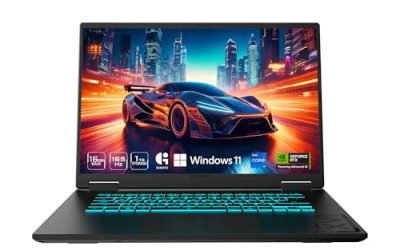
The MSI Cyborg 17 B2RWFKG-074US combines an Intel Core 7 240H processor with an NVIDIA GeForce RTX 5060 Laptop GPU carrying 8GB of GDDR7 memory. MSI’s US deal listing identifies 16GB of DDR5 RAM, a 1TB NVMe SSD, and a 17.3-inch Full HD IPS display running at 144Hz.
The principal advantage is its lower observed price of $1,399. That makes it a more accessible starting point than systems built around RTX 5070 Ti or RTX 5080 graphics.
The RTX 5060 is suitable for learning programming, developing many 2D games, building smaller 3D projects, and testing moderately demanding scenes. However, 16GB of system RAM leaves less room for an engine, an IDE, Blender, and a browser to operate together. Increasing system memory to 32GB should be a priority if the exact unit supports the required upgrade.
The display is another compromise. Full HD is adequate for development, but the listed panel’s 45% NTSC color coverage is less suitable for color-critical texture and art work.
Advantages: Lower entry cost, dedicated graphics, and 1TB of storage.
Limitations: Only 16GB of installed RAM, an entry-level GPU for demanding 3D environments, and limited display color coverage.
Buy if your projects are relatively small and you want to begin development without spending several thousand dollars. Skip if you need an out-of-the-box 32GB system, advanced Unreal Engine rendering, or a color-accurate display.
2. ASUS ROG Strix G16 (2025) G615LR-MS97 — Best Balanced Choice
Best for: Developers who want a capable CPU, 12GB of GPU memory, and generous storage.
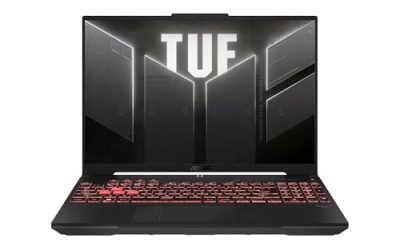
The ASUS ROG Strix G16 configuration G615LR-MS97 pairs an Intel Core Ultra 9 275HX with an NVIDIA RTX 5070 Ti Laptop GPU, 32GB of DDR5 RAM, and a 2TB PCIe 4.0 SSD. Its 16-inch display has a 2560 × 1600 resolution and a 240Hz refresh rate.
This combination is a strong fit for developers who regularly switch between an engine editor, code editor, asset management tools, and play-testing. The 2TB SSD offers more breathing room than a 1TB drive, especially when maintaining multiple projects or engine versions.
The RTX 5070 Ti Laptop GPU has 12GB of GDDR7 memory. That capacity provides more headroom for complex materials, textures, and real-time graphics than an 8GB GPU. Nevertheless, available memory is only one part of performance; GPU power limits, cooling, and the application’s rendering workload also matter.
ASUS listed this configuration at $2,899.99. It is substantially more expensive than the entry-level MSI, but it starts with 32GB of RAM and more capable graphics.
Advantages: 12GB VRAM, 32GB RAM, 2TB storage, and a high-resolution 240Hz display.
Limitations: Its price is high for an RTX 5070 Ti laptop, and demanding future projects may eventually require more than 32GB of RAM.
Buy if you want one machine for ongoing 3D development, programming, and testing. Skip if your projects are primarily 2D or your budget cannot justify the additional cost over an entry-level system.
3. Acer Predator Helios Neo 16 AI PHN16-73-98MC — Best High-Power RTX 5070 Ti Configuration
Best for: Developers who prioritize GPU power for 3D scenes and rendering-related workloads.
Acer’s specific configuration PHN16-73-98MC, part number NH.U0UAA.004, pairs a Core Ultra 9 275HX with an RTX 5070 Ti Laptop GPU carrying 12GB of GDDR7 memory. Acer lists maximum graphics power of up to 170W, 32GB of DDR5 RAM, a 1TB SSD, and a 16-inch 2560 × 1600 IPS display running at 240Hz.
The higher stated GPU power limit distinguishes this configuration from lower-power implementations of the same graphics processor. It can be a useful factor when comparing laptops intended for prolonged graphics-intensive work, although power limits alone do not establish which machine performs better in every application.
The 240Hz display offers a responsive workspace for play-testing, while the 2560 × 1600 resolution provides useful space for engine panels and asset inspectors.
CDW’s listing showed a price of $3,007.99 in a June 24, 2026 product-page snapshot. That is a historical observation, not a verified October 2026 offer. The purchase decision should therefore depend on the price and availability confirmed at checkout.
A major restriction is memory capacity: Acer identifies 32GB as the maximum supported system RAM for this SKU. That is adequate for many projects, but restrictive for a laptop at this price if your workflow may expand to large scenes and numerous simultaneous applications.
Advantages: 12GB VRAM, a stated GPU power limit of up to 170W, and a high-refresh QHD-class display.
Limitations: Only 1TB of storage, a stated 32GB system-memory ceiling, and an unconfirmed current price.
Buy if GPU capability is your priority and the exact configuration is competitively priced. Skip if your work may benefit from 64GB of RAM or you need a confirmed current offer before making a purchase.
4. Lenovo Legion Pro 7i Gen 10 (83F50014US) — Best High-End Balance
Best for: Developers who need strong graphics capability, more VRAM, and room for demanding projects.
Lenovo’s official PSREF identifies 83F50014US as a Legion Pro 7i Gen 10 configuration. It uses an Intel Core Ultra 9 275HX processor, an NVIDIA RTX 5080 Laptop GPU with 16GB of GDDR7 memory, 32GB of DDR5-6400 CSODIMM RAM, and two 1TB PCIe 4.0 SSDs.
The GPU has a specified 175W total graphics power limit. Its 16GB of VRAM provides greater capacity than the RTX 5070 Ti configurations above, which can be valuable for detailed Unreal Engine scenes, high-resolution assets, and graphics-heavy workflows.
The laptop also has a 16-inch 2560 × 1600 OLED display with a 240Hz refresh rate and 100% DCI-P3 coverage. That combination provides useful editor workspace and supports visual asset review. Lenovo specifies two memory slots and support for up to 64GB of system RAM, while the 2TB storage configuration offers useful room for project files.
Lenovo’s US listing showed $3,868.99 during this research, but the final checkout price must be reconfirmed. More importantly, the recommendation is tied to the official 83F50014US SKU rather than relying on a conflicting model identifier in a third-party review.
Advantages: RTX 5080 with 16GB VRAM, a 175W graphics power limit, 2TB storage, OLED display, and a supported path to 64GB RAM.
Limitations: Expensive, relatively heavy, and likely to need wall power during demanding work. The current price still requires checkout confirmation.
Buy if your workload justifies more GPU memory and you want a balanced high-end machine. Skip if a less expensive RTX 5070 Ti system already meets the requirements of your projects.
5. Alienware 16 Area-51 — Best for Demanding Graphics Workloads
Best for: Developers building complex environments, handling large assets, or working with demanding real-time rendering features.
The Dell-listed Alienware 16 Area-51 configuration useaa16250hbtsjdmr combines an Intel Core Ultra 9 290HX Plus processor, an RTX 5090 Laptop GPU with 24GB of GDDR7 memory, 32GB of DDR5 RAM, and a 1TB NVMe SSD. Its 16-inch OLED display runs at 2560 × 1600 and 240Hz.
The main reason to choose this system is its 24GB GPU memory capacity. Large scenes with detailed textures, complex geometry, and advanced lighting can put considerable pressure on graphics memory. More VRAM can reduce the need to compromise on assets or rendering settings, although it does not guarantee faster performance in every project.
Dell listed this configuration at $4,749.99. The price is substantial, and the standard 1TB SSD may fill quickly when several large projects and engine installations share the same drive.
The laptop also starts at approximately 7.49 pounds, making it less attractive for people who carry their development machine daily. For a mostly desk-based workflow, its size may be a reasonable trade-off for its high-end hardware.
Advantages: 24GB VRAM, a high-end processor, a 240Hz OLED display, and considerable headroom for demanding graphics workloads.
Limitations: High cost, heavy chassis, 32GB of installed RAM, and only 1TB of storage in the identified configuration.
Buy if your projects genuinely benefit from a flagship GPU and 24GB of VRAM. Skip if you mainly develop small games or would gain more from upgrading your RAM and storage on a less expensive machine.
6. Razer Blade 18 (2026) — Best Premium Large-Screen Option
Best for: Developers who prefer an 18-inch workspace and want configurable high-end hardware.
The Razer Blade 18 configuration page lists an Intel Core Ultra 9 275HX, an RTX 5090 Laptop GPU with 24GB of GDDR7 memory, 32GB of RAM, and a 2TB SSD. The 18-inch display supports dual modes: UHD+ at 240Hz or FHD+ at 440Hz.
The large panel is useful for arranging the engine viewport, code editor, hierarchy, and asset browser side by side. Razer also offers memory configurations up to 128GB on the product line, although larger memory configurations carry a substantial additional cost and should not be confused with the 32GB configuration described here.
The listed price was $4,899.99, but the selected configuration showed as out of stock when checked. It should therefore be treated as a conditional alternative rather than a currently available recommendation.
Razer’s premium construction and large display may appeal to developers who move between a desk setup and other workspaces. However, an 18-inch high-performance laptop is still considerably less portable than a thinner productivity laptop, and its price is difficult to justify for smaller projects.
Advantages: Large dual-mode display, 24GB of VRAM, 2TB storage, and configurable memory up to 128GB.
Limitations: Premium pricing, significant carrying weight, potential fan noise under sustained load, and an out-of-stock listing for the selected configuration.
Buy if the configuration becomes available and the larger display and memory options justify the premium. Skip if you need a laptop immediately or value portability and cost efficiency over premium construction.
How to Choose the Best Gaming Laptop for Game Development
CPU: Consider how often you compile
A powerful multi-core CPU is useful for code compilation, asset processing, shader work, and builds. A Core Ultra 9 or Ryzen 9 is appropriate for demanding workflows, but smaller projects may not benefit enough to justify the premium. Sustained cooling matters as much as peak processor specifications during lengthy workloads.
GPU and VRAM: Match the engine and project size
For 2D development and smaller 3D projects, a GPU with 8GB of VRAM can be sufficient. For demanding Unreal Engine 5 scenes, 12GB is a more comfortable target, while 16GB or 24GB can be useful for particularly complex projects.
Do not compare laptops by the GPU model alone. Check the precise graphics processor, available VRAM, power limit, and cooling design. A higher power limit may help sustain performance, but it does not establish a fixed performance advantage across all applications.
RAM: Start with 32GB for serious development
16GB is usable for learning programming or developing smaller games, but 32GB is a more practical starting point when an engine, IDE, browser, and art tools run simultaneously. Consider 64GB for large projects, heavy multitasking, or substantial local asset workloads.
Check the exact SKU’s maximum memory capacity and whether the RAM is upgradeable. The Acer configuration above, for example, lists a lower maximum than the Lenovo.
Storage and display: Avoid bottlenecks outside the GPU
A 1TB NVMe SSD is a reasonable starting point; 2TB is preferable for large projects and multiple engine installations. Check the number of SSD slots and supported drive sizes before assuming you can expand storage later.
A 2560 × 1600 display offers more workspace than Full HD. Color coverage matters when reviewing textures and artwork, while refresh rate is more relevant to responsive play-testing. For long development sessions, also consider keyboard comfort, port selection, fan noise, and whether you can work near a power outlet.
FAQs
1. What is the best gaming laptop for game development?
The ASUS ROG Strix G16 is a strong balanced choice for many developers because it combines an RTX 5070 Ti, 32GB of RAM, and a 2TB SSD. The Lenovo Legion Pro 7i Gen 10 and Alienware 16 Area-51 are better candidates when demanding graphics workloads justify their higher prices.
2. Is 16GB of RAM enough for game development?
16GB can support smaller Unity, Godot, and 2D projects, but 32GB is a more comfortable target for serious development. Larger Unreal Engine projects and heavy multitasking can benefit from 64GB.
3. Do I need an RTX 5080 or RTX 5090 for Unreal Engine 5?
No, an RTX 5080 or RTX 5090 is not required for every Unreal Engine 5 project. A capable lower-tier GPU can handle many projects, while 16GB or 24GB of VRAM may be useful for especially complex scenes and graphics-heavy workloads.
4. Is a gaming laptop better than a workstation laptop for game development?
A gaming laptop can provide good value for developers who need real-time graphics and game testing. A professional workstation may be preferable when specialized software certification, professional application support, or particular reliability requirements matter more than gaming performance.
Final Verdict
For most developers, the ASUS ROG Strix G16 G615LR-MS97 is the strongest balanced starting point in this comparison. Its 32GB of RAM, 2TB SSD, and RTX 5070 Ti provide a sensible combination for ongoing Unity and Unreal Engine development.
The MSI Cyborg 17 is the lower-cost option for smaller projects, provided its RAM limitations are acceptable. The Acer Predator Helios Neo 16 AI offers a high-power RTX 5070 Ti configuration but has a stated 32GB system-memory ceiling. For more demanding projects, the Lenovo Legion Pro 7i Gen 10 83F50014US offers an RTX 5080 with 16GB VRAM, while the Alienware 16 Area-51 provides 24GB VRAM for workloads that can use it.
Before purchasing, verify the exact model identifier, RAM limit, GPU memory, current price, and stock status. A confirmed, well-balanced configuration is more useful than a higher specification on paper if it comes with insufficient memory or an unreliable price listing.