Choosing the best gaming laptop for travel means balancing gaming performance with weight, battery life, charger size, and durability. A powerful laptop can be frustrating on flights or during daily commutes if it is bulky or runs out of power quickly. This guide compares portable options and explains the compromises worth considering before you buy.
How to Choose a Gaming Laptop for Travel
The right travel laptop depends on more than its advertised GPU. A compact chassis saves bag space, but cooling limits, power requirements, and battery capacity influence how useful the machine is away from a desk. Prioritize the following four factors according to how often you travel and which games you play.

1. Weight, dimensions, and charger size
A 14-inch laptop is usually easier to pack than a 16- or 18-inch gaming machine. For example, the ASUS ROG Zephyrus G14 (2025) weighs approximately 3.31–3.46 pounds, depending on configuration, while the ASUS TUF Gaming A14 (2025) starts at approximately 3.22 pounds. Those weights exclude the charger and other accessories.
Republic of Gamers|ROG Global
+1
Check the power adapter before buying. A slim laptop may still require a relatively large gaming charger, adding considerable bulk to your bag. USB-C charging can be convenient for lighter workloads, but confirm the laptop’s supported input wattage and whether a compatible charger can supply enough power for your intended use.
2. GPU performance and thermal limits
Choose the GPU based on your games and target resolution rather than the graphics name alone. A mobile RTX 5060 can be suitable for many modern games, but actual performance also depends on power limits, cooling, CPU configuration, and graphics settings. Two laptops with the same GPU label do not necessarily perform identically.
Thin laptops have less room for cooling hardware than many thicker gaming models. Expect fan noise and warmer surfaces during demanding sessions, particularly when gaming while plugged in. Look for independent reviews of the exact configuration and prioritize sustained performance over a brief peak result.
3. Battery life away from an outlet
A large battery does not guarantee a full day of gaming. Discrete-GPU gaming, high screen brightness, demanding games, and high refresh rates can increase power consumption considerably. Manufacturer battery figures also depend on workload and power settings, so don’t treat them as estimates of continuous gaming time.
For flights, campus visits, and hotel work, consider a laptop that can switch to integrated graphics or an efficient power profile when you are not gaming. Lower brightness and a capped frame rate can help extend unplugged use. Plan to play demanding games near an outlet whenever possible.
4. Display, memory, and storage
A 14-inch screen is portable, but the smaller workspace may feel cramped for strategy games, editing, or multitasking. A 16-inch laptop offers more room, although it occupies more bag space. Resolution matters too: a high-resolution panel looks sharp, but demanding games can require more GPU power to run at native resolution.
Check memory and storage before purchase. Some thin gaming laptops use onboard memory that cannot be upgraded later. A 1TB SSD is a reasonable starting point for a varied game library, but large modern installations can fill it quickly. Confirm the exact configuration’s RAM capacity, SSD slots, and upgrade restrictions rather than assuming every version of a model is identical.
Top Gaming Laptops for Travel
These recommendations prioritize portability, practical gaming hardware, and manufacturer-documented specifications. The models below serve different needs rather than claiming a universal performance winner. Exact GPU, memory, storage, display, and power specifications vary by configuration, so verify the complete model number before purchasing.
Quick comparison
| Product | Best For | Key Spec | Compatibility | Watch Out For |
| ASUS ROG Zephyrus G14 (2025) | Premium all-around travel | 14-inch display; 73Wh battery | Windows 11; configuration-dependent GPU | Premium pricing; charger adds weight |
| ASUS TUF Gaming A14 (2025) | Lightweight value | 14-inch, 2560 × 1600, 165Hz display; up to RTX 5060 | Windows 11; FA401-series configuration varies | Onboard RAM limits upgrades |
| Razer Blade 14 (2025) | Premium compact gaming | 14-inch class; RTX 50-series options reported by TechRadar | Windows 11; confirm exact regional SKU | High-end pricing; configuration matters |
The ASUS specifications are documented on the manufacturers’ product pages. TechRadar identifies the Razer Blade 14 (2025) as a leading thin-and-light gaming option, but the precise configuration and current US price should be checked before purchase.
Republic of Gamers|ROG Global
+2
ASUS ROG Zephyrus G14 (2025) — Best Premium All-Rounder
The Zephyrus G14 is a strong choice for travelers who want a compact gaming laptop without giving up a high-quality display. ASUS lists a 14-inch chassis weighing approximately 3.31–3.46 pounds across configurations, plus a 73Wh battery. Its small footprint suits backpacks and shared workspaces, while its gaming-focused hardware targets users who need more than basic integrated graphics.
Republic of Gamers|ROG Global
+1
Check the exact GPU and memory configuration before committing. The G14 family includes different hardware options, so do not assume every listing offers the same graphics performance or upgrade potential. It is best for frequent travelers who value screen quality, compact dimensions, and a premium finish. Consider the TUF A14 instead if lower cost and practical storage expansion matter more than premium positioning.
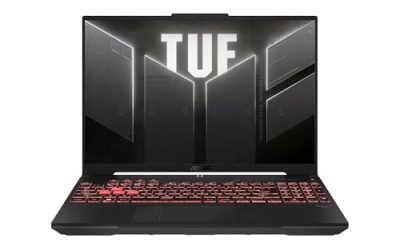
ASUS TUF Gaming A14 (2025) — Best Lightweight Value
The TUF Gaming A14 emphasizes portability with a listed starting weight of approximately 3.22 pounds and a 73Wh battery. ASUS documents configurations with up to an AMD Ryzen AI 7 350 processor and an NVIDIA GeForce RTX 5060 Laptop GPU. The display is a 14-inch, 2560 × 1600 IPS-level panel with a 165Hz refresh rate, making it suitable for gaming and everyday work.
ASUS Global
+1
Storage flexibility is a useful advantage: ASUS specifies two M.2 PCIe SSD slots, with some platform-specific speed limitations on the second slot. However, its LPDDR5X memory is onboard, and maximum capacity depends on the configuration. Choose a version with enough RAM from the start. This laptop suits travelers who want a lighter system and future SSD flexibility; consider the Zephyrus if a more premium design and display experience are higher priorities.
Razer Blade 14 (2025) — Best Premium Compact Alternative
The Razer Blade 14 is worth comparing if you want a compact gaming laptop with a premium chassis and higher-end graphics options. TechRadar’s thin-and-light gaming roundup lists the 2025 model among its leading choices for the category. However, a recommendation should be based on the precise GPU, memory, storage, and display configuration—not the Blade name alone.
TechRadar
+1
Its main trade-off is likely to be purchase cost relative to more practical alternatives, and a compact design does not remove the need for a gaming power adapter. Verify the exact US configuration, warranty, included charger, and current price before buying. Choose it if premium construction and a small footprint justify the expense; consider the TUF A14 if portability and upgrade flexibility are more important than luxury positioning.
Which travel laptop should you choose?
For frequent flights and commuting, start with the TUF Gaming A14 if its configuration meets your needs and you want a lighter option with two SSD slots. The Zephyrus G14 is a better starting point for buyers prioritizing a premium compact experience. The Blade 14 is a reasonable alternative for shoppers willing to pay more for its particular design and configuration.
No current US price comparison is included here because a reliable, same-day price for matching configurations has not been established. Compare identical RAM, SSD, and GPU specifications when checking retailers; otherwise, a lower advertised price may simply reflect a less capable version.
FAQ
Is a 14-inch gaming laptop good for travel?
Yes, a 14-inch gaming laptop is a practical travel choice because it generally takes up less space than larger gaming models. Check its total carry weight, including the charger, and make sure the screen size suits your games and everyday work.
Can you play games on a gaming laptop without plugging it in?
Yes, but demanding games generally consume battery quickly and may run slower on battery power. Use an efficient power profile for light tasks, and check independent battery measurements for the exact laptop configuration before relying on it during long journeys.
Is an RTX 5060 laptop GPU enough for travel gaming?
Yes, an RTX 5060 Laptop GPU can suit portable gaming at 1080p or 1600p, depending on the game, graphics settings, and laptop power limits. Check reviews of the exact model before expecting a particular frame rate, especially with ray tracing enabled.
Should I choose a thin gaming laptop or a larger 16-inch model?
Choose a thin 14-inch laptop if carrying comfort is your priority, or a 16-inch model if you value a larger display and potentially more cooling capacity. Compare the complete system weight, charger, GPU power limits, and battery performance before deciding.
Final Thoughts
The best gaming laptop for travel should fit your bag, handle your favorite games, and remain useful away from a power outlet. Start by comparing the ASUS TUF Gaming A14 and ROG Zephyrus G14, then check exact configurations, independent performance reviews, and current US pricing before making your purchase.