Choosing the best gaming laptop with long battery life means balancing everyday endurance, gaming performance, weight, and charging convenience. Gaming laptops rarely last as long during demanding games as they do during light work, so this guide focuses on portable systems, verified battery specifications, and practical trade-offs for students, travelers, and mobile gamers.
How to Choose a Gaming Laptop With Long Battery Life
The right laptop should handle browsing, schoolwork, streaming, and gaming without forcing you to carry its charger everywhere. Start with independent battery measurements, then compare battery capacity, processor efficiency, display characteristics, and graphics power. Manufacturer battery claims are useful context, but real-world results matter more.
1. Compare Real-World Battery Endurance
A large battery does not automatically mean long runtime. Screen brightness, refresh rate, background applications, wireless connectivity, and processor activity all affect power consumption. Independent reviews that report a repeatable web-browsing test provide a useful starting point for estimating everyday endurance.
For a gaming laptop with long battery life, check both light-use and gaming results whenever possible. Web browsing can last several hours longer than demanding 3D games. Treat the two workloads separately, and avoid comparing review results obtained at substantially different brightness levels, power profiles, or test conditions.
2. Understand Battery Capacity and Charging
Battery capacity is usually expressed in watt-hours (Wh). A higher Wh rating provides more stored energy, but it cannot predict runtime without knowing how efficiently the laptop uses that energy. Two laptops with similar battery capacities can have very different endurance because their processors, displays, and graphics hardware draw different amounts of power.
Also consider the included power adapter and USB-C charging support. A smaller USB-C charger may be convenient for travel, but charging capability and performance limits vary by model. Confirm the manufacturer’s supported charging specifications before replacing the supplied adapter or expecting full gaming performance from a compact charger.
3. Choose an Efficient Performance Profile
Discrete NVIDIA GeForce RTX graphics provide substantial gaming capability, but keeping the dedicated GPU active during light tasks can increase power consumption. Hybrid graphics modes allow supported laptops to use integrated graphics for less demanding work and activate the discrete GPU when needed. The exact controls depend on the model and its firmware.
When away from an outlet, use the manufacturer’s balanced or quiet profile, lower unnecessary background activity, and reduce display brightness to a comfortable level. These adjustments can help everyday endurance, but they may also reduce responsiveness or gaming performance. Switch back to an appropriate performance profile when connected to power.
4. Balance Portability, Display, and Performance
A 14-inch gaming laptop is often easier to carry than a 16-inch model, particularly for commuting, college, and frequent flights. However, a smaller chassis can constrain cooling, while a high-resolution OLED display and high refresh rate can consume more power under certain workloads. Consider screen quality alongside battery capacity rather than treating either as a complete answer.
GPU power limits matter, too. Two laptops with the same GeForce GPU name may use different graphics power budgets and deliver different performance. If you prioritize unplugged gaming, investigate performance on battery rather than assuming an advertised GPU configuration will deliver its plugged-in results without compromise.
Top Picks: Gaming Laptops With Long Battery Life
These recommendations prioritize independently reported endurance, portability, and gaming capability rather than GPU performance alone. Tom’s Guide’s 2026 reviews provide useful evidence for the Razer Blade 16, ASUS ROG Zephyrus G14, Framework Laptop 16, and ROG Flow Z13. Their results reflect different configurations and workloads, so use them as individual reference points rather than a universal ranking.
| Product | Best For | Key Spec | Compatibility | Watch Out For |
| Razer Blade 16 (2026) | Best premium overall | 16-inch OLED, 240Hz; up to RTX 5090 | Windows PC games and applications | High price, heat, and fan noise |
| ASUS ROG Zephyrus G14 (2025) | Best compact gaming laptop | 14-inch 3K OLED, 120Hz; 73Wh battery | Windows gaming; configuration-dependent components | Limited upgradeability |
| Framework Laptop 16 | Best modular design | 16-inch platform; reviewed RTX 5070 configuration | Windows gaming; modular components vary by configuration | Larger chassis and configuration-dependent endurance |
| ASUS ROG Flow Z13 (2025) | Best ultraportable alternative | 13.4-inch convertible gaming PC | Windows gaming; performance depends on game compatibility | Integrated graphics differ from a discrete RTX GPU |
1. Razer Blade 16 (2026) — Best Premium Overall
The Razer Blade 16 is a strong choice if you want a powerful gaming laptop that can also handle a substantial day of everyday work. Tom’s Guide measured 12 hours and 46 minutes of battery life in its web-browsing test. The reviewed model uses an Intel Core Ultra 9 358H processor, a 16-inch OLED display with a 240Hz refresh rate, and graphics configurations reaching the GeForce RTX 5090.
That endurance makes the Blade 16 a compelling option for travel, office work, and gaming after hours, but it is not an all-day unplugged gaming machine. Tom’s Guide recorded approximately 1 hour and 42 minutes in its PCMark 10 gaming battery test for the RTX 5090 configuration. It is also expensive and can become loud and hot under demanding workloads. Consider a smaller, less expensive system if portability and budget matter more than premium performance.
2. ASUS ROG Zephyrus G14 (2025) — Best Compact Gaming Laptop
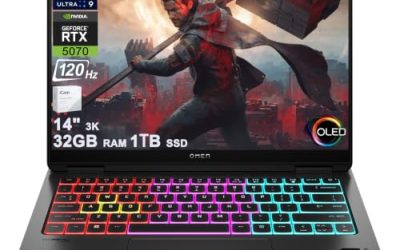
The ROG Zephyrus G14 (2025) combines a compact 14-inch design with a 3K OLED panel running at up to 120Hz. ASUS lists a 73Wh battery, Wi-Fi 7, and configurations with NVIDIA discrete graphics. Its relatively small footprint makes it attractive for students, commuters, and travelers who want a conventional gaming laptop rather than a larger desktop replacement.
The main compromise is that the G14’s battery endurance depends heavily on the configuration and workload. Its high-resolution OLED screen and discrete GPU can consume substantial power, and its memory is soldered on supported configurations. Check the exact RAM capacity and GPU before buying. The 2026 generation is also available, but compare its price and endurance with the 2025 model before paying more for newer hardware.
3. Framework Laptop 16 — Best for Modular Design
The Framework Laptop 16 is worth considering if repairability and component flexibility matter alongside gaming. Its modular design distinguishes it from many thin gaming notebooks, while configurations with a discrete GPU can support more demanding PC games. Tom’s Guide’s reviewed RTX 5070 configuration recorded 2 hours and 9 minutes in its PCMark 10 gaming battery test.
That result is useful evidence of the trade-off between gaming capability and unplugged endurance, not a promise of the same runtime in every game. The larger chassis is also less convenient than a compact 14-inch notebook for some travelers. Before buying, verify the precise GPU module, memory configuration, battery specification, and included components. Choose this model for modularity and repair options rather than assuming it will outperform every rival on battery life.
4. ASUS ROG Flow Z13 (2025) — Best Ultraportable Alternative
The ROG Flow Z13 (2025) is a convertible Windows gaming PC with a compact tablet-style design and detachable keyboard. It suits travelers who value a smaller carrying footprint and flexible use for entertainment, browsing, and compatible games. Tom’s Guide recorded 2 hours and 15 minutes in its PCMark 10 gaming battery test for the configuration using AMD Radeon 8050S graphics.
Its graphics architecture is different from that of the discrete-GPU laptops above, so its benchmark results should not be treated as directly equivalent to theirs. Game compatibility, graphics settings, and performance expectations matter when choosing it. The compact form also means that keyboard comfort and sustained gaming behavior may differ from a conventional notebook. Consider the Flow Z13 if portability is your priority and its graphics performance suits the games you play.
FAQ
Which gaming laptop has the longest battery life?
The Razer Blade 16 (2026) is a strong candidate for long everyday battery life among premium gaming laptops. Tom’s Guide measured 12 hours and 46 minutes of web browsing, but demanding games consume power much faster. Compare results from the same workload before choosing.
Can a gaming laptop last eight hours on battery?
Yes, some gaming laptops can last eight hours or longer during light productivity tasks, depending on configuration and usage. That does not mean they can sustain eight hours of demanding gaming. Lower brightness, use an efficient graphics mode, and close unnecessary applications when traveling.
Is a bigger battery always better for gaming?
No, a bigger battery does not automatically provide longer runtime. Processor efficiency, GPU power, display settings, and background applications all affect energy consumption. Compare battery capacity in watt-hours with independent runtime measurements for both everyday use and gaming.
Should I prioritize battery life or GPU performance?
Prioritize battery life if you frequently work or study away from outlets, and prioritize GPU performance if demanding games are your main use. If you need both, choose a portable gaming laptop with efficient hybrid graphics and check its battery results under separate workloads.
Final Thoughts
The best gaming laptop with long battery life depends on how you divide your time between travel, everyday work, and gaming. The Razer Blade 16 stands out for measured productivity endurance, while the Zephyrus G14 offers a more compact design. Compare the exact configuration and workload-specific battery results before making your purchase.