Choosing the best gaming laptop with advanced optimus means finding a machine that can switch between integrated and NVIDIA graphics automatically without sacrificing the gaming experience you want. These picks prioritize verified Advanced Optimus support, GPU capability, display quality, portability, and practical buying considerations.
How to Choose a Gaming Laptop With Advanced Optimus
Advanced Optimus is particularly useful if you switch between gaming and everyday laptop work. NVIDIA’s technology can dynamically route the display between integrated graphics and the discrete GeForce GPU, avoiding the need to manually change graphics modes on supported configurations. However, the feature alone does not determine gaming performance, battery life, or overall value.
1. Confirm Advanced Optimus, Not Just a MUX Switch
A conventional MUX switch can route the internal display directly to the discrete GPU, but changing modes may require a manual setting or restart, depending on the laptop. Advanced Optimus automates display routing on supported systems, making it more convenient for people who alternate between demanding games and ordinary productivity.
Before buying, check the manufacturer’s specifications for the exact laptop configuration. Terms such as NVIDIA Optimus, MUX switch, and NVIDIA Advanced Optimus are not interchangeable. A product family can include several configurations, so a feature listed for one model does not establish that every version supports it.
2. Match GPU Power to Your Games
The laptop GPU matters more than the graphics-switching feature when choosing performance. An RTX 5070 configuration and an RTX 5080 configuration can have substantially different capabilities, while their actual performance also depends on GPU power limits, cooling, processor selection, and the manufacturer’s operating profiles.
Compare the precise GPU, its available graphics power, and its video memory. NVIDIA’s advertised maximum graphics power can include Dynamic Boost, so it should not automatically be interpreted as sustained GPU power. For demanding games, resolution and ray tracing requirements should guide your GPU choice.
3. Balance Display Quality and Portability
A 14-inch laptop is easier to carry between classes, work, and travel, while a 16-inch system offers more screen space for games and multitasking. OLED panels can provide deep blacks and rich contrast, whereas IPS panels may be a more practical choice for buyers prioritizing cost or particular brightness and refresh-rate combinations.
Check resolution, refresh rate, adaptive-sync support, brightness, and panel type together. A high refresh rate can help in competitive games, but only if the hardware can produce enough frames. Also consider weight, charger size, and battery capacity if you frequently work away from a desk.
4. Verify the Exact Configuration Before Paying
Manufacturers often sell the same laptop family with different processors, GPUs, memory, displays, and graphics features. Confirm Advanced Optimus support against the full model number and regional configuration rather than relying on a retailer’s generic family description.
Also check whether memory is upgradeable, how many SSD slots are available, and which ports the system provides. If battery life is important, look for independent results from the same or closely matching configuration. Graphics switching can reduce unnecessary discrete-GPU use, but it cannot compensate for a small battery or an inefficient workload.
Top Gaming Laptops With Advanced Optimus
The following shortlist focuses on ASUS gaming laptops whose official specifications identify NVIDIA Advanced Optimus. These are distinct choices for different budgets, screen sizes, and performance priorities. Because configurations vary by generation and region, confirm the exact US model before purchase; no current retail prices or independently comparable benchmark results are asserted here.
1. ASUS ROG Zephyrus G14 (2025) — Best Compact Option
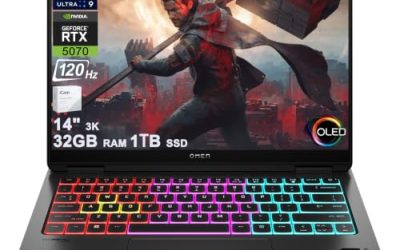
The ROG Zephyrus G14 is the strongest starting point for buyers who want gaming capability in a smaller chassis. Its 14-inch 3K OLED display runs at 120Hz and supports G-SYNC, while NVIDIA Advanced Optimus provides automatic graphics routing on supported configurations. Its compact format is attractive for commuting and travel.
The main trade-off is the smaller display and chassis, which can limit sustained cooling and available screen space compared with larger gaming laptops. OLED is also worth considering carefully if you regularly display static interface elements for long periods. Choose the G14 for portability, but verify the exact GPU and memory configuration before deciding how demanding your games can be.
2. ASUS ROG Zephyrus G16 (2025) — Best Premium All-Rounder
The ROG Zephyrus G16 is a sensible option for buyers who want a larger screen without moving to a bulky desktop-replacement design. Official specifications for the GU605 family include configurations with NVIDIA Advanced Optimus. Depending on the version, the display can be a 16-inch 2.5K OLED panel with a 240Hz refresh rate.
This model is worth considering for gaming, content creation, and everyday productivity. However, the GU605 family includes different GPU and display configurations, so do not assume every unit has the same specifications. Premium pricing and configuration-dependent graphics performance are important trade-offs. Choose it when display quality and portability matter alongside gaming performance.
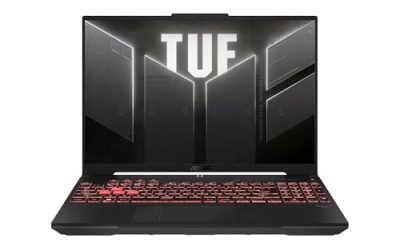
3. ASUS TUF Gaming F16 (2025) — Best Practical Value Candidate
The ASUS TUF Gaming F16 offers a more mainstream alternative to the ROG range. Its official specifications list NVIDIA Advanced Optimus on supported configurations, with GPU options including the GeForce RTX 5050, RTX 5060, and RTX 5070 Laptop GPUs. Selected configurations feature a 16-inch 2560 × 1600 IPS-level display with a 165Hz refresh rate.
The F16 is particularly appealing if you prefer upgradeable memory and storage over a more compact premium chassis. ASUS lists two accessible PCIe 4.0 M.2 SSD slots on the 2024 F16, but buyers should verify the layout for the 2025 generation separately. The precise GPU, panel, and memory configuration determine whether a particular listing offers good value.
4. ASUS ROG Strix G16 — Best for Performance-Focused Gaming
The ROG Strix G16 is worth considering if gaming performance takes priority over minimizing size and weight. Official specifications for the G614 generation document Advanced Optimus alongside dedicated MUX functionality. Depending on the configuration, the family includes GeForce RTX 4050, RTX 4060, and RTX 4070 Laptop GPU options.
Selected configurations also offer a 16-inch QHD+ display with a 240Hz refresh rate, while other versions use a lower-resolution 165Hz panel. These differences matter when matching the laptop to competitive gaming or visually demanding single-player titles. The larger gaming-focused chassis is less convenient for frequent travel, and its specifications should not be transferred to newer Strix generations without verification.
Comparison Table
| Product | Best For | Key Spec | Compatibility | Watch Out For |
| ROG Zephyrus G14 (2025) | Compact gaming | 14-inch 3K OLED, 120Hz | Advanced Optimus on supported configurations | Smaller screen and chassis |
| ROG Zephyrus G16 (2025) | Premium all-round use | Selected 16-inch 2.5K OLED, 240Hz | Confirm GU605 configuration | Premium cost and GPU variation |
| TUF Gaming F16 (2025) | Practical value | Up to RTX 5070 Laptop GPU in listed configurations | Confirm exact FX608/market variant | Different panels and GPU options |
| ROG Strix G16 | Performance-focused gaming | Selected 16-inch QHD+ 240Hz display | Confirm G614 generation and GPU | Larger chassis and variant differences |
FAQ
What is the best gaming laptop with Advanced Optimus?
The ASUS ROG Zephyrus G14 (2025) is a strong choice if portability is your priority, while the Zephyrus G16 suits buyers who want a larger display. Your preferred games, GPU requirements, and budget should determine the final choice.
Does Advanced Optimus increase gaming FPS?
Advanced Optimus can improve performance in situations where routing the discrete GPU directly to the internal display avoids an integrated-graphics bottleneck. The gain varies by laptop, game, resolution, and graphics settings; it does not guarantee a fixed FPS increase.
Does Advanced Optimus improve battery life?
It can help reduce unnecessary discrete-GPU use during lighter workloads by allowing automatic graphics switching. Actual battery life still depends on battery capacity, screen brightness, CPU activity, display technology, and background applications.
Can I enable Advanced Optimus on any gaming laptop?
No. Advanced Optimus requires compatible laptop hardware, graphics support, firmware, and drivers. A conventional MUX switch or standard NVIDIA Optimus support alone does not establish Advanced Optimus compatibility.
Final Thoughts
The best gaming laptop with advanced optimus depends on how you balance portability, display quality, and graphics performance. Start with the Zephyrus G14 for compact gaming, the G16 for a premium larger screen, or the TUF F16 for practical features. Before buying, verify the exact configuration and Advanced Optimus support.