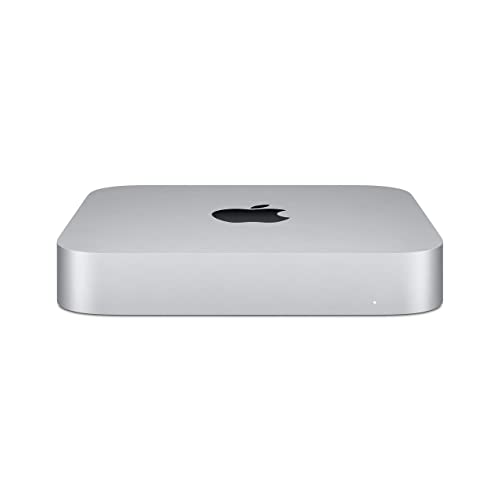
The Apple Mac mini (M4) is the sleekest mini PC in 2026, with its five-inch square aluminum body and no external power brick. If you want a slim Windows alternative, the ASUS NUC 14 Pro, Beelink SER9 Pro and Minisforum UM870 Slim combine clean metal designs with enough power for daily work. Sleek also means quiet, so noise and port placement matter as much as looks.
As an Amazon Associate we earn from qualifying purchases at no extra cost to you.

Our Top Picks

Top 3 picks at a glance
Quick Comparison of the Best Sleek Mini PCs
| Pick | Best for | Key specs | Price range |
|---|---|---|---|
| Apple Mac mini (M4) | Best overall design | Aluminum body, about 5 x 5 inch footprint, internal power supply | Mid-range |
| ASUS NUC 14 Pro | Best clean Windows design | Core Ultra processors, up to 96GB DDR5 | Upper-mid |
| Beelink SER9 Pro | Best sleek and powerful | Ryzen AI 9 HX 370, Radeon 890M | Mid to upper-mid |
| Minisforum UM870 Slim | Best thin chassis | Ryzen 8000-series chip, USB4 | Mid-range |
| Framework Desktop | Best modular compact design | Ryzen AI Max series, about 4.5L chassis | Premium |
| GEEKOM A8 | Best sleek value | Ryzen 8040-series, Radeon 780M, multiple outputs | Mid-range |
Best Overall Design: Apple Mac mini (M4)
The M4 Mac mini is hard to beat for looks: a seamless aluminum shell, a power supply inside the case and a quiet cooling design. It uses a 10-core M4 chip and starts at 16GB of unified memory per Apple’s specifications, and it offers Thunderbolt 4 on the back.
The trade-offs are limited upgradeability and the lack of Windows gaming support. Front-mounted USB-C is a plus for a clean desk.
Best Clean Windows Design: ASUS NUC 14 Pro
The NUC 14 Pro keeps the NUC tradition of a small, understated metal box. It supports up to 96GB of DDR5, has a single 2.5GbE port and is noted for low idle power, so the fan stays quiet most of the day.
It is often sold barebone, so factor in memory and storage. It is not the cheapest, but the build is dependable.
Best Sleek and Powerful: Beelink SER9 Pro
The SER9 Pro keeps a slim silhouette while including the Ryzen AI 9 HX 370 and Radeon 890M graphics. It fits easily on a shelf, supports multiple monitors and handles light gaming.
Under sustained load the fan becomes audible, so a thin design does have limits. Check the memory configuration on the listing.
Best Thin Chassis: Minisforum UM870 Slim
As the name suggests, the UM870 Slim focuses on a low-profile case, making it easy to place under a monitor or in a living room cabinet. Roundups point to its price-to-performance.
The thin chassis restricts cooling and expansion. It is a good office or media PC, not a heavy-duty machine.
Best Modular Compact Design: Framework Desktop
Framework’s small desktop pairs a Ryzen AI Max processor with a compact roughly 4.5-liter case and is designed to be serviceable. It targets people who want a handsome but repairable machine.
It is a premium product, and as a new category its configuration options have changed over time, so confirm the current specifications.
Best Sleek Value: GEEKOM A8
The A8 offers an all-metal body, Ryzen 8040-series performance and plenty of ports, with GEEKOM’s multi-year warranty. It looks tidy beside a monitor and handles everyday workloads.
It lacks the newest graphics core. Verify the exact processor, since several A8 versions exist.
Worked Example: Footprint and Desk Space
A mini PC footprint is simple to compare. The Mac mini occupies about 5 x 5 inches, or 25 square inches, roughly 160 square centimetres. A typical 15-inch laptop sits on about 14 x 10 inches, or 140 square inches. That means the Mac mini uses less than a fifth of the laptop’s footprint. If your monitor stand has an 8-inch wide gap, any of these machines fits under the monitor, but keep at least 2 centimetres on each side of the vents. A VESA mount behind the display removes the footprint entirely, so a thin chassis helps more there than a small base.
Sleek Design Choices at a Glance
| Priority | Choose | Reason |
|---|---|---|
| Minimal desk, macOS | Mac mini (M4) | Hidden power supply, quiet |
| Minimal desk, Windows | ASUS NUC 14 Pro | Low idle noise |
| Slim and fast | Beelink SER9 Pro | Strong integrated graphics |
| Fits in a cabinet | Minisforum UM870 Slim | Thin profile |
| Repairable and compact | Framework Desktop | Modular |
What Makes a Mini PC Look and Feel Sleek
- Material: aluminum or metal shells look cleaner than glossy plastic.
- Power: an internal power supply avoids another brick on the desk.
- Ports: front-facing USB-C is more convenient than reaching behind.
- Noise: low idle power and a larger fan keep the design calm.
Mistakes to Avoid When Buying for Looks
A sleek case can hide a weak cooling system, so do not buy on appearance alone. Look at what happens under load: a thin chassis with a small fan may throttle the processor and get loud. The second mistake is neglecting ports. A minimalist front panel sometimes means only two USB ports, so count what you need for peripherals, and check that at least one front port is USB-C if you charge devices.
Third, remember the cables. A beautiful box can look cluttered if it needs an external power brick and several adapters. Models with internal power supplies, like Apple’s, are neater. Finally, make sure the machine can be serviced; a sealed unit with soldered memory limits future upgrades, and a repair may require a full replacement.
Placement Tips for a Clean Desk
Put the mini PC on a monitor stand with a gap beneath, or attach it behind the display using a VESA bracket. Run a single cable bundle along the edge of the desk and use a small hub for extra ports instead of piling adapters on the front.
Frequently Asked Questions
What is the best looking mini PC?
Most reviewers consider the Mac mini the cleanest design. Among Windows models, the ASUS NUC 14 Pro and Beelink SER9 Pro have understated metal bodies.
Are slim mini PCs slower?
They can be, because thin cases limit cooling. Pick a model with a power-efficient processor if you want to avoid fan noise and throttling.
Can I mount a mini PC behind a monitor?
Many models support VESA brackets, which are sold separately in some cases. Check the compatibility of the exact model.
Do sleek mini PCs support two monitors?
Yes. Most offer HDMI plus USB-C or DisplayPort outputs, and some support three or four displays.
Are sleek mini PCs good for gaming?
Models with Radeon 780M or 890M graphics handle esports titles at 1080p with reduced settings. Frame rates vary with the game and settings.