Ryzen processors reward good cooling more visibly than most chips. They raise their clock speeds as long as temperature and power limits allow, so a cooler that moves heat away faster can translate into steadier performance, while a weak one quietly holds the processor back. Air coolers are the sensible default for most Ryzen builders: no pump to fail, no leak risk, and a price that leaves room in the budget for the graphics card. The real decision is how much tower you need, because a modest six-core chip and a sixteen-core flagship ask very different things of a heatsink.
This guide is for builders on AM4 or AM5 sockets, upgraders moving off the boxed cooler, and anyone choosing between a compact single tower and a heavy twin-tower design. Cooler Master and Thermalright dominate the value end of the list, while be quiet! covers the silent, high-capacity end. Statements below come only from the listing wording, so verify socket support and case clearance for your exact parts before buying in 2026.
Our Top Picks
 Thermalright Peerless Assassin 120 SE ARGB CPU Air6 Heat Pipe4.92 x 5.31 x 6.1 Inches2 PoundsCheck on Amazon


Top 3 picks at a glance
Quick Picks
As an Amazon Associate we earn from qualifying purchases at no extra cost to you.





| Product | Best for | Key spec from the title |
|---|---|---|
| Thermalright Assassin X120 Refined SE | Budget single-tower cooling | 4 heat pipes, TL-C12C PWM fan |
| Thermalright Peerless Assassin 120 Vision MAX ARGB | Showpiece builds with a screen | Twin tower, 2150RPM, IPS screen |
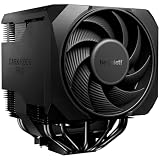
| be quiet! Pure Rock Pro 3 | Quiet, compact twin tower | 250W TDP, 2 silent 120mm PWM fans |
| Thermalright Peerless Assassin 120 SE ARGB | Value dual-fan performance | 6 heat pipes, dual PWM fans |
| be quiet! Dark Rock Pro 6 | High-core-count Ryzen chips | 7 heatpipes, 300W TDP, semi-passive mode |
| Cooler Master Hyper 212 Spectrum V3 ARGB | Easy, lit entry-level cooling | 4 heat pipes, AM5/AM4 and LGA1851/1700 |
| Thermalright PS120SE | Strong cooling on a budget | 7 heat pipes, dual 120mm fans, S-FDB bearing |
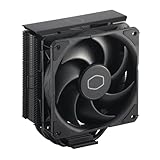
| Cooler Master Hyper 212 Black | Classic, plain single tower | 4 heat pipes, 120mm PWM fan |
| Thermalright Assassin X 120R Digital ARGB | Compact cooler with a digital display | 2000RPM, 4 heatpipes, 12cm PWM fan |
The 9 Best Options
The white version of the Peerless Assassin 120 Vision MAX appears in the source list as a duplicate color of the black model, so it is covered once below.
Thermalright Assassin X120 Refined SE
This is the cooler for a builder who wants a tidy single tower without spending much. The title lists 4 heat pipes, a TL-C12C PWM fan, an aluminium heatsink cover, AGHP technology and support for AMD AM4 and AM5 sockets, along with Intel sockets in the cut-off text.
For a mainstream six- or eight-core Ryzen processor, a single tower of this kind is a sensible match, and its modest footprint leaves room around the memory slots. The aluminium cover is as much about neat appearance as about cooling, hiding the fin stack behind a clean top.
Think of it as the upgrade for a Ryzen 5 or Ryzen 7 owner whose boxed cooler is audible every time a game loads. The cost of stepping up is small, the installation is familiar, and the result is a processor that can hold its boost clocks for longer stretches. It also suits small-form-factor-minded builders who want something taller than a stock cooler but less bulky than a double tower.
- AM4 and AM5 support is stated in the title.
- Four heat pipes with a PWM fan suit mid-range Ryzen chips.
- Single-tower shape is less likely to collide with tall memory modules.
- Single fan limits headroom for the most power-hungry Ryzen chips.
- No TDP rating appears in the visible title text.
Skip it if you plan to run a high-core-count Ryzen 9 chip at full load. Against the Vision MAX next, it is the plain, practical option, while the Vision MAX adds twin towers and a display.
Thermalright Peerless Assassin 120 Vision MAX ARGB
The Vision MAX is a showpiece cooler. The title describes a twin-tower radiator with a 2150RPM fan and a 5 inch IPS screen with 480×854 resolution, in black (the white version uses the same description).
The screen shows the cooler is built for visible builds with glass panels, where the display can show information. Twin towers point to higher cooling capacity than the single-tower options here, though the title gives no TDP figure.
This is the one to consider when the case is a display piece and the cooler is part of the show. Builders who like to see system information without opening software will find the screen appealing, and the twin-tower body at least backs up the looks with real cooling surface. Because the screen is a separate feature, check that it works with your operating system before relying on it, and consider whether the fan speed matches your noise tolerance.
- Twin-tower design for greater cooling surface.
- 2150RPM fan wording suggests strong airflow at full speed.
- IPS screen adds a visual centerpiece.
- The screen adds cost that does not improve cooling.
- High fan speed may be audible without a custom fan curve.
Skip it if your case has a solid side panel or you want maximum value for the money. Compared with the be quiet! Pure Rock Pro 3, it prioritizes spectacle over silence.
be quiet! Pure Rock Pro 3
The Pure Rock Pro 3 is the quiet, compact twin tower. The title lists a black finish, AMD and Intel support, a 250W TDP rating, a double-tower compact design, two silent 120mm PWM fans and 6 high-performance 6mm heat pipes.
A 250W TDP rating is a useful number: it gives buyers a manufacturer figure to compare against processor power draw. Even a demanding Ryzen 9 chip sits comfortably under that rating, while the dual fans suggest that airflow stays moderate rather than shrill.
It is aimed at the builder who sits close to the machine and counts noise as a spec. Dual-tower construction spreads heat across a large fin area, which lets the two fans run at gentler speeds for the same cooling job. Buyers with a Ryzen 7 or Ryzen 9 processor and a quiet-room preference are the natural fit, provided the case has width for a double tower.
- 250W TDP rating gives clear headroom.
- Two silent PWM fans emphasize low noise.
- Compact twin-tower body.
- Twin towers can crowd memory slots and tall RAM modules.
- Less eye-catching than the lit Thermalright and Cooler Master coolers.
Skip it if you want RGB lighting or very low cost. It sits between the flashier Vision MAX and the Thermalright Peerless Assassin SE that follows.
Thermalright Peerless Assassin 120 SE ARGB
The Peerless Assassin 120 SE is the value twin-tower option. The title lists 6 heat pipes, dual TL-C12C-S PWM fans, an aluminium heatsink cover and AGHP technology, with AMD and Intel support in the truncated remainder.
Dual fans on a six-heat-pipe tower give it more cooling capacity than the single-fan Assassin X120, and the ARGB lighting adds a splash of color for builds with windows. It is a popular recipe for strong cooling at a modest price.
A common route for budget-minded Ryzen 7 and Ryzen 9 builders ends here. The combination of six heat pipes and two fans is what many enthusiasts look for before they consider a pricier cooler, and ARGB lighting costs little extra. If you want the cooler to match a lit case and memory kit, this is an easy way to do it without paying brand premiums.
- 6 heat pipes with dual PWM fans.
- ARGB lighting for visible builds.
- Aluminium cover for a cleaner look.
- Twin-fan design takes up more space than a single tower.
- No TDP rating in the visible title.
Skip it if you want a no-lighting, no-frills cooler or have a case with limited height. Against the be quiet! Dark Rock Pro 6, it is the budget alternative, while the be quiet! cooler brings more heat pipes and a rated TDP.
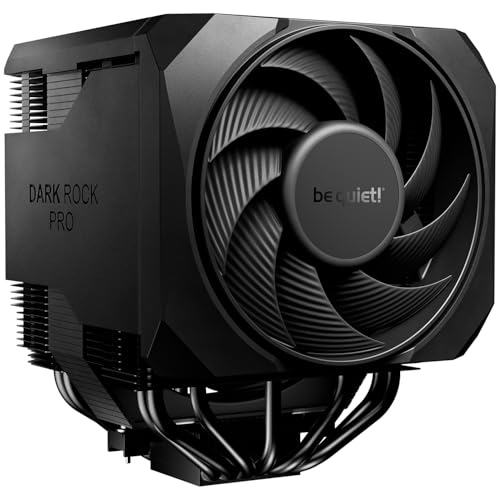
be quiet! Dark Rock Pro 6
This is the high-capacity cooler for demanding Ryzen setups. The title lists 7 heatpipes, 2 PWM fans, a 300W TDP rating, a semi-passive mode and high RAM and VRM cooler compatibility, with Silent Wings fans mentioned.
The 300W TDP rating is the highest figure in this guide. The semi-passive mode means the fans can stay off when load is light, which suits users who want near silence while browsing. The note on RAM and VRM compatibility suggests the layout was designed with tall memory in mind.
It suits builders who pair a sixteen-core Ryzen chip with long rendering, compiling or gaming-plus-streaming sessions, and who want to keep the fans below the threshold of annoyance. The semi-passive mode is especially useful for people who leave a PC on all day for light tasks. Check the case’s cooler height limit and your motherboard’s support for heavy hardware before ordering.
- 300W TDP rating offers generous headroom.
- Semi-passive mode for silent light-load operation.
- Designed with RAM and VRM clearance in mind.
- Large and heavy, so case clearance and board support need checking.
- Higher price than the Thermalright twin towers.
Skip it if your case is compact or the processor is a modest six-core model. Compared with the Cooler Master Hyper 212 Spectrum V3 next, it is a very different class, built for capacity rather than convenience.
Cooler Master Hyper 212 Spectrum V3 ARGB
The Hyper 212 is a long-running name in air cooling. The Spectrum V3 listing shows ARGB lighting, 4 heat pipes, AMD AM5 and AM4 support, Intel LGA1851 and LGA1700 support, quiet cooling and a 120mm PWM fan.
Its appeal is simplicity: a single tower that fits widely, installs without drama and adds some lighting. Buyers upgrading from a boxed cooler on a mainstream Ryzen processor are the natural audience.
A first-time builder will appreciate that the Hyper 212 family is one of the most widely discussed coolers online, which makes installation advice easy to find. The lighting also lets a budget build look intentional, and the stated Intel sockets keep the cooler useful if you switch platforms later. Treat it as a capable entry-level choice rather than a cooler for the hottest Ryzen chips.
- Stated AM5 and AM4 support.
- Familiar brand with a simple single-tower layout.
- ARGB lighting included.
- Single-fan, four-heat-pipe design limits ceiling for heavy loads.
- No TDP rating in the visible title.
Skip it if you plan a 16-core Ryzen chip. Next to the Thermalright PS120SE, it is the easier-to-find option, while the PS120SE is the more capable one.
Thermalright PS120SE
The PS120SE is the strong budget performer on paper. The title lists 7 heat pipes, dual 120mm TL-C12B V2 PWM fans, AGHP 4.0 technology, an S-FDB bearing and support for AM4 and AM5 sockets, plus Intel support.
Seven heat pipes and dual fans is a configuration normally associated with larger and pricier coolers. The S-FDB bearing is a fan-bearing type often chosen for longevity and quiet operation.
It is the cooler for buyers who want more capacity than a Hyper 212 offers but are not ready to pay for a premium be quiet! unit. The AGHP 4.0 wording refers to the heat-pipe design used by the maker, and the long-life bearing mention hints at durability. Fit matters, so confirm that the dual fans clear your memory and that the case panel closes without pressure.
- 7 heat pipes with dual 120mm fans.
- S-FDB bearing aimed at long life.
- Stated AM4 and AM5 support.
- Not as widely recognized as the be quiet! models.
- Twin-fan layout needs case and RAM clearance.
Skip it if you prefer a no-lighting look and compact size. It sits just above the Cooler Master Hyper 212 Black in capacity.
Cooler Master Hyper 212 Black
The Hyper 212 Black is the plain, dependable single tower. The title lists 4 heat pipes, a PWM fan, AMD AM5 and AM4 support, Intel LGA1851 and LGA1700 support, quiet cooling and a 120mm fan.
With no lighting and no extras, it suits a build that favors a clean, dark look and a quiet fan. It is a solid fit for mainstream Ryzen 5 and Ryzen 7 processors.
Anyone building a dark, understated machine will find this a natural match. It makes sense for an eight-core gaming processor in a mid-tower case with decent airflow, where lighting would be a distraction and the cooler simply needs to do its job. Because the design is common, spare parts and mounting advice are easy to track down.
- Simple, clean black look.
- AM5 and AM4 support stated.
- Familiar installation.
- Lower capacity than the twin-tower options.
- No lighting or display features.
Skip it if you want RGB or plan to run heavy multi-core workloads. It is the no-nonsense counterpart to the Spectrum V3.
Thermalright Assassin X 120R Digital ARGB
The Assassin X 120R is the compact cooler with a digital twist. The title lists a 2000RPM fan speed, 4 heatpipes, a 12cm quiet PWM fan and a digital screen top cover, in black.
The top-cover display can show information about the system, which appeals to builders who like data on view. Cooling capacity sits in the single-tower range, so it fits mainstream Ryzen processors.
Choose it when you want a small cooler that still shows something interesting through the side panel. The 2000RPM fan is moderate compared with the 2150RPM Vision MAX, and the single-tower shape keeps it clear of memory in most cases. Buyers should confirm how the display is powered and whether it needs extra software, since the title does not say.
- Digital display adds information and style.
- 2000RPM fan with 4 heatpipes.
- Compact single-tower size.
- The display adds cost without improving cooling.
- Single fan limits capacity for high-end chips.
Skip it if you prefer a simple, silent cooler. It closes the list as the novelty pick.
Who Needs an Air Cooler for Ryzen
Air cooling is the default for most Ryzen builders, but some buyers benefit more than others.
Upgraders from the boxed cooler
Some Ryzen processors ship with a stock cooler that is adequate but loud under load. Replacing it with a tower cooler lowers noise and often unlocks steadier boost behavior.
Builders chasing reliability
Air coolers have few failure points, mainly the fan. There is no pump to fail and no coolant to leak, so a quality tower can run quietly for years.
Smaller cases and office-style builds have their own reasons to choose a tower cooler. A compact heatsink with a single fan takes little space, and because Ryzen chips idle at low power, the fan often stays near its minimum speed during everyday use. That quiet idle behavior is a big part of why air remains the mainstream choice.
High-core-count and X3D owners
Larger Ryzen chips pull more power, and chips with stacked cache are sensitive to temperature. A twin-tower cooler such as the Dark Rock Pro 6 or Pure Rock Pro 3 offers the capacity to keep them steady.
Buyers with small cases or low-power six-core chips can choose a simple single tower and save money. The same applies to anyone who mostly browses, edits documents and plays lightly threaded games, since those workloads rarely push a Ryzen chip to its thermal limit for long.
How to Choose
Match the cooler to the processor
Mainstream six- and eight-core Ryzen chips run well on a single tower with four heat pipes. Twelve- and sixteen-core chips, particularly under sustained load, benefit from twin towers and a TDP rating of 250W or more. When a listing gives a TDP number, treat it as a rough ceiling and leave margin. A practical rule is to look at the processor’s sustained power draw, not its box rating, because chips such as the top Ryzen 9 models can draw well beyond their nominal TDP when boosting, and a cooler whose own rating only just covers the nominal figure will run its fans hard.
Confirm socket support
AM4 and AM5 coolers share mounting hole spacing, but the retention hardware can differ, so confirm that AM5 is named in the listing. Several titles above name AM4 and AM5 directly, while others rely on the cut-off text, so check the full listing.
Check height and width clearance
Measure the case’s maximum cooler height and compare it with the cooler’s height. Twin towers are wider and can overhang memory slots, so check the RAM clearance and the first PCIe slot. Typical mid-tower cases accept coolers around 155 to 165 millimeters tall, while compact cases may cap out below 150, so read your case’s maximum cooler height before you fall for a tall twin tower. Also confirm that the top of the cooler clears the case’s top-mounted radiator or fan, if there is one.
Compare fan count and quality
Two 120mm fans move more air at lower speed than one fan, which helps noise. Look for PWM control, so the motherboard can adjust speed, and for bearing types such as S-FDB. Ignore peak RPM figures on their own. A fan rated for higher speed is not automatically better; what matters is the airflow it delivers at the speed where you can tolerate the sound. If the cooler comes with extra clips for a third fan, that is a bonus for buyers who plan to upgrade later.
Weigh weight and mounting
Heavy coolers put load on the socket and motherboard. Use a case that can be moved with care, and avoid shipping a built PC with a heavy tower cooler unless it is braced. If you move the machine to events or between homes, lay it on its back or fit a support bracket, because a heavy heatsink hanging sideways puts steady stress on the socket area. Single towers like the Hyper 212 models are lighter and far less of a worry in this respect.
Decide on lighting and displays
ARGB and screens add cost and complexity without improving cooling. Budget models cut corners on fan bearings, mounting hardware and fin finish, so pay attention to those details instead of lighting.
Single Tower vs Twin Tower
This is the comparison almost every Ryzen air-cooling buyer faces.
| Factor | Single tower | Twin tower |
|---|---|---|
| Cooling capacity | Good for six- to eight-core chips | Better for heavy loads and high core counts |
| Size and clearance | Smaller, easier around RAM | Wider and heavier |
| Noise at load | One fan works harder | Two fans can run slower |
| Listed examples | Assassin X120 SE, Hyper 212 models, Assassin X 120R | Peerless Assassin models, PS120SE, be quiet! models |
When a single tower is enough
For a Ryzen 5 or Ryzen 7 used for gaming, a single tower with four heat pipes handles typical loads. It also avoids RAM clearance issues and is simpler to install.
When to step up to twin towers
If you run a 12- or 16-core chip, render video, compile code or want the fans to stay quiet at load, twin towers provide the capacity. They also give more room to tune the fan curve for silence.
The tradeoff is physical. A twin tower weighs more, covers more of the board and can limit memory choices, so the extra capacity should be matched to a real need. If your processor never leaves the mid-range of its power curve, you pay in size and cost for headroom you do not use, and a good single tower will feel quieter in practice than a mismatched giant.
Setup, Compatibility and Upgrade Tips
What to check before buying
Confirm AM4 or AM5 support, the case’s cooler height limit, the RAM height and whether the first PCIe slot might be blocked. Make sure the cooler includes the correct mounting hardware.
What to upgrade first
Before changing the cooler, make sure the case has working intake and exhaust fans. A good tower cooler cannot compensate for a case with no airflow. Then add quality thermal paste if the cooler’s tube is small. After the swap, open the motherboard firmware and set the CPU fan header to PWM mode with a gentle curve, which keeps the fans near idle for light use and ramps them up only when the processor works hard.
Common compatibility traps
Tall memory can collide with the front fan on twin towers. Some cases need the fan shifted upward, which affects clearance. Also check that the cooler’s backplate fits your motherboard, and tighten mounting screws evenly in a cross pattern. If the cooler ships with a small tube of thermal paste, a pea-sized dot at the center of the processor is enough; spreading it by hand is unnecessary and can introduce air gaps.
Which One Fits Your Situation
A mainstream Ryzen 5 gaming build
Choose the Cooler Master Hyper 212 Black. It is simple, quiet and adequate for typical gaming loads.
A sixteen-core Ryzen for rendering
Choose the be quiet! Dark Rock Pro 6. Its 300W TDP rating and semi-passive mode suit heavy loads.
A glass-panel build with a theme
Choose the Thermalright Peerless Assassin 120 Vision MAX ARGB, or the Assassin X 120R Digital ARGB for a smaller footprint.
A tight budget with strong performance
Choose the Thermalright PS120SE. Seven heat pipes and dual fans give the most capacity per cost in this list.
When two coolers look equal, let your case and memory settle it. A tower that clears your RAM and fits under the side panel with room to spare will always beat a slightly stronger model that forces you to shift the fan or remove a memory stick.
Common Mistakes
- Buying a cooler without checking the case’s height limit.
- Ignoring RAM clearance on twin-tower coolers.
- Assuming every cooler named for AM4 also lists AM5 support.
- Choosing by lighting instead of heat pipes, fans and TDP.
- Using too much thermal paste or skipping the plastic film on the cold plate.
- Neglecting case airflow and blaming the cooler.
Related guides
- Gaming Laptop Battery Draining While Plugged In Fix
- Graphics Cards For Low Wattage Power Supplies
- How To Stop Laptop Thermal Throttling In Software
Frequently Asked Questions
Is air cooling good enough for Ryzen?
Yes, for most chips. A quality tower cooler handles typical gaming and productivity loads, and twin-tower models narrow the gap with entry-level liquid coolers. Only the most demanding setups, or compact cases with no room for a tower, gain much from switching to liquid.
Do AM4 coolers fit AM5?
Often yes, because the mounting hole spacing is shared, but the listing must name AM5 or the brand must offer a bracket. Verify before buying.
What does TDP mean on a cooler?
It is the manufacturer’s rating of how much heat the cooler is designed to dissipate. Treat it as a guide and leave margin for your processor.
Are twin-tower coolers louder?
Not necessarily. Two fans can spin slower to move the same air, so a twin tower is often quieter at load than a single tower.
Is RGB lighting worth paying for?
Only if you value the look and have a window panel. Lighting and screens do not improve cooling, and they can add cables and software to manage, so a plain cooler is often the more sensible use of money.
How often should I replace thermal paste?
Many builders leave it alone for several years unless temperatures climb or the cooler is removed. Replace it whenever the cooler is taken off.
Final Words
For most Ryzen builds, a single tower such as the Cooler Master Hyper 212 models is enough, while the Thermalright twin towers offer strong value and the be quiet! models offer quiet capacity for demanding chips. Choose by processor, case clearance and noise preference, not by lighting. Confirm AM5 support, measure RAM and height clearance, and buy a cooler that leaves your processor room to boost.