Short answer: for most gaming laptops the best stand is a sturdy, metal, ventilated riser sized for your screen, and a fan cooling pad is the better pick only if your laptop genuinely runs hot and you accept extra noise and a used USB port. This page sorts ten Amazon listings into those two camps, flags where a listing’s size range falls short for 16 and 17 inch machines, and gives you a worksheet to check fit before you buy. Prices are shown as relative tiers, not figures, because they change.
Our Top Picks
Top picks at a glance

LOXP Adjustable Laptop Stand, Computer Stand with 360 Rotating Base | Ergonomic Laptop Riser Mount for Desk Foldable Protable Computer Desk Fits with MacBook Pro Air


As an Amazon Associate we earn from qualifying purchases. Product prices and availability are accurate as of the date/time indicated.

Kootek Laptop Cooling Pad Cooler Stand with 5 Quiet Fans for 12"-17" Laptop | 5 Quiet & High‑Performance Laptop Fan for 360° Full Coverage, USB‑Powered, 2 Extra USB Hubs, 6 Adjustable Height, Blue LED


As an Amazon Associate we earn from qualifying purchases. Product prices and availability are accurate as of the date/time indicated.

Tonmom Laptop Stand for Desk, Adjustable Laptop Riser, Black | ABS+Silicone Foldable Portable Notebook Holder, Ventilated Cooling Notebook Mount Computer Stand for 10-15.6” Laptops,Tablets


As an Amazon Associate we earn from qualifying purchases. Product prices and availability are accurate as of the date/time indicated.

Gogoonike Adjustable Laptop Stand for Desk, Metal Laptop Riser Holder | Portable Desktop Book Stands, Foldable Ventilated Cooling Computer Notebook Stand Compatible with 10-15.6” Laptops, Tablets


As an Amazon Associate we earn from qualifying purchases. Product prices and availability are accurate as of the date/time indicated.

BESIGN LS03 Aluminum Laptop Stand, Ergonomic Detachable Computer Stand, Notebook Riser, Laptop Mount Compatible with Air, Pro, Dell, HP, Lenovo More 10-15.6" Laptops, Black


As an Amazon Associate we earn from qualifying purchases. Product prices and availability are accurate as of the date/time indicated.

Lamicall Aluminum Laptop Stand for Desk for MacBook Neo Air Pro 10-17.3'' | Adjustable Laptop Riser, 360° Rotating Base Computer Stand Ergonomic Foldable Protable fits Dell HP Office Home College Black


As an Amazon Associate we earn from qualifying purchases. Product prices and availability are accurate as of the date/time indicated.

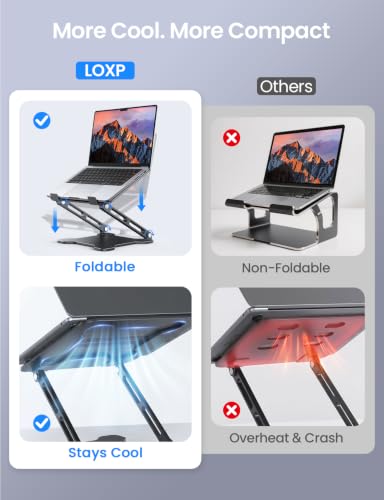
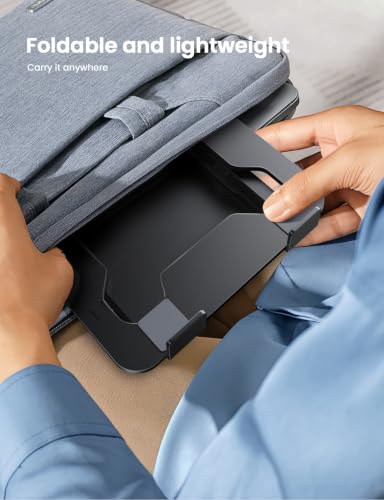
LOXP Adjustable Laptop Stand for Desk, Portable Airflow Laptop Riser Holder | Metal, Foldable, Ergonomic, Computer Notebook Stand Mount Perfect for Home Desk, Office, College, Travel, 10-15.6" Laptops



As an Amazon Associate we earn from qualifying purchases. Product prices and availability are accurate as of the date/time indicated.

ChillCore Laptop Cooling Pad, RGB Lights Laptop Cooler 9 Fans for 15.6-19.3 Inch Laptops, Gaming Laptop Fan Cooling Pad with 8 Height Stands, 2 USB Ports - A21 Blue


As an Amazon Associate we earn from qualifying purchases. Product prices and availability are accurate as of the date/time indicated.

Amazon Basics Sturdy and Portable Ergonomic Laptop Stand for Desk, Height Adjustable Riser with Ventilated Cooling, Foldable, Fits all Laptops up to 15.6 Inch, Silver


As an Amazon Associate we earn from qualifying purchases. Product prices and availability are accurate as of the date/time indicated.

OMOTON LA10 360° Rotating Laptop Stand Riser Foldable for Desk, Silver | Aluminium Aolly, Tool-free Adjustable Height Angles, Collaborative Work, Easy Storage, Fits 11"-17" MacBook Pro/Air, Dell, HP


As an Amazon Associate we earn from qualifying purchases. Product prices and availability are accurate as of the date/time indicated.
| Model | Type | Key point from the title | Price tier | Best for |
|---|---|---|---|---|
| LOXP Adjustable Stand (360 base) | Riser | 360 rotating base, foldable | Mid | Desk sharing, presentations |
| Kootek Cooling Pad | Fan pad | 5 fans, 12-17 inch, 2 extra USB hubs, 6 heights | Mid | Hot-running laptops, wide size range |
| Tonmom Laptop Stand | Riser | ABS plus silicone, 10-15.6 inch | Budget | Light laptops, tight budgets |
| Gogoonike Metal Riser | Riser | Metal, foldable, ventilated, 10-15.6 inch | Budget | Entry metal build |
| BESIGN LS03 | Riser | Aluminum, detachable, 10-15.6 inch | Budget | Travel bags |
| Lamicall Aluminum Stand | Riser | Aluminum, 10-17.3 inch, 360 base | Premium | 17 inch laptops |
| LOXP Airflow Riser (metal) | Riser | Metal, airflow focus, 10-15.6 inch | Budget | Everyday desk use |
| ChillCore A21 Cooling Pad | Fan pad | 9 fans, RGB, 15.6-19.3 inch, 8 heights, 2 USB ports | Mid | Large laptops, fan-first buyers |
| Amazon Basics Riser | Riser | Height adjustable, ventilated, up to 15.6 inch | Mid | Plain, no-fuss option |
| OMOTON LA10 | Riser | Aluminium alloy, tool-free angles, 11-17 inch | Mid | Rotating, collaborative setups |
Risers and fan pads are not the same product
A passive riser tilts the keyboard deck and opens a gap under the chassis. A cooling pad does that and adds fans. Gaming laptops that pull air from the underside benefit most when that gap exists, while models with side or rear intakes gain less. Whatever you choose, nothing here lowers heat by a promised amount; the effect depends on your model, dust level and room temperature. Read the sections below as a way to match a form factor to a problem.
What heat does to a gaming laptop, in plain terms
Gaming laptops move heat from the processor and graphics chip through heat pipes to fins, where small fans push it out. If the intake is starved, the fans spin faster, noise climbs and the chips may lower their clocks to stay inside their temperature limits. That is throttling, and it shows up as lower or uneven frame rates. A stand attacks only one link in that chain, the supply of cool air under the chassis. It cannot fix dried thermal paste, a dust-packed fin stack or a room that is simply hot.
It also helps to know where your laptop breathes. Some models draw from the bottom plate, some from the keyboard deck and some from the sides. The maker’s manual or spec page usually shows the vent layout. If the intake is mostly on the bottom, any lift helps, and a fan pad aimed at those grilles helps more. If the intake is on the sides, a pad may do little, and a plain riser mainly improves typing angle.
How these ten were picked
The list uses published specifications in each listing title, manufacturer documentation where it exists and the themes buyers raise in reviews. Nobody on the team used or measured these units. Where a title says nothing about weight capacity, rubber feet or fan noise, the entry says “check the listing” instead of guessing.
The ten listings, one by one
LOXP Adjustable Laptop Stand with 360 Rotating Base
The title advertises a foldable riser with a base that turns through 360 degrees and a mount for desk use, with MacBook Pro and Air named as fits. The rotating base suits turning the screen toward a teammate or a second seat, which is less useful in a solo gaming station. It does not give a stated size range for large laptops, so a 16 or 17 inch gaming machine needs a check with the seller before purchase. Weight rating, base grip and hinge firmness are not stated in the title.
Pros
- Rotating base helps when sharing a screen
- Folds for a bag
Cons
- No stated size range for big laptops
- A swivel base adds a joint that can wobble under a heavy machine
Question to ask before buying: what is the maximum load, and does the rotation lock?
Kootek Laptop Cooling Pad with 5 Quiet Fans
This is one of two active pads in the set. The title lists five fans for 12 to 17 inch laptops, USB power, two extra USB hubs, six height positions and blue LED lighting. The wide size range makes it the more flexible pad for owners of 15.6 and 17.3 inch machines. “Quiet” is the seller’s description, so treat noise as unknown until you read buyer comments. The extra hubs are handy, though they share the laptop’s supply, as explained in the buyer guide below.
Pros
- Stated range reaches 17 inch laptops
- Six height positions and extra USB hubs
Cons
- Uses a USB port and adds fan noise
- Bulkier than a folding riser
Question to ask: where do the fans sit relative to my laptop’s intake vents?
Tonmom Laptop Stand for Desk, Adjustable Riser
The cheapest entry in the group. The title says ABS plus silicone, foldable, ventilated and compatible with 10 to 15.6 inch laptops and tablets. Plastic and silicone mean less rigidity than aluminium, and silicone grips are mainly there to stop sliding. It is a reasonable accessory for a thin and light laptop. A heavy 15.6 inch gaming model with a large power brick sits near the edge of what a budget plastic frame should carry, so confirm the load rating first.
Pros
- Lowest-cost option here
- Light and easy to pack
Cons
- Plastic frame offers less stiffness
- Capped at 15.6 inches
Question to ask: does the stated capacity cover a laptop plus its weight shift when typing?
Gogoonike Adjustable Metal Laptop Riser
Another budget-tier choice, but metal, foldable and ventilated, rated by its title for 10 to 15.6 inch laptops and tablets. The listing calls it a desktop book stand style, suggesting a simple hinged frame with a few preset angles. Metal helps with rigidity and with spreading some heat from the chassis, though the title makes no thermal claim. It overlaps heavily with the Tonmom and the second LOXP, so buy on small differences such as available angles and rubber padding.
Pros
- Metal frame at a modest tier
- Folds flat
Cons
- Not listed for 16 or 17 inch laptops
- Few details on height steps
Question to ask: how many angles are offered, and are the contact points padded?
BESIGN LS03 Aluminum Laptop Stand
The title describes an aluminum, ergonomic, detachable riser compatible with Air, Pro, Dell, HP and Lenovo, in the 10 to 15.6 inch range. Detachable construction suggests it breaks into pieces for a backpack, which suits LAN party travel. Brand names in a title only mean the seller expects the stand to fit those laptops; they confirm nothing about your exact model. Check how the pieces lock together, because detachable designs can be less rigid than one-piece folding frames.
Pros
- Aluminum build
- Detachable for transport
Cons
- Maximum 15.6 inch
- Joints may loosen with repeated assembly
Question to ask: does it stay fixed at the highest angle with a heavy laptop?
Lamicall Aluminum Laptop Stand, 10-17.3 Inch
The most costly riser here and one of four listings whose titles reach 17 inches or beyond. It lists an aluminum body, adjustable height, 360 degree rotating base and foldable design. The title also contains a typo-prone model phrase (“MacBook Neo”) and “Protable”, so read the actual product page for details instead of relying on the title. For a 17 inch gaming machine, this and the OMOTON are the only passive risers in the set that claim the size, making it the natural pick if you refuse a fan pad.
Pros
- Claims 17.3 inch compatibility
- Aluminum and adjustable
Cons
- Highest tier among the risers
- Rotating base adds another moving part
Question to ask: what is the weight rating at full height?
LOXP Adjustable Laptop Stand, Portable Airflow Riser
Not the same listing as the first LOXP: this is a metal, foldable, ergonomic riser built around airflow, listed for desk, office, college and travel with 10 to 15.6 inch laptops. It is close to the Gogoonike and Besign in what the title promises. That near-duplication is common in this category, so shop on warranty wording, packaging and review comments. If you only need elevation for a standard 15.6 inch gaming laptop, it is a sensible lower-tier pick.
Pros
- Metal with an airflow focus
- Budget tier
Cons
- Capped at 15.6 inches
- Little to separate it from similar listings
Question to ask: is the surface grippy enough that the laptop will not creep?
ChillCore Laptop Cooling Pad, 9 Fans, A21 Blue
The loudest sounding spec sheet in the set: nine fans, RGB lights, eight height stands and two USB ports, for 15.6 to 19.3 inch laptops. The large-laptop range is its main reason to exist, since few other listings reach past 17.3. More fans do not guarantee more cooling, because pad size, fan placement and your laptop’s intake layout matter at least as much. Expect more noise and power draw than a five-fan pad, and check whether the lights can be switched off.
Pros
- Covers 15.6 to 19.3 inch laptops
- Eight height positions
Cons
- Large, RGB and likely louder
- Needs USB power from the laptop
Question to ask: can fan speed be reduced or the lighting turned off?
Amazon Basics Ergonomic Laptop Stand, Height Adjustable
A plain, silver riser with ventilated cooling and a fold-flat design, stated for laptops up to 15.6 inches. Its appeal is simplicity and a retailer-owned label with no extra feature list to decode. It does not state aluminum or a rotating base in the title, so material and weight capacity are items to confirm on the page. It suits a modest 15.6 inch laptop on a desk, but it is not the one to choose for a 17 inch machine.
Pros
- Straightforward design
- Foldable and ventilated
Cons
- Up to 15.6 inches only
- Material not named in the title
Question to ask: what is the stated weight limit?
OMOTON LA10 360 Rotating Laptop Stand Riser
Aluminium alloy, tool-free height angles, foldable and rotating through 360 degrees, with 11 to 17 inch laptops named. The title misspells the metal (“Aolly”), which is a good reminder to verify the page. Its big plus for gamers is a 17 inch claim in a passive format. It is also aimed at collaborative work, so the rotation feature is useful in meetings but not necessarily at a battle station.
Pros
- Names 17 inch compatibility
- Tool-free angle changes
Cons
- Typos in the title
- Rotation base adds complexity
Question to ask: does the base stay put when you type hard?
Buying guide: what actually matters
Match the stand to the laptop size
Gaming laptops often sit at 15.6, 16, 17 or 17.3 inches. Five of the ten listings stop at 15.6 inches and one gives no range at all. Only the Kootek, Lamicall, OMOTON and ChillCore claim larger sizes. If you own a 16 inch model, a stand listed to 15.6 may still hold it, but that is a call for the seller, not an assumption to make at checkout.
Choose passive or active on purpose
Choose a riser if your priorities are silence, posture and portability. Choose a pad if your laptop throttles and you want more airflow. Do not buy a pad purely for the RGB. To judge whether it is doing anything, compare your own CPU and GPU temperature readouts before and after the change, and read the guide on gaming laptop micro stuttering, which explains how heat can show up as frame pacing trouble.
Understand the build material
Aluminum and metal risers are stiff and look clean, whereas ABS plastic is lighter and cheaper but flexes more. Silicone pads on the contact points reduce sliding. Check for rubber on the underside so the stand does not slide on a smooth desk.
Think about noise, power and lights
Fans add a constant hum on top of the laptop’s own fans, which matters if you play without headphones or stream with a microphone open. Lighting is cosmetic, yet an always-on RGB strip can be distracting in a dark room, so look for an off switch. Power matters too: a USB-powered pad draws from the laptop, which on battery shortens runtime. Plan to run pad and laptop on mains power during long sessions.
| Spec concept | What to look for | Why it matters |
|---|---|---|
| Size range | Your screen size inside the stated range | Avoids a laptop that overhangs |
| Weight capacity | A stated figure above your laptop weight | Titles rarely give it, so ask |
| Intake gap | Open space below the rear vents | Air must reach the fans |
| Fan power | USB-A powered, speed control if offered | Noise and port load |
| Foldability | Hinge that locks at each angle | Safety and portability |
Run a setup check once the stand arrives
Before you trust the new accessory with a laptop that costs far more than it does, work through a short routine. It takes about ten minutes and catches most disappointments.
- Place the stand on a hard, flat surface and set the lowest angle first.
- Put the laptop on gently and press the corners of the keyboard deck to feel for flex or creep.
- Confirm the rear vents and any bottom grilles are not covered by feet, bars or the pad frame.
- For a fan pad, connect it, listen at your normal seat and note whether the noise is bearable with headphones off.
- Run your usual game for twenty minutes with a free monitoring tool open and write down the temperatures, then compare with a session without the stand.
- Keep the return window in mind and send it back if the numbers or the wobble are not acceptable.
Worked example: fit and port worksheet
Assumptions, all invented for illustration: a 16 inch gaming laptop weighing 2.5 kg, plus a 0.8 kg power brick on the desk, not on the stand. A mouse receiver, a headset dongle and a flash drive take three USB-A ports; the laptop has four. Check each row against the listing you consider.
| Check | Assumed value | Rule of thumb | Result |
|---|---|---|---|
| Size range | 16 inch screen | Listing must state 16 or larger | Skip stands stopping at 15.6 unless the seller confirms |
| Load | 2.5 kg | Rated capacity at least 25 percent above laptop weight | Want about 3.2 kg or more stated |
| USB budget | 4 ports, 3 used | Pad needs 1 free port | Fits, but with no spare |
| Hub use | Pad includes hubs | Hubs share the laptop’s supply | Do not hang a drive on a pad hub |
If any check fails, the answer is a different product, not a workaround.
Which one for which user
| User | Best match | Reason |
|---|---|---|
| Hot 17 inch laptop | Kootek or ChillCore | Fans plus stated large-size range |
| Quiet desk, 17 inch | Lamicall or OMOTON | Passive and 17 inch claims |
| Student with a 15.6 inch laptop | Gogoonike or LOXP airflow riser | Lower tier, metal |
| LAN party traveler | BESIGN or Tonmom | Detachable or light and foldable |
| Shared screen use | LOXP rotating or OMOTON | Rotating base |
Mistakes buyers make
| Mistake | Why it hurts | Fix |
|---|---|---|
| Buying by fan count | Placement and intake fit matter more than the number | Compare the fan layout to your vent map |
| Ignoring the size range | The laptop overhangs and tips | Read the range before checkout |
| Putting a fan pad on a soft surface | It blocks its own airflow | Use a hard desk |
| Loading all peripherals on pad hubs | Power is shared | Use a powered hub elsewhere |
| Expecting a stand to fix dusty fans | A clogged heatsink still throttles | Clean vents as the maker advises |
Verdict by use case
Best passive pick for a large laptop: Lamicall or OMOTON. Best pad for wide size coverage: Kootek, with the ChillCore as the choice for 18 and 19 inch machines. Best budget metal: Gogoonike or the airflow LOXP, provided your laptop is 15.6 inches or smaller. Ethernet, Wi-Fi and display cable choices have their own effects on performance; see Ethernet versus Wi-Fi latency if lag, not heat, is your problem.
A final practical point: whichever stand you choose, keep the power brick and cables off the stand platform and away from the vents, route the charging lead so it cannot be tugged, and follow the laptop maker’s guidance on ventilation and cleaning. If the laptop already shuts down from heat, stop gaming and have it serviced rather than trying to solve it with an accessory.
Frequently asked questions
Does a laptop stand actually lower gaming temperatures?
A stand can help, but the size of the effect depends on the laptop and the room. Raising the rear lets air reach the intake vents on the underside, and a fan pad pushes extra air at the chassis. Neither replaces a clean heatsink or sensible fan curves. Treat any gain as modest and unpredictable, and watch your own CPU and GPU temperature readouts before and after so you know whether the purchase did anything for your machine.
Is a fan cooling pad better than a metal riser?
They solve different problems. A cooling pad adds moving air and usually offers several height positions, but it costs a USB port, adds noise and is bulkier. A metal riser is silent, folds flat for travel and gives better typing and eye-level posture, yet it only improves passive airflow. If your laptop runs hot under load, a pad is the logical first try; if posture matters more, choose a riser.
Will a stand listed for 15.6 inch laptops hold a 16 or 17 inch gaming laptop?
Do not assume so. The size range in a listing usually describes the screen sizes the seller intends the stand for, and many gaming laptops are heavier and deeper than ultrabooks. Several listings here stop at 15.6 inches, while others state 17 or 17.3 inches. For a 16 or 17 inch machine, choose a listing that names your size and ask the seller for the weight rating.
Do I need a stand if I already use an external monitor?
Often yes, because a stand lifts the laptop out of the way and frees desk space, and it keeps the vents unobstructed while the lid is open beside the monitor. If you run the lid closed, check that the laptop still gets airflow around its exhaust, as clamshell use can trap heat. A riser with open sides is typically the easier match for that setup than a flat cooling pad.
Can a cooling pad run from the laptop’s USB port?
Most fan pads are USB-powered, and the two pads here are listed as USB-powered, so they draw from a port on the laptop. Powerful laptops usually have several ports, but the pad’s hubs and fans share that supply. If you also plug in a mouse receiver, headset dongle and drive, count your ports first, and use a powered hub for peripherals rather than loading everything onto one port.
Which stand is easiest to carry to a LAN event?
Detachable or fold-flat risers are the usual travel choice. The BESIGN LS03 is described as detachable and the Tonmom as foldable and portable, and both are light. A fan pad works too, though it is larger and needs a free USB port. Whatever you pick, pack it in a padded sleeve, and check that the hinges lock before placing a valuable laptop on it.