A PC handheld’s screen is its largest exposed surface, and it lives a harder life than a laptop panel: docked and undocked, slid into cases, wiped down after sessions and carried in bags alongside chargers and cables. A tempered glass screen protector is the sacrificial layer that takes the scratches and scuffs instead. This guide covers protectors for the Steam Deck, the ROG Ally family and the Lenovo Legion Go — PC handhelds only.
The five picks below split by device and by finish. Steam Deck owners get three options: a clear two-pack, a matte anti-glare two-pack, and a value three-pack. ROG Ally owners get one cut that spans four Ally models, and Legion Go owners get the console maker’s own protector.
As an Amazon Associate, we earn from qualifying purchases.
Top 3 picks at a glance


Quick Answer
Most Steam Deck owners should start with the JSAUX Ultra HD 2-Pack for clear glass and a guiding frame; choose the JSAUX Anti-Glare 2-Pack instead for bright rooms and travel. The amFilm 3 Pack adds a third spare sheet. ROG Ally owners get the JSAUX cut covering all four Ally models, and Legion Go owners get Lenovo’s own single protector.
JSAUX Ultra HD 2-Pack — The Clear Steam Deck Default
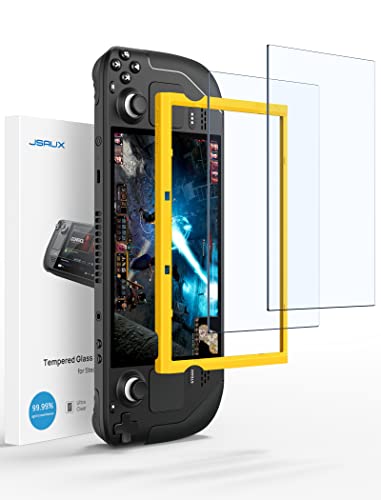
This is the straightforward pick for a Steam Deck LCD or Steam Deck OLED: clear tempered glass with a glossy finish and full-screen coverage of the 7-inch display. The listing states an oleophobic anti-fingerprint coating, which keeps palm and thumb prints from building up as quickly during play. JSAUX markets the glass as extra-reinforced; treat that as the maker’s own claim rather than a measured result.
The practical draw is the install. The pack includes two protectors, a guiding frame that registers against the Deck’s body, and toolkits for cleaning and fitting. A frame matters more on a handheld than on a phone, because the Deck’s screen sits inside a wide shell and freehand alignment drifts easily. With two protectors in the box, a dusty first attempt is not the end of the job.
| Brand | Product | ASIN | Key specs |
| — | — | — | — |
| JSAUX | Ultra HD Screen Protector 2-Pack for Steam Deck | B0B55ZD4HL | Fits Steam Deck LCD and Steam Deck OLED (7-inch), full-screen coverage; tempered glass; 9H hardness; glossy finish; oleophobic anti-fingerprint coating; 2 protectors; guiding installation frame and toolkits included; model GP0107TZ |
JSAUX Anti-Glare 2-Pack — The Matte Steam Deck Option
The anti-glare version of the JSAUX Deck protector swaps the glossy surface for a matte finish. That finish scatters reflections from windows, ceiling lights and train or plane cabins, which is where a glossy Deck screen struggles most. It fits both the Steam Deck LCD and the Steam Deck OLED, and ships as a two-pack with the same guiding frame and toolkits approach as the clear version.
The trade-off should be stated plainly: a matte surface softens the image slightly compared with clear glass. Text and fine detail lose a little crispness in exchange for reflection control. That trade suits a handheld played outdoors, on commutes or under bright room lighting; a Deck that lives on a desk under controlled light should take the clear pick above.
| Brand | Product | ASIN | Key specs |
| — | — | — | — |
| JSAUX | Anti-Glare Screen Protector 2-Pack for Steam Deck | B0BM9BPQQ8 | Fits Steam Deck LCD and Steam Deck OLED; matte anti-glare tempered glass; 9H hardness; 0.33 mm; 2 protectors; guiding frame and toolkits included; model GP0110 |
amFilm 3 Pack — The Steam Deck Spare-Parts Pick
amFilm’s pack is the value play in this roundup: three tempered glass protectors for the Steam Deck instead of two. The listing covers the original Steam Deck from 2021 and 2022 and the Steam Deck OLED from 2023 and 2024, so one pack serves either generation. The box includes a microfiber cloth and cleaning and dry wipes for the prep work before fitting.
A third protector sounds minor until an install goes wrong — a speck of dust under the glass, an edge that will not seat, a sheet dropped adhesive-side down. With three in the pack there is a spare for the second attempt, or a replacement ready when the first protector eventually takes a knock. Note that this pack leans on wipes and cloth rather than a registration frame, so alignment is a manual job.
| Brand | Product | ASIN | Key specs |
|---|---|---|---|
| amFilm | Screen Protector 3 Pack for Steam Deck | B09TPF6NQ8 | Fits Steam Deck (2021 and 2022 LCD models) and Steam Deck OLED (2023 and 2024); tempered glass; 3 protectors; microfiber cloth and cleaning and dry wipes included; model SD7-GLSX3; manufacturer TechMatte |
JSAUX Ultra HD for ROG Ally — One Cut for Four Models

The ROG Ally family has grown across three model years, and this JSAUX protector’s Compatible Devices field covers all of it: the ASUS ROG Ally from 2023, the ROG Ally X from 2024, and the ROG Xbox Ally and ROG Xbox Ally X from 2025, all on the same 7-inch screen size. One listing serving the whole family simplifies ordering, but confirm the exact model name on the handheld before ordering, since Ally naming is close enough to invite mistakes.
The glass itself is a clear glossy protector at 0.33 mm with an oleophobic coating per the listing, sold as a two-pack with a guiding frame included. As with the Steam Deck clear pick, the frame earns its keep: the Ally’s flat front gives little margin for a crooked sheet, and the second protector covers a failed first attempt.
| Brand | Product | ASIN | Key specs |
|---|---|---|---|
| JSAUX | Ultra HD Screen Protector for ROG Ally Series | B0CL92H125 | Compatible devices: ASUS ROG Ally (2023), ASUS ROG Ally X (2024), ASUS ROG Xbox Ally (2025), ASUS ROG Xbox Ally X (2025), 7-inch; tempered glass; 9H hardness; 0.33 mm; glossy finish; oleophobic coating; 2 protectors; guiding frame included |
Lenovo Legion Go Screen Protector — The First-Party Pick

Lenovo’s own protector is the only first-party option in this roundup, cut for the original Legion Go and its 8.8-inch display. It is a single protector per box, not a multi-pack, so there is no spare for a failed install — factor that in before ordering.
The box contents are fitting aids rather than extras: the protector itself, two dust wipes, a dust removal sticker and a dust removal cloth — the usual failure point in these installs is dust trapped during application. The listing carries a one-year manufacturer warranty, the only warranty statement among these five picks, suiting buyers who prefer the console maker’s own accessory channel.
| Brand | Product | ASIN | Key specs |
|---|---|---|---|
| Lenovo | Legion Go Screen Protector | B0CV8WMKS5 | Fits Lenovo Legion Go (original 8.8-inch model); protective glass 0.33 mm; 9H hardness; single protector per box; includes 2 dust wipes, dust removal sticker and dust removal cloth; model GXJ1N65746; 1-year manufacturer warranty |
How to Choose
Start with the exact device. A protector is cut for one screen, and close is not close enough: match the full model name and generation — Steam Deck LCD against Steam Deck OLED, the original Legion Go against its successor models, and the specific Ally variant in hand.
Next, choose the finish. Clear glossy glass keeps the picture at its sharpest and suits desk and dock play. Matte anti-glare glass trades a small amount of sharpness for reflection control, which pays off in bright rooms, outdoors and in transit. Owners of an etched-glass Deck should know a glossy protector changes that surface; matte is the closer match.
Then weigh the pack and the fitting method. A guiding frame is worth having for a first install, and a two- or three-pack turns a dusty failure into a retry instead of a reorder. Finally, read hardness figures correctly: the 9H ratings quoted here are the makers’ own pencil-hardness ratings for scratch resistance. A protector is sacrificial glass that absorbs everyday abrasion — not a guarantee about drops or cracked screens.
Who Should Skip
Skip this category if the handheld already wears a protector in good condition; stacking a second sheet dulls the picture and helps nothing. Skip these picks if the device in hand is outside the Steam Deck, ROG Ally and Legion Go families — none of the cuts here will fit it. Skip tempered glass entirely if the preference is a thin plastic film; that is a different product class. And skip the single-pack Lenovo pick if a first install is likely to need a second attempt — a two- or three-pack is the safer buy while learning the fitting process.
FAQ
Does a tempered glass protector affect touchscreen response on a handheld?
These protectors sit at 0.33 mm where a thickness is stated, the standard sheet thickness for this class, and they are sold for capacitive touchscreens. The fitting matters more than the glass: a sheet seated flat with no lifted edges keeps touch behaviour consistent, while a poorly aligned sheet is the usual cause of complaints. Follow the maker’s fitting directions and use the included frame where one is supplied.
Should a Steam Deck owner choose clear or anti-glare glass?
Choose by lighting, not by habit. Clear glossy glass preserves the sharpest image and suits a Deck played at a desk, docked or in a dim room. Matte anti-glare glass earns its place in bright rooms, near windows and in transit, at the cost of a slight softening of fine detail. Owners of an etched-glass Deck model should lean matte to stay closest to the original surface character.
Will a 9H protector stop a screen cracking in a drop?
No protector should be bought on that promise. The 9H figure is the maker’s pencil-hardness rating, a scratch-resistance scale, not a drop rating. Tempered glass protectors are sacrificial: they take scratches, scuffs and minor knocks so the display underneath does not, and they are replaced when damaged. Drop protection comes from a proper case and careful handling, with the protector as the surface layer only.
Can one protector fit both the Steam Deck LCD and the OLED model?
For the three Steam Deck picks here, yes — each listing names both the LCD and OLED models, which share the same 7-inch screen size. That sharing does not extend across device families: an Ally cut does not fit a Deck, and a Deck cut does not fit a Legion Go. Always order against the listing’s compatible devices field for the exact model in hand.
Final Verdict
For most Steam Deck owners, the JSAUX Ultra HD 2-Pack is the default buy — clear glass, a guiding frame and a spare sheet. The JSAUX Anti-Glare 2-Pack is the same idea tuned for bright rooms and travel, and the amFilm 3 Pack is the pick when spares matter more than a frame. ROG Ally owners are covered across all four models by the JSAUX Ally cut, and Legion Go owners who want the maker’s own accessory should take the Lenovo protector, accepting that it ships as a single sheet.
Product and ASIN Reference
| Product | ASIN |
|---|---|
| JSAUX Ultra HD Screen Protector 2-Pack for Steam Deck | B0B55ZD4HL |
| JSAUX Anti-Glare Screen Protector 2-Pack for Steam Deck | B0BM9BPQQ8 |
| amFilm Screen Protector 3 Pack for Steam Deck | B09TPF6NQ8 |
| JSAUX Ultra HD Screen Protector for ROG Ally Series | B0CL92H125 |
| Lenovo Legion Go Screen Protector | B0CV8WMKS5 |
Related guides
More from Amazon
Programs that pair well with the guide above. Offers and eligibility are set by Amazon and may change.
Free shipping on eligible items, Prime Video and more. Eligible new members can start with a free trial.
Start a Prime free trialAd-free music streaming. Eligible new subscribers can start with a free trial.
Try Music Unlimited freeA Prime membership for ages 18-24 with a trial period. Eligibility is set by Amazon.
See Prime for Young AdultsAudiobooks and podcasts to listen to on the go. Eligible new members can start with a free trial.
Try Audible freeAs an Amazon Associate we earn from qualifying purchases.