Logitech has spent years refining one idea: a wireless gaming mouse should feel like it is not there at all. The company’s LIGHTSPEED wireless connection is built to keep input delay low enough for competitive play, while its HERO sensors track fast flicks without the smoothing or acceleration that can make aim feel unpredictable. Across the current lineup, the differences that matter most are shape, weight, button count, and battery life, not the wireless link itself.
This guide compares five Logitech wireless gaming mice that are still sold on Amazon US, from the featherweight PRO X Superlight 2 to the button-rich G502 Lightspeed. Each one suits a different kind of player, so the right pick depends on your grip, your hand size, the games you play, and how many buttons you actually use.
As an Amazon Associate, we earn from qualifying purchases.
Our Top Picks


Top 3 picks at a glance

Quick answer
If you want the lightest mouse, the PRO X Superlight 2 leads with a 60-gram body and a HERO 2 sensor. The original PRO X Superlight remains a strong lighter-weight pick. The G502 Lightspeed suits players who want many buttons and an adjustable weight, the G703 Lightspeed suits palm-grip players who want comfort, and the G305 Lightspeed is the pick for long battery life on a single AA cell.
1. Logitech G PRO X Superlight 2
The PRO X Superlight 2 is Logitech’s flagship esports mouse, and it is built around subtraction. At 60 grams it is one of the lightest wireless gaming mice Logitech has made, and the symmetrical shape suits claw and fingertip grips in medium to large hands. There is no RGB lighting and no DPI button, which keeps the shell clean and the weight down. The HERO 2 sensor tracks up to 44,000 DPI with a report rate of up to 8 kHz, and the LIGHTFORCE hybrid switches combine optical actuation with a mechanical feel.
Battery life reaches up to 95 hours of constant motion, and the mouse charges over USB-C, which is a welcome change from the older micro-USB connector on the original Superlight. It also works with the POWERPLAY wireless charging mat, so it can top up while it sits on the desk between sessions. The five-button layout covers left click, right click, middle click, and two side buttons, which is enough for most shooter players who keep their extra commands on the keyboard.
The main trade-off is the price tier that comes with a flagship sensor and an ultralight body. Players who want a thumb rest, a sniper button, or onboard weight tuning will find this mouse too plain. For competitive first-person shooter players who value a light, neutral shape and a fast sensor above all else, it is the strongest pick in this guide.
Key specs
| Spec | Detail |
|---|---|
| Sensor | HERO 2 optical |
| Max DPI | 44,000 |
| Weight | 60 g |
| Buttons | 5 programmable |
| Battery life | Up to 95 hours |
| Connection | LIGHTSPEED wireless, USB-C charging |
| Charging | USB-C cable; POWERPLAY compatible |
2. Logitech G PRO X Superlight
The original PRO X Superlight is the mouse that made ultralight wireless gaming mainstream, and it still holds up. It weighs under 63 grams, uses the HERO 25K sensor with tracking up to 25,600 DPI, and shares the same symmetrical shape as its successor. The shell is smooth and unadorned, with five buttons and no RGB lighting, which keeps distractions out of the way during long sessions.
Battery life reaches up to 70 hours, and the mouse charges over a micro-USB cable. It is also compatible with the POWERPLAY charging mat. The sensor is a step behind the HERO 2 in the newer model, but for most players the difference shows up in specification sheets rather than in everyday aiming. The shape is the real draw: a neutral, symmetrical body that works for claw and fingertip grips and stays comfortable across long matches.
This is the pick for players who want the Superlight shape and a light body without paying the flagship tier for the newest sensor. It suits competitive shooter players, and it also works well as a daily mouse for work and browsing because the shape is easy to live with. The micro-USB charging is the clearest sign of its age, so players who have moved all their gear to USB-C may prefer the newer model.
Key specs
| Spec | Detail |
|---|---|
| Sensor | HERO 25K optical |
| Max DPI | 25,600 |
| Weight | Under 63 g |
| Buttons | 5 programmable |
| Battery life | Up to 70 hours |
| Connection | LIGHTSPEED wireless |
| Charging | Micro-USB cable; POWERPLAY compatible |
3. Logitech G502 Lightspeed
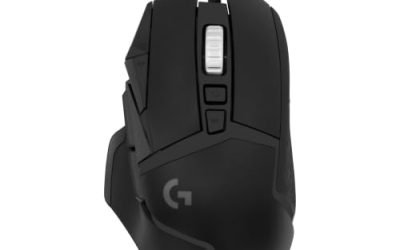
The G502 Lightspeed is the most versatile mouse in this guide. It keeps the sculpted right-handed shape that made the G502 line popular, with a thumb rest, an adjustable weight system, and eleven programmable buttons. The dual-mode scroll wheel switches between a notched mode for weapon selection and a free-spinning mode for scrolling through long pages, and the two buttons beside the left click work well as DPI shift or push-to-talk controls.
The HERO 25K sensor tracks up to 25,600 DPI, and battery life reaches up to 60 hours with lighting turned off. The mouse supports LIGHTSYNC RGB lighting on the logo and the side strip, and it works with the POWERPLAY charging mat. At 114 grams before the optional weights, it is noticeably heavier than the Superlight models, and that weight is part of the design: the G502 is built for players who like a solid, planted feel and who use the extra buttons for abilities, macros, or inventory shortcuts.
This is the pick for MMO players, battle royale players, and anyone who wants one mouse that can handle gaming, editing, and everyday work. It is less suited to players who chase the lightest possible mouse for fast flick aiming, since the shape and the weight reward a palm or relaxed claw grip rather than a fingertip grip.
Key specs
| Spec | Detail |
|---|---|
| Sensor | HERO 25K optical |
| Max DPI | 25,600 |
| Weight | 114 g, plus optional tuning weights |
| Buttons | 11 programmable |
| Battery life | Up to 60 hours |
| Connection | LIGHTSPEED wireless |
| Charging | Micro-USB cable; POWERPLAY compatible |
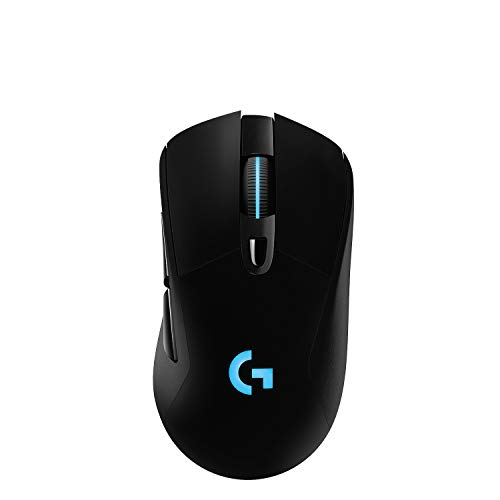
4. Logitech G703 Lightspeed
The G703 Lightspeed is the comfort pick of the Logitech wireless lineup. Its sculpted right-handed shape fills the palm, with rubber side grips and a gentle curve that suits palm-grip players and larger hands. The HERO 25K sensor tracks up to 25,600 DPI, and the six programmable buttons cover the essentials without crowding the shell. The layout is simple: two main buttons, a scroll wheel, a DPI button behind the wheel, and two side buttons.
Battery life reaches up to 60 hours with lighting off, and the mouse charges over a micro-USB cable. It also works with the POWERPLAY charging mat, and a 10-gram optional weight in the box lets players add a little heft if the 95-gram body feels too light. LIGHTSYNC RGB lighting on the logo and the side strip can be turned off to stretch battery life further.
This is the pick for players who game for long sessions and want a mouse that disappears into the hand rather than demanding attention. It suits palm-grip players best, and it works well for shooters and action games where a stable, comfortable shape matters more than a featherweight body. Fingertip-grip players and players with small hands may find the sculpted shape too large.
Key specs
| Spec | Detail |
|---|---|
| Sensor | HERO 25K optical |
| Max DPI | 25,600 |
| Weight | 95 g, plus 10 g optional weight |
| Buttons | 6 programmable |
| Battery life | Up to 60 hours |
| Connection | LIGHTSPEED wireless |
| Charging | Micro-USB cable; POWERPLAY compatible |
5. Logitech G305 Lightspeed
The G305 Lightspeed is the value pick of the lineup, and it is also the longest-lasting on a single charge. It runs on one AA battery for up to 250 hours of play, which means months of use for most players before a battery swap. The compact ambidextrous shape weighs 99 grams with the battery installed, and the HERO 12K sensor tracks up to 12,000 DPI, which is more than enough for most players outside the top competitive tier.
The six programmable buttons cover the essentials, and on-board memory stores one profile on the mouse itself, so settings travel with the mouse between computers. There is no RGB lighting and no rechargeable battery, which keeps the design simple and the weight low. The shape suits claw and fingertip grips, and the smaller body works well for players with small to medium hands.
This is the pick for players who want a dependable wireless gaming mouse without a flagship budget, and for anyone who prefers swapping a battery over remembering to charge. It is also a strong second mouse for travel or for a laptop setup. Players who need the highest sensor ceiling or a sculpted palm shape should look at the G703 or the G502 instead.
Key specs
| Spec | Detail |
|---|---|
| Sensor | HERO 12K optical |
| Max DPI | 12,000 |
| Weight | 99 g with AA battery |
| Buttons | 6 programmable |
| Battery life | Up to 250 hours on one AA battery |
| Connection | LIGHTSPEED wireless |
| Charging | Replaceable AA battery, no cable charging |
Who it’s for
These five mice cover most players. Competitive shooter players who use a claw or fingertip grip will get the most from the PRO X Superlight 2 or the original Superlight, since the light body and neutral shape make fast flicks easier to control. Palm-grip players who want comfort across long sessions will prefer the G703 Lightspeed, while players who use many abilities or shortcuts will get more from the eleven buttons on the G502 Lightspeed. The G305 Lightspeed suits players who want a simple, dependable wireless mouse with very long battery life, including players building a first gaming setup or a travel kit.
Who should skip
Players who need a left-handed mouse should look elsewhere, since every mouse in this guide is built for right-handed use or a symmetrical right-handed shape. Players with very small hands may find the G502 and G703 too large, and they should try the G305 or the Superlight shape first. Anyone whose main problem is wrist strain rather than aim should consider a different shape altogether: a vertical mouse changes the wrist angle and can feel easier across a long workday, and our guide to the best vertical gaming mouse compares the Logitech MX Vertical and Lift for that use. Players who need Bluetooth for a tablet or a console should also check connectivity carefully, since these mice are built around the LIGHTSPEED receiver and a wired USB connection rather than Bluetooth.
Comparison
| Mouse | Sensor | Weight | Buttons | Battery life | Best for |
|---|---|---|---|---|---|
| PRO X Superlight 2 | HERO 2, up to 44,000 DPI | 60 g | 5 | Up to 95 hours | Competitive FPS, light feel |
| PRO X Superlight | HERO 25K, up to 25,600 DPI | Under 63 g | 5 | Up to 70 hours | Competitive FPS, light feel |
| G502 Lightspeed | HERO 25K, up to 25,600 DPI | 114 g plus weights | 11 | Up to 60 hours | Many buttons, versatile use |
| G703 Lightspeed | HERO 25K, up to 25,600 DPI | 95 g plus 10 g weight | 6 | Up to 60 hours | Palm grip, long sessions |
| G305 Lightspeed | HERO 12K, up to 12,000 DPI | 99 g | 6 | Up to 250 hours | Long battery life, value |
The pattern is clear: the Superlight models trade buttons and features for weight, the G502 trades weight for buttons and versatility, the G703 trades weight for comfort, and the G305 trades sensor ceiling and rechargeable charging for battery life and simplicity. Sensor performance is strong across the whole lineup, so shape and weight should drive the decision more than the DPI number.
FAQ
Which Logitech wireless gaming mouse is best for competitive FPS?
The PRO X Superlight 2 is the strongest pick for competitive first-person shooters. Its 60-gram body, HERO 2 sensor, and report rate of up to 8 kHz suit fast flick aiming, and the symmetrical shape works for claw and fingertip grips. The original PRO X Superlight is a close second for players who want the same shape at a lower tier.
How long does the battery last on a Logitech wireless gaming mouse?
Battery life varies by model. The G305 Lightspeed lasts up to 250 hours on a single AA battery, the PRO X Superlight 2 lasts up to 95 hours, the original Superlight lasts up to 70 hours, and the G502 and G703 Lightspeed models last up to 60 hours with lighting turned off. Turning off RGB lighting stretches battery life on the models that have it.
Can Logitech wireless gaming mice charge while playing?
Yes. The PRO X Superlight 2, the original Superlight, the G502 Lightspeed, and the G703 Lightspeed all charge over a cable while in use, so a low battery does not have to end a session. All four also work with the POWERPLAY wireless charging mat, which charges the mouse whenever it rests on the mat. The G305 Lightspeed runs on a replaceable AA battery instead of charging.
Do Logitech wireless gaming mice work on Mac?
Yes. These mice work with macOS as well as Windows, and the G HUB software runs on both systems for button remapping and DPI settings. The G305 Lightspeed also stores one profile in on-board memory, so its settings travel with the mouse between computers without extra software.
Final verdict
The best Logitech wireless gaming mouse depends on how you play. For competitive shooter players, the PRO X Superlight 2 is the pick, with a 60-gram body, a HERO 2 sensor, and USB-C charging. The original PRO X Superlight remains a strong lighter-weight option for players who want the same shape without the newest sensor. Players who want buttons and versatility should take the G502 Lightspeed, palm-grip players who value comfort should take the G703 Lightspeed, and players who want long battery life and a simple setup should take the G305 Lightspeed. Any of the five is a dependable wireless gaming mouse; the right one is the one that fits your hand and your games.
Product and ASIN Reference
| Product | ASIN |
|---|---|
| Logitech G PRO X Superlight 2 Wireless Gaming Mouse | B09NBWL8J5 |
| Logitech G PRO X Superlight Wireless Gaming Mouse | B087LXCTFJ |
| Logitech G502 Lightspeed Wireless Gaming Mouse | B07L4BM851 |
| Logitech G703 Lightspeed Wireless Gaming Mouse | B07NSSPV9S |
| Logitech G305 Lightspeed Wireless Gaming Mouse | B07CMS5Q6P |
Related guides
More from Amazon
Programs that pair well with the guide above. Offers and eligibility are set by Amazon and may change.
Free shipping on eligible items, Prime Video and more. Eligible new members can start with a free trial.
Start a Prime free trialAd-free music streaming. Eligible new subscribers can start with a free trial.
Try Music Unlimited freeA Prime membership for ages 18-24 with a trial period. Eligibility is set by Amazon.
See Prime for Young AdultsAudiobooks and podcasts to listen to on the go. Eligible new members can start with a free trial.
Try Audible freeAs an Amazon Associate we earn from qualifying purchases.