The best AIO CPU coolers are the ones whose radiator fits your case and whose bracket fits your socket. For most gaming PCs, the ARCTIC Liquid Freezer III Pro 360 and MSI MAG Coreliquid A13 360 are strong 360mm choices, and the Cooler Master 240 Core II is a sensible 240mm pick for tighter cases.
Reviews usually rank AIOs by temperature charts. This guide starts one step earlier, with the question that causes most returns: will it fit? So the picks are grouped by radiator size, each one lists the sockets printed on its listing, and the buying guide walks through radiator length, fan thickness and mounting position. Anything the listing does not print is marked as not listed.
Our Top Picks
Top 3 picks at a glance
AIO Cooler Picks at a Glance
- Best overall 360mm: ARCTIC Liquid Freezer III Pro 360
- Best value 360mm with ARGB: MSI MAG Coreliquid A13 360
- Best low-noise 360mm: CORSAIR Nautilus 360 RS ARGB
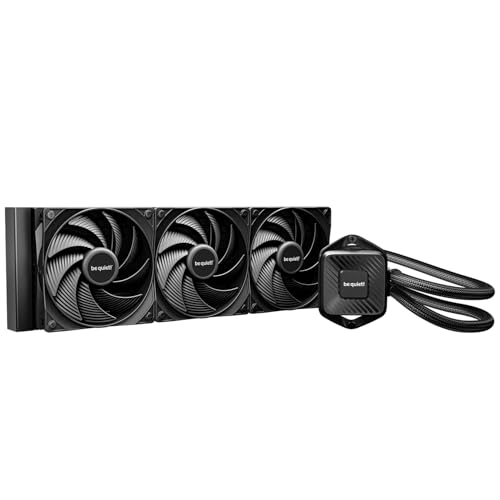
- Best quiet, no-RGB 360mm: be quiet! Pure Loop 3 360mm
- Best 360mm with an LCD screen: NZXT Kraken Plus 360
- Best budget 360mm with a screen: Thermalright FW 360 White ARGB
- Best 240mm for most builds: Cooler Master 240 Core II
- Best budget 240mm: Thermalright Aqua Elite 240 V3
| Cooler | Radiator | Fans (as listed) | Sockets (as listed) | Standout |
|---|---|---|---|---|
| ARCTIC Liquid Freezer III Pro 360 | 360mm | 3x 120mm | LGA1851, LGA1700, AM4, AM5 | Broad socket support |
| MSI MAG Coreliquid A13 360 | 360mm | 3x 120mm ARGB PWM | LGA1700/1851, AM5/AM4 | ARGB, value |
| CORSAIR Nautilus 360 RS ARGB | 360mm | 3x RS120 ARGB | LGA1851/1700, AM5/AM4 | Low noise |
| be quiet! Pure Loop 3 360mm | 360mm | 3x 120mm silent PWM | Not listed | Quiet, refill port |
| NZXT Kraken Plus 360 | 360mm | F120P | Not listed | LCD, CAM control |
| Thermalright FW 360 White ARGB | 360mm | Not listed | AM4/AM5, LGA1700 | 2.4 inch LCD |
| Cooler Master 240 Core II | 240mm | 2x ARGB PWM | AM5/AM4, LGA1851/1700 | Dual-chamber pump |
| Thermalright Aqua Elite 240 V3 | 240mm | 2x ARGB PWM | AM4/AM5, Intel LGA1150 to LGA1851 | Low cost |
Radiator Size Comes First
The label on an AIO (240mm, 280mm, 360mm) is the radiator’s length measured in fan sizes, not its true length. A 240mm radiator takes two 120mm fans and a 360mm radiator takes three. Published guides note that real radiators are longer than their label; NZXT lists its Kraken Plus 360 at 401mm, for instance. Always compare the true length to the space inside your case.
| Radiator | Best for | Watch out for |
|---|---|---|
| 240mm | Ryzen 5, Ryzen 7, Core i5 and tighter cases | Slightly higher fan noise under heavy loads |
| 360mm | Hotter CPUs such as Ryzen 9 and Core i7 or i9, roomy cases, quieter running | Needs a case that lists 360mm support in that spot |
A properly fitted 240mm cooler beats a poorly fitted 360mm every time. If your case lists only 240mm in the top or front, buy a 240mm and spend the saving elsewhere.
1. ARCTIC Liquid Freezer III Pro 360
As an Amazon Associate we earn from qualifying purchases at no extra cost to you.

The Liquid Freezer III Pro 360 is the first cooler to consider if you want a straightforward, wide-compatibility 360mm AIO without a screen. The listing states support for LGA1851, LGA1700, AM4 and AM5, which means it covers nearly every current desktop socket, including older AM4 builds.
- Radiator: 360mm with 3x 120mm fans
- Sockets: LGA1851, LGA1700, AM4, AM5
- Version: non-RGB listing (an A-RGB model also exists)
- Extras: not listed beyond water cooling
Best for: anyone building a Ryzen or Intel gaming PC who wants a no-frills 360mm cooler. Skip if: you want a screen or lighting, as this version does not list them.
Pros
- Supports four sockets including AM4 and AM5
- Plain, focused design without extra add-ons
- Three 120mm fans included
- Easy to match to most 360mm-ready cases
Cons
- No LCD or advanced software features listed
- Check your case radiator mount before ordering
2. MSI MAG Coreliquid A13 360

A value 360mm AIO that comes with three 120mm ARGB PWM fans. It lists LGA 1700 and 1851 along with AM5 and AM4 support, and it is a good fit for builders who want colored lighting without paying for a screen.
- Radiator: 360mm
- Fans: 3x 120mm ARGB PWM
- Sockets: LGA 1700/1851, AM5/AM4
- Color: black
Best for: buyers who want a 360mm cooler with ARGB fans at a reasonable cost. Skip if: you want a quiet, non-RGB look, in which case the be quiet! is a better fit.
Pros
- Triple ARGB fans are included
- Wide socket support
- Good match for a Ryzen 7 or Core i7 system
- Black design blends into most cases
Cons
- ARGB adds to wiring and software
- Pump and noise specs are not listed
3. CORSAIR Nautilus 360 RS ARGB

The Nautilus 360 RS is marketed as a low-noise 360mm cooler. The listing includes three RS120 ARGB fans with daisy-chain wiring, which cuts down on cables, and it lists support for Intel LGA 1851 and 1700 plus AMD AM5 and AM4.
- Radiator: 360mm
- Fans: 3x RS120 ARGB, daisy-chain
- Sockets: Intel LGA 1851/1700, AMD AM5/AM4
- Focus: low noise (as listed)
Best for: builders who want a quieter 360mm AIO from a well-known brand. Skip if: you are on a strict budget, since it costs more than the ARCTIC or MSI.
Pros
- Daisy-chain wiring means a cleaner build
- Low-noise focus listed
- Supports four sockets
- Three ARGB fans included
Cons
- Higher price than the budget 360mm picks
- Pump details are not listed
4. be quiet! Pure Loop 3 360mm

A non-RGB, quiet-focused AIO for people who dislike lighting. The listing describes three Silent 120mm PWM high-speed daisy-chain fans, a 6-pole pump motor and an easy refill port, and says it is made for slight overclocking.
- Radiator: 360mm
- Fans: 3x Silent 120mm PWM, daisy-chain
- Pump: 6-pole motor
- Extras: easy refill port
- Sockets: not listed
Best for: quiet builds with a Ryzen 7 or Core i5 or i7, no RGB. Skip if: you need clear socket confirmation, as the listing does not print one.
Pros
- Silent fans with daisy-chain wiring
- Refill port is uncommon at this tier
- No RGB cable clutter
- 6-pole pump motor is listed
Cons
- Socket support not printed in the listing
- Higher price than the ARGB value picks
5. NZXT Kraken Plus 360

The Kraken Plus 360 is the polished option. It pairs a 360mm radiator with an LCD, a turbine pump and F120P fans, and it is controlled through NZXT’s CAM software. It is the choice if you want the cooler to be a focal point of the build.
- Radiator: 360mm
- Screen: customizable LCD
- Pump: turbine pump (as listed)
- Fans: F120P
- Control: CAM software
Best for: builders who want an LCD screen and a refined design in a glass-side case. Skip if: you want the best cooling for the money, since the screen costs more than the cooling gains.
Pros
- Customizable LCD screen
- Simple install is advertised
- CAM control for fans and display
- Premium brand and design
Cons
- Highest cost among the 360mm picks
- Socket support not printed in the headline listing
6. Thermalright FW 360 White ARGB

A white 360mm AIO that adds an IPS LCD for a lot less than the big names. The listing mentions a 2.4 inch magnetic LCD with 320 x 240 resolution and support for AM4, AM5 and Intel LGA1700.
- Radiator: 360mm, ARGB
- Screen: 2.4 inch IPS LCD, 320 x 240
- Sockets: AM4, AM5, Intel LGA1700
- Color: white
Best for: white builds that want a screen without a premium price. Skip if: you need LGA1851 support, as only LGA1700 is mentioned for Intel.
Pros
- Screen at a lower cost than premium brands
- White finish suits light builds
- Supports AM4, AM5 and LGA1700
- Magnetic LCD is easy to attach
Cons
- LGA1851 is not mentioned
- Software and display support depend on the maker’s tools
7. Cooler Master 240 Core II
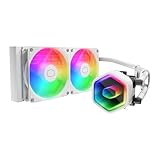
The best 240mm pick here. Its listing mentions a dual-chamber pump and two low-noise ARGB PWM fans, with support for AM5, AM4, LGA1851 and LGA1700, and a white Infinity Mirror ARGB look.
- Radiator: 240mm
- Fans: 2x low-noise ARGB PWM
- Pump: dual-chamber
- Sockets: AM5/AM4, LGA1851/1700
- Color: white, Infinity Mirror ARGB
Best for: mainstream builds in cases that take a 240mm radiator. Skip if: you have a hot Ryzen 9 or Core i9 and want extra thermal headroom, as a 360mm would help.
Pros
- Fits cases limited to 240mm
- Dual-chamber pump is a plus at this tier
- Four sockets supported
- ARGB Infinity Mirror styling
Cons
- Smaller radiator means less headroom
- White-only version in the listing
8. Thermalright Aqua Elite 240 V3

A very low-cost 240mm AIO. It lists double PWM ARGB fans with S-FDB bearings and a PWM-controlled pump, and it supports AM4, AM5 and Intel sockets from LGA1150 up to LGA1851, so it also helps older builds.
- Radiator: 240mm
- Fans: 2x PWM ARGB, S-FDB bearings
- Pump: PWM controlled
- Sockets: AM4, AM5, Intel LGA1150/1151/1200/1700/1851
Best for: budget builds and older Intel systems that need a basic AIO. Skip if: you want a quiet, premium feel, because savings come from simpler finishes.
Pros
- Low entry cost
- Very wide Intel socket list
- PWM control for both fans and pump
- S-FDB bearings are listed
Cons
- Smaller 240mm radiator
- Fewer premium features
Also Consider
- MSI MAG Coreliquid A13 240: A 240mm AIO with dual 120mm ARGB PWM fans and support for LGA 1700/1851 and AM5/AM4.
- be quiet! Pure Loop 3 240mm: The 240mm version of the quiet pick, with two Silent 120mm PWM fans and a refill port.
- Antec Ultra 360 ARGB: A low-cost 360mm with three 120mm PWM fans. The listing mentions Intel LGA 1200/1851/20XX and AM4/AM5, and LGA1700 is not listed, so confirm it first.
How We Chose These AIO Coolers
We did not use these coolers. This is a research-based list built from the store listings, the makers’ printed specifications and published sizing guides from NZXT, Corsair and others. Our criteria:
- Socket coverage: AM4, AM5, LGA1700 and LGA1851 where the listing states them
- Radiator size spread: six 360mm and two 240mm options, so both case types are covered
- Noise and pump design: noted where the maker lists them
- Style choices: no RGB, ARGB and LCD options
- Value: a mix of budget, mainstream and premium
- Brand limit: no more than two coolers per brand
We do not publish temperature charts or fan-speed numbers, because we did not run these coolers. Instead, we explain how to match one to your case and CPU.
AIO Buying Guide
240mm or 360mm: how to decide
Published sizing guides agree on a simple rule. A 240mm AIO is enough for a Ryzen 5, Ryzen 7 or a gaming-focused X3D chip in most cases. A 360mm AIO is better for hotter processors like Ryzen 9 and Core i7 or i9, for overclocked systems and for builders who want the quietest result, because larger radiators let fans spin slower.
Check the case first
- Look for explicit radiator support in the case specs, such as 360mm front or top.
- Confirm that the radiator plus fans fits the available thickness, usually in the 55 to 60mm range for most cases.
- Check RAM height and VRM heatsink clearance if you mount the radiator on top.
- Make sure a front radiator does not clash with a long graphics card.
Sockets and brackets
Check the listing for your socket. For Intel’s newest generation, look for LGA1851 and for older chips LGA1700. AMD AM5 and AM4 are usually covered by the same brackets on modern AIOs, but a few listings (like the Thermalright FW 360) mention only LGA1700 for Intel. Confirm on the maker page when in doubt.
Pump design and noise
The pump is the part you hear in a quiet room. Dual-chamber pumps and 6-pole motors are marketed as lower-noise designs, and the Corsair Nautilus and be quiet! Pure Loop 3 both focus on noise. If you are sensitive to sound, choose a quiet-focused model and set the fan curve in BIOS.
Screens and software
LCD screens on the NZXT Kraken Plus 360 and Thermalright FW 360 show temperatures, images or animations. They add cost and sometimes need software to run. If you only want cooling, you can skip the screen and spend the money on a better radiator or fans.
Fan curves and noise tuning
Whatever AIO you choose, the fan curve decides how it sounds. Set the pump to a steady speed and let the fans ramp slowly with CPU temperature. A short delay or smoothing setting in BIOS stops the fans from revving up and down during brief spikes, such as when a game loads. Many gamers find that holding the fans at a low, constant speed while browsing and ramping only under real load gives the quietest result.
Cables, headers and RGB control
ARGB fans and LCD pumps need extra headers or software. Check that your motherboard has a 5V ARGB header, a pump header and enough PWM fan headers before you buy. Daisy-chain fans, such as those on the CORSAIR Nautilus and be quiet! Pure Loop 3, reduce the number of cables you need to route.
Fan direction and mounting position
A common layout is a front-mounted radiator as intake or a top-mounted radiator as exhaust. Top-mounted exhaust usually keeps the graphics card cooler because the CPU’s hot air leaves the case directly, while front mounting gives the CPU cooler air but warms the GPU. Pick the layout that matches the part you want to keep cooler.
| Mount | CPU temperature | GPU temperature | Typical case |
|---|---|---|---|
| Front intake | Lower | Slightly higher | Mesh-front mid tower |
| Top exhaust | Slightly higher | Lower | Cases with top radiator support |
Match the Cooler to Your CPU Class
Printed thermal ratings vary between makers and are hard to compare, so a simpler approach is to match the radiator size to the class of processor. These are starting points, not promises, and the case and room temperature will always change the result.
| CPU class | Suggested radiator | Picks to start with |
|---|---|---|
| Ryzen 5 or Core i5 | 240mm is usually enough | Thermalright Aqua Elite 240 V3, Cooler Master 240 Core II |
| Ryzen 7, X3D gaming chips, Core i5 K | 240mm or 360mm | Cooler Master 240 Core II, MSI MAG Coreliquid A13 360 |
| Ryzen 9 or Core i7 | 360mm | ARCTIC Liquid Freezer III Pro 360, CORSAIR Nautilus 360 RS ARGB |
| Core i9 or overclocked builds | 360mm with good case airflow | ARCTIC Liquid Freezer III Pro 360, NZXT Kraken Plus 360 |
| Quiet office-gaming PC | 360mm at low fan speed | be quiet! Pure Loop 3 360mm |
How to Install an AIO Without Surprises
Most problems with AIO installs come from the order of steps, not from the cooler. This sequence avoids the usual mistakes and applies to every pick above.
- Test-fit the radiator first. Hold the radiator and fans in the planned position inside the empty case to confirm clearance before you add any parts.
- Install the CPU and RAM before the cooler. A radiator in the way makes memory installation awkward.
- Fit the socket bracket. Use the bracket for your socket, which is included with the cooler. Check that the backplate, if any, sits correctly behind the board.
- Apply thermal paste if the cold plate is not pre-applied. Many AIOs ship with paste already on the plate, so read the manual.
- Mount the radiator before the pump. Fix the radiator and fans to the case, then lower the pump block onto the CPU so the tubes are not strained.
- Tighten the screws in a cross pattern. Even pressure helps contact, and most makers say to stop when the springs reach their stop.
- Connect the pump to the right header. Use the pump header or an always-on fan header, and the fans to a PWM fan header or the cooler’s own hub.
- Set the fan curve in BIOS. A gentle curve that ramps with CPU temperature keeps noise low at idle.
AIO or Air Cooler?
An AIO is not automatically better than a large air cooler. Both can cool a gaming CPU, and the right choice depends on the case, the noise target and how you feel about moving parts.
| Factor | AIO | Large air cooler |
|---|---|---|
| Cooling headroom | Usually higher with 360mm | Good on mainstream CPUs |
| Case fit | Needs a radiator mount | Needs height clearance |
| Space around the CPU | More open, easier RAM access | Tower blocks the area |
| Moving parts | Pump and fans | Fans only |
| Noise | Can be very quiet with large radiators | Can be very quiet with big fans |
| Cost | Often more for equal performance | Often less |
If your case lists 360mm support and you run a hot CPU, an AIO is a reasonable choice. If you want the simplest, lowest-risk setup, a large air cooler is hard to fault.
Keeping an AIO Healthy
- Dust: Clean radiator fins and fan filters every few months with compressed air.
- Orientation: Keep the pump block lower than the radiator top when possible, so air stays at the top of the radiator and away from the pump.
- Noise changes: Gurgling or a rising pump noise can mean trapped air or a failing pump. Check mounting position first.
- Warranty: Read the terms on the product page, as they differ by brand.
- Refill ports: The be quiet! Pure Loop 3 lists an easy refill port, which is unusual among AIOs and can help longevity.
Frequently Asked Questions
What is the best AIO cooler for gaming?
For most gaming PCs, a 360mm AIO such as the ARCTIC Liquid Freezer III Pro 360 is the best balance of cooling and compatibility. A 240mm is fine for smaller cases and mainstream CPUs.
Is a 360mm AIO better than a 240mm?
Usually, because a larger radiator keeps fans slower and quieter under load. It only helps if your case fits it cleanly.
Do AIO coolers fit AM5 and LGA1700?
Most do, and the picks here list AM5 and LGA1700 or LGA1851 support. The be quiet! and NZXT listings do not print sockets, so confirm those before ordering.
Do I need an LCD screen on my AIO?
No. It is a styling extra and does not improve cooling. Choose it only if you want to show temperatures or images.
How long do AIO coolers last?
The pump and tubing are sealed, so the life depends on the pump and the model. Many makers list multi-year warranties, so check the product page for the specific term.
Can I mount a 360mm AIO in any mid tower?
No. Only cases that list 360mm radiator support in that position will take it. Check the case spec list before you order.
Is air cooling better than an AIO?
Large air coolers can match mid-range AIOs and have fewer parts to fail. An AIO frees space around the CPU and suits hotter chips and compact layouts.
Which One Should You Buy?
- Best all-round 360mm: ARCTIC Liquid Freezer III Pro 360.
- ARGB and value: MSI MAG Coreliquid A13 360.
- Quiet focus: CORSAIR Nautilus 360 RS ARGB or be quiet! Pure Loop 3 360mm.
- Screen and style: NZXT Kraken Plus 360, or Thermalright FW 360 White ARGB for less.
- Smaller case: Cooler Master 240 Core II, or Thermalright Aqua Elite 240 V3 on a strict budget.
Whichever you pick, confirm the radiator mount in your case and the bracket for your socket before you buy.
Sources
- NZXT: 240 vs 280 vs 360 vs 420 AIO radiator size guide
- Corsair: Which size AIO do I need?
- Sunbeam: 360mm AIO cooler vs 240mm sizes explained
- Manufacturer product pages and store listings for each cooler named above
Last updated: November 2026
Related guides
More from Amazon
Programs that pair well with the guide above. Offers and eligibility are set by Amazon and may change.
Free shipping on eligible items, Prime Video and more. Eligible new members can start with a free trial.
Start a Prime free trialAd-free music streaming. Eligible new subscribers can start with a free trial.
Try Music Unlimited freeA Prime membership for ages 18-24 with a trial period. Eligibility is set by Amazon.
See Prime for Young AdultsAudiobooks and podcasts to listen to on the go. Eligible new members can start with a free trial.
Try Audible freeAs an Amazon Associate we earn from qualifying purchases.