The INPHIC A9 V2 Explorer is the best all-around travel mouse in this group for a gaming laptop, because it connects three ways: a 2.4GHz wireless receiver, Bluetooth, or a wired USB-C cable. It also lists adjustable DPI up to 12,800, so it can double as a casual gaming mouse. A wireless mouse for gaming laptop travel needs to be small, quiet and dependable on a hotel desk, a train table or a couch, and it must survive a bag without losing its receiver. The six models below cover tri-mode, dual-mode and receiver-only designs, and each section explains who it suits.
Our Top Picks
Top 3 picks at a glance
Quick List
- VersionTECH Wireless Gaming Mouse – best for a simple rechargeable 2.4GHz mouse with a gaming look
- USB-A and USB-C Adapter Mouse (6-button) – best for laptops with only USB-C ports
- AIKOKOK Dual-Mode Mouse – best for switching between Bluetooth and a receiver
- INPHIC A9 V2 Explorer – best for a tri-mode gaming-style mouse that also works wired
- WREANU Dual-Mode Mouse – best for a slim, quiet Bluetooth and receiver option
- wegear 2.4GHz Wireless Mouse – best for a basic, ergonomic receiver-only mouse with five DPI levels
Which One Is Right for You?
| If you… | Choose |
|---|---|
| Want wired, Bluetooth and receiver options in one mouse and play casual shooters on the road | INPHIC A9 V2 Explorer |
| Want a rechargeable 2.4GHz mouse with a silent click and a gaming look | VersionTECH Wireless Gaming Mouse |
| Carry a thin laptop with USB-C ports only and hate dongles and adapters | USB-A and USB-C Adapter Mouse (6-button) |
| Switch between a laptop and a tablet or phone and want Bluetooth 5.2 plus a receiver | AIKOKOK Dual-Mode Mouse |
| Prefer a slim, quiet mouse for hotel rooms and shared spaces | WREANU Dual-Mode Mouse |
| Need a basic mouse with an ergonomic shape and five DPI steps | wegear 2.4GHz Wireless Mouse |
Think about your ports first. Many gaming laptops still have USB-A, but thin models rely on USB-C, so a receiver that needs USB-A might require an adapter. After that, decide whether you can live without Bluetooth, and whether a rechargeable battery or a replaceable one suits your trips. Honest expectations help too: these are travel-friendly mice, and none of the listings position them as competitive esports peripherals.
All 6 Picks in Detail
1. VersionTECH Wireless Gaming Mouse – Best for a Simple Rechargeable Receiver Mouse
As an Amazon Associate we earn from qualifying purchases at no extra cost to you.
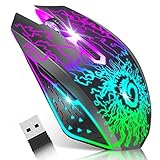
The VersionTECH mouse is a rechargeable 2.4GHz mouse with colorful LED lighting and a silent-click design. The listing mentions a USB nano receiver and three levels of DPI adjustment. A nano receiver is small enough to stay in the laptop’s port in transit, although you should still use the storage compartment if one is provided, since a bumped dongle is easy to bend. Silent switches suit libraries, hotels and shared rooms, but they feel softer than standard clicks, which some gamers dislike.
- Connection: 2.4GHz wireless via USB nano receiver
- Power: rechargeable battery; confirm charging port and battery life on the listing
- DPI: three adjustable levels; confirm the exact range
- Buttons: silent click, with colorful LED lighting
- Compatibility: confirm the operating systems on the listing
Pros
- Rechargeable, so there are no spare batteries to carry
- Silent clicks for quiet environments
Cons
- Receiver only, with no Bluetooth to fall back on
- LED lighting can shorten battery life
Compared with the INPHIC, it is simpler and has fewer connection options, but the same kind of everyday gaming-style design.
Who should buy it: players with a USB-A port who want a no-fuss rechargeable mouse. Who can skip it: anyone with a USB-C-only laptop who does not want an adapter, or anyone who wants Bluetooth.
Travel tip: switch the lighting off when you are away from a charger, since decorative LEDs are one of the quickest ways to drain a small battery. Most rechargeable mice also sleep after a period of inactivity, so a quick click or movement wakes them, which is worth remembering before you assume the battery has died. Pack the charging cable alongside the mouse so it never gets left behind in a hotel room.
2. USB-A and USB-C Adapter Mouse (6-Button) – Best for USB-C-Only Laptops

This listing describes a quiet cordless mouse for office and travel use with a 2.4GHz connection, a USB-A port and a USB-C adapter, six buttons and three DPI levels. The adapter is the main selling point: thin gaming laptops are increasingly USB-C-heavy, and a receiver that fits both port types removes one more thing to buy. The listing name does not state the brand clearly or whether the battery is rechargeable, so confirm those details on the product page before you rely on it for a long trip.
- Connection: 2.4GHz wireless with a USB-A receiver and a USB-C adapter
- Buttons: six, including forward and back keys
- DPI: three levels
- Noise: described as quiet
- Power: confirm battery type and runtime on the listing
Pros
- Works with both USB-A and USB-C ports
- Extra buttons help in browsers and productivity apps
Cons
- Receiver only; the adapter is one more small part to keep track of
- Less detail in the listing about the sensor and battery
Next to the wegear, it adds the USB-C adapter and a quiet design, which matters for modern thin laptops.
Who should buy it: owners of a USB-C-only gaming laptop who want a plain wireless mouse. Who should skip it: anyone who needs Bluetooth or a verified rechargeable battery.
Setup tip: plug the receiver into the USB-C adapter before you leave home and confirm the connection works, because adapters sometimes need a firm push to seat fully. If the laptop has one USB-A port, use it for the receiver and keep the adapter in a zip pocket as a spare. A six-button layout also means you can map the side buttons to browser navigation or a game’s quick actions in the settings of your operating system.
3. AIKOKOK Dual-Mode Mouse – Best for Bluetooth Plus a Receiver

The AIKOKOK is a slim rechargeable mouse with Bluetooth 5.2 and a 2.4GHz receiver, so it can connect to your gaming laptop with the receiver for low-latency use and to a tablet or a second laptop over Bluetooth when you are away from your desk. It has three DPI levels and LED lighting, and the listing describes a silent design. For travelers who carry several devices, being able to pair without taking up a USB port is a real advantage on a laptop with limited ports.
- Connection: Bluetooth 5.2 and 2.4GHz receiver
- Power: rechargeable; confirm the charging port and runtime
- DPI: three adjustable levels
- Design: slim and silent, with LED lighting
- Color: black
Pros
- Two connection modes cover most devices
- Slim body slips into a laptop sleeve
Cons
- Slim mice can feel cramped for large hands
- Bluetooth adds some latency compared with a receiver
It is almost a sibling of the WREANU, so choose based on shape, color and the exact reviews you trust.
Who should buy it: travelers who also pair a tablet or a second laptop. Who should skip it: players with large hands who need a bigger shell.
Pairing tip: when you switch between Bluetooth and the receiver, most dual-mode mice use a small selector on the underside. Learn which position is which before a trip, and remove the old pairing from your device if it ever refuses to reconnect. Keeping the receiver stored inside the mouse, if there is a slot, protects it and prevents it from catching on fabric when you slide the laptop into a bag.
4. INPHIC A9 V2 Explorer – Best Tri-Mode Gaming-Style Mouse

The A9 V2 Explorer is the most versatile mouse in this list. It supports 2.4GHz wireless, Bluetooth and a wired USB-C mode, so a low battery does not end your gaming session: you simply plug in and keep playing. The listing mentions 12,800 DPI, silent clicks and RGB lighting. According to the manufacturer’s pages, it uses a built-in rechargeable battery and offers adjustable polling rates, though specifications vary by listing and generation, so confirm the details you care about on the product page.
- Connection: 2.4GHz, Bluetooth and wired USB-C
- DPI: up to 12,800, adjustable through steps
- Power: rechargeable; wired mode keeps it running when the battery is low
- Buttons: silent click, with RGB lighting
- Form factor: a raised palm shape, as described by the manufacturer
Pros
- Wired mode removes battery worries
- Three connection options fit almost any situation
Cons
- Larger and heavier than the slim models
- RGB lighting uses battery power
It is the most capable of the six, but also the bulkiest, so weigh that against the AIKOKOK or WREANU if bag space is tight.
Who should buy it: players who want to use the same mouse for casual gaming and travel. Who should skip it: those who prioritize the smallest possible mouse.
Handling tip: use wired mode to charge and play at once if the battery runs low during a long session, and switch back to wireless once it is topped up. Because the shell is taller and wider than the slim models, check that it fits in the pocket of your laptop bag before you commit. The adjustable DPI steps are helpful on varied surfaces, such as a glossy desk or a mouse pad, where a lower setting may feel more controlled.
5. WREANU Dual-Mode Mouse – Best Slim Option for Quiet Spaces
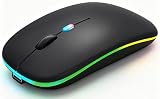
The WREANU is a rechargeable dual-mode mouse with Bluetooth 5.2 and a 2.4GHz receiver, LED lighting and a silent design. Its listing describes a portable USB receiver, which suggests a compact dongle that can be stored in the laptop in transit. Think of it as a good everyday mouse for a student or traveler who occasionally plays games but mostly browses, writes and streams. It does not position itself as a high-end gaming sensor, and the listing does not state a maximum DPI in the name.
- Connection: Bluetooth 5.2 and 2.4GHz receiver
- Power: rechargeable; confirm the runtime on the listing
- Design: slim and silent, with LED lighting
- DPI: confirm the levels on the product page
- Color: black
Pros
- Dual connection modes in a slim body
- Quiet clicks suit shared rooms
Cons
- Little detail about the sensor in the listing name
- Slim design may tire larger hands on long sessions
It sits right next to the AIKOKOK in features, so pick between them on factors such as shape and which lighting you like.
Who should buy it: students and commuters who want a quiet mouse that pairs with several devices. Who should skip it: gamers who want precise DPI control and a wired fallback.
Surface tip: slim optical mice track best on a matte surface such as a mouse pad, a notebook cover or a clean desk. Glass and mirrored surfaces confuse many optical sensors, which is a common cause of jumpy pointers in hotel lobbies and airport lounges. A small fabric pad folded in the laptop sleeve solves that problem for almost no weight and makes any table behave like your home desk.
6. wegear 2.4GHz Wireless Mouse – Best Basic Ergonomic Receiver Mouse

The wegear is the plainest mouse in the group: a 2.4GHz wireless mouse with an ergonomic shape, six buttons and five DPI levels. The listing is for a portable optical mouse intended for laptops, PCs and Macs. It does not mention Bluetooth, and the listing name does not say whether it uses a rechargeable battery or replaceable cells, so confirm that before packing it. For a traveler who just needs a reliable pointer and wants a comfortable shape, plainness is a feature.
- Connection: 2.4GHz wireless with a USB receiver
- Buttons: six
- DPI: five levels
- Design: ergonomic, portable optical mouse
- Power: confirm battery type on the listing
Pros
- Comfortable shape and five DPI steps
- Simple receiver-only setup with no pairing
Cons
- No Bluetooth listed
- Less information about battery and sensor details
Compared with the unbranded USB-C adapter model, it offers one more DPI step but no adapter for USB-C-only laptops.
Who should buy it: people who want a conventional ergonomic mouse for travel. Who should skip it: players who want Bluetooth or a rechargeable battery confirmed.
Battery tip: because the listing does not state the power source, check whether it takes a standard AA or AAA cell or a built-in battery, and pack a spare if it does. Replaceable cells are easy to find abroad, which can matter on long trips, while built-in batteries need a charger. Either way, switch the mouse off with its power switch before putting it in a bag so it does not wake and drain itself.
Specs Compared
| Mouse | Connection | Power | DPI | Buttons / switches | Extras |
|---|---|---|---|---|---|
| VersionTECH Wireless Gaming Mouse | 2.4GHz receiver | Rechargeable | Three levels | Silent click | Colorful LED |
| USB-A and USB-C Adapter Mouse | 2.4GHz receiver with USB-C adapter | Confirm on listing | Three levels | Six buttons, quiet | USB-A plus USB-C |
| AIKOKOK Dual-Mode Mouse | Bluetooth 5.2 and 2.4GHz | Rechargeable | Three levels | Silent | LED, slim |
| INPHIC A9 V2 Explorer | 2.4GHz, Bluetooth, wired USB-C | Rechargeable | Up to 12,800 | Silent click | RGB lighting |
| WREANU Dual-Mode Mouse | Bluetooth 5.2 and 2.4GHz | Rechargeable | Confirm on listing | Silent | LED, slim |
| wegear 2.4GHz Wireless Mouse | 2.4GHz receiver | Confirm on listing | Five levels | Six buttons | Ergonomic shape |
How We Chose These
This guide comes from desk research, not physical evaluation. We took the mice named in current catalog listings and compared connection options, power type, DPI levels, button count and size notes against listing text and manufacturer pages. Because travel is the focus, we weighed portability, quiet clicks, the number of connection modes and whether a mouse works with USB-C-only laptops. Where a listing left out a value, such as the battery type or maximum DPI, we say so instead of guessing. None of the six is marketed as a competitive esports mouse, and we avoid implying otherwise.
What to Look For
Receiver, Bluetooth or wired: choose the connection that fits your trip
A 2.4GHz receiver generally gives the most consistent response and is the better choice for games. Bluetooth is convenient because it needs no port, which helps with thin laptops, but it can add a little latency and may reconnect slowly after sleep. Wired USB-C mode, like the INPHIC offers, is the most reliable and removes battery worries. Rule of thumb: use the receiver at your desk, Bluetooth on the go, and a cable when you want zero surprises.
Ports and adapters
Many thin gaming laptops have a mix of USB-A and USB-C ports, and some have only USB-C. A receiver that plugs into USB-A will need an adapter on a USB-C-only laptop, and adapters are easy to lose. A mouse that includes its own adapter, or one that connects over Bluetooth, avoids that problem. Keep a spare adapter in the laptop bag if the mouse relies on one.
DPI, polling rate and sensor expectations
DPI describes how far the cursor moves per inch of hand movement. Most players use between 800 and 3,200 DPI on a laptop screen, and anything above that is often more marketing than benefit. Polling rate, which describes how often the mouse reports its position, matters more for fast games: gaming mice commonly report at 1,000 times per second, while basic office mice often report much less. Because several listings here do not state a polling rate, treat them as casual gaming mice rather than competitive tools.
Battery, charging and travel safety
Rechargeable mice use small lithium batteries. Charge them with the supplied cable and a standard USB port, avoid leaving them in a hot car or in direct sun, and stop using any mouse that swells, leaks or gets unusually hot. Airline rules generally require spare lithium batteries to travel in carry-on bags, and batteries installed in a device are usually allowed, but check your airline’s current policy. Models with replaceable cells need spares, which can be easier to find abroad.
Size, weight and noise
A mouse that is too small can cramp your hand during a long session, while a large one takes bag space. A slim shape suits a palm or claw grip with smaller hands, and a raised palm rest suits relaxed palm grips. Silent switches reduce noise in shared rooms but can feel softer. A worked example: if you play on a hotel desk for two hours a night and also write emails during the day, a tri-mode mouse like the INPHIC covers both; if you only browse on a train, a slim dual-mode mouse is plenty.
Questions
Are wireless mice good enough for gaming?
Modern 2.4GHz wireless mice respond quickly enough for casual and many competitive games, but Bluetooth is generally less consistent. For a serious competitive session, use a receiver or a wired connection.
Which is better for travel, Bluetooth or a receiver?
Bluetooth saves a port and a small part, while a receiver is usually more consistent. Dual-mode mice like the AIKOKOK and WREANU let you choose depending on the situation.
How should I protect the receiver in my bag?
Leave it in the laptop port if the receiver is tiny, or store it in the mouse’s compartment if one exists. Avoid loose receivers in a bag, where they can bend or be lost.
What DPI should I use on a laptop?
Between 800 and 1,600 DPI is a comfortable range on most laptop screens. If you use a higher-resolution display, a slightly higher setting can reduce the number of swipes needed to cross the screen.
Can I use these mice with a Mac or a tablet?
Receiver mice usually need a USB port, so a tablet or a USB-C-only Mac may need an adapter. Bluetooth models can connect to many tablets and Macs directly, but confirm compatibility on the listing.
Is a silent mouse worth it?
If you use your mouse in shared spaces, silent switches are considerate. They feel softer than standard clicks, and some gamers prefer the tactile feedback of regular switches.
Update History
- October 20, 2026 – Initial publication; product set drawn from current catalog listings.
- Check the product page for current specifications and availability before buying.
Sources
- Manufacturer product and specification pages for INPHIC
- Retailer listing titles and specification fields for all six mice