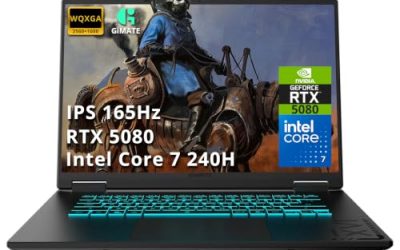
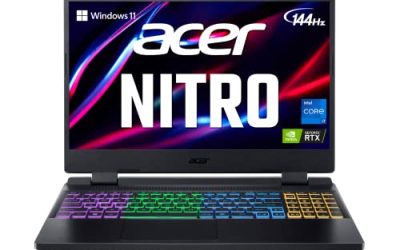
An RTX 5080 laptop asks for a serious commitment, so the real decision is not whether the graphics power tempts you, but whether this exact configuration matches how you actually play and work. The GIGABYTE Gaming A16 PRO combines a high-refresh WQXGA screen with a storage bundle that needs careful reading, because part of its headline capacity lives outside the laptop itself.
This guide serves competitive players chasing high frame rates, creators who game after editing sessions, and travelers who want desktop-class graphics in a bag. Every product mentioned was chosen from the names and specifications published on its Amazon page, and the checks below focus on the details that decide whether this machine fits your desk, your library, and your routine.
Quick Picks
As an Amazon Associate we earn from qualifying purchases
| Product | Best for | Key spec from title |
|---|---|---|
| GIGABYTE Gaming A16 PRO | Players wanting RTX 5080 graphics in a portable 16-inch chassis | GeForce RTX 5080 |
Only one laptop is featured here, and that is deliberate. A single-product shortlist keeps the attention on configuration details that a long comparison table tends to flatten: where the storage physically sits, which ports remain available once a dock enters the picture, and how the warranty splits between upgraded parts and the rest of the machine. Read the sections below as a checklist against your own setup. If each check lands in your favor, this is a coherent package. If one fails, that failure matters more than any headline specification, because laptops are difficult to change after purchase, especially when memory and storage arrive configured by the seller rather than fitted later by you.
How to Choose
Choosing a high-end gaming laptop means weighing four things in order: the graphics and screen pairing, the true layout of the storage, the memory format, and the connection set you will rely on daily. Shoppers often start with the graphics card alone, yet a fast card feeding a slow or dim panel wastes much of its advantage. Work through each criterion below with your own games and peripherals in mind, and note where this configuration makes a trade you are happy to accept.
Match the Graphics Card to the Screen
The RTX 5080 in this machine drives a 16-inch WQXGA panel at 2560×1600 with a 165Hz refresh rate and 3ms response time, a pairing that suits fast shooters and racing titles where motion clarity matters. Brightness is listed at 400 nits, comfortable for indoor play and office lighting. Before buying, list the games you play most and ask whether they benefit from high refresh rates or from higher settings at moderate frame rates. A card of this class also serves GPU-accelerated editing and rendering, so creators should weigh that dual use rather than judging the machine on gaming alone.
Read the Storage Layout Carefully
Headline storage figures can hide where capacity actually lives. Here, the laptop itself holds a 1TB SSD, while a second 1TB SSD sits inside the bundled 7-in-1 docking station set. That split changes daily life: games installed internally load wherever you travel, while dock-based storage only appears when the dock is connected at your desk. Plan your library accordingly, keeping current titles on the internal drive and archives, captures, and backups on the dock drive. Buyers who mostly play at one desk may love the arrangement; frequent travelers should judge the machine as a 1TB laptop with a useful home bonus.
Understand Soldered-Style Memory Trade-Offs
The 32GB of LPDDR5X memory is generous for gaming, streaming, and heavy multitasking, and it removes any immediate pressure to upgrade. However, LPDDR5X in machines of this class is not a user-swappable module format, so treat the fitted capacity as the capacity for the life of the laptop. That makes the initial decision important: 32GB covers large game installs running alongside chat, browser tabs, and capture software, but anyone planning demanding virtual machines or huge editing timelines should confirm this ceiling works for them. Checking your current memory usage on your old machine gives a realistic baseline for that judgment.
Count Ports Against Your Desk Setup
A gaming laptop often anchors a full desk, so port selection decides whether you need extra adapters. This chassis offers USB-C 3.2, two USB-A 3.2 ports, one USB-A 2.0 port, HDMI 2.1, DisplayPort 1.4, an RJ45 Ethernet socket, DC-in, and an audio combo jack. That mix covers an external monitor, wired networking, a mouse, keyboard, and headset without a hub for many setups. The bundled dock then adds desktop convenience rather than rescuing a sparse port layout. Before ordering, sketch your own desk connections on paper and tick each one against this list, including where the power cable will sit.
The 1 Best Options
GIGABYTE Gaming A16 PRO

This configuration suits players who want flagship-level graphics without surrendering portability entirely. At 5.07 lb and 0.77 inches thick, it remains a machine you can carry between rooms or to a friend’s place, while the RTX 5080 with 16GB of GDDR7 memory and the Intel Core 7 240H processor handle demanding titles and creative workloads. The 165Hz WQXGA screen gives that hardware a panel worth feeding, Windows 11 Pro adds workplace flexibility, and the docking station set turns a home desk into a semi-permanent station with extra storage waiting when you sit down.
Specs
- Display: 16-inch WQXGA 2560×1600, 165Hz, 3ms response, 400-nit brightness
- Processor: Intel Core 7 240H
- Graphics: GeForce RTX 5080 with 16GB GDDR7
- Memory: 32GB LPDDR5X
- Internal storage: 1TB SSD
- Operating system: Windows 11 Pro
- Keyboard: 1-zone RGB backlit keyboard
- Ports: 1x USB-C 3.2, 2x USB-A 3.2, 1x USB-A 2.0, HDMI 2.1, DisplayPort 1.4, RJ45, DC-in, audio combo jack
- Wireless: Wi-Fi 6E, Bluetooth 5.2
- Dimensions and weight: 14.11 x 10.34 x 0.77 in, 5.07 lb
- Color: Titanium Black
- Included docking station set: 7-in-1 dock containing a 1TB SSD, 32GB MicroSD card with adapter, Type-C data cable, 3-in-1 charging cable, and suede cleaning cloth
Best for: Gamers and creators who want RTX 5080 performance in a 16-inch laptop that still travels, with a desk dock waiting at home.
Watch out for: This is a seller-upgraded configuration: the listing states the seal is opened for the upgrade, with a 1-year warranty on the upgraded RAM and SSD and the manufacturer warranty covering the remaining components. Also remember the headline storage combines the 1TB internal SSD with the 1TB SSD inside the dock, so confirm both points before ordering.
A few practical notes round out the picture. The 1-zone RGB backlit keyboard lets you set a single color scheme across the board rather than per-key effects, which is fine for most players but worth knowing if elaborate lighting zones matter to you. Wired Ethernet through the RJ45 socket gives competitive players a stable alternative to wireless during ranked sessions, while Wi-Fi 6E covers everywhere else in the home. Bluetooth 5.2 handles wireless headsets and controllers. None of these details headline the listing, yet together they decide whether the laptop slots into your routine without friction or demands a pile of adapters and compromises.
Which One Fits Your Situation
With a single featured product, this section works differently: it tests the same laptop against four common buying situations. Be honest about which description matches your week, because a machine that thrills one owner can frustrate another purely through fit rather than quality.
You Play Competitively at a Fixed Desk
The GIGABYTE Gaming A16 PRO fits you well. Its 165Hz panel, wired Ethernet option, and full-size display outputs support a monitor-and-peripherals desk, while the dock adds a second SSD for captures and game archives. You get desktop-style sessions with the option to unplug and move, which is exactly the rhythm most desk-based competitive players actually live by week after week.
You Travel Often but Refuse to Leave Power Behind
At 5.07 lb, this laptop is portable for its class, though never light in absolute terms. Judge it as a 1TB machine on the road, since the dock storage stays home. If your library rotates through a handful of current titles, that works comfortably. Heavy travelers carrying huge offline collections should pause and reconsider how the storage split affects them before committing.
You Create Content as Well as Play
The combination of RTX 5080 graphics, 32GB of memory, and Windows 11 Pro suits editing, rendering, and streaming alongside gaming. The WQXGA screen gives timelines and previews room to breathe, and the dock’s extra drive holds project archives without crowding the internal SSD. Creators who value one machine for both work and play will find this configuration coherent, provided the fixed memory ceiling matches their project sizes.
You Want a Simple Console-Style Purchase
Pause before buying. A seller-upgraded configuration with split storage and split warranty coverage asks the owner to understand what they own. Nothing here is hidden, but it rewards a careful reader. If you prefer a factory-sealed machine with one storage figure and one warranty conversation, a different configuration may suit you better, even at similar headline specifications and performance levels for your favorite games.
Common Mistakes
- Reading the headline storage as 2TB inside the laptop, when 1TB sits in the bundled docking station instead.
- Ignoring the seller-upgrade warranty split between the upgraded RAM and SSD and the remaining components.
- Assuming the LPDDR5X memory can be expanded later like traditional removable laptop modules.
- Forgetting that dock-based storage disappears from the system whenever you travel without the dock.
- Overlooking the port layout and later buying adapters for a monitor, headset, or wired network connection.
Frequently Asked Questions
Is the storage really 2TB inside the laptop?
No. The internal drive is a 1TB SSD, and a second 1TB SSD sits inside the bundled 7-in-1 docking station set. The headline figure combines both. Games and files on the dock drive are only available while the dock is connected, so keep your current titles and essential documents on the internal drive for travel days and treat the dock capacity as home-base expansion.
What does the seller-upgraded configuration mean for warranty?
The listing explains that the seal is opened so the seller can perform the upgrade. The upgraded RAM and SSD carry a 1-year warranty, while the manufacturer warranty covers the remaining components. Keep the listing details and your order records, and confirm the current terms on the Amazon page before ordering, because that split coverage is a defining feature of this particular configuration rather than a footnote.
Can this laptop drive an external monitor for desk gaming?
Yes. HDMI 2.1 and DisplayPort 1.4 outputs are both listed, alongside USB-C 3.2, so connecting an external display is straightforward. The RJ45 socket also allows wired networking for steadier competitive sessions, and the two USB-A 3.2 ports cover a mouse and keyboard. Many owners will find the bundled dock becomes a convenience for storage rather than a necessity for basic desk connections and daily peripheral use.
Is 32GB of memory enough for gaming and streaming together?
For the vast majority of players, yes. The 32GB of LPDDR5X comfortably covers a demanding game running alongside streaming software, voice chat, and a browser full of tabs. The important caveat is permanence: this memory format is not something you plan to swap later, so the capacity you buy is the capacity you keep. Buyers with unusually heavy editing or virtualization workloads should sanity-check their current usage first.
Related guides
More from Amazon
Programs that pair well with the guide above. Offers and eligibility are set by Amazon and may change.
Free shipping on eligible items, Prime Video and more. Eligible new members can start with a free trial.
Start a Prime free trialAd-free music streaming. Eligible new subscribers can start with a free trial.
Try Music Unlimited freeA Prime membership for ages 18-24 with a trial period. Eligibility is set by Amazon.
See Prime for Young AdultsAudiobooks and podcasts to listen to on the go. Eligible new members can start with a free trial.
Try Audible freeAs an Amazon Associate we earn from qualifying purchases.