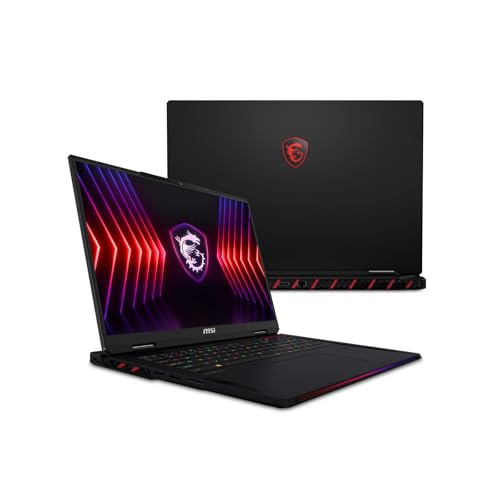
The MSI Vector 16 HX AI with a Core Ultra 9 275HX, an RTX 5080, 32 GB of DDR5 and a 2 TB SSD is the best RTX 5080 gaming laptop in this group. It states every important part in its listing name and fits all of them in a 16 inch body. The Alienware 18 Area-51 is the choice if you want the biggest, fastest screen and the heaviest cooling. The RTX 5080 laptop GPU is NVIDIA’s second-fastest mobile card, with 16 GB of GDDR7 and 7,680 CUDA cores, aimed at high-refresh 1440p and capable 4K play.
Our Top Picks
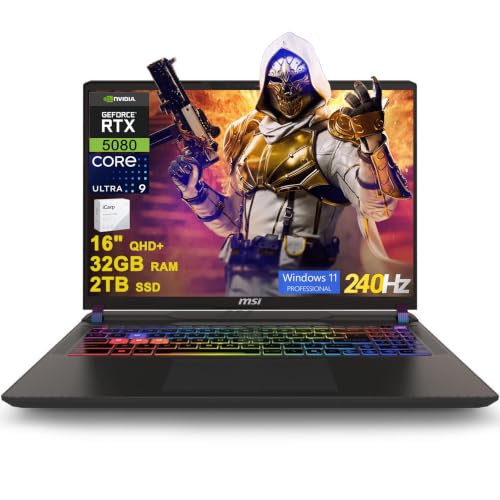 msi Vector 16 HX AI Gaming Laptop 16"32GB RAM | 2TB SSD11.1 x 14.05 x 1.12 inches49.82 poundsCheck on Amazon
 Alienware 18 Area-51 Gaming Laptop AA18250-18.0" WQXGA 300Hz18.0 WQXGA12.6 x 16.1 x 1.2 inches9.56 PoundsCheck on Amazon


Top 3 picks at a glance
Quick List
- MSI Vector 16 HX AI (32 GB, 2 TB) – best for a fully specified 16 inch RTX 5080 build
- ASUS ROG Strix G16 (2026) – best for the newest Core Ultra 9 290HX Plus processor
- MSI Vector 16 HX AI (16 GB, 1 TB) – best for the same platform in a smaller configuration
- GIGABYTE Gaming A16 PRO – best only if the product page confirms an RTX 5080
- MSI Raider A18 HX – best for an AMD 3D V-Cache processor and a mini-LED screen
- Alienware 18 Area-51 – best for an 18 inch 300 Hz screen and a large cooling system
Which One Is Right for You?
| If you… | Choose |
|---|---|
| want a 16 inch RTX 5080 with 32 GB and 2 TB stated up front | MSI Vector 16 HX AI (32 GB, 2 TB) |
| want the newest ASUS flagship processor in a 16 inch frame | ASUS ROG Strix G16 (2026) |
| want a large, fast 18 inch screen and strong cooling | Alienware 18 Area-51 |
| care most about CPU gaming performance and a 4K mini-LED panel | MSI Raider A18 HX |
| plan to upgrade memory and storage yourself | MSI Vector 16 HX AI (16 GB, 1 TB) |
| carry the laptop often and want a slimmer 16 inch body | GIGABYTE Gaming A16 PRO, after confirming the GPU |
| edit video and also game | MSI Vector 16 HX AI (32 GB, 2 TB) or Alienware 18 Area-51 |
Screen size is the first fork: 16 inch machines are easier to carry, while 18 inch machines give you a larger image and more cooling. Next, check how fully the listing states the memory and storage, since an RTX 5080 laptop is only as useful as the parts around it.
All 6 Picks in Detail
1. MSI Vector 16 HX AI (32 GB, 2 TB) – Best for a fully specified 16 inch RTX 5080
As an Amazon Associate we earn from qualifying purchases at no extra cost to you.
This listing describes a 16 inch QHD+ IPS 240 Hz laptop with an Intel Ultra 9 275HX, 32 GB of DDR5, a 2 TB SSD and an RTX 5080. The 275HX has 24 cores, with 8 performance cores boosting to about 5.4 GHz and 16 efficiency cores, and a 36 MB L3 cache. MSI lists the 5080 on the Vector 16 HX AI with a 175 W maximum graphics power and up to 240 W combined CPU and GPU power with OverBoost Ultra. It suits players who want a sharp 2,560 by 1,600 screen and enough memory and storage that they do not need to upgrade right away. At about 2.7 kg in MSI’s published figures, it is a heavy 16 inch laptop, but still far easier to move than the 18 inch machines. Confirm the battery size on the product page, because regional listings differ.
- Display: 16 inch QHD+ IPS, 240 Hz
- CPU: Intel Core Ultra 9 275HX, 24 cores
- GPU: RTX 5080, 16 GB GDDR7
- Memory: 32 GB DDR5
- Storage: 2 TB SSD
- Ports: dual Thunderbolt 5 on the series, per MSI
Pros
- Memory and storage are clearly stated
- Portable for an RTX 5080 laptop
Cons
- Smaller screen and cooling than the 18 inch models
- Fan noise rises under full load
Compared with the 16 GB, 1 TB variant, it gives you double the memory and storage for the same graphics and screen.
2. ASUS ROG Strix G16 (2026) – Best for the newest Intel flagship

The 2026 Strix G16 uses the Core Ultra 9 290HX Plus, a refreshed 24-core processor that ASUS lists at up to 5.5 GHz, with an RTX 5080 and 32 GB of DDR5 according to the listing name. The listing describes a 2.5K 240 Hz Nebula HDR panel, though ASUS’s own announcement for the 2026 G16 mentions a 300 Hz panel, so confirm which screen you get. ASUS lists a 90 Wh battery, a tri-fan cooling design with a vapor chamber and a tool-less chassis for upgrades. It is for buyers who want the latest ASUS design and an easy path to adding memory or storage. The tool-less panel design means you can reach the memory and drives without special tools, which is useful on a machine meant to last several years. Verify the Windows edition and the panel specifications before buying.
- Display: 16 inch 2.5K ROG Nebula HDR, 240 Hz per the listing; confirm on the product page
- CPU: Intel Core Ultra 9 290HX Plus
- GPU: NVIDIA GeForce RTX 5080
- Memory: 32 GB DDR5
- Storage: confirm on listing
- Cooling: tri-fan with vapor chamber, per ASUS
Pros
- Latest processor and an upgrade-friendly chassis
- Vapor chamber cooling and a large battery for the class
Cons
- Listing details can differ from ASUS’s own specifications
- Storage size is not stated in the listing name
Against the Vector 16, it has the newer CPU name but states less about storage.
3. MSI Vector 16 HX AI (16 GB, 1 TB) – Best for the same platform in a smaller configuration

This listing shares the 16 inch QHD+ 240 Hz screen, the 275HX processor and the RTX 5080 of the 32 GB model, but ships with 16 GB of RAM and a 1 TB SSD. MSI’s Vector 16 HX AI series has two memory slots and supports up to 96 GB, so the configuration can be expanded. It suits a buyer who is comfortable adding memory and storage later and wants to start with a lower-capacity build. The main trade-off is the need to upgrade soon if you edit video or install many large games. Since the CPU, GPU and screen match the larger model, you are really choosing how much RAM and SSD space you want from day one. If you already own spare memory or a spare M.2 drive, this configuration can be the sensible one.
- Display: 16 inch QHD+ (2,560 x 1,600), 240 Hz
- CPU: Intel Core Ultra 9 275HX
- GPU: RTX 5080, 16 GB GDDR7
- Memory: 16 GB
- Storage: 1 TB SSD
- Platform: two memory slots, per MSI
Pros
- Same CPU, GPU and screen as the larger configuration
- Upgradeable memory
Cons
- Only 16 GB of RAM and 1 TB of storage as shipped
- May need immediate upgrades for heavy use
The 32 GB, 2 TB model is the better pick if you do not want to upgrade.
4. GIGABYTE Gaming A16 PRO – Best only if the page confirms an RTX 5080

The listing name gives a Core Ultra 7 240H processor, 32 GB of LPDDR5x and a 16 inch screen, but it does not mention a graphics card. Other retailer listings of the A16 PRO commonly show an RTX 5070 Ti, and a published review headline describes a restricted-power RTX 5080 variant, so the configuration may vary. Because we cannot confirm an RTX 5080 from the listing, we treat it as a runner-up. Treat it as a candidate only if the product page lists an RTX 5080 and a stated power limit. If the page confirms a lower-tier GPU, treat the model as a fine portable laptop for other tasks but not as an RTX 5080 machine. Review the power limit as well, since a slim chassis can restrict how hard the GPU runs.
- CPU: Intel Core 7 or Core Ultra 7 240H class, per the listing name
- GPU: not stated in the listing name; confirm on listing
- Memory: 32 GB LPDDR5x
- Storage: confirm on listing
- Display: 16 inch; common configurations show 2,560 x 1,600 at 165 Hz
- Design: slim chassis aimed at portability
Pros
- Slimmer and lighter than the other models here
- Sharp 16:10 screen on common configurations
Cons
- Graphics card is not stated in the listing name
- Memory may be soldered, so upgrades are limited
If an RTX 5080 is a must, the first MSI above is the clearer choice.
5. MSI Raider A18 HX – Best for 3D V-Cache gaming and a 4K mini-LED screen
![EXCaliberPC [2025] MSI Raider A18 HX A9WIG-082US (AMD Ryzen 9 9955HX3D, 32GB DDR5 RAM, 2TB NVMe SSD, NVIDIA GeForce RTX 5080, 18" UHD+ 120Hz](https://m.media-amazon.com/images/I/31NznkpvipL._SL160_.jpg)
This listing is a reseller configuration of the MSI Raider A18 HX with an AMD Ryzen 9 9955HX3D, 32 GB of DDR5, a 2 TB NVMe SSD, an RTX 5080 and an 18 inch UHD+ 120 Hz display. The 9955HX3D has 16 Zen 5 cores, 32 threads and 128 MB of L3 cache thanks to 3D V-Cache, which AMD positions as its fastest mobile gaming processor. MSI lists the panel as 3,840 by 2,400 mini-LED with DisplayHDR 1000. It suits players who want a big, bright HDR screen and the best cache-heavy CPU, and who accept a heavy machine with a large power adapter. Because this is a third-party reseller configuration, check what is included, such as the operating system edition and warranty terms, in addition to the hardware. The reseller’s RAM and SSD figures may differ from MSI’s standard SKU.
- Display: 18 inch UHD+ 120 Hz; MSI lists mini-LED on the series
- CPU: AMD Ryzen 9 9955HX3D, 16 cores, 32 threads
- GPU: RTX 5080, 16 GB GDDR7
- Memory: 32 GB DDR5
- Storage: 2 TB NVMe SSD
- Power: MSI lists a 400 W adapter and a 99.9 Wh battery for the series
Pros
- Strong gaming CPU with large cache
- Bright, high-resolution HDR panel
Cons
- Refresh rate is 120 Hz, lower than the other models
- Heavy at roughly 3.6 kg for the series
Compared with the Alienware 18, it trades 300 Hz for 4K and HDR brightness.
6. Alienware 18 Area-51 – Best for a big, fast screen and heavy cooling

The Area-51 is Alienware’s flagship 18 inch machine. The listing gives an 18 inch WQXGA 300 Hz, 3 ms display, a Core Ultra 9 275HX and an RTX 5080, with 32 GB of DDR5 in two 16 GB sticks. Dell describes a large cooling system with a vapor chamber and quad fans, and published figures list the screen at 100 percent DCI-P3 and 500 nits with G-SYNC. The result is a desktop-replacement laptop that is meant to stay on a desk. It suits players who want a large screen and a chassis built to sustain high power. Dell also describes a transparent panel that shows the cooling hardware, which adds to the show-piece look. Because retailer listings disagree on several details, treat the manufacturer’s page as the final word on weight, storage and ports. Expect a large power adapter and a deep chassis, so measure your desk before ordering.
- Display: 18 inch WQXGA (2,560 x 1,600), 300 Hz, 3 ms
- CPU: Intel Core Ultra 9 275HX
- GPU: RTX 5080, 16 GB GDDR7
- Memory: 32 GB (2 x 16 GB) DDR5
- Storage: confirm on listing
- Weight: published figures vary by source, so confirm
Pros
- Large, very fast screen
- Extensive cooling for sustained power
Cons
- Heavy and bulky for travel
- Sources disagree on weight and several details
Next to the MSI Raider A18 HX, it is the faster-refresh panel but not the 4K option.
Specs Compared
| Model | CPU | GPU | RAM | Storage | Screen |
|---|---|---|---|---|---|
| MSI Vector 16 HX AI (32 GB, 2 TB) | Core Ultra 9 275HX | RTX 5080 16 GB | 32 GB DDR5 | 2 TB SSD | 16 inch QHD+ IPS, 240 Hz |
| ASUS ROG Strix G16 (2026) | Core Ultra 9 290HX Plus | RTX 5080 | 32 GB DDR5 | Confirm on listing | 16 inch 2.5K, 240 Hz per listing |
| Alienware 18 Area-51 | Core Ultra 9 275HX | RTX 5080 | 32 GB (2 x 16 GB) DDR5 | Confirm on listing | 18 inch WQXGA, 300 Hz |
| MSI Raider A18 HX | Ryzen 9 9955HX3D | RTX 5080 | 32 GB DDR5 | 2 TB NVMe SSD | 18 inch UHD+, 120 Hz |
| MSI Vector 16 HX AI (16 GB, 1 TB) | Core Ultra 9 275HX | RTX 5080 | 16 GB | 1 TB SSD | 16 inch QHD+, 240 Hz |
| GIGABYTE Gaming A16 PRO | Core Ultra 7 240H (per listing name) | Confirm on listing | 32 GB LPDDR5x | Confirm on listing | 16 inch, confirm on listing |
How We Chose These
We worked only from the six listed laptops and compared what each listing name states about the processor, graphics, memory, storage and display, then added details from manufacturer pages and NVIDIA’s published GPU specifications. We ranked by how completely the listing states an RTX 5080 build, the screen and the cooling class. This is a research-based guide, so we did not benchmark or use these laptops, and we do not quote frame rates. One listing that does not state an RTX 5080 is described plainly and treated as a runner-up.
What to Look For
What the RTX 5080 laptop GPU gives you
NVIDIA lists the RTX 5080 laptop GPU with 7,680 CUDA cores, 16 GB of GDDR7 on a 256-bit bus and a power range of roughly 80 to 150 W, with MSI quoting up to 175 W including Dynamic Boost. Compared with the 12 GB RTX 5070 Ti, it has about 30 percent more CUDA cores, 7,680 versus 5,888, and four more gigabytes of memory. That extra memory matters at 4K, with ray tracing and with high-resolution texture packs.
Why wattage and cooling matter
A high-end GPU in a thin body is power limited. A 16 inch chassis with dual fans can sustain around 240 W of combined CPU and GPU power on MSI’s design, while larger 18 inch designs with quad fans and vapor chambers are built for more. The practical rule: if the laptop is for long sessions at full load, favor a thicker chassis. If you travel, accept lower sustained power in exchange for a slimmer machine.
Gaming on battery is short on every model here, so plan to plug in for play. Many of these laptops ship with 330 to 400 W power adapters, which are large and heavy, and MSI lists a 400 W adapter for its Raider line. Count the adapter in your travel weight, and prefer the manufacturer’s charger over third-party ones. Battery capacities of 90 to 100 Wh sit near the limit allowed for airline carry-on, so check the rules if you fly.
CPU choices at this tier
The Core Ultra 9 275HX and 290HX Plus have 24 cores, while the Ryzen 9 9955HX3D has 16 cores and a large 128 MB cache. Cache-heavy gaming CPUs help in CPU-bound titles, whereas the Intel parts have more total cores for editing and streaming. At 1440p and above, the GPU is usually the limit, so either path works. If you plan to stream while you play, the extra efficiency cores on the Intel chips help keep the encoder running without hurting the game, while the 3D V-Cache part leans on a large cache to keep frame times steady. Weigh that against the memory and storage you actually get.
Screen size, resolution and refresh
A 16 inch QHD+ 240 Hz screen suits fast play, an 18 inch 300 Hz panel adds size and speed, and a 4K mini-LED panel favors HDR and sharpness at 120 Hz. Match the panel to the games you play. Example: for competitive shooters, prioritize refresh rate; for story games and creative work, prioritize resolution and brightness.
Memory, storage and upgrades
32 GB of DDR5 is the sweet spot for an RTX 5080 laptop, and 1 TB fills quickly with games that exceed 100 GB each. Check for two memory slots and a free M.2 slot, because soldered memory limits upgrades. A thin chassis often trades upgrade access for weight.
Before you decide, compare the sound and the ports too. Large gaming laptops can reach high fan noise under full load, so a headset or a quiet performance profile may matter if you share a room. Thunderbolt 5 on the MSI models can drive external displays and fast storage, while Alienware and ASUS also list modern high-speed ports. A last rule of thumb: add up the monitors, drives and accessories you plan to connect, and confirm the laptop’s ports support each of them without a hub.
Questions
Is the RTX 5080 laptop GPU a good choice for 4K?
It can drive 4K in many games with DLSS 4, and its 16 GB of memory helps with textures. Demanding titles may still need lowered settings. For consistent 4K play, many buyers consider the RTX 5090.
Is an 18 inch laptop better than a 16 inch one?
It offers a larger screen and room for more cooling, which helps sustained performance. The cost is weight and size. Choose 16 inch if you travel, and 18 inch if the laptop mostly stays on a desk.
Do I need 32 GB of RAM?
For gaming alone, 16 GB works, but 32 GB gives room for streaming, editing and many background apps. Since an RTX 5080 laptop is a long-term purchase, 32 GB is a safer default.
Why do listings for the same laptop show different specs?
Retailers use different configurations and sometimes shorten names, and manufacturers update panels during a model’s life. Always match the model code to the manufacturer’s page and read the specification table.
Is the 3D V-Cache processor better for gaming?
The extra cache helps in games that depend on the CPU, and AMD positions the 9955HX3D as its top mobile gaming chip. At high resolutions the GPU matters more, so the gain may be smaller.
Can I upgrade these laptops later?
The MSI Vector series has two memory slots and supports up to 96 GB, and ASUS describes a tool-less chassis for the Strix G16. The GPU is soldered and cannot be upgraded, so choose it carefully.
Update History
- October 14, 2026 – Initial publication; product set drawn from current catalog listings.
- Check the product page for current specifications and availability before buying.
Sources
- Manufacturer product and specification pages for MSI, ASUS, Alienware (Dell) and GIGABYTE
- NVIDIA published RTX 50 series laptop GPU specifications, as reported by hardware news outlets
- Intel and AMD processor specification pages
- Retailer listing titles and specification fields
- Published laptop reviews, including TechRadar’s GIGABYTE Gaming A16 PRO coverage