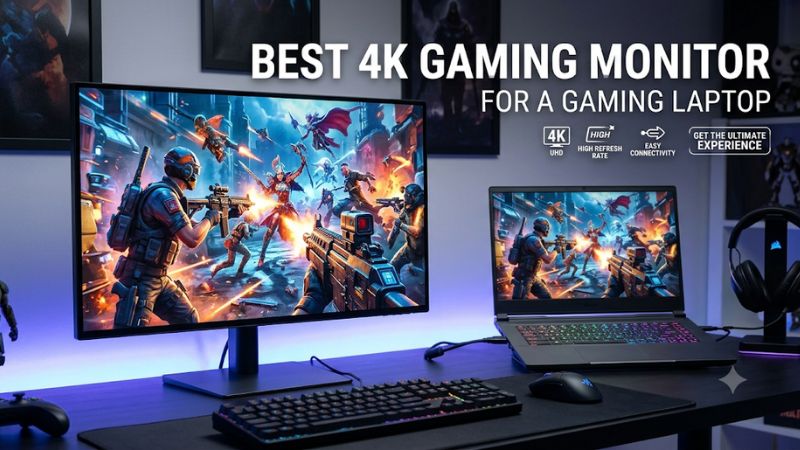
Choosing the best 4K gaming monitor for a gaming laptop means balancing image quality, refresh rate, connectivity, and GPU capability. A good display should deliver sharper visuals without creating unnecessary compatibility problems. This roundup compares four options, from premium OLED models to a more affordable IPS alternative.
How to Choose a 4K Gaming Monitor for a Laptop
A 4K monitor can significantly improve a gaming laptop setup, but the right purchase depends on more than resolution. Your laptop must support the required video output, while its GPU needs enough performance to render games at 3840 × 2160. Consider these four factors before choosing a display.
1. Check Your Laptop’s Display Output and Bandwidth
Start by checking which external display connections your gaming laptop supports. HDMI 2.1, DisplayPort over USB-C, and Thunderbolt can all provide high-resolution output, but their actual capabilities depend on the laptop’s implementation. A USB-C connector alone does not automatically support DisplayPort video output.
For the best 4K gaming monitor for a gaming laptop, check the manufacturer’s specifications for maximum external resolution and refresh rate. Also confirm whether USB-C supports DisplayPort Alternate Mode and whether the connection uses the dedicated GPU or integrated graphics. These details determine which display modes are available.
2. Choose a Refresh Rate Your Laptop Can Use
A 4K 144Hz monitor offers a useful balance between image detail and motion smoothness. More expensive displays now reach 240Hz, but achieving that frame rate at native 4K requires substantial GPU performance. Competitive players should consider whether their laptop can maintain high frame rates in their preferred games.
A 240Hz panel can still make sense when you play lighter esports titles or use lower graphics settings. However, buying a high-refresh-rate display does not increase your laptop’s rendering performance. Technologies such as NVIDIA G-SYNC Compatible and AMD FreeSync Premium Pro can help synchronize supported refresh rates and reduce visible tearing.
3. Decide Between OLED, IPS, and Mini-LED
OLED is attractive for gaming because each pixel produces its own light. This allows deep blacks, high contrast, and fast pixel transitions. QD-OLED and newer tandem OLED panels also offer wide color reproduction, making them appealing for visually demanding games and entertainment.
IPS remains a practical alternative for buyers who prefer an LCD panel and want to avoid OLED’s long-term image-retention considerations. Mini-LED is another option, using local dimming to improve HDR contrast. However, the number of dimming zones and the quality of local dimming implementation matter when comparing individual displays.
4. Consider USB-C Power Delivery and Desk Space
USB-C can simplify a laptop gaming setup by carrying video, data, and power through one connection. A monitor with 90W or 98W Power Delivery can charge many productivity laptops, but demanding gaming laptops often require considerably more power than a monitor can supply.
Think of USB-C charging as a convenience rather than a replacement for your laptop’s original power adapter. Also consider screen size: 27-inch and 28-inch displays are easier to accommodate on smaller desks, while 32-inch monitors offer a larger viewing area. Check VESA mounting support if you plan to use a monitor arm.
Top Picks: Best 4K Gaming Monitor for a Gaming Laptop
The following four displays cover different buying priorities, including premium OLED image quality, compact high-refresh-rate gaming, dual-mode performance, and a more accessible IPS option. Their specifications come from manufacturer documentation, while independent monitor reviews provide additional context about image quality and practical trade-offs.
| Product | Best For | Key Spec | Compatibility | Watch Out For |
| ASUS ROG Swift OLED PG32UCDM Gen3 | Best Overall | 31.5-inch 4K QD-OLED, 240Hz, 90W USB-C | HDMI 2.1, DP 2.1, USB-C DP Alt Mode | Premium OLED pricing |
| MSI MPG 272URX QD-OLED | Best Compact OLED | 26.5-inch 4K QD-OLED, 240Hz, 98W USB-C | HDMI 2.1, DP 2.1a, USB-C | OLED image-retention considerations |
| LG UltraGear 32GX870B-B | Best Dual-Mode Display | 31.5-inch 4K OLED, 240Hz/480Hz | HDMI 2.1, DP 2.1, USB-C 90W | High-end hardware requirements |
| GIGABYTE M28U | Best Value IPS | 28-inch 4K IPS, 144Hz | HDMI 2.1, DP 1.4, USB-C | Limited USB-C charging |
1. ASUS ROG Swift OLED PG32UCDM Gen3 – Best Overall
The ASUS ROG Swift OLED PG32UCDM Gen3 is a strong premium choice for laptop owners who want a large 4K OLED display without sacrificing connectivity. Its 31.5-inch QD-OLED panel combines a 3840 × 2160 resolution with a 240Hz refresh rate and 0.03ms GTG response time. It also supports HDR10 and Dolby Vision.
Connectivity is particularly useful for a laptop setup. ASUS includes two HDMI 2.1 ports, one DisplayPort 2.1 connection, and USB-C with DisplayPort Alternate Mode and up to 90W Power Delivery. A built-in USB hub and KVM switch also help manage multiple connected devices. The monitor includes a three-year warranty covering panel burn-in.
240Hz BlackShield™ film
This model is particularly suitable for users who want one display for gaming, entertainment, and everyday productivity. However, OLED image-retention considerations remain relevant, especially when displaying static desktop elements for extended periods. Its 240Hz capability also requires a laptop with sufficient GPU performance and compatible output bandwidth. Buyers seeking a less expensive LCD alternative should consider the GIGABYTE M28U instead.
2. MSI MPG 272URX QD-OLED – Best Compact OLED
The MSI MPG 272URX QD-OLED is an interesting option for laptop owners who want premium 4K gaming without moving to a 32-inch display. Its 26.5-inch panel delivers 3840 × 2160 resolution, a 240Hz refresh rate, and a 0.03ms GTG response time. The QD-OLED technology also provides high contrast and wide color reproduction.
Its connectivity is particularly appealing for a laptop workstation. MSI provides two HDMI 2.1 ports, one DisplayPort 2.1a connection with UHBR20 support, and USB-C with DisplayPort Alternate Mode and up to 98W Power Delivery. It also includes two USB-A ports, KVM functionality, and OLED Care 2.0. MSI specifies a three-year warranty that includes burn-in coverage.
MSI Global+1
The smaller screen is useful when desk space is limited, while its high pixel density makes detailed content look sharp. Nevertheless, 4K at 240Hz remains demanding, and the laptop must support the appropriate connection mode. OLED is also not ideal for everyone who spends long periods displaying static applications. Consider this monitor if compact dimensions and high refresh rates matter more than minimizing the purchase cost.
3. LG UltraGear 32GX870B-B – Best Dual-Mode Display
The LG UltraGear 32GX870B-B is designed for gamers who want flexibility between high-resolution gaming and competitive frame rates. Its 31.5-inch OLED panel supports native 4K at 240Hz and offers a dual-mode option that switches to Full HD at 480Hz. This makes it particularly interesting for players who enjoy both visually demanding single-player games and fast-paced esports titles.
The connection options also suit a modern laptop setup. LG includes HDMI 2.1, DisplayPort 2.1, and USB-C with up to 90W Power Delivery. The manufacturer lists a 0.03ms GTG response time, DisplayHDR True Black 500, G-SYNC compatibility, and AMD FreeSync Premium Pro. Its USB-C connection supports video, data, and charging through one cable.
LG Việt Nam+1
The dual-mode capability is its biggest distinction, but buyers should understand the resolution trade-off. The 480Hz mode operates at 1920 × 1080 rather than native 4K. This is useful when prioritizing competitive motion performance, but it does not provide the same image detail as UHD mode. Its premium positioning also makes it less suitable for budget-conscious buyers.
4. GIGABYTE M28U – Best Value IPS
The GIGABYTE M28U is a practical alternative for gamers who want 4K resolution and a high refresh rate without choosing an OLED display. Its 28-inch Super Speed IPS panel supports 3840 × 2160 resolution and up to 144Hz refresh. It also offers a 1ms GTG response-time specification, a non-glare surface, and VESA DisplayHDR 400 support.
For connectivity, the monitor includes two HDMI 2.1 ports, DisplayPort 1.4 with DSC, and USB-C. The USB-C connection supports DisplayPort Alternate Mode, while the display also includes KVM functionality. However, its USB-C Power Delivery is limited to 18W, making it unsuitable as the primary charger for most gaming laptops.
GIGABYTE Vietnam+1
This model makes sense for buyers who prefer LCD technology, want a smaller 4K display, and do not need high-wattage laptop charging. Its main limitation is HDR performance: DisplayHDR 400 certification does not provide the same contrast characteristics as premium OLED or advanced Mini-LED displays. It is a sensible alternative when resolution and refresh rate matter more than premium HDR features.
FAQ
1. Can a Gaming Laptop Run a 4K 240Hz Monitor?
Yes, a gaming laptop can connect to a 4K 240Hz monitor if its GPU and display output support the required resolution, refresh rate, and bandwidth. However, connecting successfully does not mean every game will run at 240 FPS.
Check the laptop manufacturer’s external display specifications before purchasing. HDMI 2.1 and DisplayPort 2.1 can provide different bandwidth capabilities, while DisplayPort over USB-C depends on the specific laptop implementation. Some configurations may require Display Stream Compression (DSC) to achieve higher refresh-rate modes.
2. Is HDMI 2.1 or USB-C Better for Connecting a Gaming Laptop?
Neither connection is universally better because the right choice depends on the laptop and monitor specifications. HDMI 2.1 is convenient when both devices support the required bandwidth, while USB-C can combine video output, data transfer, and charging.
USB-C is particularly useful for a cleaner desk setup, but check DisplayPort Alternate Mode support and Power Delivery wattage. If your laptop cannot output video through USB-C, use a compatible HDMI or DisplayPort connection instead.
3. Is a 4K 144Hz Monitor Better Than a 4K 240Hz Monitor?
A 4K 144Hz monitor is generally a more practical purchase for many gaming laptop owners because it offers a high refresh rate without requiring the same level of frame-rate performance as 240Hz gaming.
A 240Hz display is more attractive for competitive players with powerful laptop GPUs or those who also play less demanding games. For cinematic titles, exploration games, and everyday use, the difference may not justify the additional cost. Consider your actual gaming performance rather than choosing solely by the refresh-rate specification.
4. Can a USB-C Monitor Replace a Gaming Laptop Charger?
No, a USB-C monitor should not automatically be considered a replacement for a gaming laptop’s original power adapter. Even a display supplying 90W or 98W may provide insufficient power for a laptop under heavy gaming workloads.
Some laptops can operate and charge through USB-C Power Delivery, but others require their dedicated AC adapter for full performance. Check the laptop manufacturer’s charging requirements and supported USB-C charging specifications before relying on a monitor for power.
Final Thoughts
The best 4K gaming monitor for a gaming laptop depends on your GPU, available display connections, and preferred panel technology. ASUS and MSI offer compelling OLED options, LG adds useful dual-mode flexibility, and GIGABYTE provides a more accessible IPS alternative. Check your laptop’s output capabilities before choosing, especially when targeting 4K at high refresh rates.
Related guides
More from Amazon
Programs that pair well with the guide above. Offers and eligibility are set by Amazon and may change.
Free shipping on eligible items, Prime Video and more. Eligible new members can start with a free trial.
Start a Prime free trialAd-free music streaming. Eligible new subscribers can start with a free trial.
Try Music Unlimited freeA Prime membership for ages 18-24 with a trial period. Eligibility is set by Amazon.
See Prime for Young AdultsAudiobooks and podcasts to listen to on the go. Eligible new members can start with a free trial.
Try Audible freeAs an Amazon Associate we earn from qualifying purchases.