Choosing between gaming laptop mini LED vs OLED display technology can significantly change your gaming experience. Mini LED prioritizes brightness and sustained HDR performance, while OLED delivers deeper blacks, exceptional contrast, and faster pixel response. Understanding their differences helps you choose a display that matches your games, environment, and daily workload.
What Gaming Laptop Mini LED vs OLED Really Comes Down To
Mini LED and OLED approach image production differently, which explains their strengths and limitations. Mini LED remains an LCD technology with a sophisticated local-dimming backlight, whereas OLED uses self-emissive pixels. Neither is automatically better for every gamer. Your room lighting, gaming preferences, screen usage, and display specifications should determine the right choice.
1. Display Technology and Image Quality
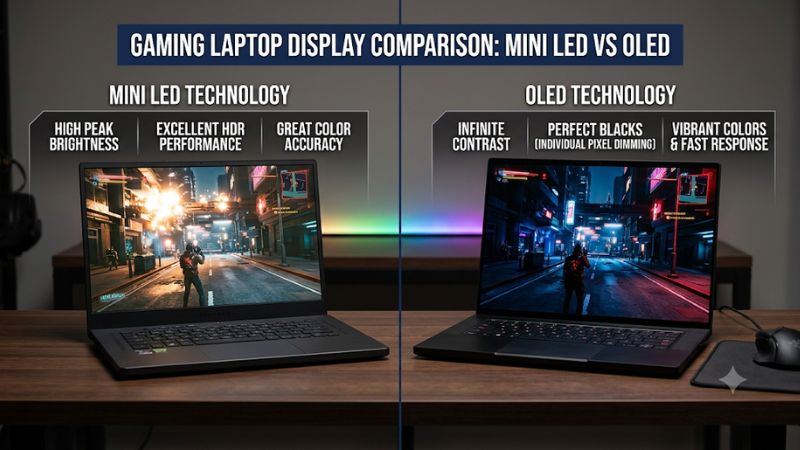
Mini LED uses thousands of small LEDs positioned behind an LCD panel. These LEDs operate in independently controlled dimming zones, allowing different screen areas to become brighter or darker depending on the displayed content. This improves contrast compared with conventional LCD displays, particularly when viewing HDR games and movies.
OLED works differently because every pixel generates its own light. Individual pixels can switch off completely to display black, producing exceptionally deep shadows and precise contrast. In a gaming laptop mini LED vs OLED comparison, OLED generally delivers more accurate dark-scene presentation because it does not depend on shared backlight zones.
The important distinction is that Mini LED controls light across groups of pixels, while OLED controls light at the individual pixel level.
2. Brightness, HDR, and Gaming Environments
Mini LED is particularly attractive for gamers who frequently use their laptops in bright rooms. Its powerful backlight can deliver high peak brightness while maintaining substantial brightness across larger illuminated areas. This helps games remain visible when sunlight or strong indoor lighting makes darker displays difficult to see.
OLED can also deliver impressive HDR highlights, but its brightness behavior differs. Depending on the panel, brightness may decrease when a large portion of the screen displays bright content. Automatic brightness limiting helps manage panel power and temperature, but it can affect sustained brightness during certain scenes.
For HDR gaming, neither peak brightness nor the HDR certification alone determines image quality. Contrast, tone mapping, color accuracy, local dimming, and the size of bright highlights all influence the final picture.
3. Response Time, Refresh Rate, and Competitive Gaming
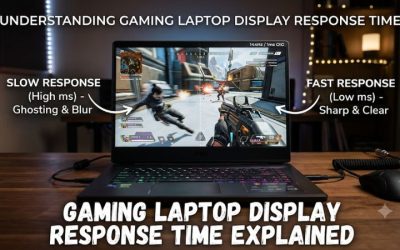
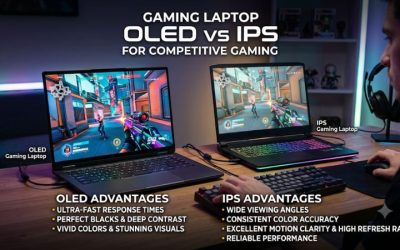
OLED has an important advantage in pixel response time. Because individual pixels can change their light output extremely quickly, OLED displays generally produce less pixel-transition blur than conventional LCD-based Mini LED panels. This can improve clarity when tracking opponents, moving the camera, or playing fast-paced shooters.
However, response time is not the same as refresh rate. A 240Hz Mini LED display can refresh more frequently than a 120Hz OLED display, even though the OLED panel may transition between pixel states faster. Both specifications matter when selecting a gaming laptop for competitive titles.
Mini LED performance also depends on LCD panel technology, overdrive tuning, and backlight behavior. Some specialized implementations offer additional motion-clarity features. Therefore, compare actual panel specifications instead of assuming every OLED automatically outperforms every Mini LED display.
4. Burn-In, Image Retention, and Long-Term Usage
OLED introduces a consideration that Mini LED does not share in the same way: permanent burn-in risk. Organic pixels gradually age through use, and uneven wear can eventually produce visible image retention. Repeatedly displaying static elements, such as taskbars, HUDs, and application interfaces, can contribute to uneven pixel aging.
Modern OLED laptops often include protective features such as pixel shifting, screen dimming, and panel maintenance routines. These features help reduce risk, but they cannot make burn-in physically impossible. Sensible brightness settings and allowing automatic maintenance to operate are useful long-term habits.
Mini LED uses an LCD panel with an LED backlight, so it does not have the same organic pixel degradation mechanism. This makes it attractive for users who spend extended periods working with static windows, spreadsheets, browser tabs, or game interfaces.
How to Choose Between Mini LED and OLED: A Practical Comparison
The best choice depends on how you actually use your gaming laptop rather than which technology has the most impressive specification. Consider your preferred games, ambient lighting, HDR expectations, and daily workload together. The following comparison highlights the practical differences and helps identify which display technology better matches your priorities.
| Comparison Factor | Mini LED | OLED |
| Display technology | LCD with LED backlighting | Self-emissive pixels |
| Black levels | Deep blacks with local dimming | True black at individual pixels |
| Contrast | High, depends on dimming zones | Extremely high |
| Peak brightness | Generally higher on comparable premium implementations | Varies by panel and content |
| Full-screen brightness | Often stronger for sustained bright content | May decrease through brightness limiting |
| HDR performance | Excellent highlights and bright scenes | Excellent contrast and precise highlights |
| Blooming | Possible around bright objects | No backlight blooming |
| Pixel response | Depends on LCD panel and tuning | Generally extremely fast |
| Refresh rate | Depends on individual laptop configuration | Depends on individual laptop configuration |
| Burn-in risk | No OLED-style burn-in | Possible with uneven pixel aging |
| Static desktop usage | Generally more suitable | Requires sensible OLED-care habits |
| Dark-room gaming | Very good | Excellent |
| Bright-room gaming | Generally preferable | Depends on brightness and screen coating |
Step 1: Identify Your Gaming Environment
Start by considering where you normally play games. If your laptop sits near a window, operates in a brightly illuminated room, or frequently travels between different environments, Mini LED deserves serious consideration.
Its stronger sustained brightness can make a noticeable difference when displaying bright scenes. However, maximum brightness figures are not always directly comparable because manufacturers may measure small HDR highlights differently from full-screen brightness.
OLED makes more sense if you usually play in a bedroom, gaming room, or controlled lighting environment. Its deep blacks and pixel-level contrast can make dark environments look more convincing, especially in atmospheric games.
Step 2: Match the Display to Your Game Library
Different gaming genres benefit from different display characteristics. Competitive shooters such as Counter-Strike 2 and Valorant reward clear motion, responsive pixel transitions, and high refresh rates. OLED is attractive here because its fast pixel response can reduce visible motion smearing.
For cinematic games, including expansive RPGs and visually detailed single-player titles, contrast and HDR presentation become particularly important. OLED can produce impressive nighttime scenes, dark environments, and detailed shadow transitions without backlight halos.
Mini LED remains competitive for HDR-heavy games featuring bright explosions, sunlight, and large illuminated environments. A high-quality Mini LED implementation can deliver a particularly impactful picture when the game contains substantial bright content.
Step 3: Compare the Actual Panel Specifications
Never purchase a laptop based exclusively on an OLED or Mini LED label. Two laptops using the same display technology can deliver noticeably different experiences because of their specifications and implementation.
Check these details before purchasing:
- Resolution: QHD, QHD+, and 4K provide different levels of image detail and GPU workload.
- Refresh rate: Compare 120Hz, 165Hz, 240Hz, and other available configurations.
- Brightness: Look for clearly identified SDR and HDR brightness measurements.
- Color coverage: Check sRGB and DCI-P3 coverage, alongside calibration information.
- Response time: Determine whether the manufacturer reports gray-to-gray measurements or another methodology.
- Adaptive sync: Check support for compatible NVIDIA G-SYNC or AMD FreeSync technologies where applicable.
Also examine the display coating, viewing angles, and panel-specific HDR behavior. These characteristics can matter as much as the underlying display technology.
Step 4: Consider Battery Life and Daily Productivity
Display technology can influence battery consumption, but there is no universally correct winner. OLED pixels consume different amounts of power depending on their brightness and displayed colors. Dark interfaces can therefore be more power-efficient than large bright images under otherwise comparable conditions.
Mini LED power consumption depends on the LCD backlight, local-dimming behavior, brightness settings, and panel implementation. A bright desktop with large white windows can demand substantial backlight power.
More importantly, gaming laptop battery life also depends on the CPU, GPU, battery capacity, refresh rate, and operating mode. A laptop with an OLED panel is not automatically more efficient than a Mini LED alternative.
If battery life matters, compare independent reviews of the exact laptop configurations using similar workloads. Avoid making purchasing decisions based only on panel technology.
FAQ
1. Is Mini LED or OLED better for gaming laptops?
OLED is generally better for pixel response, black levels, and dark-scene contrast, while Mini LED is generally better for sustained brightness and bright-room visibility. Both technologies can provide excellent gaming experiences.
For competitive gaming, consider OLED models with high refresh rates and suitable adaptive-sync support. For bright environments and HDR-heavy games, Mini LED can be the more practical option.
The GPU, cooling system, refresh rate, and actual panel implementation should still influence your final decision.
2. Does an OLED gaming laptop have burn-in problems?
Yes, OLED gaming laptops can develop permanent burn-in after prolonged uneven pixel usage, although the risk varies by panel and usage habits.
Static taskbars, game HUDs, and frequently displayed application interfaces can contribute to uneven pixel aging. Modern OLED protection features help manage this issue, but they do not completely remove the possibility.
To reduce risk, use reasonable brightness levels, enable available OLED-care features, and allow automatic panel maintenance to operate according to manufacturer instructions.
3. Does Mini LED have better HDR than OLED?
Mini LED can deliver stronger sustained brightness, while OLED generally provides better black levels and pixel-level contrast.
For bright HDR scenes, Mini LED can produce particularly impressive highlights and illuminated environments. OLED offers more precise control over individual bright and dark pixels, avoiding the blooming that can occur with local dimming.
The better HDR experience ultimately depends on the specific panel, brightness behavior, HDR processing, and content being displayed.
4. Is OLED worth paying more for in a gaming laptop?
OLED can justify a higher purchase price if you prioritize visual quality, deep blacks, fast pixel response, and cinematic gaming experiences.
However, paying more does not automatically provide better overall gaming performance. A laptop with a stronger GPU, better cooling, or higher refresh-rate display may offer greater practical value depending on your priorities.
Compare the complete laptop configurations rather than spending extra money solely because a model carries an OLED display.
Final Thoughts
Choosing between gaming laptop mini LED vs OLED display technology comes down to your priorities. Mini LED is the practical choice for bright environments, sustained HDR brightness, and static desktop workloads, while OLED excels at contrast, black levels, and motion clarity. Compare the exact panel specifications before making your purchase.
Related guides
More from Amazon
Programs that pair well with the guide above. Offers and eligibility are set by Amazon and may change.
Free shipping on eligible items, Prime Video and more. Eligible new members can start with a free trial.
Start a Prime free trialAd-free music streaming. Eligible new subscribers can start with a free trial.
Try Music Unlimited freeA Prime membership for ages 18-24 with a trial period. Eligibility is set by Amazon.
See Prime for Young AdultsAudiobooks and podcasts to listen to on the go. Eligible new members can start with a free trial.
Try Audible freeAs an Amazon Associate we earn from qualifying purchases.