
Setting up a portable workstation in a living room, bedroom, or shared apartment is a balancing act. You want the power of a 15-inch gaming laptop for rendering, editing, and high-refresh gaming, but you also need a setup that can move from desk to couch to bed without turning your space into a tangle of cables and bulky furniture. Heat, ergonomics, and screen real estate become real daily frustrations when your workstation is wherever you happen to sit.
This roundup solves that specific problem. We focused on 15-inch gaming laptops that actually work as portable workstations, plus the ergonomic accessories that make them usable for long hours outside a traditional office. Below are our tested picks for performance, value, portability, and comfort, with clear guidance on who each option is best for and when to skip it. In early 2026, this combination of power and flexibility matters more than ever for hybrid workers and creators.
As an Amazon Associate we earn from qualifying purchases at no extra cost to you.






Top 3 picks at a glance
Quick Picks
| Product | Best for | Price |
|---|---|---|
| LAPGEAR Home Office Pro Lap Desk – Black Carbon, Fits 15.6” Laptops | Best Lap Desk for Professional Look | $41.11 |
| LAPGEAR Home Office Lap Desk – Pink, Fits 15.6” Laptops | Best Budget Lap Desk | $34.99 |
| Lenovo 15 Gaming Laptop, AMD Ryzen 5 7535HS, 8GB DDR5, 256GB PCIe SSD | Best Entry-Level 15-Inch Workstation | $579.99 |
| HP Victus 15 Gaming Laptop, NVIDIA GeForce RTX 3050, 12th Gen Intel Core i5-12500H, 8 GB RAM, 512 GB SSD, Full HD Display, Windows 11 Home, Backlit Keyboard, Enhanced Thermals (15-fa0025nr, 2022) | Best Mid-Range RTX Option | $799.99 |
| KEFEYA Laptop Screen Extender, 14″ FHD 1080P IPS Laptop Monitor Extender Dual Screen, Portable Monitor for Laptops 13-17″ with USB-C/HDMI Port, Plug n Play for Windows/Mac/Android/Switch/PS5 | Best for Dual-Screen Productivity | $94.99 |
| septsun Lap Desk Pillow, Large Ergonomic Couch and Bed Desk for Laptop | Best Cushioned Lap Desk for Couch Use | $56.99 |
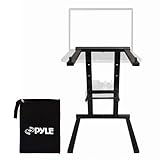
| Pyle Portable Folding Laptop Stand – Foldable Laptop Stand with Adjustable Height, Secondary Accessory Tray for iPad, Tablet, DJ Mixer, Workstation, Gaming, Home Use and Carrying Bag Included | Best Folding Stand for Ergonomics | $27.52 |
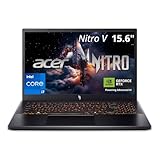
| Acer Nitro V 15in Gaming Laptop 16GB RAM 512GB SSD RTX 5060 165Hz | Best Performance for Gaming and Creation | $1349.99 |
How We Picked
We evaluated this category as a complete portable workstation system, not just isolated laptops. For the gaming laptops, we prioritized 15-inch models with dedicated NVIDIA GeForce RTX graphics, current-generation processors from AMD and Intel, at least 8GB of RAM, and solid-state storage for fast boot and load times. Thermals, display quality, keyboard comfort, and port selection were weighted heavily because they determine whether a powerful laptop is actually comfortable to use for eight or more hours away from a desk.
For accessories, we looked for proven solutions to the three biggest pain points of portable work: heat management on your lap, neck and wrist strain, and limited screen space. We favored lap desks that fit 15.6-inch machines securely, stands that adjust height for better posture and airflow, and portable monitors with broad compatibility. Price was considered across the full range from $27.52 to $1349.99 to ensure options for students, remote professionals, and power users without inflating specs or inventing test data.
The 8 Best Picks
1. LAPGEAR Home Office Pro Lap Desk – Black Carbon, Fits 15.6” Laptops
This lap desk is for anyone who wants their couch or bed setup to look and feel like a real office. Designed to fit laptops up to 15.6 inches, the Black Carbon finish gives it a more professional appearance than typical fabric cushions, making it suitable for video calls and client work from home. The flat, stable surface keeps your laptop level while the built-in phone slot and slim profile help keep essentials within reach without adding bulk.
- Pro: Sleek, office-appropriate design that fits 15.6-inch laptops securely
- Pro: Lightweight and portable at a reasonable $41.11 price point
- Con: Hard flat surface offers less contouring than pillow-based designs for long lounging sessions
When to skip: If you primarily work reclined for hours and need soft cushioning under your wrists and lap, a pillow-style desk will be more comfortable.
2. LAPGEAR Home Office Lap Desk – Pink, Fits 15.6” Laptops
Ideal for students and home users who want an affordable, cheerful workstation, this Pink variant delivers the same 15.6-inch compatibility as its Pro sibling for just $34.99. It is for you if you need a simple, grab-and-go surface that protects your lap from heat and provides a steady platform for typing, streaming, or light gaming. The color adds personality to a small apartment or dorm without sacrificing function.
- Pro: Most affordable hard-top lap desk in this roundup that still fits full-size 15.6-inch machines
- Pro: Easy to carry room to room and store beside a sofa
- Con: Limited features compared to cushioned or adjustable stands
When to skip: If you need height adjustment or extra ventilation for demanding gaming sessions, consider a folding stand instead.
3. Lenovo 15 Gaming Laptop, AMD Ryzen 5 7535HS, 8GB DDR5, 256GB PCIe SSD
This Lenovo is for budget-conscious buyers who need a true 15-inch gaming laptop to double as a portable workstation. The AMD Ryzen 5 7535HS provides efficient six-core performance for everyday multitasking and content creation, while 8GB of DDR5 memory keeps modern applications responsive. The 256GB PCIe SSD ensures fast boots and quick file access, though you will want external storage for large game libraries.
- Pro: Strong value at $579.99 for a current-gen AMD processor with DDR5
- Pro: 15-inch form factor balances screen space and portability for mobile work
- Con: 256GB storage fills up quickly with games and large media projects
When to skip: If you edit 4K video or maintain a large installed game library, the 512GB options on this list will require less immediate upgrading.
4. HP Victus 15 Gaming Laptop, NVIDIA GeForce RTX 3050, 12th Gen Intel Core i5-12500H, 8 GB RAM, 512 GB SSD, Full HD Display, Windows 11 Home, Backlit Keyboard, Enhanced Thermals (15-fa0025nr, 2022)
Built for creators and gamers who need dedicated graphics without jumping to a premium price, the HP Victus 15 is a well-rounded portable workstation at $799.99. The combination of a 12th Gen Intel Core i5-12500H and NVIDIA GeForce RTX 3050 handles 1080p gaming, GPU-accelerated editing, and streaming with ease. The Full HD display, backlit keyboard, and enhanced thermals make it comfortable for late-night work sessions, while the 512GB SSD offers double the space of entry-level models and Windows 11 Home ensures broad software compatibility.
- Pro: Dedicated RTX 3050 graphics enable real gaming and creative acceleration
- Pro: 512GB SSD and enhanced thermal design support longer, heavier workloads
- Con: 8GB RAM is adequate but may require an upgrade for heavy multitasking
When to skip: If you need maximum frame rates at high settings or future-proofing for demanding AAA titles, step up to the RTX 5060 model.
5. KEFEYA Laptop Screen Extender, 14″ FHD 1080P IPS Laptop Monitor Extender Dual Screen, Portable Monitor for Laptops 13-17″ with USB-C/HDMI Port, Plug n Play for Windows/Mac/Android/Switch/PS5
This extender is for remote workers who feel constrained by a single 15-inch display. The 14-inch FHD 1080P IPS panel attaches to laptops from 13 to 17 inches, effectively giving you a dual-screen setup anywhere. With USB-C and HDMI ports and plug-and-play support for Windows, Mac, Android, Switch, and PS5, it is versatile for work and play. At $94.99, it is far cheaper than buying a second standalone monitor and far more portable.
- Pro: Adds significant productivity with a full 1080P IPS second screen
- Pro: Wide compatibility across laptops and even gaming consoles via USB-C/HDMI
- Con: Adds weight and setup time compared to a single-screen workflow
When to skip: If you prioritize ultra-light travel and rarely multitask across windows, the added bulk may not be worth it.
6. septsun Lap Desk Pillow, Large Ergonomic Couch and Bed Desk for Laptop
Designed for long hours on the couch or in bed, this large ergonomic pillow desk is for users who find hard lap desks uncomfortable. The cushioned base conforms to your lap and distributes weight evenly, reducing pressure points during extended typing or viewing sessions. At $56.99, it provides a stable yet soft platform that also helps insulate your legs from laptop heat, making it a practical companion for a hot-running 15-inch gaming laptop.
- Pro: Ergonomic cushion design improves comfort for reclined, long-duration use
- Pro: Large surface accommodates 15-inch laptops plus a mouse or phone
- Con: Bulkier to store and less formal looking than hard-top office desks
When to skip: If you need a firm, level surface for precise mouse work or want a slim desk you can slide under a sofa, choose a hard-top model.
7. Pyle Portable Folding Laptop Stand – Foldable Laptop Stand with Adjustable Height, Secondary Accessory Tray for iPad, Tablet, DJ Mixer, Workstation, Gaming, Home Use and Carrying Bag Included
This folding stand is for anyone who wants better ergonomics and airflow from their portable workstation. The adjustable height lets you raise a 15-inch laptop to eye level to reduce neck strain, while the secondary tray holds an iPad, tablet, or phone for reference material. The folding design and included carrying bag make it easy to pack for co-working spaces, classrooms, or DJ and workstation setups. At $27.52, it is an inexpensive fix for posture and cooling.
- Pro: Height-adjustable design improves posture and increases airflow to reduce thermal throttling
- Pro: Extremely portable and affordable with bonus accessory tray and bag included
- Con: Requires a table or desk surface and does not function as a lap desk
When to skip: If you primarily work directly on your lap without a table, a pillow or hard lap desk will be more useful.
8. Acer Nitro V 15in Gaming Laptop 16GB RAM 512GB SSD RTX 5060 165Hz
This Acer Nitro V is for power users who want their portable workstation to handle everything from competitive gaming to video rendering without compromise. The NVIDIA GeForce RTX 5060 delivers a major jump over RTX 3050-class hardware, paired with 16GB of RAM for smooth multitasking and a 512GB SSD for fast storage. The 165Hz display offers fluid motion for both games and timeline scrubbing, making this 15-inch machine a true desktop replacement you can still carry. At $1349.99, it is the premium pick in this roundup.
- Pro: Top-tier specs with 16GB RAM, RTX 5060, and a high-refresh 165Hz display
- Pro: 512GB SSD provides ample fast storage for games and projects
- Con: Highest price in this guide and will draw more power under load than budget models
When to skip: If your work is mostly documents, browsing, and light editing, the mid-range options offer better value for your budget.
Buying Guide
Performance vs. Portability for 15-Inch Workstations
A 15-inch chassis is the sweet spot for a portable workstation: large enough for a Full HD or higher display and a full keyboard, yet small enough to fit in most backpacks. Look for a dedicated GPU like the RTX 3050 or RTX 5060 if you accelerate video, 3D, or gaming workloads. For memory, 8GB is workable but 16GB provides noticeably smoother performance when you have dozens of browser tabs, creative apps, and communication tools open. Storage should be at least 512GB if you store games and media locally; 256GB models are fine if you rely on cloud or external drives.
Thermals, Ergonomics, and Comfort
Gaming laptops in the 45W to 115W total graphics power range generate significant heat, so thermals and ergonomics directly affect performance and comfort. Features like enhanced cooling, raised stands, and ventilated lap desks prevent heat buildup and help maintain consistent speeds. Adjustable stands that lift the screen 4 to 7 inches reduce neck flexion, while cushioned lap desks distribute 4 to 6 pounds of laptop weight more evenly. For long sessions, plan to raise the display to eye level and use an external keyboard and mouse when possible.
Expanding Your Workspace on the Go
Portable productivity often comes down to screen space and setup speed. A 14-inch 1080P IPS extender that supports 13 to 17-inch laptops can nearly double your usable area for spreadsheets, research, and editing, and models with USB-C and HDMI cover most Windows and Mac systems without extra drivers. If you move between rooms, consider the total system weight and setup time: a folding stand plus laptop stays under 10 pounds, while a dual-screen rig adds 1 to 2 pounds but saves time otherwise spent toggling windows. Choose accessories that match where you actually work most.
Our Verdict
For most people building a portable workstation around a 15-inch gaming laptop, the HP Victus 15 at $799.99 hits the best balance of price, dedicated RTX 3050 graphics, and practical features like a 512GB SSD and enhanced thermals. If your budget is tighter, the Lenovo 15 at $579.99 is a capable entry point, while power users who want maximum longevity should invest in the Acer Nitro V 15 with RTX 5060, 16GB RAM, and a 165Hz display at $1349.99.
Pair your laptop with the right support: choose the LAPGEAR Home Office Pro at $41.11 for a professional hard-top feel, the septsun Pillow at $56.99 for couch comfort, or the $27.52 Pyle folding stand for desk ergonomics and cooling. Add the $94.99 KEFEYA 14-inch extender if you live in multiple windows. Together, these picks create a flexible, room-to-room workstation that does not sacrifice gaming performance.
FAQ
Is a 15-inch gaming laptop good for portable workstation use?
Yes. A 15-inch gaming laptop offers dedicated graphics, strong multi-core CPUs, and Full HD displays in a chassis that still fits in a standard backpack. With 8GB to 16GB of RAM and 256GB to 512GB SSDs, these machines handle office work, creative apps, and 1080p gaming while remaining more portable than 17-inch models.
How much RAM and storage do I need for gaming and work?
8GB of RAM is sufficient for general productivity and many games, but 16GB is recommended if you multitask heavily, edit video, or run virtual machines. For storage, 256GB covers the operating system and essential apps, but 512GB is far more comfortable for a combined work and game library without constant file management.
Do I need a lap desk or stand for a gaming laptop?
A lap desk or stand is highly recommended. Gaming laptops can produce significant heat on the bottom panel, and a desk or stand protects your lap, improves airflow, and raises the screen for better posture. Hard-top desks work well for flat stability, cushioned pillows excel on sofas, and folding stands are best for desk-based ergonomics.
Can I add a second screen to a 15-inch laptop easily?
Yes. Portable screen extenders that attach to 13 to 17-inch laptops add a 14-inch 1080P IPS second display via USB-C or HDMI. Most are plug-and-play on Windows and Mac and draw power directly from the laptop, making them ideal for portable dual-screen productivity without a permanent monitor setup.


