
Apex Legends is a fast, CPU-hungry battle royale where consistent frame pacing beats raw peak FPS. On a laptop the goal is simple: lock a stable 144-240 FPS at native resolution so your aim tracks smoothly during 20-player fights. This guide breaks down the specs that move the needle and the ones marketing overstates.
Top 3 picks at a glance
Why frame consistency matters more than peak FPS
Apex rewards a display that can actually show the frames you render. A 1080p or 1440p panel at 144-240Hz paired with a mid-tier GPU is the sweet spot. Chasing 360Hz only helps if your rig can hold well above 300 FPS, which few laptops do at 1440p. Aim for a GPU that keeps 1% lows above your refresh floor rather than a headline average.
As an Amazon Associate we earn from qualifying purchases at no extra cost to you.



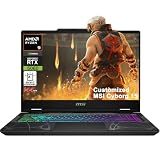


GPU tier recommendations
An RTX 5060-class mobile GPU (around 100-115W) handles 1080p high at 200+ FPS comfortably. Step up to an RTX 5070 (115-140W) for 1440p 144-165Hz. The RTX 5080 is overkill for Apex alone unless you also do heavy creative work.
CPU, RAM, and thermals
Apex leans on the CPU during late-game fights. A modern 8-core mobile chip (Intel Core Ultra 7/9 H-series or Ryzen 7/9 HX) prevents stutter when the lobby is full. Pair it with 32GB DDR5 dual-channel; 16GB works but leaves little headroom for Discord, a browser, and a stream overlay. A MUX switch or Advanced Optimus is worth prioritizing because it routes the GPU directly to the panel and can add 10-15% FPS.
| Play style | Resolution / refresh | Suggested GPU | RAM | Price range |
|---|---|---|---|---|
| Casual / controller | 1080p 144Hz | RTX 5050-5060 | 16GB | $900-1,200 |
| Ranked / KBM | 1080p 240Hz | RTX 5060-5070 | 32GB | $1,300-1,700 |
| High-fidelity | 1440p 165Hz | RTX 5070-5070 Ti | 32GB | $1,700-2,300 |
Settings that unlock free frames
Cap FPS a few frames below your refresh rate to stabilize frame times, enable the MUX/discrete mode, and set the Windows power plan to performance while plugged in. On battery, Apex throttles hard, so competitive play should always be on the charger with the 200W+ adapter.
FAQ
Do I need 240Hz for Apex?
Only if you play ranked with mouse and keyboard and your GPU can sustain 200+ FPS. Otherwise a 144-165Hz panel gives smoother, more affordable results with better 1% lows.
Is 16GB of RAM enough for Apex?
It runs fine, but 32GB is the safer buy if you stream, browse, or keep Discord open. Memory is one of the cheapest ways to avoid late-game stutter.
Battery, portability, and thermals for LAN and travel
Apex is often played at friends’ houses, LAN events, and dorms, so a laptop’s weight and cooling matter beyond raw frames. A 16-inch chassis around 2.0-2.5kg strikes a good balance, while 18-inch machines trade portability for larger fans and lower noise. Expect only 60-120 minutes of unplugged competitive play from most gaming laptops, so always pack the 200W+ adapter and treat battery gaming as a last resort.
Cooling headroom prevents mid-match slowdowns
Late-game Apex fights are exactly when a thin laptop throttles, dropping you from 200 FPS to 120 at the worst moment. A model with dual or triple fans, a vapor chamber, and a 115-140W GPU power limit holds its clocks far better than an ultra-slim design capped at 90-100W. If your chassis runs hot, a cooling pad plus a modest CPU undervolt of 50-100mV can recover 5-10% sustained performance and keep frame times flat through a full ranked session.
Storage and updates
Apex plus its seasonal updates can occupy 60-75GB, and patches are frequent and large. A 1TB Gen4 NVMe SSD leaves room for a couple of other games and keeps load times short so you spawn into the lobby before your squad does.
Upgrade paths and long-term value
Apex evolves each season with new maps and effects, so buying a laptop with a little headroom protects your investment. Prioritize models with user-accessible RAM slots and a spare M.2 bay, which let you add memory and storage cheaply years later instead of replacing the whole machine. An RTX 5060 or 5070 with 32GB has enough margin to stay competitive as the game grows heavier.
Also weigh the warranty and build quality, since a competitive machine sees heavy daily use. A sturdy hinge, a keyboard rated for millions of presses, and reliable cooling matter for a laptop that will log thousands of hours. Spending a little more on durability often costs less than an early replacement.
Bottom line: For Apex Legends, prioritize a high-refresh 1080p/1440p panel, an RTX 5060-5070 with a MUX switch, a strong 8-core CPU, and 32GB of RAM. That combination delivers the stable, high frame pacing the game demands without paying for a flagship GPU you will not use.


