The best portable monitor for a laptop is a 15.6 inch 1080p IPS panel with both a USB-C input and an HDMI input, a cover that works as a stand, and a USB-C port on your laptop that can carry video. Seven of the nine listings below fit that description almost word for word, so the choice often comes down to cover design, extras like speakers and VESA mounting, and what you pay. One listing is a different type of product, a clip-style screen extender, and the page says so where it matters. Prices appear as relative tiers only.
Our Top Picks
 KYY Portable Monitor 15.6" 1080P Computer Monitor Screen15.6-inch8.85 x 14.48 x 0.35 inches1.7 PoundsCheck on Amazon
 MNN 15.6" FHD 60Hz Portable Monitor USB-C HDMI15.6" 1080P14.48 x 8.85 x 0.3 Inches1.53 PoundsCheck on Amazon



Top 3 picks at a glance

Top picks at a glance
KYY Portable Monitor 15.6" 1080P Computer Monitor Screen Extender w/Cover | Portable Monitor for Laptop 1080P FHD IPS with USB-C and HDMI, Laptop Screen Extender for Travel HDR Gaming Monitor w/Speaker


As an Amazon Associate we earn from qualifying purchases. Product prices and availability are accurate as of the date/time indicated.
MNN 15.6" FHD 60Hz Portable Monitor USB-C HDMI IPS HDR Gaming Laptop | 15.6" FHD IPS HDR, USB-C one-cable, PC/Mac/Phone/Switch, Smart Case,Laptop , low blue, work&game


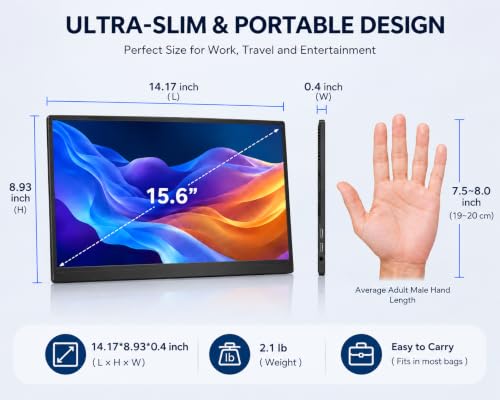
As an Amazon Associate we earn from qualifying purchases. Product prices and availability are accurate as of the date/time indicated.

cocopar Portable Monitor 15.6 Inch 1080P FHD 60Hz 85% sRGB Travel Monitor with Speaker HDMI USB-C Second Screen for Laptop MacBook Surface PC Xbox PS4/5, VESA Mountable, with Cover Stand





As an Amazon Associate we earn from qualifying purchases. Product prices and availability are accurate as of the date/time indicated.

InnoView Portable Monitor, 15.6 Inch FHD 1080P HDMI USB C Second External Monitor for Laptop, Desktop, MacBook, Phones, Tablet, PS5/4, Xbox, Switch, Built-in Speaker with Protective Case
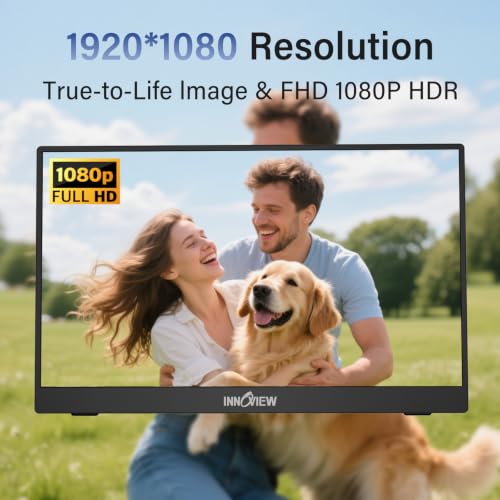


As an Amazon Associate we earn from qualifying purchases. Product prices and availability are accurate as of the date/time indicated.

Anyuse 15.6" FHD IPS USB-C HDMI Portable Monitor | 1080P 60Hz FHD, IPS, Ultra-Slim ,USB-C/HDMI, Second External Monitor, for PC/Mac/Phone/PS/Xbox/Switch


As an Amazon Associate we earn from qualifying purchases. Product prices and availability are accurate as of the date/time indicated.

Laptop Screen Extender 1.87lbs Ultra-Portable & Ultra Slim, 14.2" FHD 1080P Dual Portable Monitor for 14"-17.3" Laptop, Plug & Play Travel Monitor Extender Compatible with Wins/Mac/Chrome/Android


As an Amazon Associate we earn from qualifying purchases. Product prices and availability are accurate as of the date/time indicated.

ForHelp 15.6inch Portable Monitor,1080P USB-C HDMI Second External Monitor for Laptop,PC,Mac Phone,PS,Xbox,Swich,IPS Ultra-Thin Zero Frame Gaming Display/Premium Smart Cover


As an Amazon Associate we earn from qualifying purchases. Product prices and availability are accurate as of the date/time indicated.

Yodoit Portable Monitor 15.6" 1920×1080 FHD IPS Travel Screen Display with USB-C Plug & Play, Built-in Speakers Smart Cover for MacBook PC Xbox, Extended Display for Remote Workers (Black)


As an Amazon Associate we earn from qualifying purchases. Product prices and availability are accurate as of the date/time indicated.

VILVA 15.6" FHD IPS USB-C HDMI Portable Monitor | 15.6" FHD IPS, USB-C/HDMI, cover+speakers, for PC/Mac/Phone/Xbox/Switch/PS4, portable.


As an Amazon Associate we earn from qualifying purchases. Product prices and availability are accurate as of the date/time indicated.
| Model | Key point from the title | Inputs named | Price tier | Best for |
|---|---|---|---|---|
| KYY 15.6 inch | 1080P IPS, cover, HDR, speaker | USB-C, HDMI | Mid | All-round travel use |
| MNN 15.6 inch | 60Hz IPS, HDR, smart case, low blue | USB-C, HDMI | Budget | Value second screen |
| cocopar 15.6 inch | 85% sRGB, speaker, VESA mountable | HDMI, USB-C | Premium | Desk mounting and colour |
| InnoView 15.6 inch | Speaker, protective case | HDMI, USB-C | Mid | Phone and console users |
| Anyuse 15.6 inch | 60Hz IPS, ultra-slim | USB-C, HDMI | Budget | Light bag |
| Orfibz 14.2 inch extender | 1.87 lb, for 14 to 17.3 inch laptops | Not named | Mid | Clip-on desk saving |
| ForHelp 15.6 inch | Zero frame, smart cover | USB-C, HDMI | Budget | Slim bezel look |
| Yodoit 15.6 inch | Speakers, smart cover | USB-C only named | Budget | USB-C-only laptops |
| VILVA 15.6 inch | Cover plus speakers | USB-C, HDMI | Budget | Lowest-cost entry |
Where portable monitors fit in a laptop setup
A portable monitor is a second-window tool. It earns its place when you keep chat, a guide, a stream or a hardware monitor open while the game runs on the main panel, or when you travel and want a bigger workspace than the laptop lid. It rarely replaces a proper gaming display. The panels in this price class are built for portability: thin, light, powered over USB-C and limited to 1080p at 60Hz in the listings. Treat them as the lightweight partner of a gaming laptop, not a competitor to its screen.
The category has also become crowded with near-identical titles. Many listings share the same 15.6 inch, 1080p, USB-C plus HDMI template, so do not expect a dramatic difference between a budget and a mid-tier unit on paper. The differences that you can check are the cover, the stand angle, the included cables, whether a speaker is present, VESA support and the quality of customer service if a panel arrives with defects.
How these nine were chosen
Each entry is built from the listing title, published specifications, manufacturer documentation and recurring buyer remarks. Nobody on the team used or measured these units, so brightness, colour accuracy, speaker quality and cover build are described as questions, not conclusions. Several titles are near-duplicates of each other, a common pattern for generic panels, and where that happens the text says so.
The nine listings
KYY Portable Monitor 15.6 Inch 1080P with Cover
The title lists a 15.6 inch, 1080p IPS screen with USB-C and HDMI, a cover, HDR labelling and a speaker, aimed at laptop screen extending and travel. It sits in the middle of the pack, which makes it the safest reference point for comparing the others. The pairing of both inputs makes it flexible: USB-C to a modern laptop, HDMI to a console or an older machine. HDR on a small panel of this class is usually a label rather than a showpiece, so do not pay extra for it by itself. Brightness is not stated in the title, and in a bright room that number matters.
Pros
- Both USB-C and HDMI named
- Cover included
Cons
- No brightness or refresh figure in the title
- HDR claim is hard to judge on an inexpensive panel
Question to ask: how many nits is the panel rated for?
MNN 15.6 Inch FHD 60Hz Portable Monitor
One of the lower-tier choices. The title states 60Hz, IPS, HDR, USB-C one-cable use, a smart case and low blue light, and names PC, Mac, phone and Switch as sources. The “one-cable” wording only works if your port carries video, so test that first. Its title reads much like those of the Anyuse and VILVA, which suggests similar panels sold under different labels. Buyers on a budget lose little by choosing one of these lookalikes. It does mean you should compare covers and return terms.
Pros
- Budget pricing with a case
- Low-blue-light feature named
Cons
- No speaker mentioned in the title
- Little to separate it from lookalike listings
Question to ask: which cable lengths and adapters ship in the box?
cocopar 15.6 Inch 1080P Portable Monitor
The most expensive 15.6 inch pick, and the only one whose title offers a colour figure (85% sRGB) and VESA mounting. It also lists a speaker, HDMI, USB-C and a cover stand, and names MacBook, Surface, Xbox and PlayStation as sources. VESA matters if you want to hang it from an arm instead of using the cover. An sRGB value of 85% means a visibly narrower gamut than a full-sRGB panel, so it fits casual work and games, not photo editing.
Pros
- VESA mounting named
- Colour coverage stated up front
Cons
- Highest price of the 15.6 inch group
- Narrower colour gamut than a full sRGB claim
Question to ask: which VESA pattern, and does the cover stand double as a desk stand?
InnoView 15.6 Inch FHD Portable Monitor
The title cites 15.6 inch, 1080p, HDMI and USB-C, with a built-in speaker and protective case, and lists laptops, desktops, phones, tablets and consoles as compatible sources. It is a mid-tier general-purpose panel without a long feature list. Because the title says nothing about panel type, check whether it is IPS before buying. Speakers on screens this thin are typically modest, so plan on headphones for anything beyond voice chat.
Pros
- Broad device list
- Case included
Cons
- Panel type not named in the title
- Thin built-in speaker likely
Question to ask: is the panel IPS, and what is the contrast ratio?
Anyuse 15.6 Inch FHD IPS Portable Monitor
The title says 1080p, 60Hz, IPS, ultra-slim, with USB-C and HDMI, and lists PC, Mac, phone and common consoles as sources. It is another budget entry and sounds close to the MNN. No cover, speaker or case is mentioned, so check what is in the package and whether you need to buy a separate sleeve. For a bag that holds a laptop already, thinness is the main appeal, and a slim sleeve is worth buying if no case ships.
Pros
- Slim and light on paper
- Both inputs named
Cons
- No cover or speaker in the title
- Close lookalike of other budget listings
Question to ask: does a stand or cover come with it?
Orfibz Laptop Screen Extender, 14.2 Inch
This is the odd one. The title calls it a laptop screen extender, ultra-portable at 1.87 lb, with a 14.2 inch 1080p “dual portable monitor” for 14 to 17.3 inch laptops, plug and play across Windows, Mac, Chrome and Android. That reads like a panel that attaches to the laptop lid, not a free-standing monitor, but the title does not say how it mounts, which input it uses or how the cable is routed. Weight on a laptop hinge is a real consideration, especially on thin lids that already flex, and a clip-on panel can change how the laptop sits on a stand or tray. Read the page before you add it to a cart, and compare the stated size range with your own laptop.
Pros
- Saves desk space if it attaches to the laptop
- Compatibility range is wide
Cons
- Mounting and input details missing from the title
- Extra weight on the laptop’s hinge
Question to ask: how does it attach and which port feeds it?
ForHelp 15.6 Inch Portable Monitor with Smart Cover
The title mentions 1080p, USB-C and HDMI, IPS, “ultra-thin zero frame” and a premium smart cover. It lists PC, Mac, phone and consoles. The title misspells Switch (“Swich”), so read the page for the real specs. Zero-frame wording in a title is marketing for a thin bezel, not a technical term. Narrow bezels make the picture feel larger, but they also leave less margin for handling the panel. The cover likely folds into a stand, which is convenient for a hotel desk.
Pros
- Narrow bezel look
- Cover included
Cons
- Title typos reduce confidence
- Lacks a stated speaker or brightness
Question to ask: does the cover hold two viewing angles?
Yodoit Portable Monitor 15.6 Inch
The only listing whose title names USB-C plug and play without naming HDMI, so check the product page for a second input before you commit. It states 1920 by 1080 IPS, built-in speakers, a smart cover and an extended-display use for remote work. If your laptop has a USB-C port with video, that may be all you need. If your laptop only has HDMI, or you plan to connect a console, the missing HDMI mention is a risk.
Pros
- Budget tier with a cover
- Speakers listed
Cons
- HDMI not named in the title
- Aimed at remote work rather than gaming
Question to ask: is there a second video input, and is a power adapter supplied?
VILVA 15.6 Inch FHD IPS Portable Monitor
The cheapest listing in the set. The title says IPS, USB-C and HDMI, cover plus speakers, and names PC, Mac, phone, Xbox, Switch and PlayStation 4. It reads almost like the MNN and Anyuse titles, so treat the three as variations on a common design. That means the decision should rest on included accessories, return handling and what buyers say about the cover and the cable. As a low-cost second screen for chat and guides it makes sense, and the low price softens the risk if the panel disappoints.
Pros
- Lowest-cost option
- Cover and speakers named
Cons
- Easy to confuse with lookalikes
- No brightness or colour figures
Question to ask: what is the return window if the screen has dead pixels?
Display interface requirements
Portable monitors connect in one of two ways. A USB-C cable can carry both video and power if your laptop port supports video output. An HDMI cable carries video only, so the monitor needs power from elsewhere, usually a USB-C or USB-A cable to a charger or a second laptop port. The table maps the common situations.
| Your laptop port | What it can do | What you need |
|---|---|---|
| USB-C with video (DisplayPort Alt Mode, Thunderbolt or USB4) | One cable for picture and power | A full-function USB-C cable |
| USB-C data only | No picture | Use HDMI instead |
| HDMI output only | Picture, no power | HDMI cable plus a separate power source |
| Mini DisplayPort or DisplayPort | Picture with an adapter | A cable or adapter to HDMI |
Read the comparison in USB-C single-cable versus HDMI for a gaming laptop for the trade-offs, and follow the external monitor setup guide once the screen is connected.
What to look for
Panel, brightness and colour
IPS panels hold their colour better at an angle, which matters when the screen sits beside you. Brightness is rarely in the title; a typical indoor screen is comfortable well below a window-lit table, so ask for a figure if you work near light. A pixel density near 141 per inch at 15.6 inches and 1080p is sharp enough for text. Stay realistic about HDR on a panel this size.
Refresh rate and gaming use
The listings that mention it say 60Hz. That works for desktop use and slower games, but it is a step behind a laptop’s built-in 144Hz or 165Hz screen. Run fast games on the laptop panel and keep the portable screen for everything else.
Cables, adapters and what is in the box
Titles seldom list the cables. A USB-C to USB-C lead with full video support is the one you want for a single-cable setup, and a short lead stays tidy on a small desk. If the box includes an HDMI lead and a wall adapter, you can use the screen with a console too. Without a wall adapter, power the screen from a laptop port or a power bank.
Cover, stand and mounting
A magnetic or folding cover is both protection and a stand. Pay attention to whether it holds an angle on a soft surface like a hotel bed. VESA mounting, named only in the cocopar title, is the cleaner answer for a permanent arm.
Worked example: how much battery does one cable cost?
Assumptions, chosen only to show the arithmetic: the laptop has a 70 watt-hour battery, it draws 20 watts for browsing on its own, and the portable monitor draws 6 watts at mid brightness when fed through USB-C. Real numbers vary, and none of the listings state a power figure.
| Scenario | Total draw | Estimated runtime |
|---|---|---|
| Laptop alone | 20 W | About 3.5 hours |
| Laptop plus monitor on USB-C | 26 W | About 2.7 hours |
| Laptop alone, brightness lowered | 17 W | About 4.1 hours |
The point is the roughly one-fifth loss. A gaming session on battery draws far more than this example, so plan to plug in.
A five-question decision flow
- Does your laptop have a USB-C port that carries video? If yes, any of the USB-C listings can run on one cable. If no, you need HDMI and a separate power source, so skip Yodoit unless its page shows an HDMI input.
- Will the screen live on a desk with an arm? If yes, cocopar’s VESA mounting is the only one named in a title.
- Do you need a console connection? Prefer the listings that name Xbox, PlayStation or Switch and HDMI together.
- Is desk space the problem? Read the Orfibz page to see exactly how it attaches before choosing it.
- Is the budget the limit? Pick among the lower-tier listings by cover design, cable length and return terms, not by hype words like HDR.
Whatever the answer, handle the panel gently, keep it in its cover while travelling, and avoid pressing on the surface when it is in a bag. Follow the maker’s instructions on cleaning and charging, and stop using a cable that runs hot or a screen that smells of burning.
Which one for which user
| User | Best match | Reason |
|---|---|---|
| Traveler with a USB-C laptop | KYY or Yodoit | Cover and USB-C focus |
| Console owner | InnoView or VILVA | HDMI and console sources named |
| Desk with a monitor arm | cocopar | VESA mounting |
| Tight budget | MNN, Anyuse or VILVA | Lower tier, near-identical specs |
| Cramped desk | Orfibz | Attaches to the laptop, if the page confirms it |
Laptop setup and port compatibility checklist
- Find the video symbol (DisplayPort or Thunderbolt) next to the USB-C port, or read the manual.
- Use the cable included with the monitor, or a certified full-function USB-C cable.
- Press Windows key plus P to choose Extend, then set the portable screen’s position in display settings.
- If the picture flickers, try another cable before you blame the screen.
- If you plan to close the lid, read the clamshell mode guide first, because heat can build up.
Quick troubleshooting
| Symptom | Likely cause | First step |
|---|---|---|
| No signal on USB-C | Port or cable lacks video | Try HDMI or another cable |
| Screen flickers or dims | Port cannot supply enough power | Add a separate power source |
| Picture is blurry or stretched | Wrong resolution or scaling | Set 1920 by 1080 and 100 percent scaling in display settings |
| No sound from the screen | Audio device not selected | Choose the monitor’s output in sound settings |
Mistakes buyers make
| Mistake | Problem | Fix |
|---|---|---|
| Assuming every USB-C port outputs video | Black screen | Check the symbol or use HDMI |
| Using a charge-only cable | No picture | Use the supplied or a full-function cable |
| Paying for HDR on a small panel | Little visible gain | Prioritise brightness and cover quality |
| Expecting 144Hz | Listings say 60Hz | Keep fast games on the laptop panel |
| Ignoring the power draw | Battery drains faster | Plug in or use a separate source |
Verdict by use case
For a general travel pick, the KYY covers the basics on paper. For the lowest cost, the MNN, Anyuse or VILVA are interchangeable enough that the cover and return terms should decide. For permanent desk use, the cocopar’s VESA mounting is the standout. If you want a larger gaming view next to the laptop, no portable screen replaces a proper display,, and a proper gaming laptop display is worth more than any accessory screen when frame rate matters.
More Portable Monitors Worth a Look
As an Amazon Associate we earn from qualifying purchases at no extra cost to you.

DZVW 15.6-Inch Laptop Screen Extender
This one targets travelers who want a screen that works the moment the cable is in. The title lists a 15.6-inch IPS panel at FHD 1080P and describes it as plug and play, with an ultra-slim travel build.
- Strength: IPS panel at full HD means readable text at the usual 15.6-inch size.
- Strength: Plug-and-play wording suggests no driver installation for most modern laptops.
- Trade-off: The title uses triple-monitor language, so confirm what arrives in the box and whether any stand or cover is included.
Skip it if you need a built-in speaker or a protective cover spelled out, since neither appears in the title.
15.6-Inch Triple Portable Monitor for 12-17.3 Inch Laptops
The unbranded listing stands out for its compatibility range: laptops from 12 to 17.3 inches, with USB-C plug-and-play and 1080P FHD. That makes it a candidate for small netbook-style machines that other extenders do not mention.
- Strength: Broadest stated laptop size range in this group.
- Strength: USB-C plug-and-play keeps the setup to one cable on supported laptops.
- Trade-off: No brand name and few extras in the title, so support and warranty details need checking.
Skip it if brand reputation or an included cover is a deciding factor.
KEFEYA 14-Inch Laptop Screen Extender
KEFEYA offers a 14-inch FHD 1080P IPS panel for 13 to 17 inch laptops, with USB-C and HDMI ports and a plug-and-play description. It is a tidy match for a 13-inch or 14-inch laptop at a shared desk.
- Strength: IPS panel with both USB-C and HDMI inputs.
- Strength: Stated 13-17 inch compatibility is clear about which laptops it suits.
- Trade-off: Speakers and cover are not mentioned, and the title uses dual-screen wording that deserves a second look.
Skip it if you want a 15.6-inch canvas for spreadsheets.
Frequently asked questions
Does my laptop need a special USB-C port for a portable monitor?
For a single-cable connection the USB-C port generally has to carry video, usually through DisplayPort Alternate Mode, Thunderbolt or USB4. A port that only moves data and charge will not light the screen. Check the laptop’s manual or the symbol next to the port. If it is not supported, use the monitor’s HDMI input instead and power the screen from a separate USB-C or USB-A source.
Can a portable monitor run at a high refresh rate for gaming?
Most listings here state 60Hz, and the ones that mention a refresh rate say 60Hz. That is fine for strategy, MMOs, streaming a chat window or a browser, and it is acceptable for casual play, but competitive shooters benefit from a faster panel. Keep your main gaming display for fast action and treat a portable screen as the second window for guides, voice chat and monitoring tools.
Will a portable monitor drain my laptop battery?
Yes, when it takes power over the USB-C cable. The screen’s brightness, speaker volume and panel size all affect how many watts it asks for, and the listings do not give a power figure. Expect noticeably shorter battery life on the go. For long sessions, plug the laptop into mains power, or feed the monitor from a separate charger or power bank if the manual allows it.
Is a 15.6 inch portable monitor big enough for a second screen?
For chat, music, guides and monitoring tools, yes. At 1920 by 1080 on a 15.6 inch panel the pixel density is roughly 141 pixels per inch, which looks sharp at arm’s length. For spreadsheets or video editing beside a 17 inch laptop, you may want something larger. The listings here are mostly 15.6 inch, so size choice is limited; the Orfibz extender uses a 14.2 inch screen instead.
What is the difference between a portable monitor and a screen extender?
A portable monitor is a standalone panel with its own stand or cover that sits beside the laptop. A screen extender, like the Orfibz listing, appears to be designed to attach to the laptop itself and carries the laptop’s size range in its title. Extenders save desk space but depend on the laptop’s weight and hinge. Read the product page closely for how it mounts before you buy.
Can I use a portable monitor with a console or a phone?
Many titles list Xbox, PlayStation, Switch and phones as compatible sources. Consoles use HDMI and need a separate power source for the screen, while phones need USB-C video output, which not every model has. Check the monitor’s page for the exact adapter and power requirements, and do not assume a speaker will work over every connection.