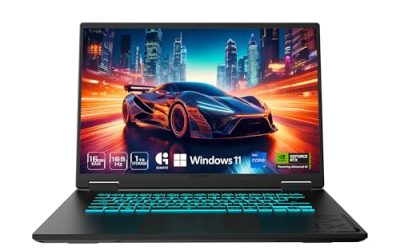
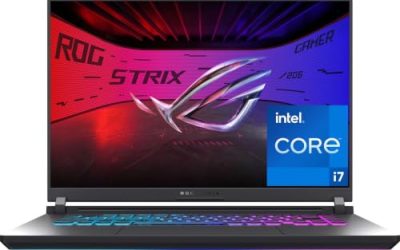
“Most affordable” is a slippery phrase in the gaming laptop aisle, because the cheapest machine is rarely the best value and the best value is rarely the cheapest. A thin office laptop with integrated graphics can cost less than any machine below, yet it will stutter in anything newer than an esports title. The real question is where the graphics card, memory, and screen land for the money, and which compromises you can live with for the next three or four years.
This guide is for students, first-time PC gamers, and anyone upgrading from a laptop that cannot launch the games their friends play. Every entry has a dedicated GeForce graphics card, so the budget-only 15.3-inch listing that carries integrated UHD graphics was dropped as a non-gaming machine, and two ultra-premium models, a 14-inch OLED and an 18-inch flagship, were set aside because they sit well outside a value brief. What remains is a ladder from entry tier to upper mid-range, judged from the listed specs and written for 2026 shoppers.
Our Top Picks
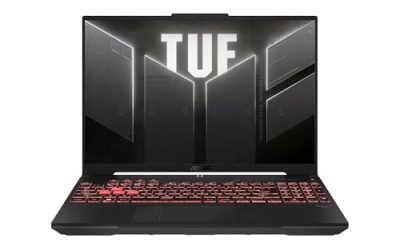
 ASUS TUF Gaming A16 Laptop: AMD Ryzen 716 GB RAM / 512 GB SSD14 x 1 x 10 inches7 PoundsCheck on Amazon
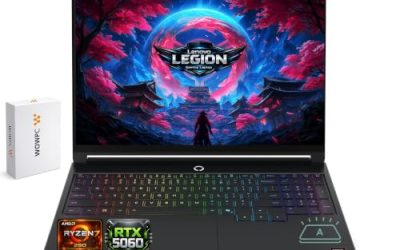
 MSI Cyborg 15 Gaming AI Laptop16GB DDR5 | 512GB SSD9.65 x 14.14 x 0.91 inches4.63 poundsCheck on Amazon
 ASUS TUF Gaming A18 AI Laptop 18" WUXGA16GB RAM | 1TB SSD11.14 x 15.71 x 1.05 inches5.73 poundsCheck on Amazon
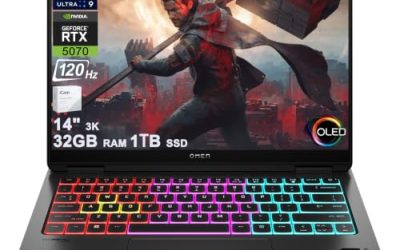
 HP Omen Transcend 14 Gaming AI Laptop 14"32GB RAM | 1TB SSD9.19 x 12.32 x 0.71 Inches3.6 poundsCheck on Amazon

Top 3 picks at a glance
Quick Picks
As an Amazon Associate we earn from qualifying purchases at no extra cost to you.


| Product | Best for | Key spec from the title |
|---|---|---|
| GIGABYTE Gaming A16 | Strong GPU and big memory | RTX 5070, 32GB DDR5, 1TB SSD |
| HP Victus Gaming 15 | Lowest entry point | RTX 3050, 144Hz, 512GB NVMe |
| ASUS TUF Gaming A16 | Balanced mid-range | RTX 4050, Ryzen 7 7445HS, 145Hz |
| MSI Cyborg 15 | Newest GPU generation at a modest tier | RTX 5060 GDDR7, 144Hz |
| ASUS TUF Gaming A18 | Big screen and storage | 18″ 144Hz, RTX 5060, 1TB SSD |
| HP Omen 16 | High-refresh upper mid-range | 240Hz WQXGA, RTX 5070, 32GB RAM |
How to Choose
Graphics card first, everything else second
The GPU decides how modern games run. An RTX 3050 class card handles 1080p at moderate settings in many titles. The RTX 4050 and RTX 5060 classes move comfortably into high settings at 1080p, and the RTX 5070 class gives headroom for higher resolutions and ray tracing. Because the screen is fixed to the laptop, buy the GPU tier you will still be happy with in three years.
Memory and storage thresholds
Treat 16GB of RAM as the practical floor for modern games, and 32GB as a comfortable ceiling for multitasking and streaming. An 8GB machine will work, but it leaves little room for the system, a browser, and a game together. For storage, 512GB fills quickly with large installs, so 1TB is a worthwhile upgrade if your budget stretches. Check whether the laptop has a spare slot for adding an SSD later, because an extra drive is the cheapest way to add space after purchase. Cooling matters here too, because thin chassis designs can throttle under sustained load and a raised stand or cooling pad is a cheap way to help. Memory type matters as well: DDR5 is faster than DDR4, though a larger amount of RAM usually helps more than a faster type.
Screen: refresh rate, resolution, and color
A 144Hz or higher panel makes motion smoother in shooters and racing games. Full HD suits an entry GPU, while a higher-resolution panel such as WQXGA needs a stronger card to fill all those pixels. For color, a panel rated 100% sRGB is a good sign for creative side work. Ignore peak-brightness claims unless a nit figure is stated.
Where affordable laptops cut corners
Budget gaming laptops usually trim the build materials, speaker quality, webcam, and battery life, and they often run the fans loudly under load. Plan on using wall power for gaming, since battery runtime drops sharply with a discrete GPU. Also ignore inflated “AI TOPS” numbers for gaming decisions, because they say little about frame rates in games. Check the ports too: at least one USB-C or HDMI output lets you plug into a monitor later, which stretches the life of a laptop whose screen you outgrow. Finally, compare the processors by generation and core count rather than by brand names alone, since a newer mid-tier chip often beats an older high-tier one.
The 6 Best Options
GIGABYTE Gaming A16
The Gaming A16 pairs an Intel Core i7-13620H with a GeForce RTX 5070 and a 16-inch 165Hz WUXGA display. It also lists 32GB of DDR5 memory and a 1TB SSD, which is a generous configuration for the tier. It suits a student or creator who wants one machine for games and heavier schoolwork.
- Strength: RTX 5070 with 32GB DDR5 and a 1TB SSD.
- Strength: a 165Hz 1920×1200 screen with extra vertical space.
- Trade-off: it sits above the entry tier, so it is less budget-friendly than the Victus.
The 1920×1200 resolution is a quiet advantage, since the extra vertical pixels help in spreadsheets, code editors, and browser-heavy study sessions between matches. Skip it if you only play light esports titles and do not need this much memory or graphics power.
HP Victus Gaming 15
The Victus is the entry point on this list, with a 15.6-inch FHD 144Hz display, an 8-core Intel Core i5-13420H, and an RTX 3050 graphics card. It lists 8GB of DDR4 memory and a 512GB NVMe SSD. It fits a first-time gamer who wants a real GPU without stretching a budget.
- Strength: 144Hz display and a dedicated RTX 3050.
- Strength: 512GB NVMe storage for quick load times.
- Trade-off: only 8GB of RAM, which is a bottleneck in newer games.
In practice this is the model where a memory upgrade is the first thing a buyer should budget for, because the processor and display are better than the RAM they are paired with. Skip it if you want future-proofing, or be ready to upgrade the memory right after buying.
ASUS TUF Gaming A16
The TUF Gaming A16 lists an AMD Ryzen 7 7445HS, a 16-inch Full HD+ 145Hz display, an RTX 4050, 16GB of DDR5 RAM, and a 512GB SSD with a backlit keyboard. It is a balanced mid-range choice for players who want a taller 16:10 screen and a sensible memory amount.
- Strength: 16GB DDR5 RAM and an RTX 4050 for 1080p gaming.
- Strength: 16-inch Full HD+ panel with a 145Hz refresh rate.
- Trade-off: 512GB of storage fills up fast with big game installs.
The backlit keyboard is a small but useful inclusion for late-night sessions in a dorm or shared bedroom. Skip it if you want the newest graphics generation or a larger drive from day one.
MSI Cyborg 15
The Cyborg 15 brings an RTX 5060 with GDDR7 memory to a 15.6-inch FHD IPS 144Hz laptop, paired with an 8-core Ryzen 9 270, 16GB of DDR5, and a 512GB SSD. It is a strong fit for someone who wants a newer GPU generation without paying for premium extras.
- Strength: RTX 5060 with GDDR7 and 16GB DDR5 memory.
- Strength: 144Hz IPS display in a compact 15.6-inch size.
- Trade-off: 512GB of storage and a plain FHD panel are the cost-saving choices.
The compact 15.6-inch footprint also fits a standard backpack, which makes it easier to carry between a dorm and a friend’s place. Skip it if you plan to do heavy creative work or want a higher-resolution display.
ASUS TUF Gaming A18
The TUF Gaming A18 offers an 18-inch WUXGA IPS 144Hz display rated at 100% sRGB with G-Sync, along with a Ryzen 7 260, 16GB of RAM, a 1TB SSD, and an RTX 5060 with GDDR7. It is the large-screen pick for a desk setup where the laptop stays put.
- Strength: an 18-inch screen with 100% sRGB and G-Sync.
- Strength: a 1TB SSD and RTX 5060 in one package.
- Trade-off: an 18-inch chassis is bulky and less portable than 15 or 16-inch models.
G-Sync support also helps smooth out frame-rate dips, which is handy when a game runs below the screen’s maximum refresh rate. Skip it if you carry your laptop to class every day.
HP Omen 16
The Omen 16 lists a 16-inch WQXGA 240Hz display rated at 500 nits and 100% sRGB, an AMD Ryzen AI 9 365, 32GB of RAM, a 1TB SSD, and an RTX 5070 with GDDR7. It is the upper mid-range pick for players who want a sharp, fast display and plenty of headroom.
- Strength: 240Hz WQXGA display with 500 nits and 100% sRGB.
- Strength: 32GB RAM, 1TB SSD, and an RTX 5070.
- Trade-off: it is the priciest tier of this group, so it is less of a bargain pick.
Because the RTX 5070 and 32GB of RAM are paired with a sharp panel, the listing reads like a laptop that could stay relevant for several upgrade cycles of games. Skip it if your priority is the lowest cost over display quality.
Which One Fits Your Situation
You want the lowest entry price
The HP Victus Gaming 15 is the entry-level choice. Plan to add memory soon, since its 8GB of RAM is the main limit. It suits a buyer who mostly plays popular multiplayer titles and wants a dedicated GPU at the lowest tier on this list, with the understanding that settings will need trimming in newer releases.
You want the best balance for 1080p
The ASUS TUF Gaming A16 or the MSI Cyborg 15 fit here. Choose the TUF A16 for its 16GB DDR5 memory and taller screen, or the Cyborg 15 for the newer RTX 5060. Either one gives a player enough power to run current releases at high settings in Full HD for several years, which is exactly what most buyers mean when they ask for an affordable machine.
You play at a desk and want a big screen
The ASUS TUF Gaming A18 delivers an 18-inch panel and 1TB of storage, so it suits a laptop that rarely leaves the desk.
You want power that lasts for years
Choose the GIGABYTE Gaming A16 for 32GB and an RTX 5070 in a lower tier, or the HP Omen 16 if display sharpness and a 240Hz refresh rate are worth more to you.
Common Mistakes
- Choosing the lowest-cost listing without checking whether it has a dedicated graphics card.
- Buying 8GB of RAM and discovering it limits newer games.
- Paying for a high-resolution panel when the graphics card cannot drive it well.
- Counting on battery life for gaming sessions instead of planning to stay plugged in.
- Falling for large AI performance numbers that do not translate into game frame rates.
Specs and Terms Explained
TGP (total graphics power)
The same graphics chip name can appear in laptops that behave very differently, because makers set how many watts the chip may draw. That limit is TGP. A higher TGP lets the chip run faster before it hits its ceiling, so two laptops sharing a GPU name can differ in frame rate. Look for a TGP figure on the spec page; if none is listed, that is a clue the number is not a selling point.
MUX switch and hybrid graphics
Many laptops route the screen image through the integrated graphics first, which saves battery but trims frame rate slightly. A MUX switch lets the display connect straight to the dedicated GPU. It is a nice extra but not a must-have in this segment.
DDR5 and dual channel
Memory runs faster in dual channel, meaning two sticks working together. A laptop with a single stick installed can lose noticeable performance in games. Check how many sticks ship in the box and whether a slot is open for an upgrade.
sRGB coverage and brightness
Budget gaming panels often cover only part of the sRGB color range, which looks muted next to a good phone screen. If you edit photos or video, look for coverage that is near the full range. For games alone, a fast refresh rate matters more than color depth.
Setup and Care Tips
- Pick the performance power mode in the manufacturer’s utility when plugged in. Many laptops default to a quieter profile that holds back the GPU.
- Update graphics drivers from the chip maker’s site, not just the Windows default, within the first week.
- Lift the rear edge with a stand or even a small book to improve airflow under the case.
- Clear dust from the vents every few months with compressed air, spraying in short bursts while holding the fan blades still.
- Cap battery charge if the software offers a limit. Keeping a laptop at full charge for months while docked wears the cells.
- Use the supplied charger. Gaming loads draw more than a generic USB-C brick can supply, and underpowered adapters make the system throttle.
Who Should Skip These
- Frequent travelers. Value gaming laptops are heavy, and the power brick adds more. A lighter machine with integrated graphics, paired with cloud gaming, may suit you better.
- Players who want top settings in the newest titles. Affordable machines favor 1080p at medium or high. If you expect ultra settings at high resolution, you will have to spend considerably more.
- Anyone who needs long battery life away from an outlet. Dedicated GPUs drain quickly, and most of these laptops are meant to stay plugged in for gaming.
- People who want a quiet bedroom or library machine. Under load, fans in this tier are audible.
Related guides
- Gaming Laptop Battery Draining While Plugged In Fix
- Graphics Cards For Low Wattage Power Supplies
- How To Stop Laptop Thermal Throttling In Software
Frequently Asked Questions
Is an RTX 3050 still good enough?
It handles 1080p gaming at moderate settings in many titles, which makes it a workable entry point. Newer demanding games may need lowered settings, and ray tracing is best left off. For esports titles and older libraries it remains a sensible, lower-cost choice.
How much RAM do I need?
Aim for 16GB as a minimum for modern gaming. If a laptop ships with 8GB, check whether the memory is upgradeable before buying.
Does a higher refresh rate matter?
It does for fast games, where 144Hz or more looks noticeably smoother than 60Hz. It matters less for slower, story-driven titles.
Should I buy a bigger screen?
A larger display is more immersive but heavier and less portable. Choose by how often you move the laptop, not by size alone. If it will live on a desk, an 18-inch model makes sense; if it rides in a backpack, a 15 or 16-inch laptop is the more realistic daily companion.
Related guides
- Best External Monitor for a Gaming Laptop: Smart Top Picks (2026)
- Best Portable Monitor for Laptop: Nine Travel Screens Compared by Port and Fit (2026)
- Best Gaming Laptop with 240Hz Display: Eight Listings Sorted by GPU Headroom and Panel Type (2026)
- Best Docking Stations for a Windows Laptop: Eight Picks and a Host-Port Check (2026)