Choosing between 16GB vs 32GB RAM for modern gaming laptops depends on more than the number of games you play. Both capacities can deliver good gaming performance, but demanding AAA titles, background applications, and limited GPU memory can change the equation. This comparison explains real performance differences, upgrade considerations, and which configuration makes more sense in 2026.
16GB vs 32GB RAM: Understanding the Real Difference
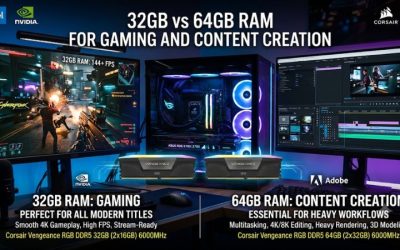
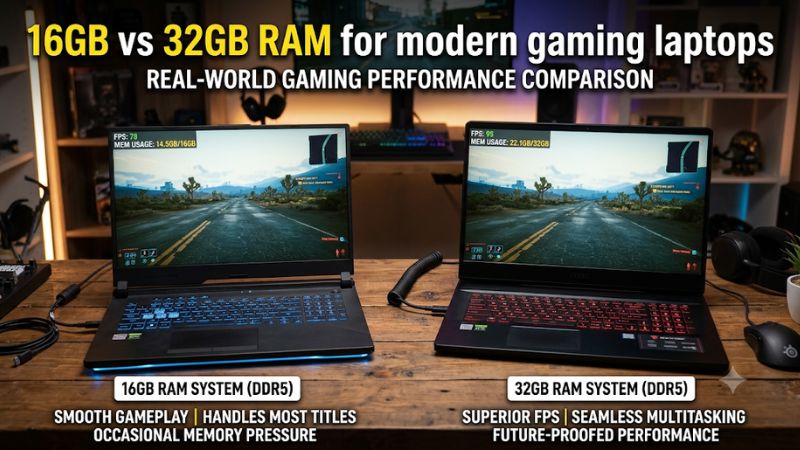
The biggest difference between these memory configurations is available headroom rather than an automatic increase in gaming speed. A laptop with 16GB can handle many modern games comfortably, while 32GB gives Windows, games, and background applications more room to operate without competing for limited physical memory.
1. Gaming Performance and Average FPS
For games that fit comfortably within 16GB of available system memory, moving to 32GB does not automatically produce higher average FPS. The GPU, CPU, cooling system, and memory speed usually have a more direct influence on frame rates when system memory is not under pressure.
Independent testing from PC Gamer illustrates this distinction. In its desktop comparison using an RTX 5090, Cyberpunk 2077 delivered 83 FPS with 16GB and 84 FPS with 32GB. Black Myth: Wukong recorded 76 FPS in both configurations. These results demonstrate that additional capacity does not necessarily improve average performance.
PC Gamer
2. 1% Lows and Frame-Time Consistency
Average FPS does not tell the entire story. A game might maintain a reasonable average while experiencing occasional slowdowns when memory becomes constrained. These interruptions can appear during intensive combat, loading new environments, or moving through large open-world locations.
The additional capacity in 32GB configurations can help reduce memory pressure and improve frame-time consistency when a game and background applications exceed what 16GB can comfortably accommodate. However, the improvement depends on the workload rather than the RAM capacity alone.
3. Multitasking While Gaming
Modern gaming rarely happens in isolation. Many players keep Discord, Chrome, Spotify, game launchers, recording software, and hardware monitoring utilities running alongside their games. Each application consumes some system memory, reducing the amount available to the game.
With 16GB, these applications can compete for limited memory during demanding sessions. A 32GB configuration provides more flexibility, particularly for players who stream, record gameplay, maintain multiple browser tabs, or switch between gaming and productivity tasks.
4. Future-Proofing for Modern Games
Game memory requirements continue to vary considerably between titles. Competitive games and many established AAA releases remain manageable with 16GB, while demanding simulations, heavily modified games, and certain newer releases benefit from additional capacity.
For example, Escape from Tarkov, Microsoft Flight Simulator 2024, and Star Citizen can place substantial demands on system memory. The requirements also depend on game updates, graphics settings, multiplayer activity, and other running applications. Choosing 32GB provides more flexibility as gaming workloads become increasingly demanding.
16GB vs 32GB RAM for Modern Gaming Laptops: Direct Comparison
Comparing these capacities requires looking beyond advertised specifications. The practical difference depends on the laptop’s processor, GPU, VRAM, memory configuration, and the applications running during gameplay. The following table summarizes where each capacity makes the most sense for different gaming scenarios.
| Comparison Factor | 16GB RAM | 32GB RAM |
| Competitive gaming | Suitable for most titles | More background headroom |
| Standard AAA gaming | Suitable for many games | Better capacity for demanding workloads |
| Average FPS | Often similar when sufficient | Not automatically higher |
| 1% lows | Can suffer under memory pressure | More room to reduce memory-related slowdowns |
| Discord and browsing | More limited multitasking | More comfortable multitasking |
| Game streaming | More restrictive | Better suited |
| Heavy modding | Can become limiting | More practical |
| Simulation games | Depends on the title | Generally preferable |
| Long-term flexibility | More limited | Greater headroom |
| Upgrade priority | Depends on usage | Useful for demanding workloads |
1. What Independent Benchmarks Reveal
Independent results provide useful context for understanding the performance gap. PC Gamer compared 16GB and 32GB configurations across several demanding games using both an RTX 5090 and RTX 5070 desktop graphics cards. The results showed that memory capacity did not affect every title equally.
For example, with an RTX 5070, Escape from Tarkov recorded 110 FPS average and 47 FPS at 1% lows with 16GB, compared with 120 FPS average and 63 FPS at 1% lows with 32GB. These results indicate that additional system memory can matter when workloads become demanding.
PC Gamer
However, these are desktop benchmark results, not direct gaming laptop measurements. Laptop CPUs, GPU power limits, cooling, memory speeds, and firmware configurations differ. Therefore, the figures should illustrate possible memory-related behavior rather than predict FPS improvements on a particular laptop.
2. How GPU VRAM Changes the Equation
System RAM and GPU VRAM serve different purposes. VRAM stores graphics-related data close to the GPU, while system RAM supports Windows, applications, game processes, and other system workloads.
When a laptop GPU runs out of available VRAM, some graphics data may need to move through system memory and shared memory resources. This can increase memory traffic and contribute to performance problems. A larger system memory capacity provides additional room, but it does not replace dedicated GPU memory.
TechSpot’s 2026 memory analysis demonstrates this relationship using desktop hardware. Its comparison found that an 8GB graphics card could experience substantial frame-time problems with only 16GB of system RAM, while 32GB improved the situation. This does not mean every laptop with an 8GB GPU needs 32GB, but it highlights why total memory requirements depend on the complete hardware configuration.
TechSpot
3. DDR4, DDR5, and Dual-Channel Memory
Capacity is only one part of laptop memory performance. DDR4 and DDR5 have different electrical characteristics, transfer rates, and module compatibility requirements. A laptop designed for DDR5 cannot automatically accept DDR4 modules, even when their advertised capacities match.
Memory configuration also matters. A 16GB laptop using two 8GB modules may have different memory bandwidth characteristics from a configuration using one 16GB module. Depending on the platform, dual-channel operation can improve memory bandwidth, which is particularly relevant to integrated graphics.
When comparing configurations, check the following:
- Memory generation: Confirm whether the laptop supports DDR4, DDR5, or another specific memory type.
- Module configuration: Check whether memory operates in dual-channel mode.
- Supported speed: Follow the manufacturer’s supported memory specifications.
- Maximum capacity: Verify the maximum supported memory for the exact laptop model.
- Form factor: Confirm whether the system uses SO-DIMM modules or soldered memory.
A properly configured 16GB system can outperform a poorly configured 32GB system in certain memory-sensitive workloads.
4. Laptop Upgradeability and Long-Term Value
Unlike many desktop computers, gaming laptops do not always provide straightforward memory upgrades. Some models include removable SO-DIMM slots, while others use soldered LPDDR memory that cannot be replaced. Certain laptops combine soldered memory with an additional removable slot.
Before purchasing or upgrading, check the manufacturer’s specifications and service documentation. Windows Task Manager can also provide an initial overview through Performance > Memory, including reported memory usage and slot information. However, the exact model’s service documentation should take priority when confirming physical upgradeability.
HP® Official Site+1
For laptops with removable memory, consider whether installing a matched 32GB configuration is more practical than adding an incompatible module to an existing setup. If memory is soldered, choosing the correct capacity at purchase becomes especially important.
Which RAM Capacity Should You Choose for Your Gaming Laptop?
The right choice depends on your gaming habits, available budget, and laptop specifications. Rather than automatically selecting the largest configuration, consider how much memory your games and everyday applications actually consume. The following recommendations provide a practical starting point for different gaming profiles.
1. Choose 16GB for Budget and Competitive Gaming
A 16GB configuration remains a reasonable choice for players primarily interested in competitive games, lighter multiplayer titles, and established gaming releases. Games such as Valorant, League of Legends, and Counter-Strike 2 generally do not require 32GB simply to deliver enjoyable gameplay.
This configuration also makes sense when purchasing a budget gaming laptop where spending more on a stronger GPU or better display would provide greater overall value. However, prioritize a suitable memory configuration rather than focusing exclusively on capacity.
2. Choose 32GB for AAA and Demanding Games
For players who regularly enjoy large open-world games, demanding simulations, and newer AAA releases, 32GB offers a more comfortable memory allowance. It gives Windows and background applications additional room while the game manages its own resources.
This configuration is particularly attractive when purchasing a midrange or high-end gaming laptop intended for several years of use. It is also a sensible option when the memory is soldered and cannot be upgraded later.
3. Choose 32GB for Streaming and Productivity
Gaming alongside streaming, recording, video editing, or other demanding applications creates a different workload from playing a single game. OBS Studio, browser windows, Discord, and editing software can consume additional memory throughout a session.
For these users, 32GB is generally the more practical configuration. It provides more room for simultaneous workloads and reduces the likelihood that applications will compete for limited physical memory. Players who regularly edit large video projects or run professional applications may also benefit from considering capacities above 32GB.
4. Upgrade Only When Memory Usage Justifies It
Upgrading from 16GB to 32GB makes sense when your laptop regularly approaches its available memory capacity during normal gaming sessions. Persistent memory pressure, application slowdowns, and stuttering that coincides with high memory usage can indicate that additional RAM would help.
Open Windows Task Manager using Ctrl + Shift + Esc and select Performance > Memory. Monitor usage while running your usual game with your typical background applications. If memory remains close to capacity, investigate which applications consume the most resources before purchasing additional RAM.
Also remember that stuttering can originate from GPU limitations, overheating, CPU bottlenecks, storage activity, or software problems. Increasing system memory will not resolve every performance issue.
Frequently Asked Questions
1. Is 16GB RAM Enough for Modern Gaming Laptops in 2026?
Yes, 16GB RAM is sufficient for many modern gaming laptops, particularly when playing competitive titles and games with moderate memory requirements. However, demanding AAA releases, extensive multitasking, and heavily modified games can create situations where 16GB becomes restrictive. Players who primarily game without multiple background applications can still find this capacity practical.
2. Does 32GB RAM Increase FPS Compared with 16GB?
Not necessarily, because additional RAM does not directly increase a laptop’s CPU or GPU processing power. When a game already fits comfortably within 16GB, average FPS may remain similar after upgrading. The main benefit appears when insufficient memory causes resource competition, paging, or inconsistent frame times.
3. Can I Upgrade My Gaming Laptop from 16GB to 32GB?
Yes, provided your particular laptop supports removable memory modules and the motherboard supports the intended capacity. Check the official specifications, memory type, supported speed, available slots, and maximum capacity before purchasing. Laptops with fully soldered memory generally cannot be upgraded, making the original configuration an important purchase decision.
4. Is 32GB RAM Better for Gaming at 1440p or 4K?
Yes, 32GB can be beneficial for demanding 1440p and 4K gaming workloads, especially when combined with background applications and graphics-intensive games. However, resolution alone does not determine system RAM requirements. GPU performance and VRAM capacity are also important, so upgrading system memory cannot compensate for an underpowered graphics processor.
Final Thoughts
The choice between 16GB vs 32GB RAM for modern gaming laptops comes down to workload, upgradeability, and long-term expectations. While 16GB remains suitable for many players, 32GB provides greater flexibility for demanding games and multitasking. If your budget allows and the laptop supports it, 32GB is the more comfortable long-term choice.
Related guides
More from Amazon
Programs that pair well with the guide above. Offers and eligibility are set by Amazon and may change.
Free shipping on eligible items, Prime Video and more. Eligible new members can start with a free trial.
Start a Prime free trialAd-free music streaming. Eligible new subscribers can start with a free trial.
Try Music Unlimited freeA Prime membership for ages 18-24 with a trial period. Eligibility is set by Amazon.
See Prime for Young AdultsAudiobooks and podcasts to listen to on the go. Eligible new members can start with a free trial.
Try Audible freeAs an Amazon Associate we earn from qualifying purchases.