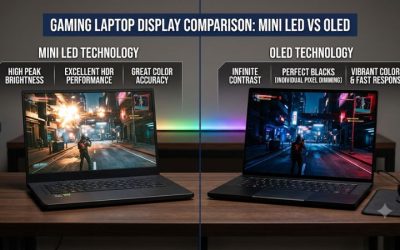
Acer Nitro 5 and Predator Helios 300 review in one line: the Nitro 5 is the cheaper, quieter all-rounder, while the Predator Helios 300 is the stronger pick when you want higher sustained frame rates and a more premium chassis. Both are 15.6-inch, 144Hz-class gaming laptops, and the right one depends on the exact configuration you find, not the badge on the lid.
Our Top Picks
 HP Victus 15.6" Full HD 144Hz Gaming Laptop16GB | 512GB SSD20 x 4 x 10.8 inches7 poundsCheck on Amazon
 ASUS TUF Gaming A16 Laptop: AMD Ryzen 716 GB RAM / 512 GB SSD14 x 1 x 10 inches7 poundsCheck on Amazon

Top 3 picks at a glance
Quick Verdict: Nitro 5 or Helios 300?
Choose the Nitro 5 if you want a capable 1080p gaming laptop for the lowest outlay and you are happy with a plain plastic build. Choose the Predator Helios 300 if you play demanding titles, want extra GPU and CPU headroom, and can accept a louder fan profile and a higher price tier.
- Best value: Nitro 5 with an RTX 3050 or RTX 3060 and a 12th-generation Intel Core CPU.
- Best performance: Helios 300 with an RTX 3060 class GPU and an H-series Core i7.
- Best for older games and esports: either line, including older GTX 1650 or RTX 2060 configurations if the price is right.
- Skip both if: you need a thin, light laptop for travel, or you want a high-quality color-accurate screen for creative work.
Specs Table: Where the Two Lines Overlap
Acer has sold many generations of each name, so a single spec sheet does not exist. The table below shows the typical pattern across listings in the store, based on model numbers such as AN515 for the Nitro 5 and PH315 for the Helios 300. Always read the exact listing before you decide.
| Feature | Acer Nitro 5 | Predator Helios 300 |
|---|---|---|
| Screen size | 15.6 in (17.3 in variants exist) | 15.6 in (17.3 in variants exist) |
| Display | Full HD IPS, 144Hz on most current models | Full HD IPS, 144Hz, G-Sync on many models |
| GPU range seen | GTX 1650 up to RTX 3060 in the 15-inch AN515 line | GTX 1060 and GTX 1660 Ti up to RTX 3060 |
| CPU range seen | Core i5-9300H to i7-12700H, Ryzen 5 variants | Core i7-8750H to i7-12700H |
| Cooling | Two fans | Two fans, more aggressive fan curve |
| Build | Plastic, simple styling | Plastic with metal accents, Predator styling |
| Typical position | Entry to mid-range | Mid-range to upper mid-range |
One public comparison of the Helios 300 PH315-54 and the Nitro 5 AN515-57 lists both with two fans, no vapor chamber and a 15.6-inch 1080p 144Hz IPS panel. The main measured difference was noise: the Helios was louder under load. That fits the idea that Acer lets the Helios run its hardware harder.
Acer Nitro 5 Review: The Everyday Gaming Laptop
The Nitro 5 is the laptop most shoppers meet first, because Acer has kept it in the lineup for years and sold it at several price tiers. That long history is both a strength and a trap. It is a strength because you can find a model for almost any budget. It is a trap because two laptops with the same name can differ by an entire GPU generation.
Acer Nitro 5 AN515-58 with Core i7-12700H and RTX 3060
As an Amazon Associate we earn from qualifying purchases at no extra cost to you.

This Nitro 5 configuration pairs an Intel Core i7-12700H with an NVIDIA GeForce RTX 3060 Laptop GPU and a 15.6-inch Full HD 144Hz IPS display. It is the strongest Nitro 5 listing in this group for 1080p gaming, since the RTX 3060 class GPU handles most current titles at high settings. Check the listing for the memory and storage amounts, because those vary between sellers.
- Best for: 1080p gaming at high settings, and mixed use such as streaming or light video work.
- Skip if: you want a metal body or a screen with wide color coverage.
What the Nitro 5 does well
- Lower price tier than a Helios of the same generation.
- Fan noise was rated lower than the Helios in a public side-by-side comparison.
- Widely available in many CPU and GPU combinations, so you can match the budget.
- Upgradeable RAM and storage on most AN515 models, which extends its useful life.
Where the Nitro 5 falls short
- Plastic chassis with some flex around the keyboard deck.
- Entry configurations with an RTX 3050 or GTX 1650 limit you to medium settings in newer games.
- Screen brightness and color coverage are modest, so it is not a pick for photo editing.
Predator Helios 300 Review: The Step-Up Option
The Predator Helios 300 sits one tier above the Nitro 5 in Acer’s lineup. It usually carries a stronger CPU, a faster GPU in the same generation, and a keyboard and chassis that feel more deliberate. The trade-off is heat and noise: Acer tunes the Helios to push performance, and the fans respond.
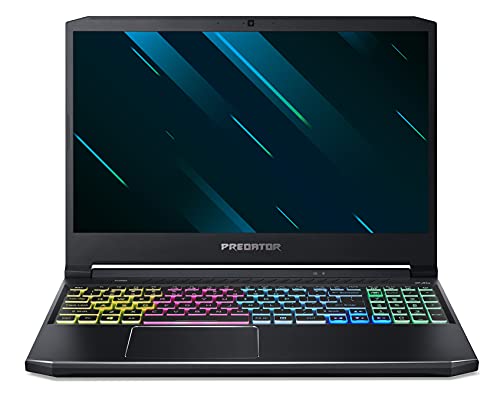
Acer Predator Helios 300 PH315-54 with Core i7-11800H and RTX 3060

This listing is the PH315-54-760S, an 11th-generation Intel Core i7-11800H machine with an NVIDIA GeForce RTX 3060 and a 15.6-inch Full HD 144Hz display. The eight-core CPU gives it an edge in games that lean on the processor and in multitasking while streaming. Confirm the memory and storage configuration in the listing, as it is not spelled out in the headline.
- Best for: players who want strong 1080p and some 1440p-with-DLSS headroom, plus a CPU that will not bottleneck.
- Skip if: you play in a quiet room or share a space, because the fans get audible under load.
What the Helios 300 does well
- Higher performance ceiling than a Nitro 5 of the same era, especially on the CPU side.
- G-Sync support on many configurations for smoother frame pacing.
- More distinctive Predator design and a keyboard that suits long sessions.
Where the Helios 300 falls short
- Louder under load than the Nitro 5 in public measurements.
- Older Helios 300 models with GTX 1060 or GTX 1660 Ti GPUs are dated, even when they look inexpensive.
- The measured panel in one public review had modest color coverage, so the screen is built for speed, not accuracy.
Performance by Use
| Use | Nitro 5 (RTX 3050 or 3060) | Helios 300 (RTX 3060) |
|---|---|---|
| Esports titles at 1080p | Comfortable, can use the full 144Hz in many games | Comfortable, more headroom |
| Recent AAA games at 1080p | Medium to high settings depending on GPU | High settings in most cases |
| Streaming while playing | Possible on i7 models | Better thanks to eight-core CPUs |
| Video editing and 3D work | Workable for light projects | Faster, though the screen limits color work |
| Battery life away from a desk | Short when gaming | Short when gaming |
We did not use these laptops ourselves, so this table is a research-based guide built from public specifications and published comparisons, not a measurement of our own. Treat it as a way to narrow your shortlist.
Acer Nitro 5 Cheapest Price: How to Find the Lowest Cost
The cheapest Acer Nitro 5 is usually an older configuration with a GTX 1650 or RTX 3050 GPU, or a refurbished or open-box unit. Prices change daily and vary by seller, so no single number applies.
A smarter approach than hunting for the absolute lowest tier is to find the cheapest model that clears your minimum spec. Use this checklist:
- Set your GPU floor. For current games at 1080p, an RTX 3050 is the realistic minimum and an RTX 3060 is more comfortable.
- Check RAM. 16GB is the sweet spot. An 8GB model is fine only if you plan to upgrade it.
- Confirm storage. 512GB fills quickly with modern games, so look for an open M.2 slot.
- Read the refurbished terms. Look for a clear return window and warranty before you buy a renewed unit.
- Compare model numbers. AN515-55, AN515-57 and AN515-58 are different generations with different CPUs and GPUs.
Nitro 5 with RTX 3050 for the lowest practical entry
This Nitro 5 AN515-58-525P pairs an Intel Core i5-12500H with an NVIDIA GeForce RTX 3050 Laptop GPU and a 15.6-inch Full HD 144Hz IPS display. It sits at the low end of the 12th-generation Nitro 5 range, so it suits players who want a modern platform without paying for a stronger GPU. Verify the memory and storage in the listing before you decide.
Where to Buy an Acer Predator Helios 300
You can buy a Predator Helios 300 from large online marketplaces, electronics retailers and refurbished-device sellers. Because Acer has moved on from many older Helios 300 variants, stock often comes from third-party sellers rather than directly from Acer.
Before you buy, check three things:
- Exact model number. PH315-53, PH315-54 and PH315-55 differ in CPU and GPU generation, and PH317 models are the 17-inch versions.
- Seller and return terms. Prefer sellers that state a return window and warranty in the listing.
- Condition. New, open-box, renewed and used units carry different risk. Ask for photos and battery health on used units.
An older Helios 300 with RTX 2060 for a lower tier

This listing pairs an Intel Core i7-10750H with an NVIDIA GeForce RTX 2060 6GB and a 15.6-inch Full HD 144Hz 3ms display. It is an older generation than the RTX 3060 models, so it makes sense only when it comes in clearly below the newer machines. Treat it as a budget route into a Helios 300 and confirm the condition and warranty first.
Best Notebook Gamer: Is It Still a Good Pick in the 2022 Class?
Yes, models from the 2022 generation, such as the Nitro 5 AN515-58 and Helios 300 PH315-55, still handle 1080p gaming well. They are no longer the newest hardware, but they remain a sensible value when the price is lower than current RTX 40 and 50 series laptops.
What has aged: the RTX 3050 and RTX 3050 Ti are now at the entry edge for new releases, and the 6GB of video memory on some models is tight for the latest titles. What has aged well: the 144Hz panel, the Core i7-12700H CPU and the upgradeable memory and storage slots.
If you want a newer Acer, the Nitro V line carries RTX 4050, RTX 5050 and RTX 5060 GPUs. The Predator Helios Neo line is the modern successor to the Helios 300 name.
Who Should Buy Which
Buy the Nitro 5 if
- You want the lowest outlay for a real gaming laptop.
- You play at 1080p and mostly esports or older titles.
- You want lower fan noise and will upgrade RAM or storage later.
Buy the Predator Helios 300 if
- You want a stronger CPU and GPU for newer games and streaming.
- You like the Predator keyboard and design.
- You can tolerate fan noise and are comfortable with a higher price tier.
Skip both if
- You need a light laptop for commuting or all-day battery life.
- You edit photos or video where color accuracy matters.
- You want the newest GPU generation with the latest DLSS features.
Alternatives Worth Checking
HP Victus 15 with RTX 3050

The HP Victus 15.6-inch gaming laptop here uses an Intel Core i5-12450H, an NVIDIA GeForce RTX 3050, 16GB of RAM and a 512GB PCIe SSD behind a Full HD 144Hz screen. It targets the same buyer as an entry Nitro 5 and states the memory and storage in the headline, which makes comparing easier.
Lenovo LOQ with RTX 4050

The Lenovo LOQ listing combines an NVIDIA GeForce RTX 4050 with an AMD Ryzen 5 7235HS, a 15.6-inch 144Hz Full HD display, 16GB of DDR5 memory and a 512GB SSD. The RTX 40 series GPU puts it a generation ahead of RTX 3050 and 3060 era Nitro 5 models in features, though not always in raw speed.
ASUS TUF Gaming A16 with RTX 4050

The TUF Gaming A16 pairs an AMD Ryzen 7 7445HS with an NVIDIA GeForce RTX 4050, 16GB of DDR5 memory and a 16-inch Full HD+ 145Hz display. The taller 16:10 screen and DDR5 memory make it a good alternative when you want a newer platform than the RTX 30 series Acer models.
Frequently Asked Questions
Is the Acer Nitro 5 or the Predator Helios 300 better for gaming?
The Helios 300 is the better performer in the same generation, thanks to a stronger CPU and GPU. The Nitro 5 is the better value and runs quieter. Pick by your budget and noise tolerance.
Is the Acer Nitro 5 good for gaming in 2026?
Recent Nitro 5 models with an RTX 3060 or better still play most games at 1080p with high settings. Entry GTX 1650 models struggle with newer releases.
What is the difference between Nitro 5 and Predator Helios 300?
The Helios 300 sits a tier higher, with more powerful components, a more premium design and louder fans. Both use 15.6-inch 144Hz IPS panels on most models.
Can I upgrade the RAM and SSD?
Yes on most models. Both lines use accessible memory slots and M.2 storage, but check the exact model, since a few configurations ship with soldered memory.
Is the Predator Helios 300 loud?
It can be. A public comparison measured higher maximum fan noise on the Helios 300 than on the Nitro 5 under load. A cooling pad or a quieter fan profile in the utility software helps.
Which Helios 300 model number should I look for?
For the best balance, look for PH315-54 or PH315-55 with an RTX 3060 and a Core i7-11800H or i7-12700H. Older PH315-52 and PH315-53 models carry GTX and RTX 20 series GPUs.
Display, Keyboard, Ports and Battery
Day-to-day comfort matters as much as frame rates, so here is how the two lines compare on the parts you touch and see.
Display
Both lines use a 15.6-inch Full HD IPS panel at 144Hz on most current models. That resolution suits an RTX 3050 or RTX 3060 well, because those GPUs can hold high frame rates at 1080p without leaning on upscaling. Brightness sits around the 300-nit level on public spec sheets, which is fine indoors but weak near a sunny window. If you plan to connect an external monitor, both lines offer an HDMI output, and many models add USB-C or a Thunderbolt-class port, though this varies by generation.
Keyboard and trackpad
The Nitro 5 uses a keyboard with a number pad and a simple backlight, in either a single color or four zones depending on the model. The Helios 300 uses a similar layout with a more Predator-styled backlight and WASD keys marked for gaming. Neither has the key travel of a premium mechanical-style board, but both are comfortable for long sessions. As with most gaming laptops, a mouse is a better choice for shooters than the trackpad.
Ports and connectivity
Expect several USB-A ports, an HDMI output, an Ethernet jack and a headphone jack on most AN515 and PH315 models. Wi-Fi support depends on the generation: older units use Wi-Fi 5, while 11th and 12th generation configurations typically move to Wi-Fi 6. If you game over wireless, that is worth checking in the listing.
Battery life
Treat battery life as an afterthought. Gaming laptops of this class run for a short time on battery when gaming, and the performance drops when unplugged. You can stretch light tasks such as browsing or document work, but you will want the charger nearby. If you travel often, look at a thinner laptop instead.
Upgrade and Maintenance Notes
A big reason people pick these laptops is that they can be improved after purchase. Most AN515 and PH315 models have two memory slots and at least one open M.2 slot, which is rare at lower price tiers.
- Add memory first. Going from 8GB to 16GB is the cheapest upgrade that makes a visible difference. Dual-channel memory also helps frame rates on integrated-graphics-sensitive titles and CPU-heavy games.
- Add a second SSD. If the laptop has a free M.2 slot, a second drive avoids deleting games to make room.
- Clean the fans and refresh the thermal paste. After a year or two of use, dust builds up and temperatures rise. A careful cleaning restores performance, and this matters more on the Helios because of its higher heat output.
- Use a cooling pad if the fans run hot. It will not change the specifications, but it can reduce throttling during long sessions.
- Update the BIOS and graphics driver. Acer’s utility software and the GPU maker’s driver pages carry fixes that help stability and game compatibility.
Always check the service manual for your exact model number before opening the laptop, since the screw layout and slot count differ between generations, and opening it may affect the warranty.
Common Buying Mistakes to Avoid
- Buying on the name alone. A Nitro 5 from 2019 and one from 2022 are very different laptops. Match the model number and GPU.
- Ignoring the GPU wattage. The same RTX 3060 name can run at different power limits. Higher limits give higher frame rates, and listings rarely spell this out, so read reviews for your exact model.
- Overlooking storage. A 256GB drive fills fast. Plan for at least 512GB.
- Skipping the return policy. Used and renewed units are where most surprises happen, so keep the return window in mind.
- Paying a premium for a dated GPU. A GTX 1650 or RTX 2060 is fine only when the price is clearly lower than the RTX 30 series options.
Our Recommendation
If you can only pick one, match the GPU first and the badge second. An RTX 3060 Nitro 5 beats a GTX 1660 Ti Helios 300 on most counts, and an RTX 3060 Helios 300 beats an RTX 3050 Nitro 5 in speed. Aim for 16GB of RAM, a 144Hz screen and a clear return policy, and you will land on a laptop that holds up for years.
How We Chose
This guide is based on desk research. We did not use these laptops ourselves. We compared published specifications, model numbers and public side-by-side comparisons, and we only describe features that appear in the listings or in those sources. Where a detail was not listed, we say so and suggest you check the maker or the seller.
Sources
- NanoReview laptop comparison pages for Predator Helios 300 and Nitro 5
- Acer product pages for Nitro 5 and Predator Helios 300
- Store listing specifications for the models named above
Last updated: November 2026
Related guides
More from Amazon
Programs that pair well with the guide above. Offers and eligibility are set by Amazon and may change.
Free shipping on eligible items, Prime Video and more. Eligible new members can start with a free trial.
Start a Prime free trialAd-free music streaming. Eligible new subscribers can start with a free trial.
Try Music Unlimited freeA Prime membership for ages 18-24 with a trial period. Eligibility is set by Amazon.
See Prime for Young AdultsAudiobooks and podcasts to listen to on the go. Eligible new members can start with a free trial.
Try Audible freeAs an Amazon Associate we earn from qualifying purchases.