Buying a gaming laptop becomes easier when you start with the game you actually want to play rather than choosing hardware based on marketing claims. how to choose a gaming laptop for a specific game comes down to matching system requirements, graphics settings, resolution, and frame-rate expectations with the laptop’s actual capabilities. This guide explains how to compare configurations and avoid paying for performance you do not need.
What Choosing a Gaming Laptop for a Specific Game Really Comes Down To
The most reliable approach is to work backward from the game’s recommended specifications. Identify its CPU, GPU, VRAM, RAM, storage, and operating-system requirements before comparing laptops. Then establish your preferred resolution, graphics quality, and frame rate. These details help distinguish a laptop that can launch a game from one that can deliver the experience you actually want.
1. Start With the Game’s Minimum and Recommended Requirements
Visit the game’s official website, publisher support page, or Steam store listing to find its system requirements. Look for separate minimum and recommended configurations. Minimum specifications generally describe an entry-level experience, while recommended specifications provide a more appropriate starting point for the publisher’s intended settings.
Do not treat these categories as guaranteed performance levels for every laptop. Desktop and mobile components can have different performance characteristics, and the published requirements may not describe every graphics option. Check whether the requirements specify resolution, graphics preset, expected FPS, ray tracing, or other demanding features.
For example, CD PROJEKT RED publishes separate requirements for Cyberpunk 2077 with and without ray tracing. Its current requirements distinguish 1080p high settings from more demanding ultra and ray-tracing configurations. This demonstrates why checking the exact graphics mode matters before purchasing hardware.
Technical Support — CD PROJEKT RED+1
2. Identify the Game’s Most Important Hardware Requirements
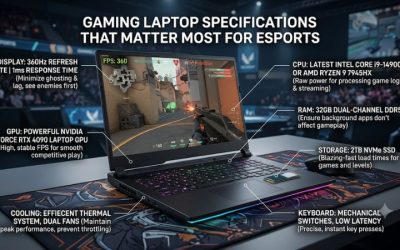
The GPU is usually the first component to investigate when selecting a laptop for graphically demanding games. It handles rendering, visual effects, resolution, and many demanding graphics features. Compare the laptop GPU against the graphics hardware specified by the developer rather than relying exclusively on a product’s gaming branding.
The CPU also matters, particularly in simulation games, strategy titles, competitive shooters, and games with complex physics or large numbers of active characters. A sufficiently capable GPU cannot compensate for every CPU limitation. Consider both components together, especially when choosing a laptop for games that emphasize processor performance.
3. Decide Your Resolution and Frame-Rate Target
A laptop that handles a game at 1080p may not provide the same experience at 1440p or 4K. Higher resolutions require the GPU to render more pixels, increasing graphics workload. Before comparing laptops, decide whether you prefer detailed visuals, higher frame rates, or a reasonable balance between them.
Competitive games often benefit more from consistent frame delivery and responsive displays than maximum visual quality. Single-player games may place greater emphasis on graphics detail, texture quality, and cinematic effects. Your preferred experience should determine the hardware budget instead of automatically choosing the highest available specifications.
4. Consider the Exact Laptop Configuration
Laptop manufacturers sometimes sell different configurations under the same product-family name. Processor, GPU, memory, display, and storage options can vary between configurations and regional markets. Even two laptops advertising the same GPU model may have different power limits and cooling capabilities.
Check the complete manufacturer configuration before purchasing. Record the exact model number, GPU, CPU, memory capacity, storage, and display specifications. This prevents confusion between similarly named laptops and helps ensure that the configuration you receive matches the requirements of your intended game.
How to Match Gaming Laptop Specifications to Your Game
Once you understand the game’s requirements, compare the laptop’s specifications against your preferred experience. A useful buying decision considers more than the GPU model. Graphics power, cooling, memory capacity, storage, and screen characteristics all influence whether a particular configuration makes sense for your gaming priorities.
1. Compare Laptop GPUs and Their Power Limits
Laptop GPUs should be compared using their complete specifications, not just their GeForce RTX or Radeon model names. NVIDIA and AMD mobile graphics products operate within laptop-specific power and thermal designs. The same GPU family can appear in machines with different performance characteristics.
Check the manufacturer’s stated graphics power, commonly described using TGP or maximum graphics power terminology. Also investigate whether the advertised figure includes Dynamic Boost and whether it represents a maximum rather than a sustained operating level. Do not confuse GPU power with the laptop’s total system power or charger wattage.
2. Choose the CPU and RAM for Your Game
Compare the laptop processor with the developer’s CPU requirements, paying attention to the processor generation and performance class. Games involving simulation, strategy, multiplayer environments, or heavy background calculations may benefit from stronger CPU performance. However, an expensive processor is unnecessary when your chosen game is primarily limited by graphics performance.
Memory requirements deserve equal attention. Some games operate with modest RAM configurations, while demanding titles and multitasking workloads benefit from additional capacity. Check whether the laptop uses upgradeable memory or soldered RAM. If you plan to stream, record gameplay, or keep multiple applications open, additional memory may be worthwhile.
3. Match the Display to Your Gaming Preferences
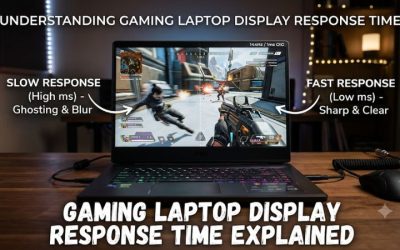
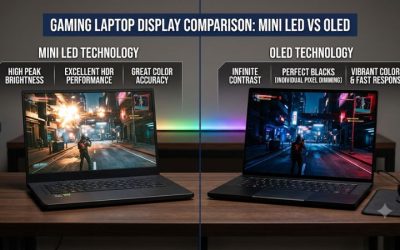
The display determines how effectively you can use the laptop’s available gaming performance. Resolution, refresh rate, response characteristics, brightness, and panel technology all influence the experience. A high-refresh-rate display is particularly relevant for competitive games where smooth motion and responsiveness are priorities.
Avoid paying extra for a display resolution or refresh rate that the laptop cannot reasonably support in your preferred games. For example, a demanding AAA title at high graphics settings may require substantially more GPU performance than an esports game at 1080p. Intel’s gaming laptop buying guidance also emphasizes matching CPU and GPU capabilities to the intended display resolution and refresh rate.
Intel+1
4. Check Cooling, Storage, and Upgrade Options
Cooling is important because gaming laptops operate within restricted spaces. The cooling system must manage heat from the processor and graphics hardware while maintaining acceptable noise levels. Look for manufacturer information about the thermal design, fan configuration, ventilation, and performance modes.
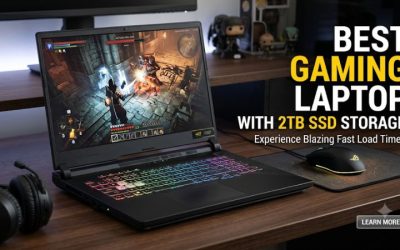
Storage is another practical consideration. Check the game’s installation requirements and leave additional capacity for updates, saved files, and other applications. An NVMe SSD is a sensible choice for modern gaming laptops, particularly when a game’s official requirements specify SSD storage. Also determine whether the laptop has an accessible additional M.2 slot or requires replacing its existing drive.
The following table provides a practical way to compare different laptop configurations before making a purchase.
| Game requirement | Laptop specification to check | Buying priority | Potential limitation |
| Minimum GPU | Compatible discrete or integrated GPU | Essential | May only support low settings |
| Recommended GPU | Mobile GPU performance and power limit | Very high | Same GPU name can perform differently |
| CPU requirement | Exact processor model and generation | High | CPU limitations can restrict performance |
| VRAM | Dedicated graphics memory | High for demanding games | Insufficient VRAM can restrict graphics settings |
| RAM | Installed capacity and upgrade options | High | Multitasking can increase memory demands |
| Storage | SSD type and available capacity | Essential when specified | Insufficient space prevents installation |
| Display | Resolution and refresh rate | Based on preference | Screen capabilities may exceed practical GPU output |
| Cooling | Thermal design and ventilation | High | Sustained workloads may reduce performance |
How to Choose a Gaming Laptop for Your Actual Game: Step by Step
The final buying decision should connect the game’s official requirements with the laptop’s complete configuration. Instead of comparing dozens of unrelated specifications, narrow your options using a consistent checklist. This makes it easier to identify unsuitable machines, compare realistic alternatives, and avoid spending money on features that do not improve your intended gaming experience.
1. Create a Game-Specific Requirements Checklist
Start by selecting the exact game and checking its current official system requirements. Write down the operating system, processor, graphics card, VRAM, RAM, and storage requirements. If the publisher provides multiple graphics configurations, record the one that matches your preferred resolution and graphics preset.
For multiple games, create a separate entry for each title. Your laptop should ideally accommodate the most demanding game you expect to play regularly. However, avoid automatically buying hardware for a demanding title you might never play. Your actual gaming library should determine the purchasing priorities.
2. Compare Two or Three Laptop Configurations
Shortlist several laptops within your budget and compare their exact configurations. Begin with the GPU and CPU, then investigate graphics power, memory, storage, and display specifications. Check the manufacturer’s documentation because retailer descriptions may omit important configuration differences.
| Setting or Step | Where | Effect | Risk |
| Game requirements | Official publisher website or Steam | Establishes hardware prerequisites | Requirements may not cover every graphics setting |
| GPU and CPU | Manufacturer specification page | Identifies processing capabilities | Similar model names can be misleading |
| GPU power | Manufacturer configuration details | Helps distinguish mobile GPU implementations | Advertised maximum may not represent sustained power |
| Display and memory | Exact laptop specification | Establishes screen and multitasking suitability | Non-upgradeable components limit future flexibility |
3. Evaluate Performance Evidence for Your Game
Independent benchmarks can help determine whether a laptop configuration is suitable for your intended game. Look for results using the same GPU configuration, similar CPU, resolution, graphics preset, and game version. Give preference to reviews that explain their testing methodology and identify the laptop’s power settings.
Pay particular attention to average FPS and 1% lows when available. Average FPS describes general rendering performance, while 1% lows help reveal less consistent frame delivery. Check whether the benchmark uses DLSS, FSR, XeSS, ray tracing, or frame generation because these technologies can substantially change the reported results.
Do not compare a laptop benchmark at 1080p low settings with another machine running 1440p ultra settings as though they represent equivalent performance. Also distinguish native rendering from upscaled output and generated frames. These details help prevent misleading conclusions when choosing between configurations.
4. Make the Final Purchase Decision
Before checking out, verify the exact model number, included components, warranty, return policy, and regional configuration. Confirm that the laptop meets your game’s requirements and has sufficient memory and storage for your intended use. If the laptop has soldered RAM or limited storage expansion, account for those restrictions before purchasing.
Think about portability and everyday use as well. A larger gaming laptop may provide more room for cooling hardware, while a lighter model may be easier to carry between locations. Battery life also matters outside gaming, although demanding games generally require the laptop to be connected to its charger for full performance.
Avoid selecting a laptop solely because it has a newer processor, a higher advertised refresh rate, or an attractive gaming design. The right configuration is the one that satisfies your game-specific requirements without unnecessary spending.
FAQ
1. Should I Choose a Gaming Laptop Based on Minimum or Recommended Requirements?
Choose a laptop that meets or exceeds the recommended requirements for the experience you want. Minimum specifications are useful for determining basic compatibility, but they do not necessarily provide the graphics quality or frame rate you expect. Check the developer’s stated resolution and graphics preset before comparing hardware.
2. Is the GPU More Important Than the CPU When Choosing a Gaming Laptop?
The GPU is generally more important for graphics-intensive games, but the CPU remains essential for overall performance. Competitive shooters, simulation games, and strategy titles can place substantial demands on the processor. Compare both components against the requirements of your specific game rather than prioritizing one universally.
3. Is 16GB RAM Enough for Gaming on a Laptop?
16GB can be sufficient for many games, but the appropriate amount depends on individual game requirements and background applications. Some newer titles recommend more memory, particularly when running demanding applications alongside the game. Check whether the laptop supports memory upgrades before deciding on its initial configuration.
4. Can a Gaming Laptop Run a Game Even If It Does Not Meet the Recommended Requirements?
Yes, a laptop may run a game without meeting every recommended specification, provided it satisfies the necessary compatibility requirements. However, you may need to reduce resolution, graphics quality, or demanding visual effects. Performance depends on the actual hardware and game configuration, so minimum requirements should not be treated as a performance guarantee.
Final Thoughts
Learning how to choose a gaming laptop for a specific game starts with understanding the experience you expect rather than chasing impressive specifications. Compare official requirements, mobile GPU power, CPU performance, memory, cooling, and display capabilities. Before purchasing, verify the exact configuration and prioritize hardware that supports your favorite games without unnecessary spending.
Related guides
More from Amazon
Programs that pair well with the guide above. Offers and eligibility are set by Amazon and may change.
Free shipping on eligible items, Prime Video and more. Eligible new members can start with a free trial.
Start a Prime free trialAd-free music streaming. Eligible new subscribers can start with a free trial.
Try Music Unlimited freeA Prime membership for ages 18-24 with a trial period. Eligibility is set by Amazon.
See Prime for Young AdultsAudiobooks and podcasts to listen to on the go. Eligible new members can start with a free trial.
Try Audible freeAs an Amazon Associate we earn from qualifying purchases.