Choosing a competitive gaming laptop requires more than looking at processor names or advertised frame rates. gaming laptop specifications that matter most for esports include CPU performance, GPU capability, display refresh rate, memory configuration, cooling, and network connectivity. This guide explains how to prioritize them for competitive games without overspending on unnecessary hardware.
What Gaming Laptop Specifications Matter Most for Esports?
The most important specifications are those that help a laptop maintain consistent frame delivery while making fast movement easy to see. Unlike a laptop designed primarily for cinematic AAA games, an esports system should prioritize CPU responsiveness, sufficient GPU performance, a fast display, and sustained cooling over maximum resolution or premium visual effects.
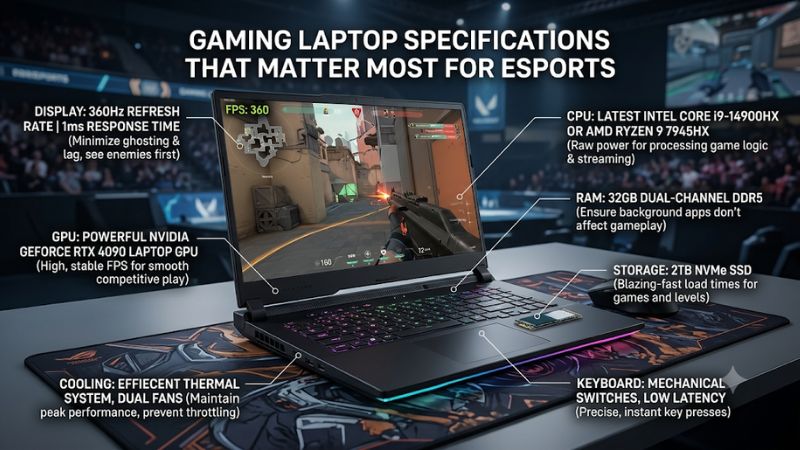
Competitive games such as VALORANT, Counter-Strike 2, League of Legends, and Rocket League have different hardware demands. A configuration suitable for one title may be unnecessarily expensive for another. Start with the games you play, your target frame rate, and whether you intend to use the built-in screen or an external gaming monitor.
1. CPU: Prioritize Consistent Processing Performance
The CPU handles game logic, player movement, physics, and other calculations that affect frame delivery. In competitive games, processor performance can become particularly important when targeting high frame rates, especially at lower graphics settings where the GPU has less work to perform.
When comparing gaming laptop specifications that matter most for esports, look beyond the processor’s Core i5, Core i7, Ryzen 5, or Ryzen 7 label. Check the exact processor generation, model, architecture, clock behavior, and available cooling capacity. Different processors within the same product family can have substantially different performance characteristics.
A modern performance-oriented Intel Core H/HX or AMD Ryzen HS/HX processor is a sensible starting point. However, an expensive flagship CPU is not automatically necessary for every esports player. Choose a processor that can sustain your intended frame rate without consuming budget better spent on the display, GPU, or cooling system.
2. GPU: Match Graphics Performance to Your Game
A dedicated GPU handles graphics rendering and determines how much visual workload a laptop can process. Although many esports games are less demanding than modern AAA releases, a capable GPU still matters when using higher resolutions, demanding visual settings, or external high-refresh-rate monitors.
For gaming laptop specifications that matter most for esports, identify the exact laptop GPU rather than relying on a general GeForce RTX family name. Laptop GPUs have different power limits, clock behavior, and cooling conditions. NVIDIA’s official specifications show that even GPUs within the same generation have different GPU subsystem power ranges.
NVIDIA
Also examine VRAM capacity and the laptop’s GPU power configuration. A higher advertised GPU tier does not automatically translate into a proportionally higher frame rate in every competitive title. Check independent benchmarks for the exact laptop configuration and game whenever possible.
3. Display: Refresh Rate and Response Time
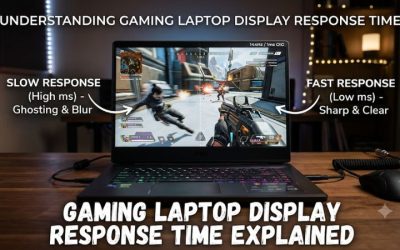
The display directly affects how motion appears during competitive play. A 144Hz screen refreshes up to 144 times per second, while a 240Hz screen can refresh up to 240 times per second. Higher refresh rates can make movement appear smoother when the laptop consistently produces enough frames to take advantage of them.
Response time is another important specification. It describes how quickly pixels transition between colors, rather than how frequently the display refreshes. Slower transitions can create visible ghosting during fast movement. ASUS also distinguishes refresh rate, pixel response time, and resolution in its gaming display guidance.
@ROG
For many esports players, a Full HD or 1920 × 1200 panel with a high refresh rate is a practical choice. A QHD panel offers sharper images, but it also increases the GPU’s rendering workload. Choose a resolution that balances motion clarity, image quality, and achievable frame rates.
4. RAM: Capacity and Memory Configuration
RAM provides temporary working space for Windows, the game, drivers, and background applications. Insufficient memory can create performance limitations, particularly when running voice chat, browser tabs, recording software, or streaming applications alongside a game.
A 16GB configuration is a reasonable starting point for a dedicated esports laptop. Consider 32GB if you regularly stream, record gameplay, multitask heavily, or play additional demanding titles. These are practical purchasing guidelines rather than universal minimum requirements for every competitive game.
Pay attention to whether the laptop uses one memory module or a dual-channel configuration. Also verify the supported DDR generation, maximum capacity, and whether memory is soldered or replaceable. A laptop with upgradeable RAM offers more flexibility, but do not assume every model allows memory upgrades.
How to Evaluate Esports Laptop Specifications Before Buying
Once you understand the main hardware components, compare complete laptop configurations rather than individual specification labels. The goal is to find a machine that can maintain your preferred frame rate, use its display effectively, and avoid performance drops during extended gaming sessions. The following checks help separate useful specifications from marketing claims.
| Specification or Step | Where to Check | Effect | Risk or Trade-Off |
| CPU model | Manufacturer specification sheet | Determines processing capability | Paying extra for unnecessary CPU performance |
| GPU and power limit | GPU specification and laptop documentation | Affects rendering performance | Same GPU name can have different power limits |
| Refresh rate and response time | Display specifications | Improves motion clarity | Higher refresh rate costs more |
| RAM and upgrade access | Memory specifications and service manual | Supports games and background tasks | Soldered RAM limits future upgrades |
| Cooling system | Manufacturer design and independent reviews | Helps maintain sustained performance | Powerful hardware can produce more heat and noise |
| SSD and connectivity | Storage and port specifications | Improves loading and peripheral flexibility | Limited upgrade slots or ports |
1. Define Your Game and Frame-Rate Target
Begin by identifying the games you actually play. VALORANT and League of Legends have different demands from Counter-Strike 2, Fortnite, or PUBG. Your intended resolution and graphics settings also influence which hardware components deserve the most attention.
Check the official system requirements for each title, but remember that minimum requirements do not describe the hardware needed for competitive high-refresh-rate play. For example, Steam lists 8GB RAM and four hardware CPU threads as minimum Windows requirements for Counter-Strike 2. That is a compatibility baseline, not a recommendation for maintaining high competitive frame rates.
Steam Store
2. Compare the Exact CPU, GPU, and TGP
Read the complete configuration listed by the manufacturer. Two laptops with the same GPU family name can have different GPU subsystem power limits, cooling designs, and sustained operating behavior. This is why the advertised graphics model should never be the only basis for a purchase.
NVIDIA’s comparison information illustrates this variation across its laptop GPU range. For example, the listed GPU subsystem power range for the GeForce RTX 5070 Laptop GPU differs from that of the RTX 5060 Laptop GPU. These figures are specifications, not guaranteed gaming power consumption or FPS results.
NVIDIA
When assessing gaming laptop specifications that matter most for esports, also check whether the manufacturer lists maximum graphics power, Dynamic Boost, or other power-management information. Avoid confusing GPU power with total laptop power consumption or the wattage printed on the charger.
3. Inspect the Screen Beyond Its Refresh Rate
A display advertised as 165Hz, 240Hz, or 300Hz should be evaluated alongside its resolution and pixel response time. A high refresh rate is useful only when the system can deliver enough frames to make meaningful use of it. A lower-resolution display may be a better competitive choice if it helps the laptop maintain higher frame rates.
Check whether the advertised refresh rate applies to the exact configuration you intend to purchase. Some laptop product families offer multiple panel options. Look for documented response-time specifications, brightness, adaptive-sync support, and the panel technology rather than assuming every version has the same screen.
4. Check Cooling, Memory, Storage, and Connectivity
Cooling is essential because short benchmark results do not necessarily represent performance during longer gaming sessions. Examine the number of fans, exhaust placement, air intake design, and independent reviews that report sustained CPU and GPU behavior. A thin chassis may be easier to transport but can involve compromises in cooling and fan noise.
Also check SSD capacity, memory upgrade access, and peripheral connectivity. A 512GB SSD may be adequate for a small game library, while 1TB provides more room for multiple installations. For online competition, wired Ethernet is worth considering when available. Wi-Fi 6 or newer can also be useful, but wireless generation alone cannot guarantee low latency because router quality, interference, and network conditions matter.
FAQ
Is a 144Hz display enough for esports?
Yes, a 144Hz display is sufficient for many competitive players, particularly those who do not need extremely high frame rates. It provides smoother motion than a conventional 60Hz panel when the system can deliver corresponding frame rates.
A 240Hz display may be worthwhile for players who consistently achieve higher FPS and prioritize motion clarity. However, the difference in refresh rate should be weighed against panel quality, response time, and overall laptop cost.
Is the CPU or GPU more important for esports gaming?
Both matter, but the CPU can become especially important in CPU-limited competitive games at high frame rates. The GPU becomes more important when rendering at higher resolutions or using demanding graphics settings.
Compare gaming benchmarks for the specific games you play rather than assuming that a higher-tier CPU or GPU always produces the best result. Balanced hardware is generally a better purchasing decision than an unnecessarily powerful component paired with a weaker one.
How much RAM does an esports gaming laptop need?
16GB RAM is a sensible starting point for most dedicated esports gaming configurations, while 32GB is preferable for heavier multitasking and streaming.
Check whether the memory operates in dual-channel mode and whether the laptop supports future upgrades. The appropriate capacity also depends on the games, applications, and background processes you intend to run.
Does a gaming laptop need an Ethernet connection for esports?
No, Ethernet is not mandatory, but a wired connection can provide a more consistent network experience than Wi-Fi in environments with wireless interference.
A laptop with Wi-Fi 6 or newer can also work well when paired with a suitable router and stable internet connection. Remember that network latency depends on the entire connection, including the router, internet service provider, server location, and network congestion.
Final Thoughts
The gaming laptop specifications that matter most for esports are balanced CPU and GPU performance, a responsive high-refresh-rate display, sufficient RAM, and effective cooling. Prioritize your main competitive games before comparing configurations, and verify sustained performance and upgrade options before purchasing.
Related guides
More from Amazon
Programs that pair well with the guide above. Offers and eligibility are set by Amazon and may change.
Free shipping on eligible items, Prime Video and more. Eligible new members can start with a free trial.
Start a Prime free trialAd-free music streaming. Eligible new subscribers can start with a free trial.
Try Music Unlimited freeA Prime membership for ages 18-24 with a trial period. Eligibility is set by Amazon.
See Prime for Young AdultsAudiobooks and podcasts to listen to on the go. Eligible new members can start with a free trial.
Try Audible freeAs an Amazon Associate we earn from qualifying purchases.