An AMD workstation laptop, in this listing set, means an HP ZBook built around a Ryzen AI Max PRO or Ryzen AI PRO processor with Radeon graphics. These suit CAD, 3D, media and local AI work where a shared memory pool is the big draw. The five below range from a 64GB, 2TB flagship to a renewed 32GB model. The search also returned Intel-based ZBooks; we leave those out of the ranking and say so below. Most picks are sold by third-party sellers or renewed, so we flag support, specs that are missing from titles and claims we cannot verify.
Our Top Picks
Top 3 picks at a glance
Quick picks
As an Amazon Associate we earn from qualifying purchases at no extra cost to you.


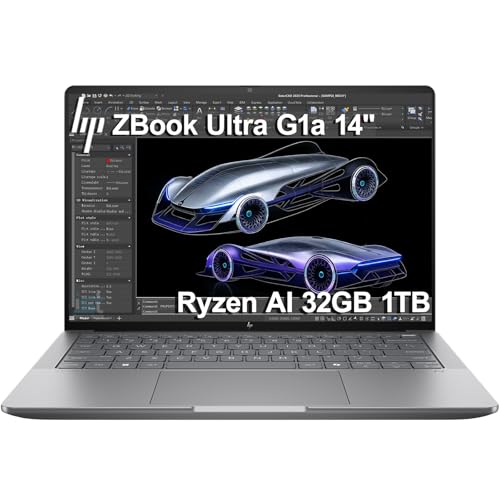




- ZBook Ultra 14 G1a (Max PRO 390) – best for local AI and 3D
- ZBook Ultra G1a, 385, OLED – best-documented 385 configuration
- ZBook Ultra G1a, 385, FHD+ – best for those who use an external monitor
- ZBook 8 G1ak (Ryzen AI 7 PRO 350) – best lower-tier AMD ZBook
- ZBook Ultra G1a, renewed – best for budget-minded 385 buyers
Comparison of all five
| Model | Type | Key specs as stated in the title | Best for |
|---|---|---|---|
| ZBook Ultra 14 G1a | 14-inch touch workstation, OLED | Ryzen AI Max PRO 390, 64GB unified RAM, 2TB SSD, Radeon 8050S | Local AI and 3D |
| ZBook Ultra G1a (OLED) | 14-inch touch workstation | Ryzen AI Max PRO 385, 32GB/1TB, QHD+ OLED 400-nit, Wi-Fi 7 | Balanced professional use |
| ZBook Ultra G1a (FHD+) | 14-inch, third-party seller | Ryzen AI Max PRO 385, 32GB/1TB, FHD+ (check the listing for the rest) | External-monitor setups |
| ZBook 8 G1ak | 14-inch, third-party seller | Ryzen AI 7 PRO 350, 32GB DDR5, 1TB SSD, 2x Thunderbolt 4 | Lighter-duty AMD |
| ZBook Ultra G1a (renewed) | 14-inch touch workstation, renewed | Ryzen AI Max PRO 385, 32GB, 1TB, QHD+ OLED, Radeon 8050S | Value seekers |
The five AMD ZBooks in detail
HP ZBook Ultra 14 G1a (Ryzen AI Max PRO 390, 64GB, 2TB SSD)
This is the top-specified AMD workstation in the set. The title gives a 14-inch 2.8K OLED touchscreen, a Ryzen AI Max PRO 390, 64GB of unified RAM, a 2TB SSD, Radeon 8050S graphics, Copilot+ PC branding and Windows 11 Pro, and it points at local LLM and 3D work. Unified RAM means the processor and the integrated graphics draw from one memory pool, so the 64GB is shared rather than split between system memory and a separate video card.
A discrete graphics card has a fixed amount of video memory, while a shared pool can be given to the graphics side as needed. Check HP’s documentation to see how much of the pool can be assigned to graphics and whether memory is soldered, which is typical for this design and means 64GB is a decision you make once, at purchase.
The title does not tell you the weight, battery capacity or port list, so confirm those on the listing before you buy.
Pros
- 64GB of unified RAM and a 2TB SSD
- High-resolution OLED touchscreen
- Top processor tier in this set
Cons
- Memory is probably fixed at purchase (confirm)
- Glossy OLED reflects light
- Top-tier configuration, so the most expensive of the five
Who it’s for: people running local AI models, 3D scenes or large datasets who want one machine that can go anywhere.
Who should skip it: anyone whose software needs NVIDIA CUDA or a certified discrete workstation card.
HP ZBook Ultra G1a (Ryzen AI Max PRO 385, 32GB/1TB, QHD+ OLED)
The listing describes a 14-inch touchscreen ZBook Ultra G1a with a Ryzen AI Max PRO 385, 32GB of memory and a 1TB SSD, a QHD+ OLED panel rated at 400 nits, Radeon 8050S graphics, Wi-Fi 7 and Windows 11 Pro. It is the same family as the 64GB model above, a step down in processor tier and memory, and it also carries Copilot+ PC branding.
The 400-nit brightness figure is stated in the title and is a useful number to compare: it is fine for indoor use but not an outdoor-bright screen. This is a good fit for architects, product designers and developers who work in CAD or media tools on integrated graphics and do not need a giant memory pool. As with its larger sibling, ask whether the memory is fixed at 32GB, because it is a limit you cannot easily change later, and note that the title does not list ports or weight.
Three listings of the 385 exist in this set, so read the screen line carefully.
Pros
- Wi-Fi 7 and a QHD+ OLED panel stated
- 32GB and 1TB are a practical workstation baseline
- Brightness figure given in the title
Cons
- 32GB may limit large local models
- Touch OLED is glossy
Who it’s for: creative professionals and engineers who want the 385 configuration in the best-described listing.
Who should skip it: anyone who plans to keep the laptop for years of growing model sizes.
HP ZBook Ultra G1a (Ryzen AI Max PRO 385, 32GB/1TB, FHD+; ist computers listing)
This listing is the barest of the three 385 configurations: HP ZBook Ultra G1a Laptop, 14-inch FHD+, Ryzen AI Max PRO 385, 32GB/1TB. The processor, memory and storage match the OLED listing, but the title gives only an FHD+ screen, so it is likely a lower-spec display, and it does not mention touch, Wi-Fi 7, Windows 11 or the graphics chip. All of that has to be confirmed before you order.
It is sold under a third-party seller name, which means you should look at who provides warranty support and what the return terms are. A lower-cost display can be a reasonable trade for people who work mostly on an external monitor, because the processor and memory, which are the expensive parts, are the same. If the listing confirms Windows 11 Pro, a US keyboard and the usual ports, it could be the best-value way to get a Max PRO 385 machine in this set. Without those confirmations it is a gamble.
Pros
- Same 385, 32GB, 1TB core as the OLED listing
- Likely cheaper because of the FHD+ screen
Cons
- Very sparse title
- Third-party seller, so check support terms
- Operating system and graphics not stated
Who it’s for: buyers who use an external monitor and want the 385 core for less.
Who should skip it: people who need touch, an OLED panel or documented Windows 11 Pro.
HP ZBook 8 G1ak (Ryzen AI 7 PRO 350, 32GB DDR5, 1TB SSD)
The ZBook 8 G1ak is the different-looking AMD option here. The title lists a 14-inch FHD+ display, a Ryzen AI 7 PRO 350, 32GB of DDR5, a 1TB SSD, Copilot+ PC branding, two Thunderbolt 4 ports, Wi-Fi 7, Windows 11 Pro and a 3-year warranty abbreviation, and it is sold under a third-party seller name. It names DDR5 memory, so ask whether it is upgradeable.
The title also contains a comparison fragment, an inequality against an Intel Ultra 7 155H. That is a seller claim and cannot be verified from the title alone; it is better read as a marketing aside than a spec. The same goes for the 3-year warranty: find out whether it is a manufacturer warranty or something the reseller provides. This is a step below the Ultra G1a machines in processor tier, so it is the pick for people who want a lighter-duty AMD workstation and do not need a big shared memory pool for models.
Pros
- 32GB DDR5 and a 1TB SSD
- Two Thunderbolt 4 ports and Wi-Fi 7 stated
- Warranty mentioned in the title
Cons
- Confusing comparison text in the title
- Lower processor tier than the Ultra models
- Third-party seller
Who it’s for: engineers and designers who want an AMD ZBook below the Ultra price tier.
Who should skip it: anyone running big local models, who would be better served by the 64GB machine.
HP ZBook Ultra G1a, Renewed (Ryzen AI Max PRO 385, 32GB, 1TB, QHD+ OLED)
The renewed variant of the 385 machine: a 14-inch touchscreen, 32GB of RAM, a 1TB SSD, a QHD+ OLED panel, Radeon 8050S graphics, Copilot+ PC branding and Windows 11 Pro. The title also mentions an IST HUB, an accessory or bundle item that the title does not explain, so check what is in the box.
Renewed on a machine of this tier is a notable flag. The processor family is new, so a renewed unit is probably a returned or open-box item, but the title does not say, so read the condition grade, the warranty length and the return policy. If the seller offers a clear warranty and genuine HP firmware, the saving over a new unit can be worthwhile, as the specifications match the OLED listing. If it does not, the low entry cost is the sort of risk you take on a workhorse laptop you rely on for income.
Ask for battery health information and whether the unit is registered to a previous owner, since that can affect HP support.
Pros
- Same OLED, 32GB and 1TB core as the new 385 listing
- Likely lower price than new
Cons
- Renewed, with unknown history
- Unexplained IST HUB item
- Support and warranty may differ from HP’s own
Who it’s for: value-focused buyers who are comfortable with a refurbished workstation and strong return terms.
Who should skip it: professionals who rely on on-site manufacturer support.
What about the Intel ZBooks in the same search?
Half of the listings that came up for this keyword are not AMD machines, so we left them out of the ranking. They are a ZBook 8 G1i with an Intel Ultra 7 255H and NVIDIA RTX 500 Ada graphics, two ZBook Firefly G11 listings with a Core Ultra 7 155U, a ZBook Fury G11 with a Core i7-13850HX and a renewed ZBook Firefly 15 G8 with a Core i7-1185G7. If you need NVIDIA graphics, they are the listings to look at instead. We have not ranked them here because the keyword asks for AMD, and mixing platforms would blur the comparison. To weigh the two approaches see our AMD HX versus Intel HX laptop comparison.
How we picked these
We took the workstation laptop listings returned for this keyword and kept only those whose titles name an AMD processor. Each title was read for processor, memory, storage, screen, graphics and seller, and near-identical listings were treated as separate configurations with different risks. Nobody on the team used or measured these units. Our basis is published specifications, manufacturer documentation and buyer reviews, and each figure comes from the listing title, which is a seller claim. Where a title was unclear or contradictory, we say so and recommend checking the listing.
What to look for in an AMD workstation laptop
Decoding AMD’s processor names
AMD’s workstation-class laptop chips follow a naming ladder, and the names in these listings read as follows. The PRO suffix marks the business edition with extra management and security features. Specific core counts and clock speeds are not in the titles, so use AMD’s product pages before comparing the chips. In practice the Max PRO parts are the ones with large integrated graphics, which is what lets a thin 14-inch machine attempt work that used to need a discrete card, while the Ryzen AI 7 PRO is the more modest tier aimed at office-grade workstation duty.
| Name in listing | What the title tells you | What to confirm |
|---|---|---|
| Ryzen AI Max PRO 390 | Top tier here, paired with 64GB unified RAM | Core count, graphics memory allocation |
| Ryzen AI Max PRO 385 | Mid tier, 32GB/1TB in three listings | Core count, display, warranty |
| Ryzen AI 7 PRO 350 | Lower tier in the ZBook 8 G1ak | Core count, graphics, upgradable RAM |
RAM: unified memory and what to buy
The Ultra models list unified RAM. Because the same pool serves the CPU and the integrated Radeon 8050S, the amount you buy matters more than on a laptop with a discrete card. Memory in this design is typically soldered, so decide with your largest workload in mind. Our guide on how much RAM a CAD workstation laptop needs goes through that logic for design software.
| Workload | 32GB | 64GB |
|---|---|---|
| CAD, BIM and 3D modelling | Comfortable for most projects | For very large assemblies |
| Video and photo editing | Fine for HD and 4K projects | Helpful for heavy effects |
| Local AI models | Smaller models | Larger models, more context |
| Virtual machines | One or two | Several at once |
Integrated Radeon versus a discrete workstation GPU
Every pick here uses the Radeon 8050S integrated graphics or has no named GPU in the title. That is capable for many CAD and creative tasks, but some professional applications are certified only for specific discrete workstation cards and may not support integrated graphics. See our comparison of workstation and gaming GPUs in laptops, then check the software vendor’s certified hardware list.
Display: OLED, brightness and touch
OLED gives deep blacks and strong colour for design and media work, but glossy touch glass reflects overhead lights. The only brightness figure in the set is 400 nits, on the QHD+ OLED model. If colour accuracy matters, look for a calibration claim on the listing and treat marketing terms as unverified.
Ports, expansion and eGPU
Check the listing for the full port list, charger wattage and HDMI version. External graphics boxes are a possible way to add a discrete card, though support varies with the port type; our explainer on external GPUs on AMD laptops covers it.
Battery, weight and sustained performance
Workstation laptops are judged on how they behave under a long load, not on a short burst. Thin 14-inch chassis have limited cooling, so the processor may settle at a lower power level during a long render than its peak suggests. The titles do not give battery capacity or weight, so find those in HP’s documentation and in buyer comments, and expect battery life to fall sharply under heavy loads.
Warranty, renewed units and third-party sellers
Three of the five listings are sold under a third-party seller name or are renewed. Ask who supplies the warranty, whether HP support is available for the serial number, and what the return terms are.
A pre-purchase checklist
- Processor line names AMD and the exact model, not just the ZBook name.
- RAM amount is stated, and the listing or HP documentation says whether it can be upgraded.
- Screen resolution, touch and brightness are spelled out.
- Windows 11 Pro is stated, and the keyboard layout is clear.
- Warranty provider and return window are visible before you pay.
Mistakes buyers make with workstation laptops
Assuming every ZBook is AMD. The same family includes Intel models, and a model number alone does not tell you the processor. Read the processor line, not just the ZBook name.
Treating unified RAM as upgradable. It is typically fixed at purchase, so buy for the heaviest project you expect over the machine’s life.
Believing comparison text in a title. Phrases such as an inequality against an Intel chip are marketing, not a specification.
Ignoring certification. If your software vendor lists certified graphics, check that integrated Radeon graphics are supported.
Paying for memory you cannot use. A 64GB machine is only worth the extra cost if your workload can fill the pool, so check your largest project before you choose.
Forgetting the screen. A Full HD panel and an OLED panel share a model name, and buyers who skim the title can end up with the wrong one.
Skipping the seller details. A renewed or third-party listing should come with a warranty and return window you can read before you order.
Verdict
The ZBook Ultra 14 G1a with the Ryzen AI Max PRO 390 and 64GB is the pick for local AI and heavy 3D, and the OLED ZBook Ultra G1a with the 385 is the best-described all-rounder. The FHD+ and renewed 385 listings are value plays that depend on seller terms. The ZBook 8 G1ak suits lighter work. If your software needs NVIDIA graphics, look at the Intel ZBooks instead. Whichever you choose, confirm the memory, screen and warranty provider on the listing, because the titles leave gaps that matter to your decision.
Related guides
- How To Stop Laptop Thermal Throttling In Software
- Gaming Laptop For High School Students
- Screen Refresh Rate For Laptops Explained
Frequently asked questions
What makes a laptop an AMD workstation?
It is a laptop built around an AMD processor and sold with workstation-class features such as a business-grade chassis, management features and certified software support. In this set the AMD options are HP ZBooks using Ryzen AI Max PRO and Ryzen AI PRO processors with Radeon graphics. Check the vendor’s certification lists for your software.
Is unified memory good for local AI models?
It can be, because the graphics side can draw on a large shared pool rather than a fixed amount of video memory. That is why the 64GB model is pitched at local LLM work. Confirm how much of the pool can go to graphics and whether memory is upgradable, since it is usually fixed. Software support for running models on AMD graphics also varies by tool, so check the one you use.
Can I add an external GPU to these laptops?
It depends on the ports and the software setup. The listings mention Thunderbolt 4 only on the ZBook 8 G1ak, and the others do not list ports in the title. Check the listing and HP documentation for what each model supports before assuming eGPU compatibility, and remember that integrated Radeon graphics already cover a lot of design work.
Are renewed workstations worth it?
They can save money, but the history is uncertain. Read the condition grade, warranty and return window, and ask about battery health and whether the unit was ever registered to another owner. A new unit from an authorized seller gives clearer manufacturer support, which matters for a laptop you rely on for income.
How much RAM do I need for CAD on an AMD laptop?
Thirty-two gigabytes suits most CAD and creative work, and 64GB helps with very large assemblies, heavy video or local models. Because the memory is likely soldered, pick the amount you will need at the end of the laptop’s life. Check the listing or HP’s documentation before ordering to confirm, and do not count on adding memory later.